

Odoo App · Project Management
Planning Extend
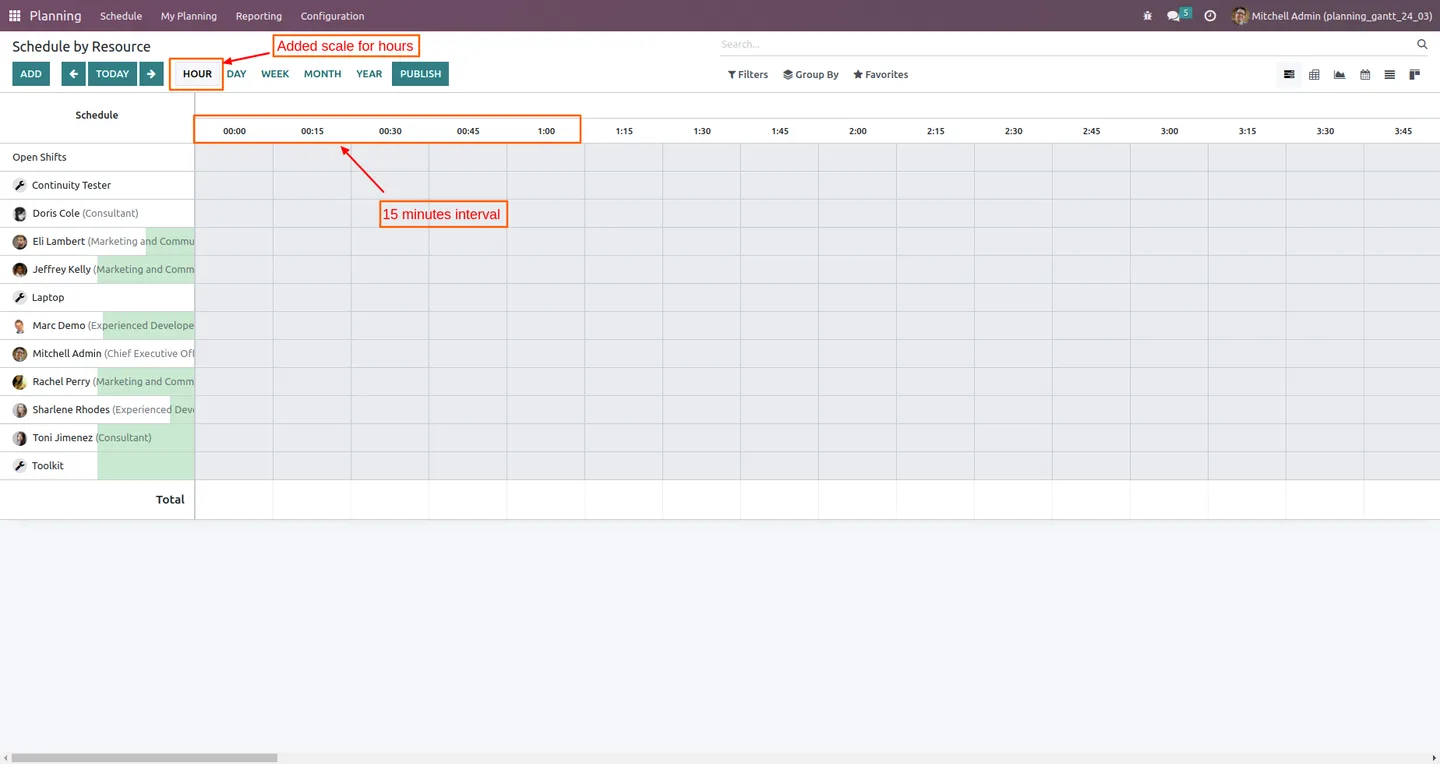
Schedule shifts in 15-minute blocks on the Odoo Planning Gantt view.
Overview
Planning Extend gives the Odoo Planning Gantt view a 15-minute time scale, so shifts and resource assignments can be planned in quarter-hour blocks instead of the default hourly granularity.
Built by TechUltra Solutions, the module is a small, focused extension of the native Odoo Enterprise Planning app: it adds a new zoom level to the Gantt view without changing any of the shift, employee, or resource models you already use.
It is well-suited to contact-centre rosters, short-appointment service businesses, and field teams stacking multiple short jobs in a single hour — anywhere a one-hour cell is too coarse to plan accurately.
Key features
-
15-minute Gantt interval
Adds a new “15 minutes” option to the Planning Gantt view's hour scale, so each cell represents a quarter of an hour instead of a full hour.
-
Quarter-hour shift planning
Drag shifts and assignments to start and end on the quarter — plan a 09:15–09:45 slot without the schedule snapping to the hour.
-
Tighter resource allocation
Pack short jobs and appointments back-to-back inside the same hour, with each block clearly visible on the Gantt.
-
Cleaner contact-centre rosters
Useful for shift patterns that change inside the hour — break starts, queue transitions, and split-shift handovers all land on natural quarter-hour boundaries.
-
Native Planning experience
Keeps Odoo's standard Planning app, models, and permissions. Only the Gantt zoom controls change — there is no second app for users to learn.
-
Works with Employees and Discuss
Builds on the standard Planning, Employees, and Discuss modules, so notifications and HR records keep flowing as before.
-
Built for Odoo Enterprise
The Planning app is Enterprise-only; this extension is published against Odoo Enterprise 16 and 17 and runs on Odoo Online, Odoo.sh, and on-premise.
Planning Extend in Odoo
Every screen, in the order you meet it — configuration first, then the module in use.




Technical details
Specification
- Publisher
- TechUltra Solutions Private Limited
- Technical name
- plnning_gantt
- Odoo versions
- 16.0, 17.0
- Lines of code
- 560
- License
- Odoo Proprietary License v1.0 (OPL-1)
- Price
- $17.47 (one-time)
- Edition
- Odoo Enterprise (Planning app required)
Deployment
- Odoo Online
- Odoo.sh
- On-premise
Odoo dependencies
- Planning
- Employees
- Discuss
Support
90 days of bug-fix support, Monday to Friday (10:00–19:00 IST). Raise a ticket at support@techultra.in.
Setup & configuration
From install to first call — here is the path.
- 1
Confirm Odoo Enterprise + Planning
The module extends Odoo's Enterprise-only Planning app. Make sure your database is Enterprise and the Planning, Employees, and Discuss apps are installed.
- 2
Install the module
In Odoo, open Apps, remove the Apps filter, search for “Planning Extend” (technical name plnning_gantt), and click Install.
- 3
Open the Planning Gantt view
Go to Planning → Schedule and switch to the Gantt view. The hour-scale selector now exposes a “15 minutes” option alongside the standard zoom levels.
- 4
Switch to the 15-minute scale
Pick “15 minutes” from the scale selector. Each Gantt cell is now a quarter of an hour, so you can drop shifts on :00, :15, :30, and :45 boundaries.
- 5
Plan and publish shifts
Create or drag shifts in quarter-hour blocks, then publish them to your employees as usual through the Planning app.
Frequently asked questions
-
What exactly does Planning Extend add to Odoo Planning?
It adds a new “15 minutes” hour option to the Planning Gantt view's scale selector. Each cell on the Gantt represents 15 minutes instead of the default one hour, so shifts and assignments can start and end on the quarter.
-
Do I need Odoo Enterprise?
Yes. The Planning app is part of Odoo Enterprise, so this extension requires an Enterprise database. It runs on Odoo Online, Odoo.sh, and on-premise installations.
-
Which Odoo versions does it support?
Planning Extend is published for Odoo Enterprise 16.0 and 17.0.
-
Does this change my shifts or resource data?
No. It only adds a new zoom level to the Gantt view. Existing shifts, employees, resources, and reporting remain on the standard Planning models.
-
Will my existing reports still work?
Yes. Because the module does not change underlying data, all existing Planning reports, exports, and dashboards continue to work as before.
-
Who is the 15-minute scale most useful for?
Teams whose shifts or appointments change inside the hour: contact centres, clinics and salons with short bookings, field-service teams stacking multiple jobs per hour, and split-shift schedules.
-
What support is included with the module?
You get 90 days of bug-fix support from TechUltra Solutions, Monday to Friday (10:00–19:00 IST). Raise a ticket at support@techultra.in.
Listing verified against the Odoo App Store:
Related solutions
Whole-platform solutions that complement Planning Extend.
Related services
Get the most out of this module with senior TechUltra consultants.
Odoo Customization Services
Odoo customization from a Gold Partner: custom modules, workflows, reports and Studio changes, written upgrade-safe and quoted at a fixed scope. Free scoping call.
Hire Odoo Developers
Hire certified Odoo developers from a Gold Partner: one developer or a team, full-time or part-time, 70–160 hours a month. Silver, Gold or Platinum plan, free trial.
Odoo Support Services & Maintenance
Odoo support services from a Gold Partner: functional and technical support plus server cover for Enterprise and Community, 30-minute P1 response, 24/7 option.







