
Odoo App · Accounting & Reporting
Export Partner Ledger Report
Print only the unfolded partner-ledger entries you need — PDF or XLSX.

Overview
The partner ledger is one of the most used accounting reports in Odoo, but the built-in export prints every entry — even when an accountant only wants the receivable or payable detail for one or two partners.
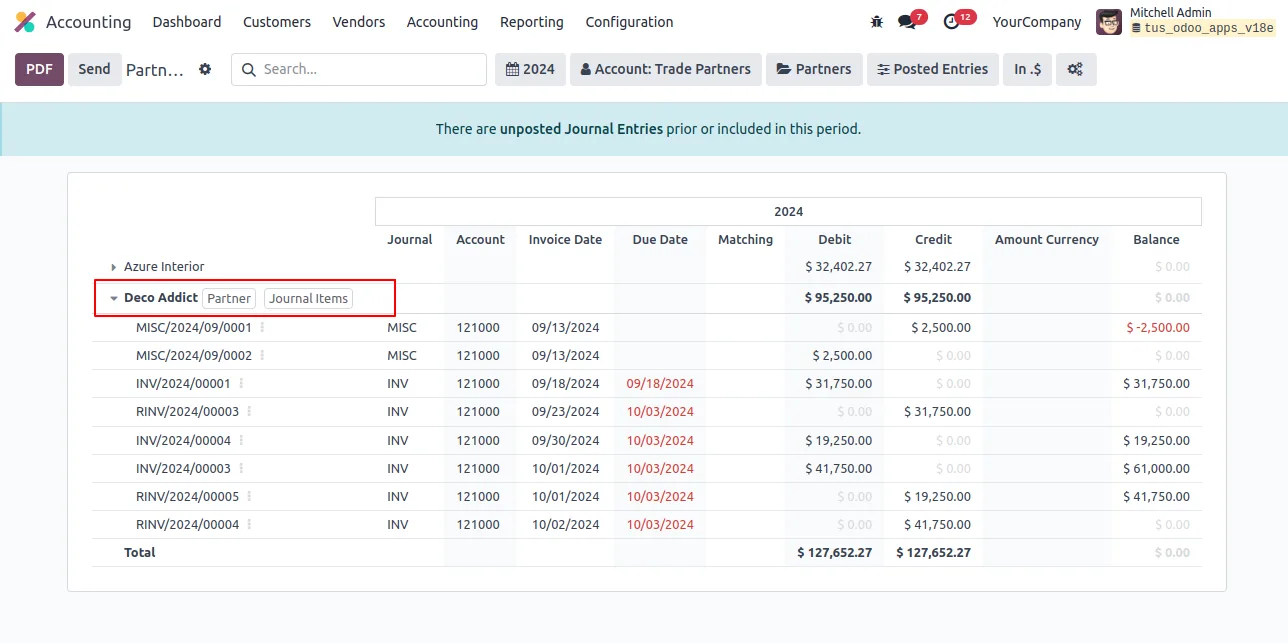
Built by TechUltra Solutions, Export Partner Ledger Report adds a focused export to the standard Odoo Accounting → Reporting → Partner Ledger view. You unfold the partners or accounts you actually care about and the PDF or XLSX export contains only those unfolded records.
There is no configuration step. Install the module, open Partner Ledger, unfold the rows you need, and click PDF or XLSX — the report exports the selected detail without the noise of every other partner on the books.
Key features
-
Print only selected entries
Export just the partner-ledger rows you have unfolded, instead of dumping every entry on every partner every time you need a report.
-
PDF export of unfolded entries
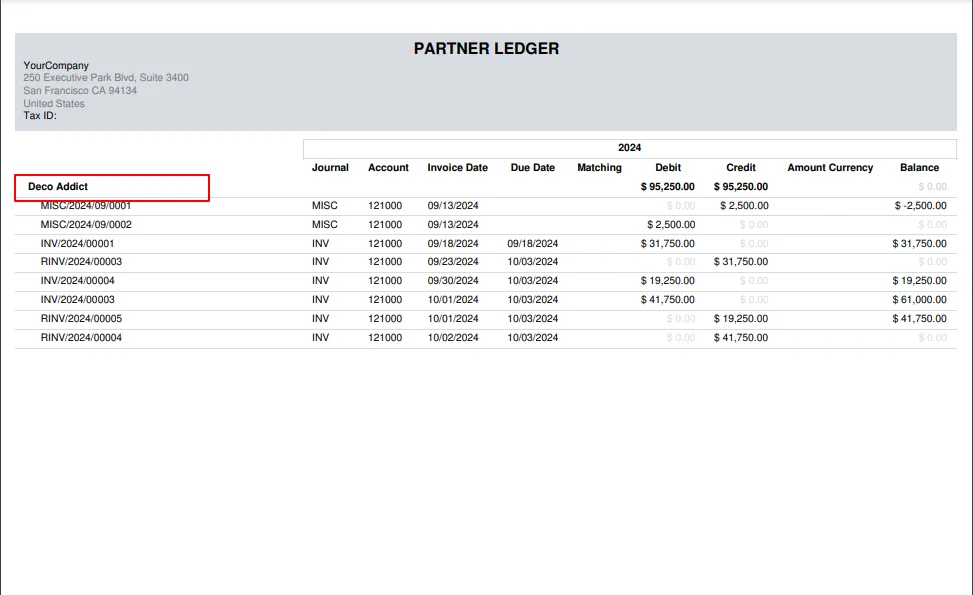
Generate a PDF that contains only the records currently unfolded in the Partner Ledger view — useful for sharing a single partner's statement with finance or the partner itself.
-
XLSX export of unfolded entries
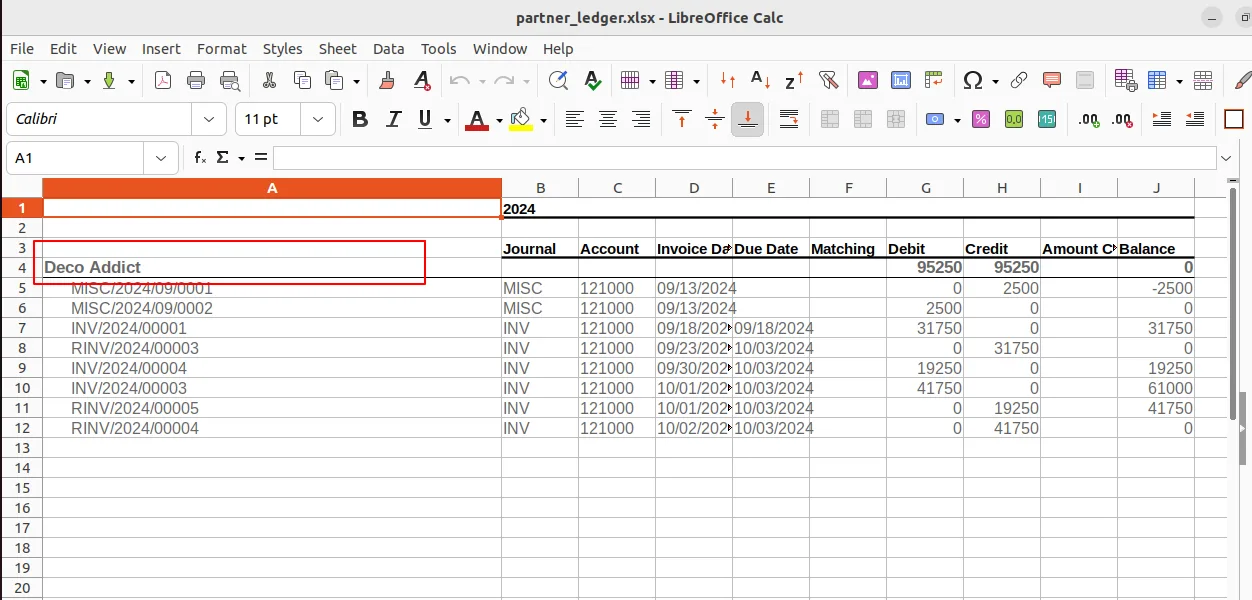
Export the same selective view to XLSX for further reconciliation, pivoting, or sharing with auditors and external accountants.
-
Native Partner Ledger integration
Works directly inside Odoo's standard Accounting → Reporting → Partner Ledger view, so accountants keep the workflow and filters they already know.
-
Multi-version support
Compatible with Odoo 15, 16, 17, 18, 19, and 20, so finance teams on older releases get the same selective export as users on the latest version.
-
Zero configuration
No settings to configure. Install the module and the new export behaviour is immediately available on the Partner Ledger report.
Export Partner Ledger Report in Odoo
Every screen, in the order you meet it — configuration first, then the module in use.
Technical details
Specification
- Publisher
- TechUltra Solutions Private Limited
- Technical name
- account_print_unfold_record
- Odoo versions
- 15.0, 16.0, 17.0, 18.0, 19.0, 20.0
- Lines of code
- 161
- License
- Odoo Proprietary License v1.0 (OPL-1)
- Price
- $13.70 (one-time)
Deployment
- Odoo Online
- Odoo.sh
- On-premise
Odoo dependencies
- Invoicing
- Discuss
Support
90 days of bug-fix support, Monday to Friday (10:00–19:00 IST). Raise a ticket at support@techultra.in.
Setup & configuration
From install to first call — here is the path.
- 1
Install the module
In Odoo, open Apps, remove the Apps filter, search for “Export Partner Ledger Report”, and click Install.
- 2
Open the Partner Ledger report
Go to Accounting → Reporting → Partner Ledger to open the standard partner ledger view.
- 3
Unfold the entries you need
Expand the partners or accounts you want in the export. Anything left folded will not appear in the exported file.
- 4
Export to PDF
Click the PDF button. The generated report contains only the entries currently unfolded in the view.
- 5
Export to XLSX
Click the XLSX button to export the same selective view as a spreadsheet for further reconciliation or audit work.
Frequently asked questions
-
Why do I need this if Odoo already has a partner ledger report?
Odoo's default partner ledger export prints every entry. When you only need detail for one partner — say to share a statement or reconcile an account — the standard export gives you everything else as well. This module exports only the rows you have unfolded.
-
Which export formats are supported?
Both PDF and XLSX. The PDF is suitable for sharing externally, and the XLSX is useful for reconciliation, pivots, and handover to auditors.
-
Does it change my existing partner ledger workflow?
No. The module hooks into Odoo's standard Accounting → Reporting → Partner Ledger view. Your filters, date ranges, and account selection stay the same — only the export respects what you have unfolded.
-
Which Odoo versions are supported?
The module supports Odoo 15.0, 16.0, 17.0, 18.0, 19.0, and 20.0, in both the Community and Enterprise editions.
-
Is any configuration required?
No. Install the module and the new PDF and XLSX export behaviour is immediately available on the Partner Ledger report.
-
Does it work with multi-company setups?
Yes. The module uses Odoo's standard Partner Ledger view, which already respects the active company selection.
-
Can I still export the full ledger when I want to?
Yes. If you unfold every partner or account in the view, the export will contain all of those entries — the module simply gives you control over what is included instead of forcing the full dump.
Listing verified against the Odoo App Store:
Related services
Get the most out of this module with senior TechUltra consultants.
Odoo Customization Services
Odoo customization from a Gold Partner: custom modules, workflows, reports and Studio changes, written upgrade-safe and quoted at a fixed scope. Free scoping call.
Hire Odoo Developers
Hire certified Odoo developers from a Gold Partner: one developer or a team, full-time or part-time, 70–160 hours a month. Silver, Gold or Platinum plan, free trial.
Odoo Support Services & Maintenance
Odoo support services from a Gold Partner: functional and technical support plus server cover for Enterprise and Community, 30-minute P1 response, 24/7 option.







