

Odoo App · CRM & Sales
Partner Last Order Info
Show each partner's last confirmed sale and purchase order — with dates — on the contact form.

Overview
Partner Last Order Info adds the question every salesperson and buyer wants to answer on a partner record: when did we last do business with them, and on what document?
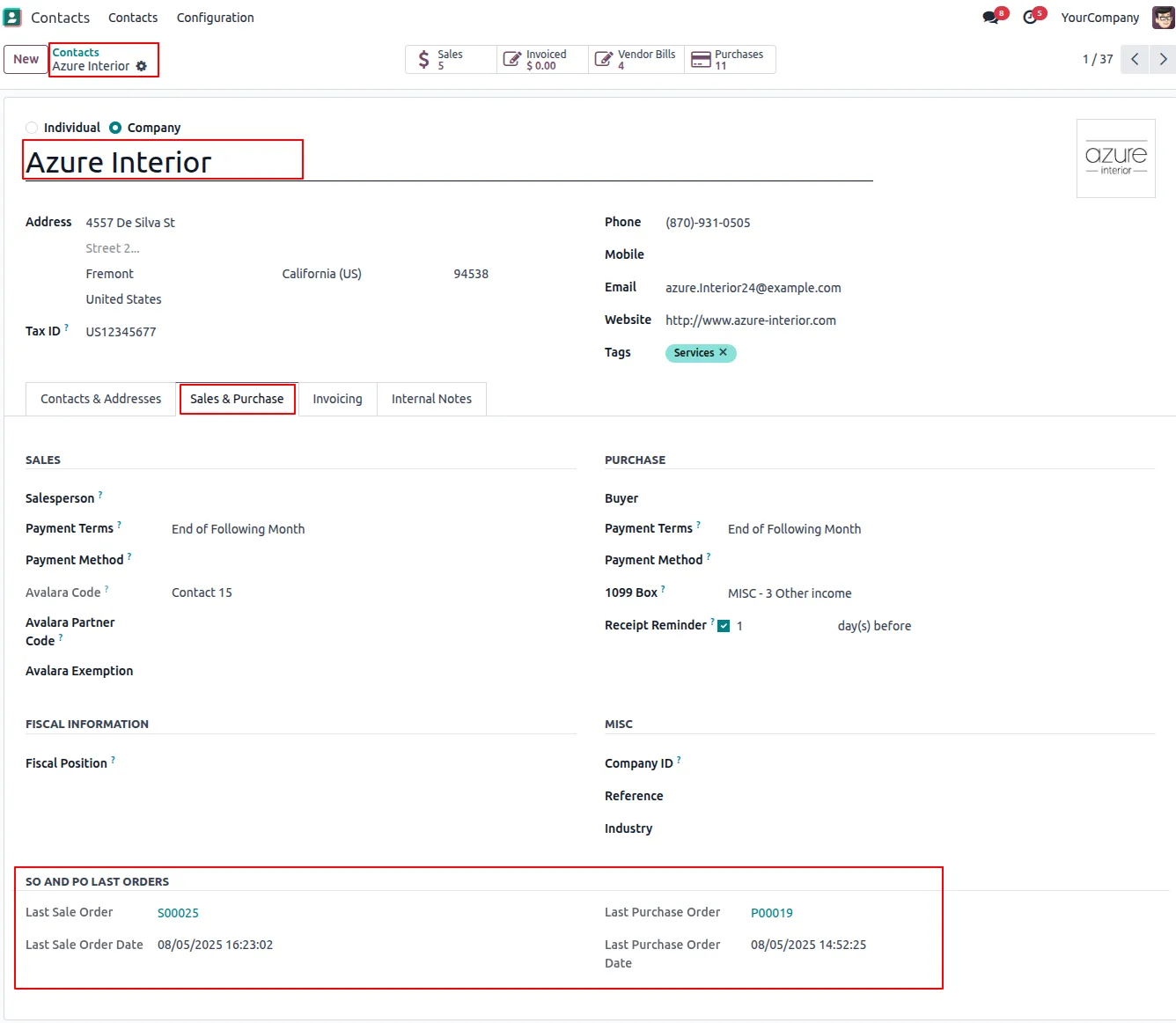
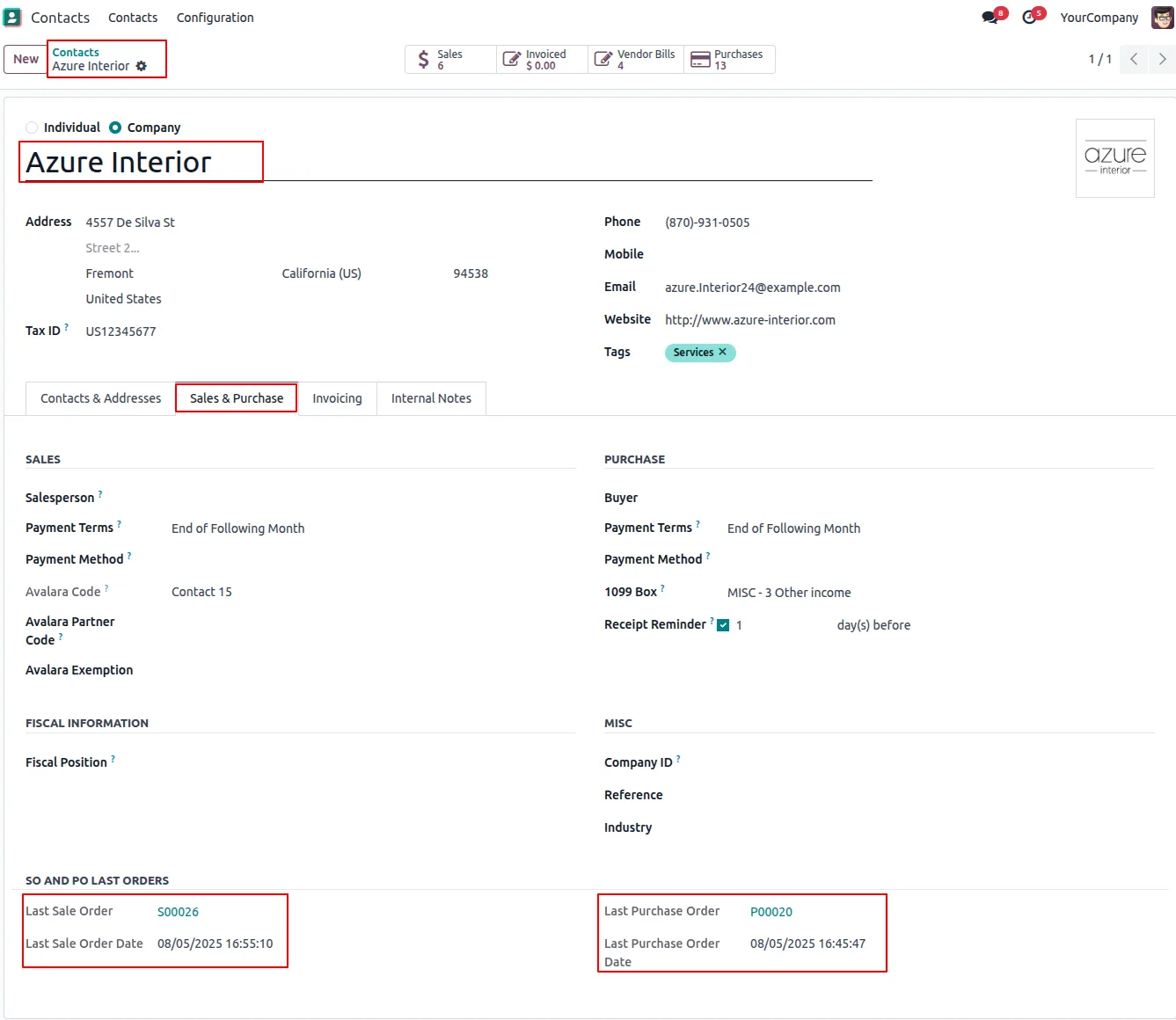
Built by TechUltra Solutions, the module extends the standard partner form with two new read-only fields — the last confirmed Sale Order and the last confirmed Purchase Order — each shown alongside the order date.
The fields update automatically the moment a sale or purchase order is confirmed, so reps see real-time commercial context next to the contact, vendor, or customer they are looking at. There is no manual data entry, no parallel report to keep open, and no risk of editing core partner data — the fields are read-only by design.
Key features
-
Last confirmed Sale Order on the partner
Shows the most recent confirmed Sale Order for the customer, with its order date, directly on the partner form — no need to open a separate list view.
-
Last confirmed Purchase Order on the partner
Shows the most recent confirmed Purchase Order for the vendor, with its order date, on the same form — useful for procurement and finance reviews.
-
Real-time updates on order confirmation
When a sale or purchase order is confirmed, the linked partner record is updated immediately with the new reference and date — no scheduled job to wait for.
-
Works for customers and vendors
Supports both sides of the partner relationship — the sale field covers customers, the purchase field covers vendors — from the same form.
-
Improved operational visibility
Sales, support, and procurement teams see the latest commercial activity for any partner at a glance, instead of jumping between Sales, Purchase, and Invoicing.
-
Read-only by design
Both fields are read-only, so the standard partner workflow is preserved and there is no risk of someone overwriting the last-order reference by accident.
-
Granular user access rights
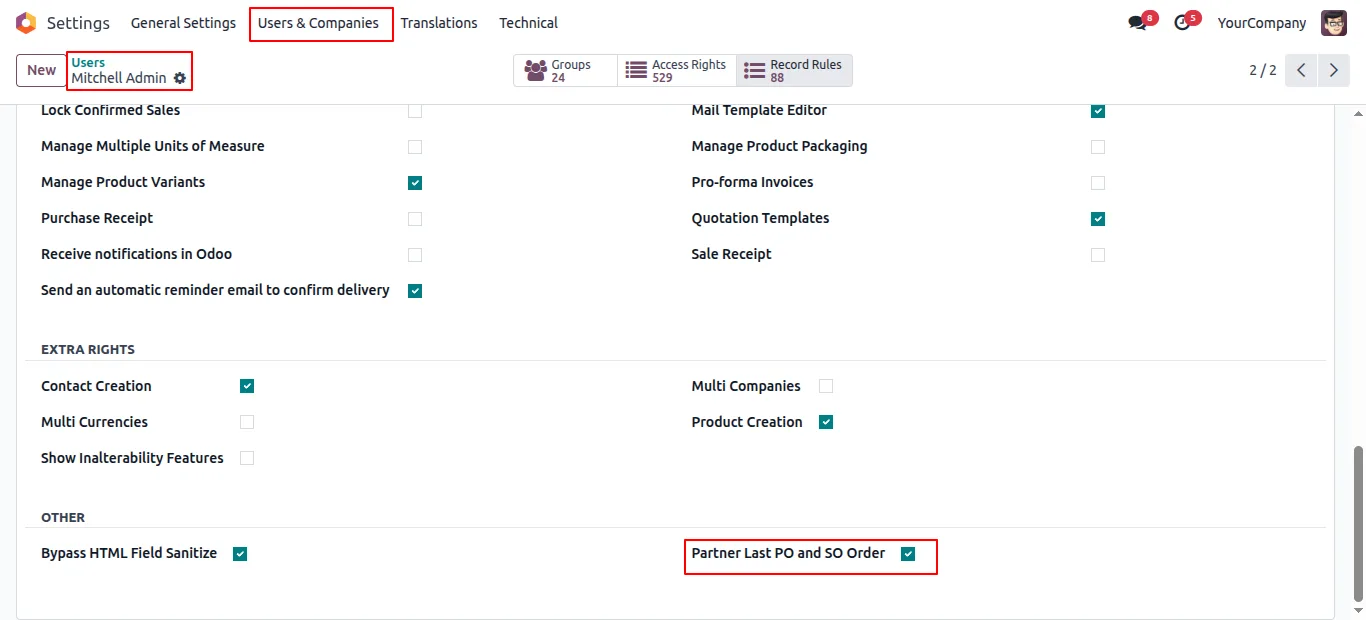
A dedicated access right controls who can see the Partner Last PO and SO information, so the data is only visible to the users who need it.
-
Community and Enterprise
Compatible with both the Community and Enterprise editions of Odoo, so smaller teams and larger deployments get the same upgrade.
Partner Last Order Info in Odoo
Every screen, in the order you meet it — configuration first, then the module in use.
Technical details
Specification
- Publisher
- TechUltra Solutions Private Limited
- Technical name
- partner_last_order_info
- Odoo versions
- 16.0, 17.0, 18.0, 19.0, 20.0
- Lines of code
- 69
- License
- Odoo Proprietary License v1.0 (OPL-1)
- Price
- $15 (one-time)
Deployment
- Odoo Online
- Odoo.sh
- On-premise
Odoo dependencies
- Contacts
- Purchase
- Discuss
- Invoicing
Support
90 days of bug-fix support, Monday to Friday (10:00–19:00 IST). Raise a ticket at support@techultra.in.
Setup & configuration
From install to first call — here is the path.
- 1
Install the module
In Odoo, open Apps, remove the Apps filter, search for “Partner Last Order Info”, and click Install.
- 2
Grant access rights
Go to Settings → Users, open the users who need to see the data, and enable the Partner Last PO and SO Order access right.
- 3
Confirm a sale order
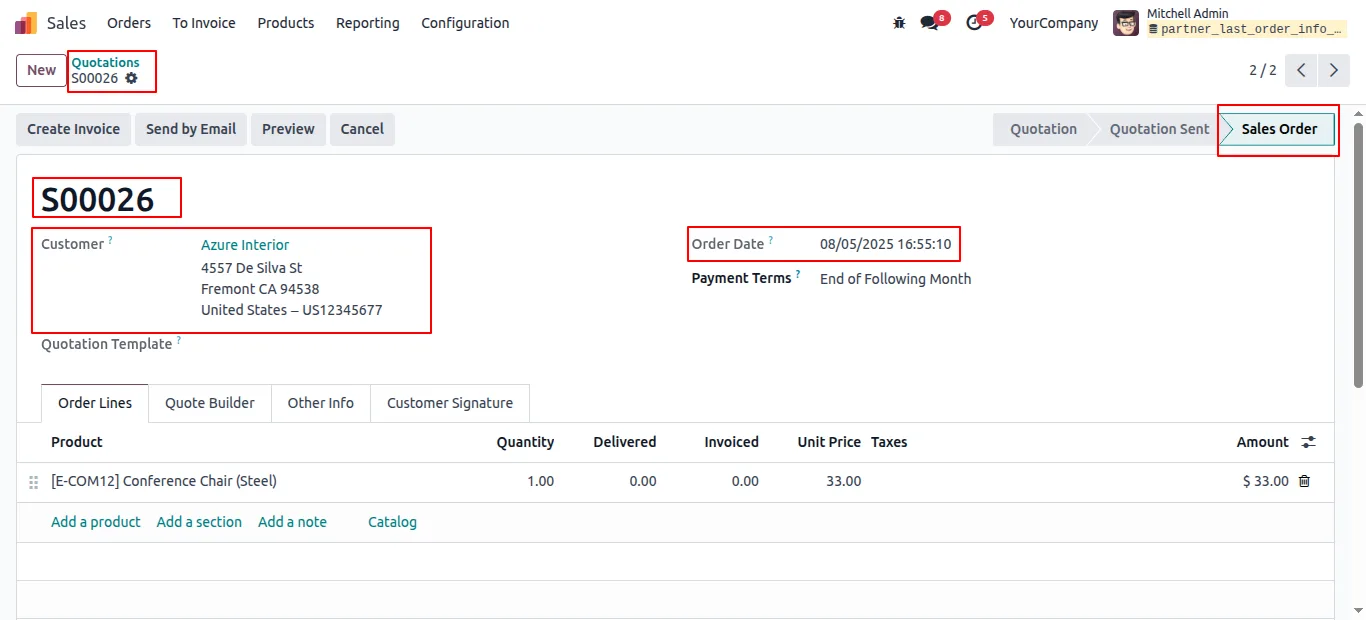
Open any quotation and confirm it. The customer's partner record is updated immediately with the new Sale Order reference and date.
- 4
Confirm a purchase order
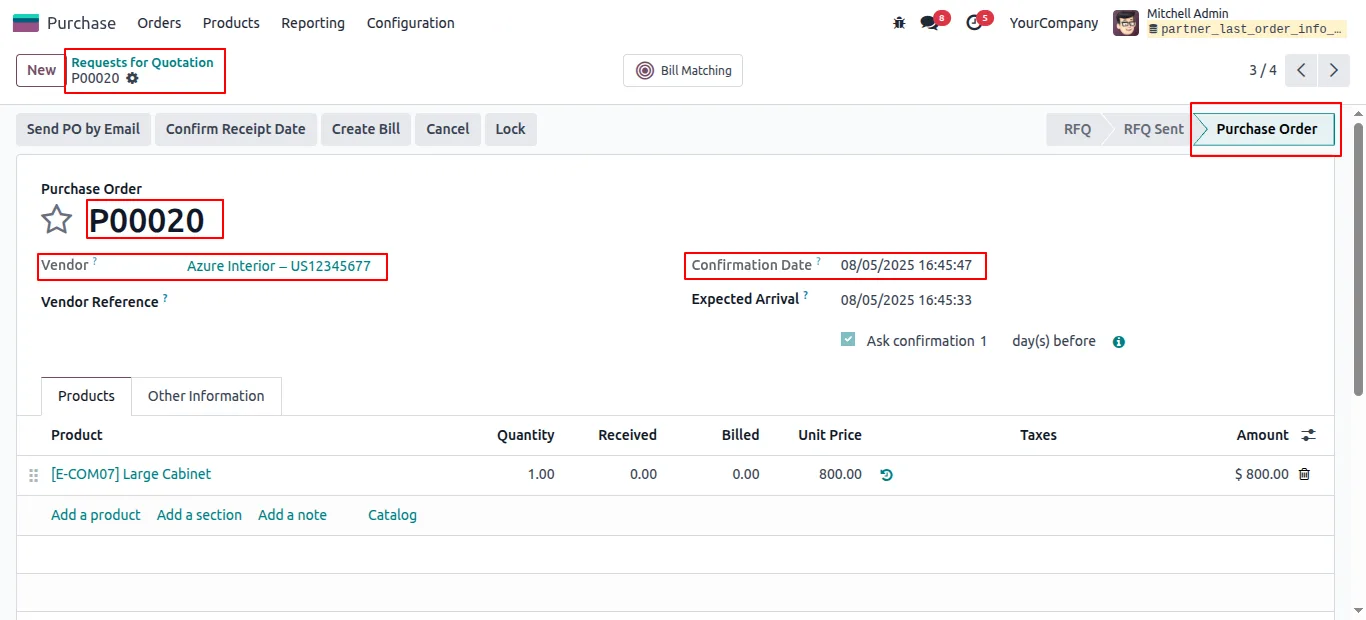
Confirm a vendor purchase order. The vendor's partner record is updated with the new Purchase Order reference and date.
- 5
Review on the partner form
Open any partner and check the last Sale Order and last Purchase Order fields to see the most recent commercial activity, with order dates.
Frequently asked questions
-
What does the module add to the partner form?
Two new read-only fields: the partner's last confirmed Sale Order and last confirmed Purchase Order, each shown with the order date so you can see how recent the activity is.
-
When do the fields update?
Immediately on order confirmation. As soon as a sale or purchase order is confirmed, the linked partner record reflects the new reference and date — no scheduled job to wait for.
-
Does it work for vendors as well as customers?
Yes. The sale field covers customers, the purchase field covers vendors, and both are visible on the standard partner form.
-
Can users accidentally edit the last-order fields?
No. Both fields are read-only by design, so the value cannot be overwritten by hand and stays in step with the actual confirmed documents.
-
Who can see the data?
A dedicated access right — Partner Last PO and SO Order — controls visibility, so administrators can grant the view only to the roles that need it.
-
Which Odoo versions are supported?
The module supports Odoo 16.0, 17.0, 18.0, 19.0, and 20.0, in both the Community and Enterprise editions.
-
Does it affect existing partner data?
No. The module only adds two read-only fields to the existing form and updates them based on confirmed orders. Standard partner data and workflows are untouched.
Listing verified against the Odoo App Store:
Related solutions
Whole-platform solutions that complement Partner Last Order Info.
Odoo CRM
Odoo CRM module — leads, opportunities, kanban pipeline, quotation, forecasting, email integration. Native with ERP. Mid-market alternative to Salesforce.
Odoo Sales
Odoo Sales module — quotations, pricing rules, sales orders, deliveries, returns. CRM-Inventory-Accounting integrated. Quote-to-cash unified.
Related services
Get the most out of this module with senior TechUltra consultants.
Odoo Customization Services
Odoo customization from a Gold Partner: custom modules, workflows, reports and Studio changes, written upgrade-safe and quoted at a fixed scope. Free scoping call.
Hire Odoo Developers
Hire certified Odoo developers from a Gold Partner: one developer or a team, full-time or part-time, 70–160 hours a month. Silver, Gold or Platinum plan, free trial.
Odoo Support Services & Maintenance
Odoo support services from a Gold Partner: functional and technical support plus server cover for Enterprise and Community, 30-minute P1 response, 24/7 option.







