Odoo App · Contacts & CRM
Partner Intelligence Dashboard
One dashboard per customer or vendor: a 0–100 health score, receivables ageing, a timeline across every Odoo app, and a PDF dossier.

Overview
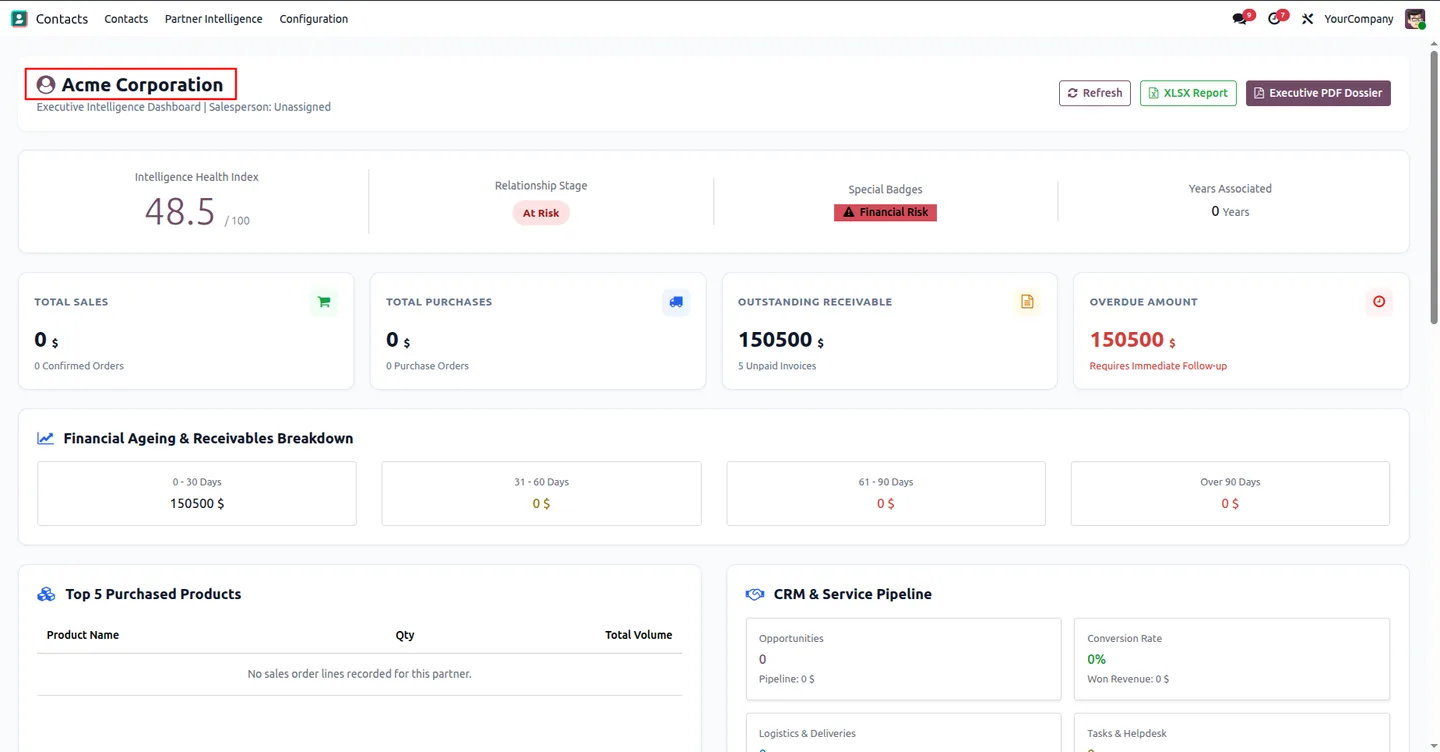
Understanding one customer in standard Odoo means opening Sales for orders, Invoicing for what they owe, CRM for open opportunities and Discuss for the conversation history. This module puts all of that on one screen, opened from a smart button on the contact form.
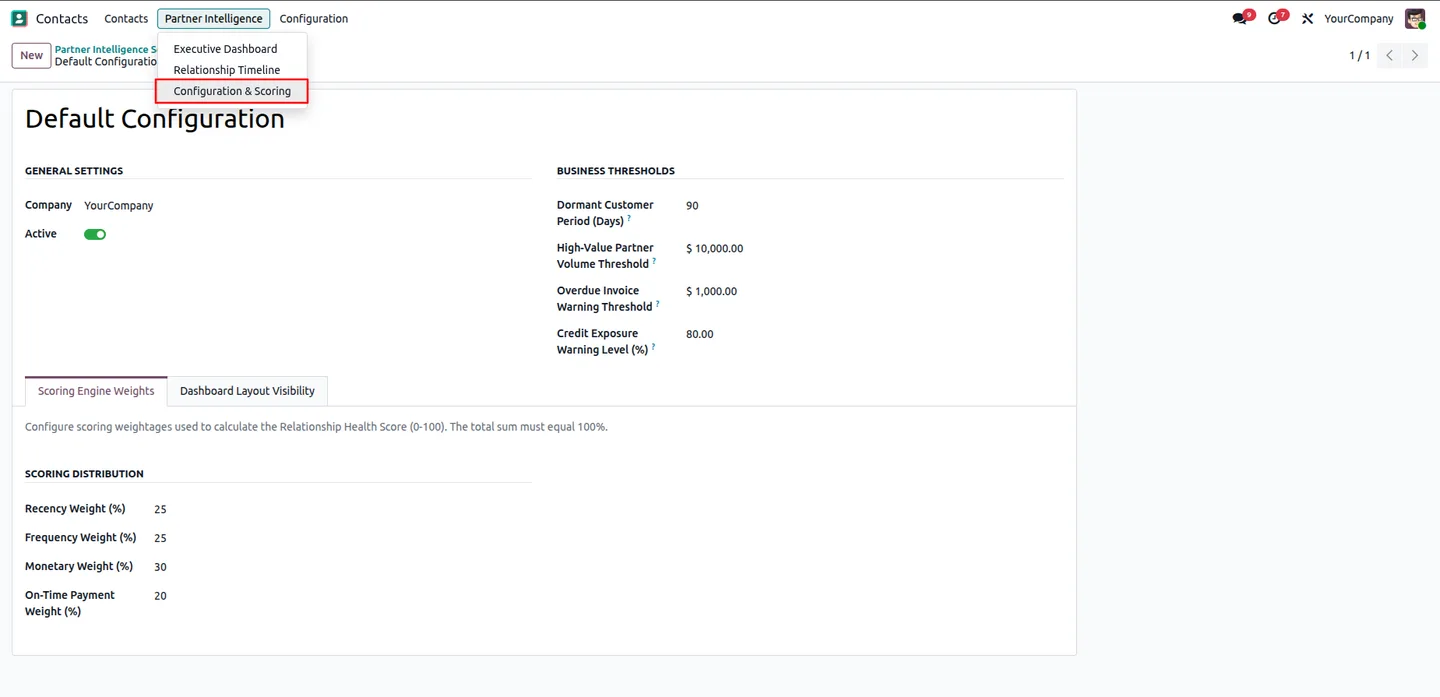
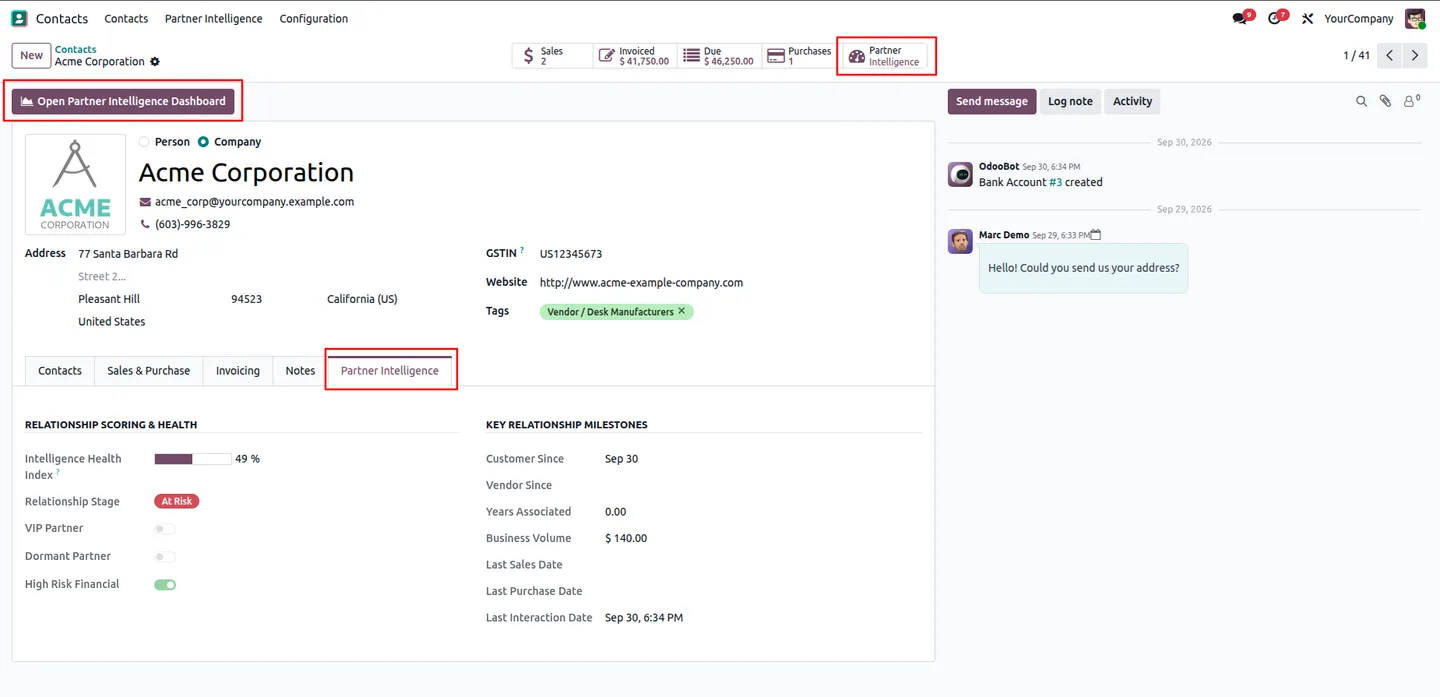
Each partner gets a health score from 0 to 100, built from recency, frequency, monetary value and on-time payment. You set the weights and the thresholds, so 'VIP', 'Dormant' and 'High Risk' badges follow your definitions rather than fixed rules. Overdue amounts are broken into 0-30, 31-60, 61-90 and 90+ day buckets, so credit risk is visible before it becomes a collection problem.
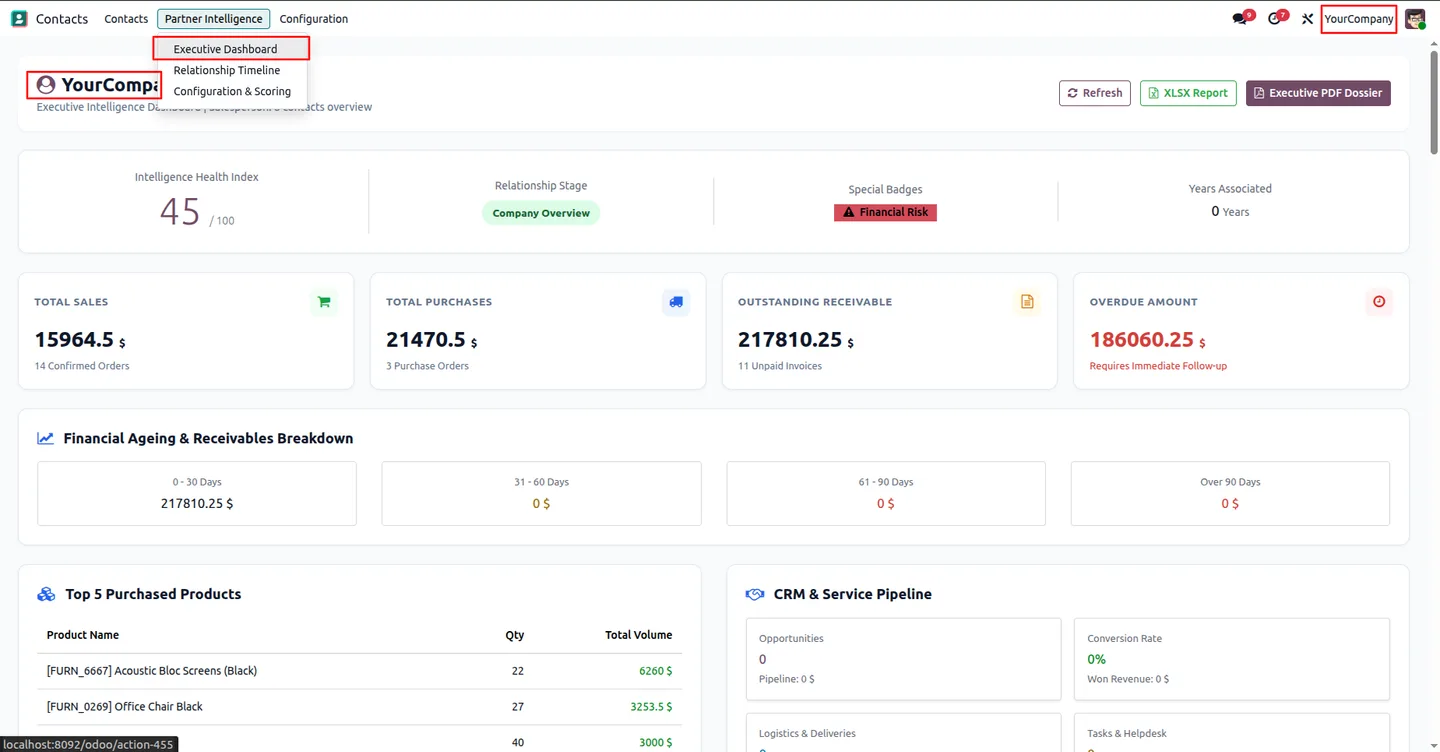
For management there is a company-wide Executive Dashboard that compares partners side by side, and a PDF dossier that summarises a partner's financial and relationship standing for a meeting or review.
Key features
-
Health scoring
A 0–100 score per partner from recency, frequency, monetary value and payment behaviour, with weights you configure per company.
-
Smart badges
Partners are labelled VIP, Dormant or High Risk automatically, against thresholds such as the high-value volume and the dormant period you set.
-
Receivables ageing
Outstanding and overdue amounts split into 0-30, 31-60, 61-90 and 90+ day buckets on every partner dashboard.
-
Unified relationship timeline
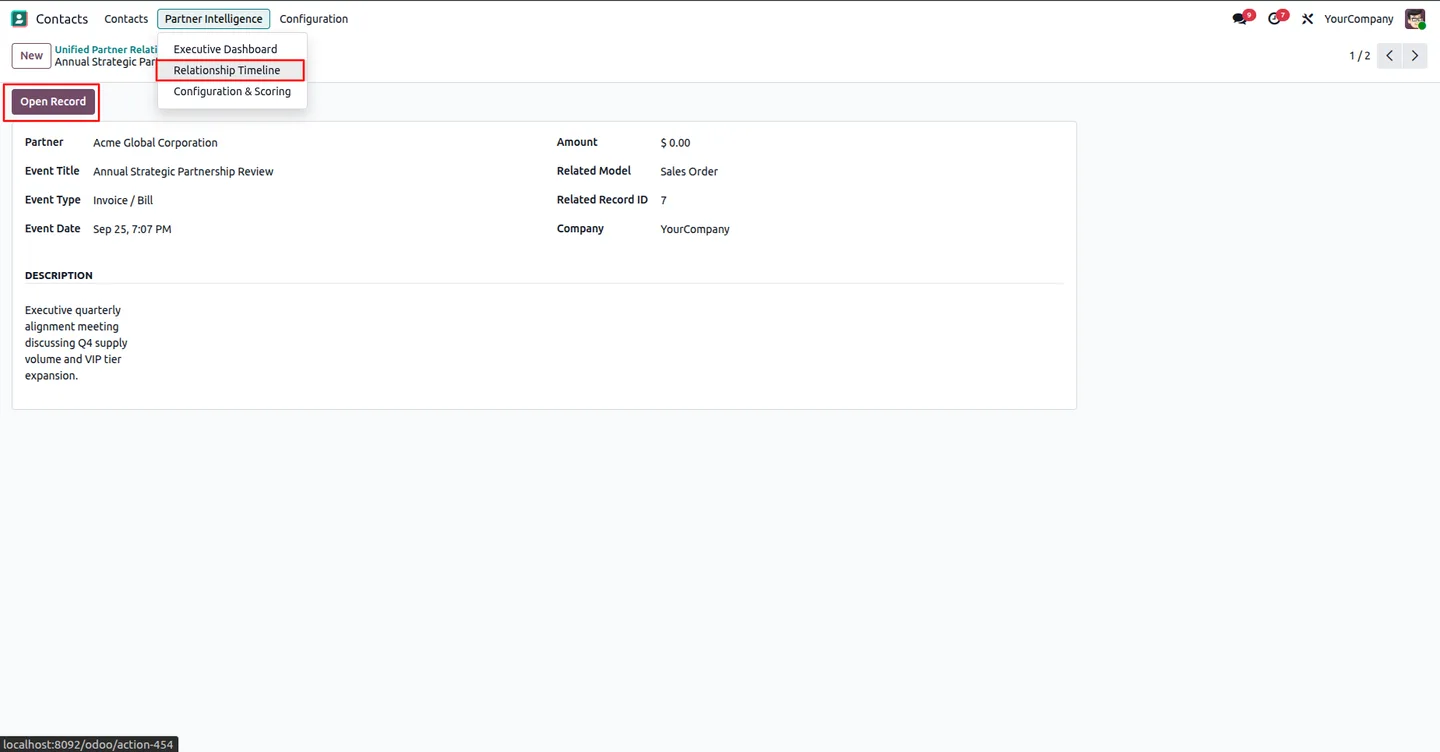
Quotations, invoices, meetings, tasks and other events from installed Odoo apps in one chronological feed, plus manual milestones linked to any record.
-
Executive dashboard
A company-wide view comparing health scores, financial standing and key metrics across all partners.
-
XLSX and PDF exports
Export a partner's data to a spreadsheet, or print an executive PDF dossier of their full intelligence report.
Partner Intelligence Dashboard in Odoo
Every screen, in the order you meet it — configuration first, then the module in use.
Technical details
Specification
- Publisher
- TechUltra Solutions Private Limited
- Technical name
- partner_intelligence_dashboard
- Odoo versions
- 16.0, 17.0, 18.0, 19.0, 20.0
- Lines of code
- 1,825
- Access
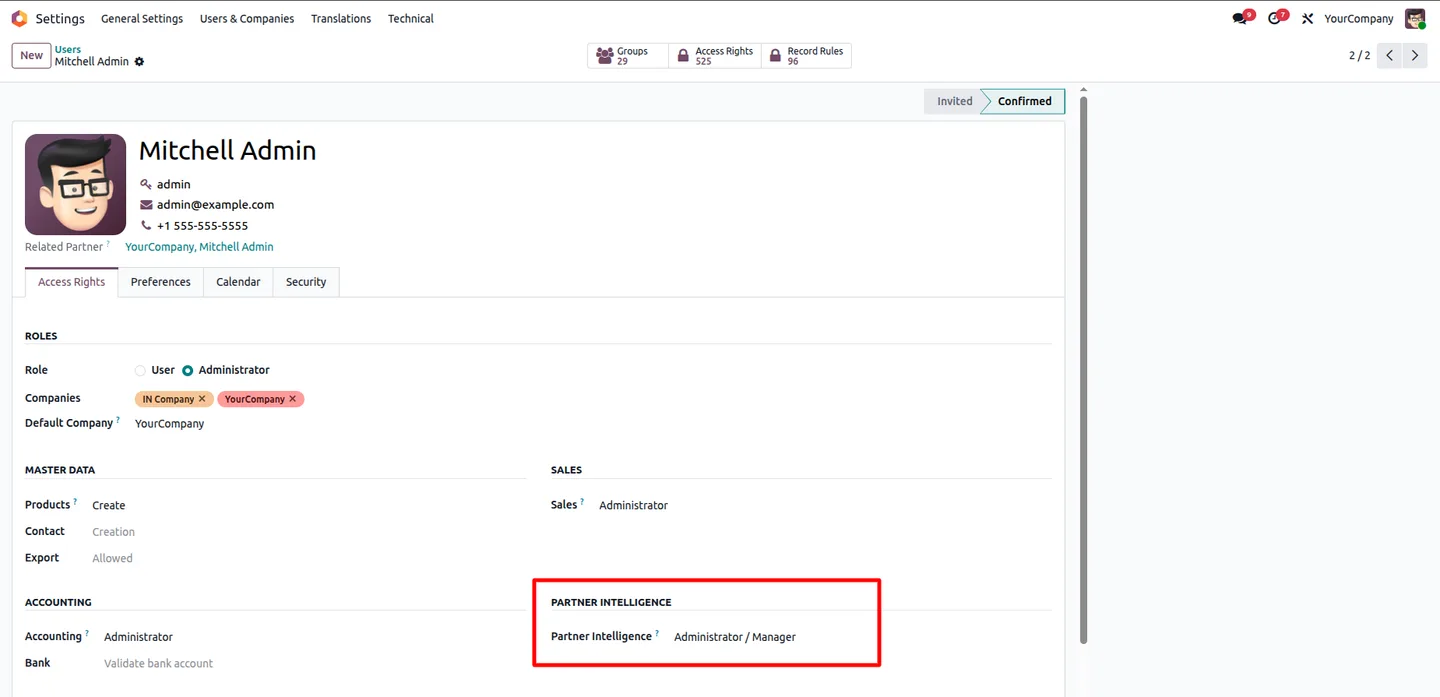
- Partner Intelligence User and Manager roles
- License
- Odoo Proprietary License v1.0 (OPL-1)
- Price
- $44.31 (one-time)
Deployment
- Odoo Online
- Odoo.sh
- On-premise
Odoo dependencies
- Contacts
- Discuss
- Invoicing
- Purchase
Support
90 days of bug-fix support plus 5 hours of free configuration help, Monday to Friday, 10:00–19:00 IST. Raise a ticket at support@techultra.in.
Setup & configuration
From install to first call — here is the path.
- 1
Grant access
In Settings → Users & Companies → Users, open a user's Access Rights tab and set the Partner Intelligence role to User or Manager.
- 2
Set thresholds and weights
Go to Contacts → Partner Intelligence → Configuration & Scoring. Set the dormant period, high-value volume, overdue and credit-exposure thresholds, and the recency, frequency, monetary and on-time payment weights (they must total 100%).
- 3
Choose dashboard blocks
On the same screen, use Dashboard Layout Visibility to show or hide sections such as Sales, CRM, Accounting and Timeline.
- 4
Open a partner dashboard
Open any contact and click the Partner Intelligence smart button, or Open Partner Intelligence Dashboard for the full-screen view.
- 5
Review the company view
Go to Contacts → Partner Intelligence → Executive Dashboard to compare partners across the company.
Frequently asked questions
-
Who can see the Partner Intelligence Dashboard?
Users who have been given the Partner Intelligence access right, as User or Manager, in their user settings.
-
Can we change how the health score is calculated?
Yes. Administrators set the weights for recency, frequency, monetary value and on-time payment under Configuration & Scoring, per company.
-
Which apps feed the relationship timeline?
It pulls events from Sales, Purchase, CRM, Project, Accounting and the other installed Odoo apps, in chronological order.
-
Can we add our own events to the timeline?
Yes. Create a Relationship Timeline event, choose the partner, the related model (for example Sale Order or Meeting) and the record ID, and the event links straight to that record.
-
What can we export?
Each partner dashboard exports to XLSX, and can be printed as an executive PDF dossier summarising the partner's financial and relationship standing.
Listing verified against the Odoo App Store:
Related services
Get the most out of this module with senior TechUltra consultants.
Odoo Customization Services
Odoo customization from a Gold Partner: custom modules, workflows, reports and Studio changes, written upgrade-safe and quoted at a fixed scope. Free scoping call.
Hire Odoo Developers
Hire certified Odoo developers from a Gold Partner: one developer or a team, full-time or part-time, 70–160 hours a month. Silver, Gold or Platinum plan, free trial.
Odoo Support Services & Maintenance
Odoo support services from a Gold Partner: functional and technical support plus server cover for Enterprise and Community, 30-minute P1 response, 24/7 option.