
Odoo App · WhatsApp & Messaging
Odoo WhatsApp Bundle (Community)
WhatsApp messaging wired into CRM, Sales, Purchase, Invoicing, POS, Project, and Inventory.

Overview
Odoo WhatsApp Bundle (Community) connects WhatsApp to the operational core of Odoo. It installs the WhatsApp Base, Automation, and two-way Discuss modules, then extends WhatsApp messaging into CRM, Sales, Purchase, Invoicing, POS, Project, and Inventory.
Built by TechUltra Solutions on Meta's official WhatsApp Cloud API, the bundle lets your team send the documents customers actually wait for — quotations, sales orders, invoices, and POS receipts — straight from the record over WhatsApp. Purchase teams can send RFQs and purchase orders to vendors the same way.
The suite supports multi-company and multi-provider setups, interactive templates, single-click media sharing, and automated Project task-stage notifications. Replies land back in Odoo through the Discuss module, so every WhatsApp conversation stays tied to the customer, order, or vendor it belongs to.
Key features
-
Official WhatsApp Cloud API by Meta
All messaging runs on Meta's official WhatsApp Cloud API, keeping your business number on a Meta-approved channel instead of an unofficial gateway.
-
WhatsApp across seven Odoo apps
WhatsApp messaging is wired into CRM, Sales, Purchase, Invoicing, POS, Project Task, and Inventory, so you can message customers and vendors from the record you are already on.
-
Send orders, invoices, and receipts
Send quotations and sales orders, customer invoices, and POS order receipts to customers over WhatsApp directly from the originating document.
-
Purchase RFQs to vendors
The Purchase integration sends requests for quotation and purchase orders to vendors over WhatsApp, keeping procurement communication in one channel.
-
Two-way chat through Discuss
The Discuss module brings bidirectional WhatsApp chat into Odoo with chatter integration, so replies are visible against the right contact and document.
-
Project task-stage notifications
The Project module sends automatic WhatsApp notifications when a task changes stage, keeping customers and team members informed without manual updates.
-
Interactive message templates
Create and send interactive templates — List, Buttons, Product, and Product List — alongside standard text and multimedia templates.
-
Single-click media sharing
Attach and send product videos, pictures, PDFs, and document files in one click from the WhatsApp composer inside Odoo.
-
Multi-company and multi-provider
Run several companies and WhatsApp providers from one Odoo database, each routed to its own WhatsApp Business number.
-
Optimized error handling
Failed messages return clear errors and the sending process is tuned for reliability, so you can fix the cause instead of guessing.
Odoo WhatsApp Bundle (Community) in Odoo
Every screen, in the order you meet it — configuration first, then the module in use.

Technical details
Specification
- Publisher
- TechUltra Solutions Private Limited
- Technical name
- odoo_whatsapp_bundle
- Odoo versions
- 15.0, 16.0, 17.0, 18.0, 19.0
- Lines of code
- 8,834
- License
- Odoo Proprietary License v1.0 (OPL-1)
- Price
- $198.99 (one-time)
Deployment
- Odoo Online
- Odoo.sh
- On-premise
Odoo dependencies
- CRM
- Sales
- Purchase
- Invoicing
- Point of Sale
- Project
- Inventory
- Contacts
- Calendar
- Discuss
Support
90 days of bug-fix support, Monday to Friday (10:00–19:00 IST). Raise a ticket at support@techultra.in.
Setup & configuration
From install to first call — here is the path.
- 1
Install the module
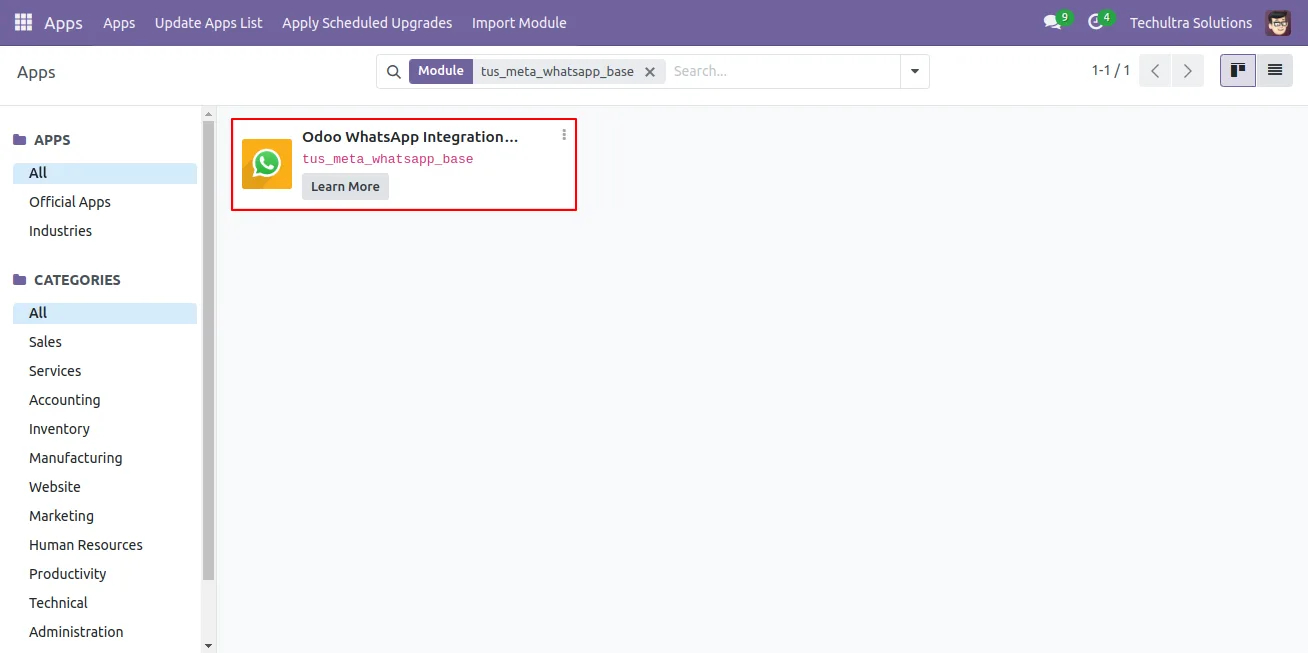
In Odoo, open Apps, remove the Apps filter, search for “Odoo WhatsApp Bundle”, and click Install.
- 2
Set up a Meta WhatsApp app
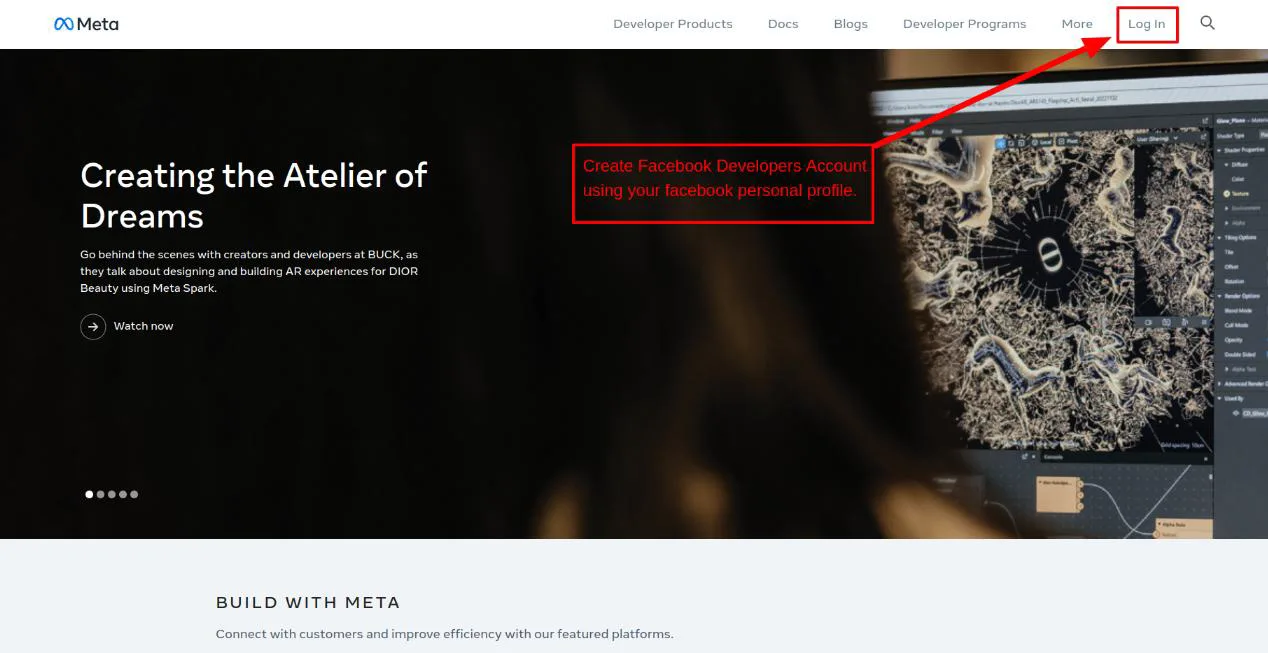
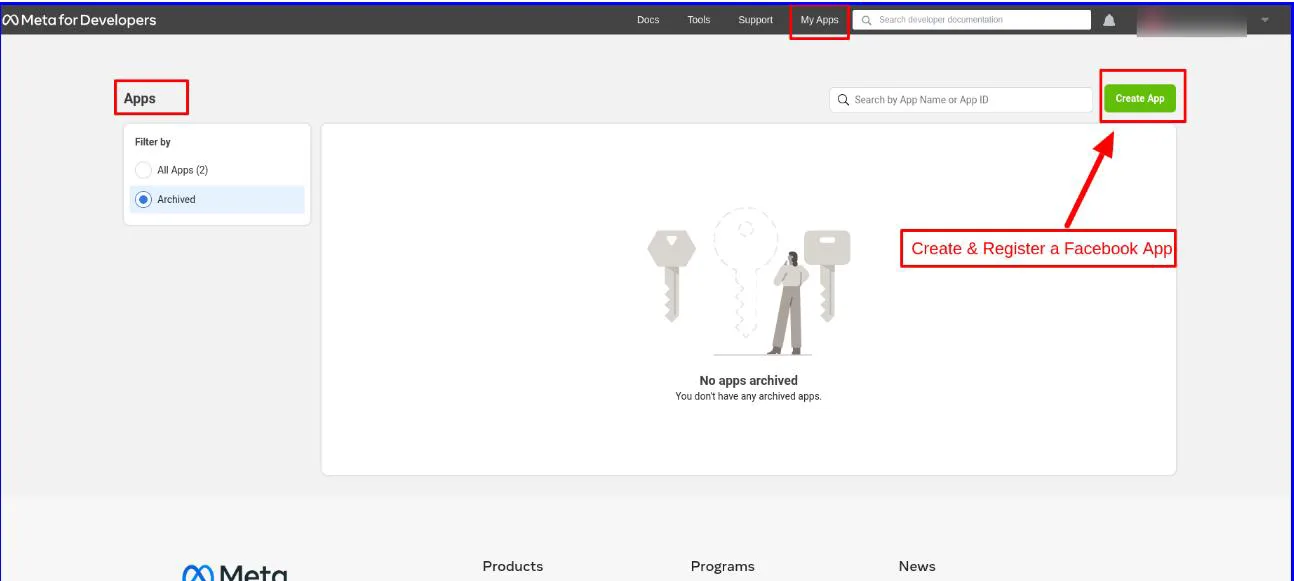
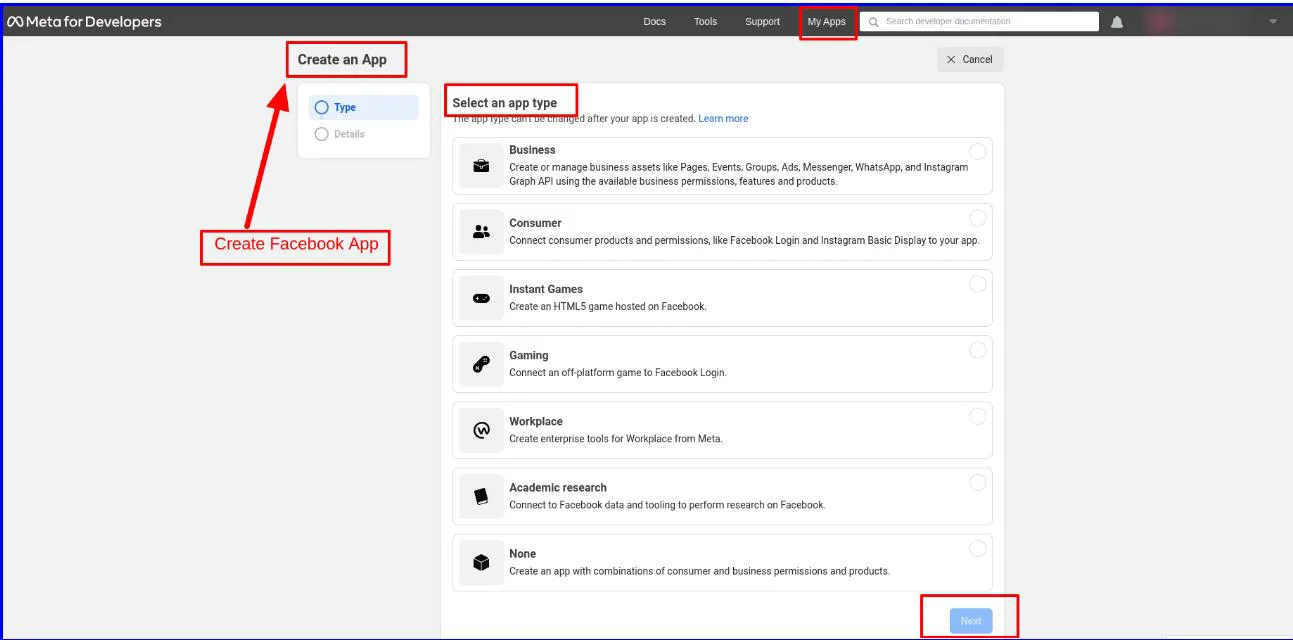
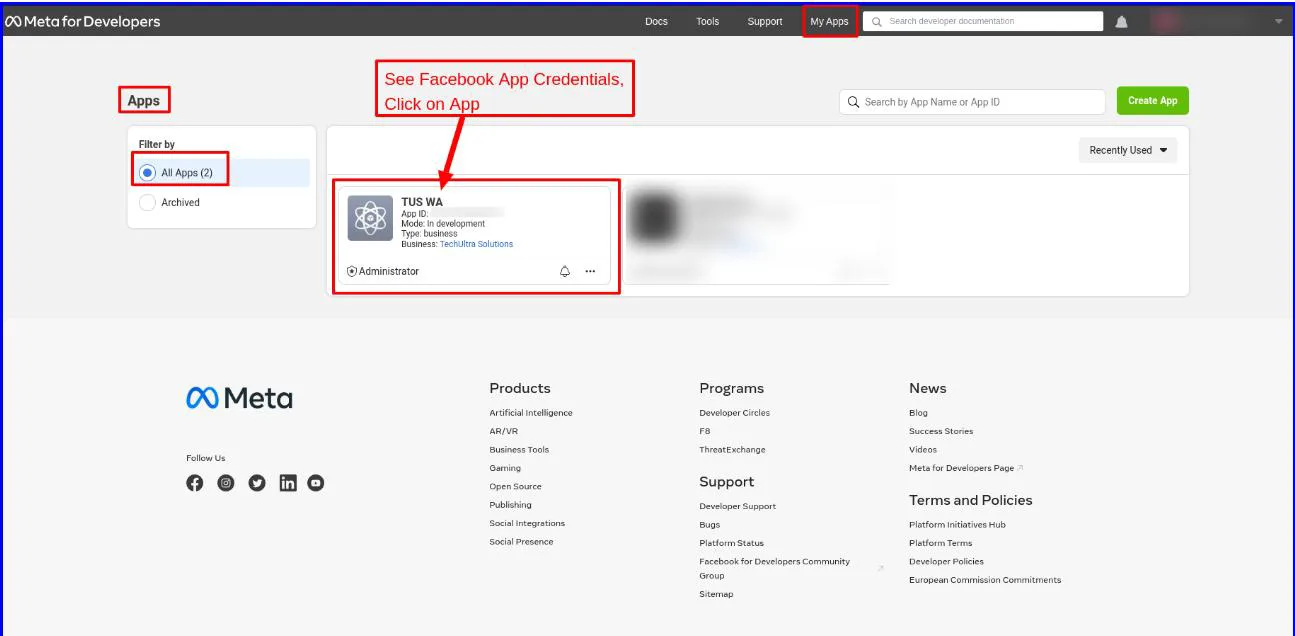
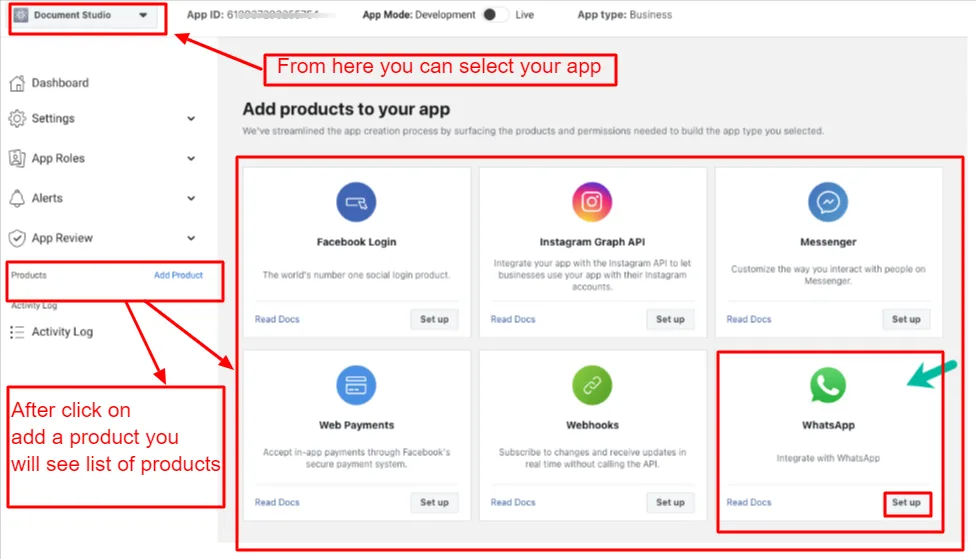
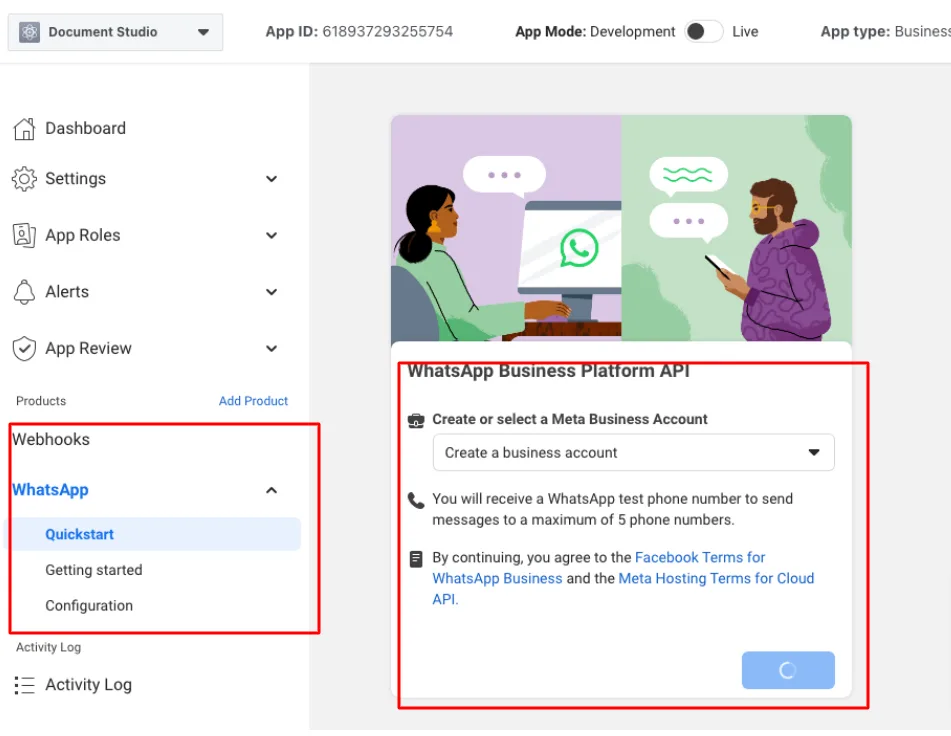
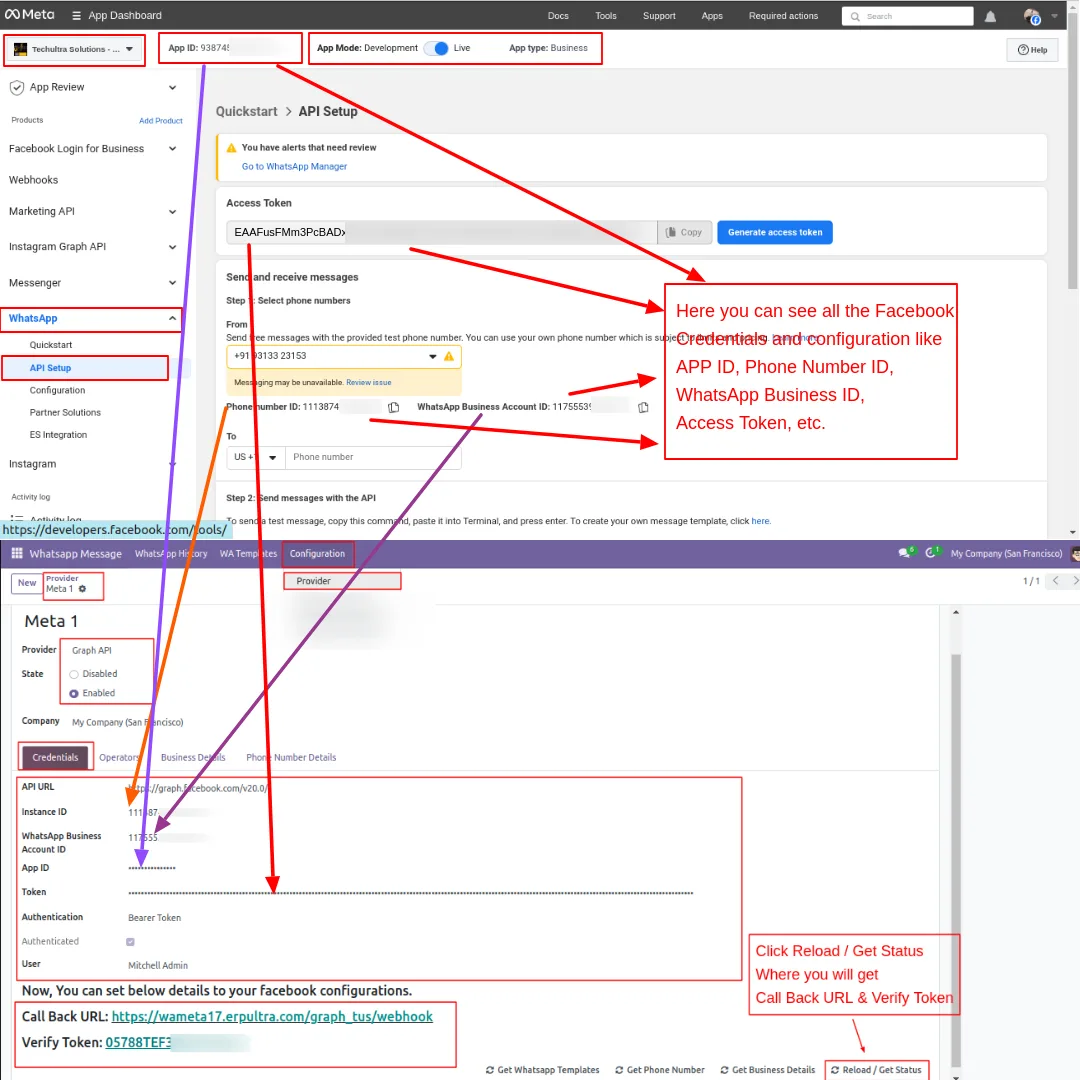
Create a Facebook Developer account, register an application, add the WhatsApp product, and open the WhatsApp quick start. Note the temporary access token, phone number ID, and WhatsApp Business Account ID.
- 3
Generate a permanent token
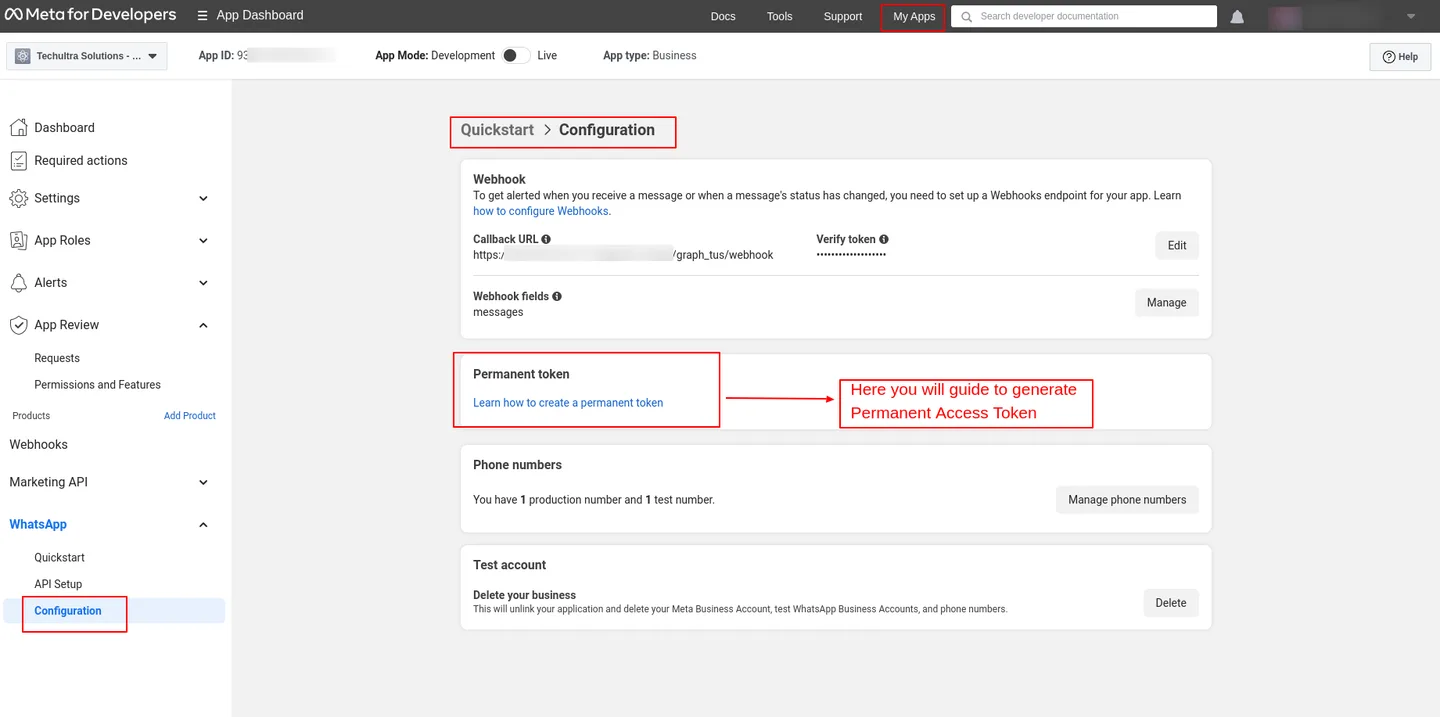
In Meta, generate a permanent access token and register your WhatsApp phone number, since temporary tokens expire after 24 hours.
- 4
Create a provider in Odoo
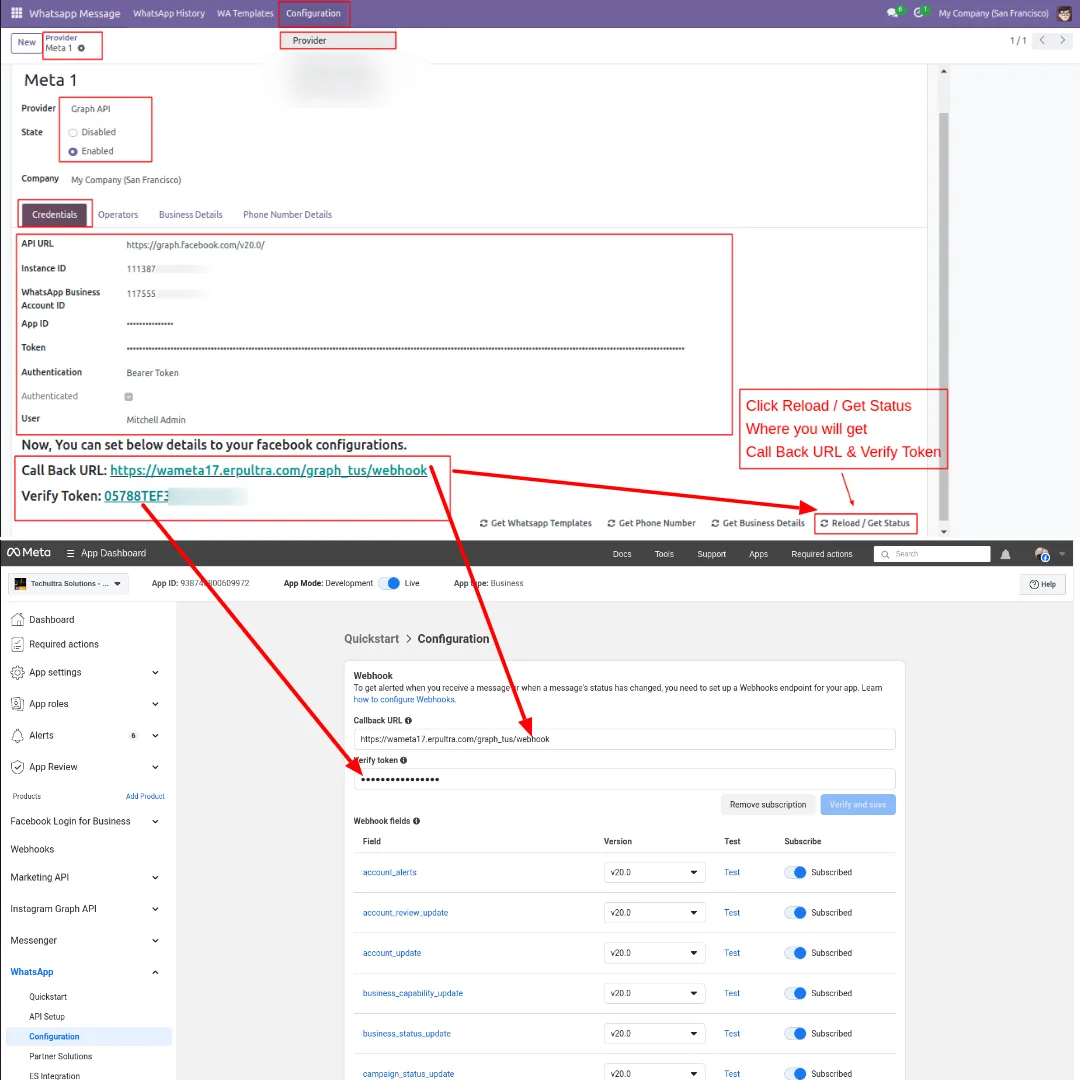
Go to WhatsApp Message → Configuration → Provider, create a record, and enter the Graph API URL, Business ID, and access token.
- 5
Connect the webhook
Click Reload / Get Status to retrieve the callback URL and verify token, paste both into Meta's webhook settings, and click Verify & Save.
- 6
Sync templates and configure modules
Use Get WhatsApp Templates to import approved templates, add operators, set contact numbers with country codes, and enable Project task-stage notifications.
Frequently asked questions
-
Which Odoo apps does the bundle integrate with?
It wires WhatsApp messaging into CRM, Sales, Purchase, Invoicing, POS, Project Task, and Inventory, plus the WhatsApp Base, Automation, and Discuss modules.
-
Can I send invoices and receipts over WhatsApp?
Yes. You can send quotations, sales orders, customer invoices, and POS order receipts to customers over WhatsApp straight from the originating document.
-
Does it work with Odoo Community?
Yes. The bundle is built for the Community edition and supports Odoo 15.0, 16.0, 17.0, 18.0, and 19.0.
-
Can vendors receive purchase orders on WhatsApp?
Yes. The Purchase integration sends requests for quotation and purchase orders to vendors over WhatsApp, keeping procurement communication in one channel.
-
Will project task changes notify customers automatically?
Yes. The Project module sends an automatic WhatsApp notification whenever a task changes stage, so updates go out without manual effort.
-
Is this an official WhatsApp integration?
Yes. The bundle uses Meta's official WhatsApp Cloud API, so your business number stays on a Meta-approved channel.
-
Can replies be seen inside Odoo?
Yes. The Discuss module provides bidirectional chat with chatter integration, so customer replies appear against the right contact and document.
-
Is support included?
Yes. The module includes 90 days of bug-fix support, Monday to Friday, 10:00–19:00 IST.
Listing verified against the Odoo App Store:
Related solutions
Whole-platform solutions that complement Odoo WhatsApp Bundle (Community).
WhatsApp ↔ Odoo Integration
Connect WhatsApp to Odoo: two-way WhatsApp Business API sync, order and invoice messages, payment links and one shared team inbox. Free demo from a Gold Partner.
AI WhatsApp Chatbot
LLM-powered WhatsApp chatbot grounded in your Odoo data. Handles ordering, support, FAQs, and lead qualification with human-agent escalation.
Odoo WhatsApp Push Notifications
Real-time WhatsApp push notifications in Odoo — web, Android, iOS. Customer names in Discuss instead of phone numbers. Compatible with Odoo 17 and 18.
Related services
Get the most out of this module with senior TechUltra consultants.
Odoo Customization Services
Odoo customization from a Gold Partner: custom modules, workflows, reports and Studio changes, written upgrade-safe and quoted at a fixed scope. Free scoping call.
Hire Odoo Developers
Hire certified Odoo developers from a Gold Partner: one developer or a team, full-time or part-time, 70–160 hours a month. Silver, Gold or Platinum plan, free trial.
Odoo Support Services & Maintenance
Odoo support services from a Gold Partner: functional and technical support plus server cover for Enterprise and Community, 30-minute P1 response, 24/7 option.







