
Odoo App · Sales & Pricing
Advanced Multi Discount
Apply a fixed per-unit discount before the percentage discount on Odoo orders and invoices.

Overview
Advanced Multi Discount extends Odoo pricing so a line can carry two discounts instead of one. It adds a fixed-amount Multi Discount per unit that is deducted first, then Odoo's standard percentage discount is applied on top.
Built by TechUltra Solutions, the module covers the discount combinations that real deals use — a scheme discount plus a cash discount, or a negotiated per-unit reduction plus a percentage. The two discounts are applied in sequence, and taxes are computed only after both, so subtotals and tax remain accurate and compliant.
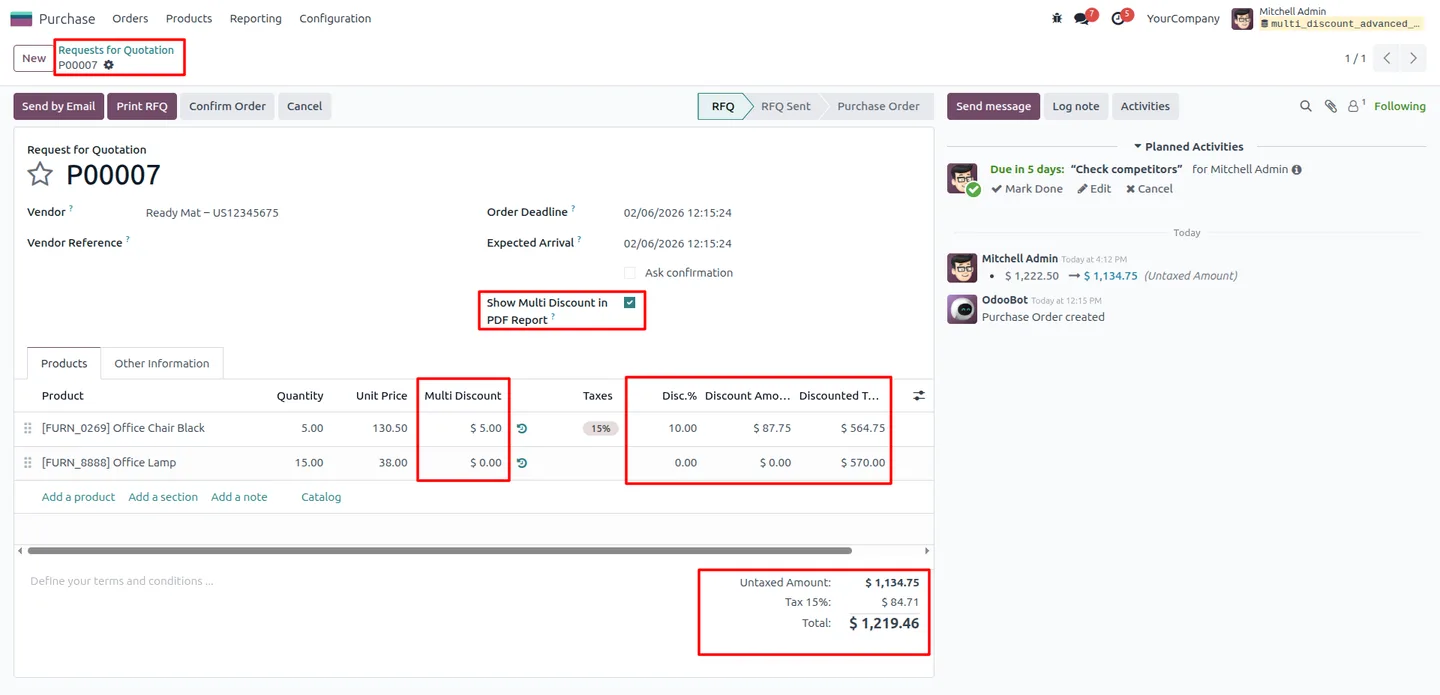
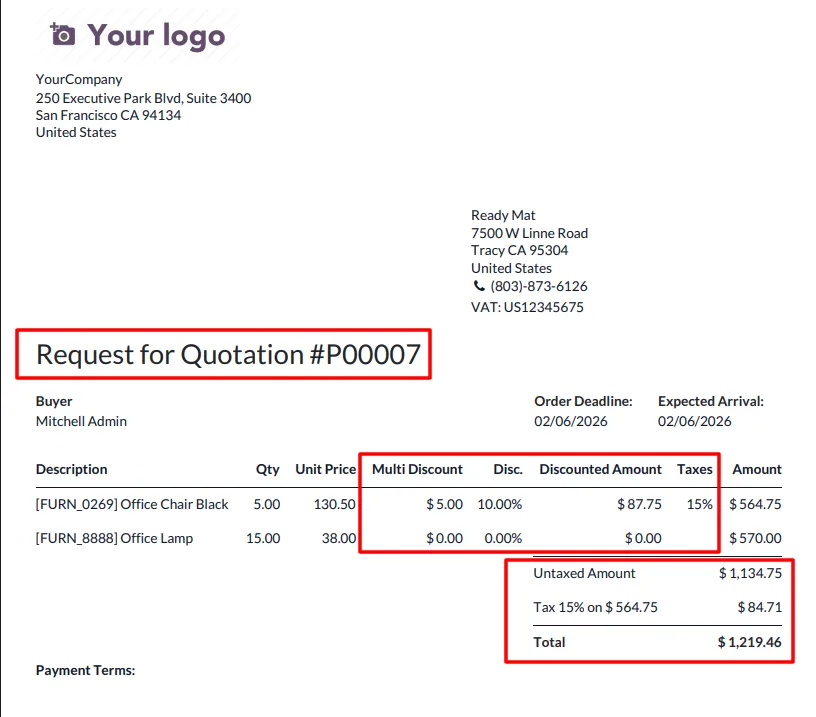
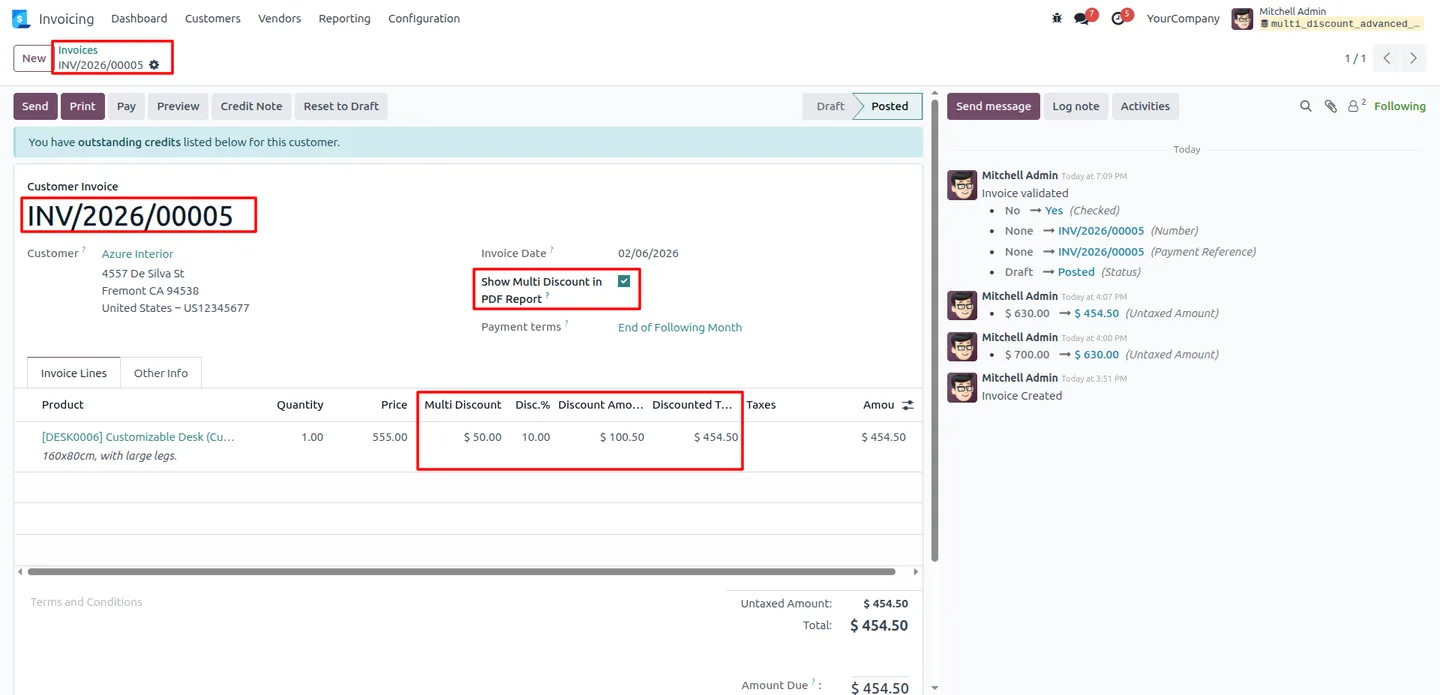
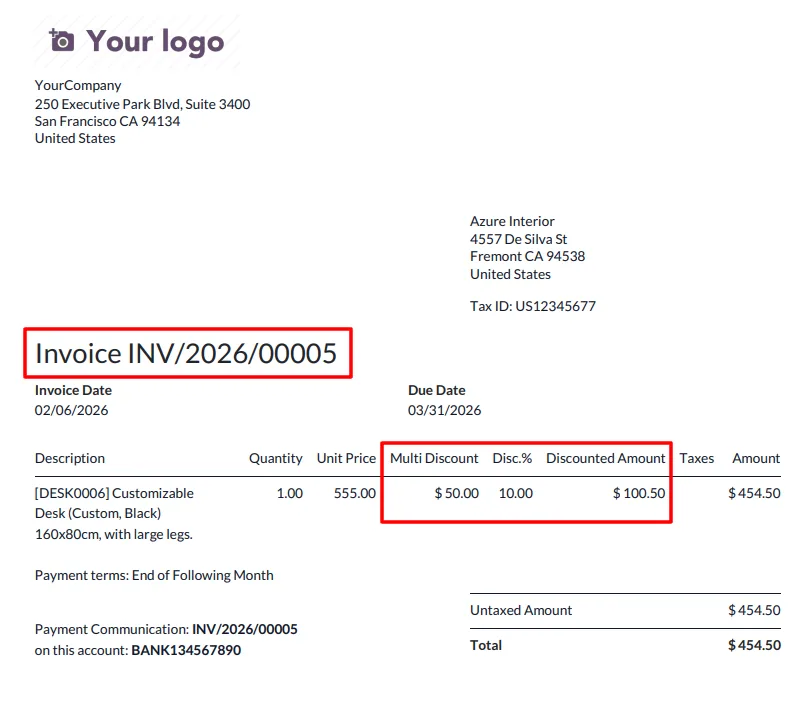
The Multi Discount field appears at line level across sales quotations, purchase orders, and customer invoices, and can be shown on the printed PDF documents. Access is controlled per user for Sales, Purchase, and Accounting, so only authorised staff can apply the extra discount layer.
Key features
-
Fixed per-unit discount layer
Adds a fixed-amount Multi Discount applied per unit, giving each line a second discount on top of Odoo's standard percentage discount.
-
Sequential discount calculation
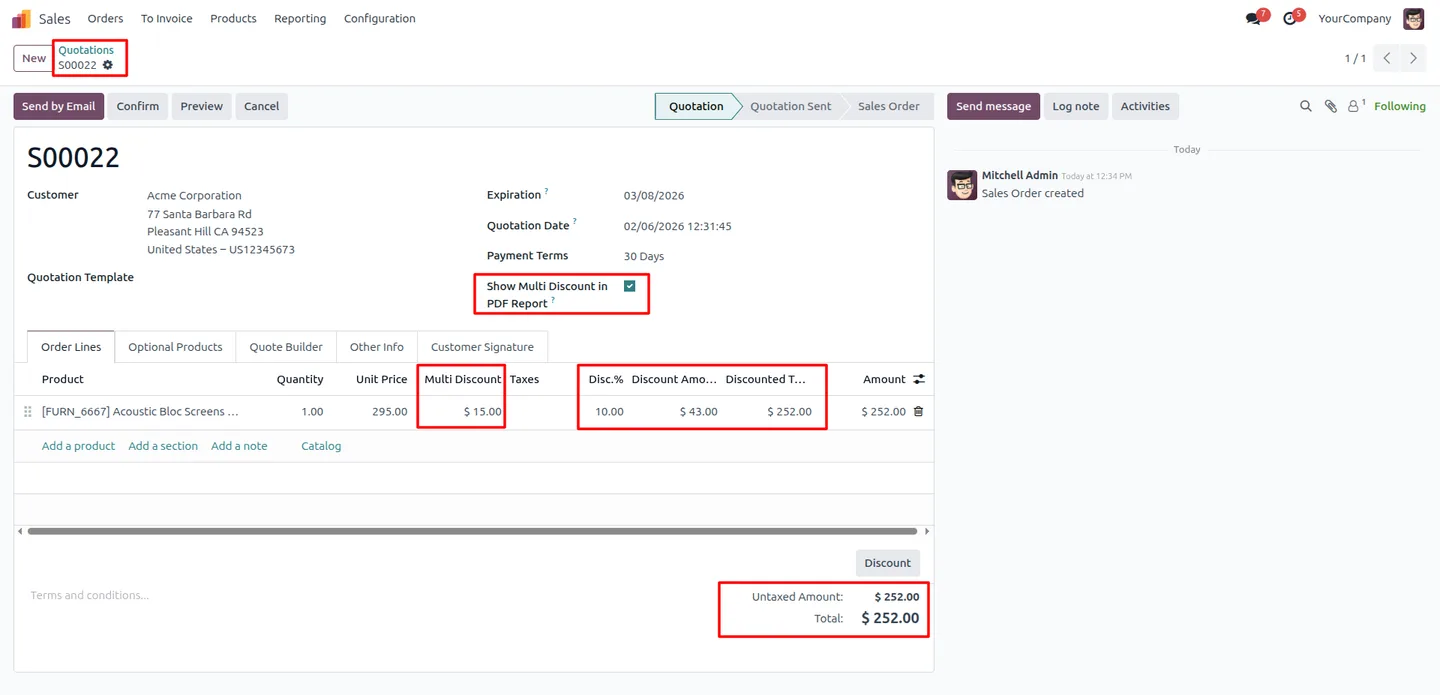
The fixed Multi Discount is deducted first, then the percentage discount is applied, so the final discounted amount is calculated accurately and predictably.
-
Tax calculated after discounts
Taxes are computed only after both discounts have been applied, keeping subtotals and tax totals accurate and compliant.
-
Works across Sales, Purchase, and Accounting
The Multi Discount appears on sales quotations, purchase orders, and customer invoices, so layered pricing is consistent across the order-to-invoice flow.
-
Line-level visibility
Multi Discount is shown transparently at individual line level, so staff and customers can see exactly how a line's price was reduced.
-
PDF report display
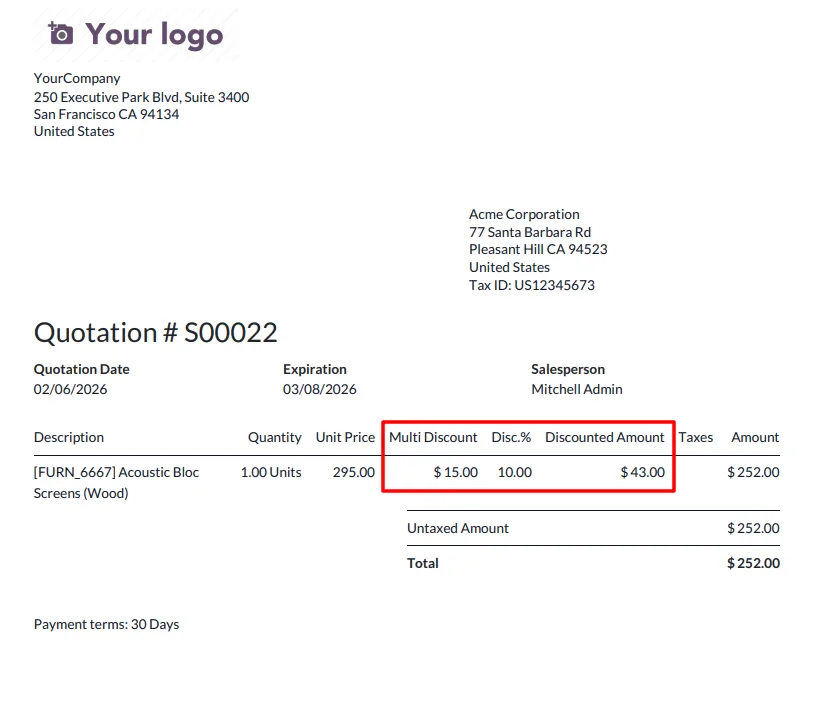
Optionally show the Multi Discount on printed documents, including quotation reports, purchase order reports, and invoice PDFs.
-
Per-user access control
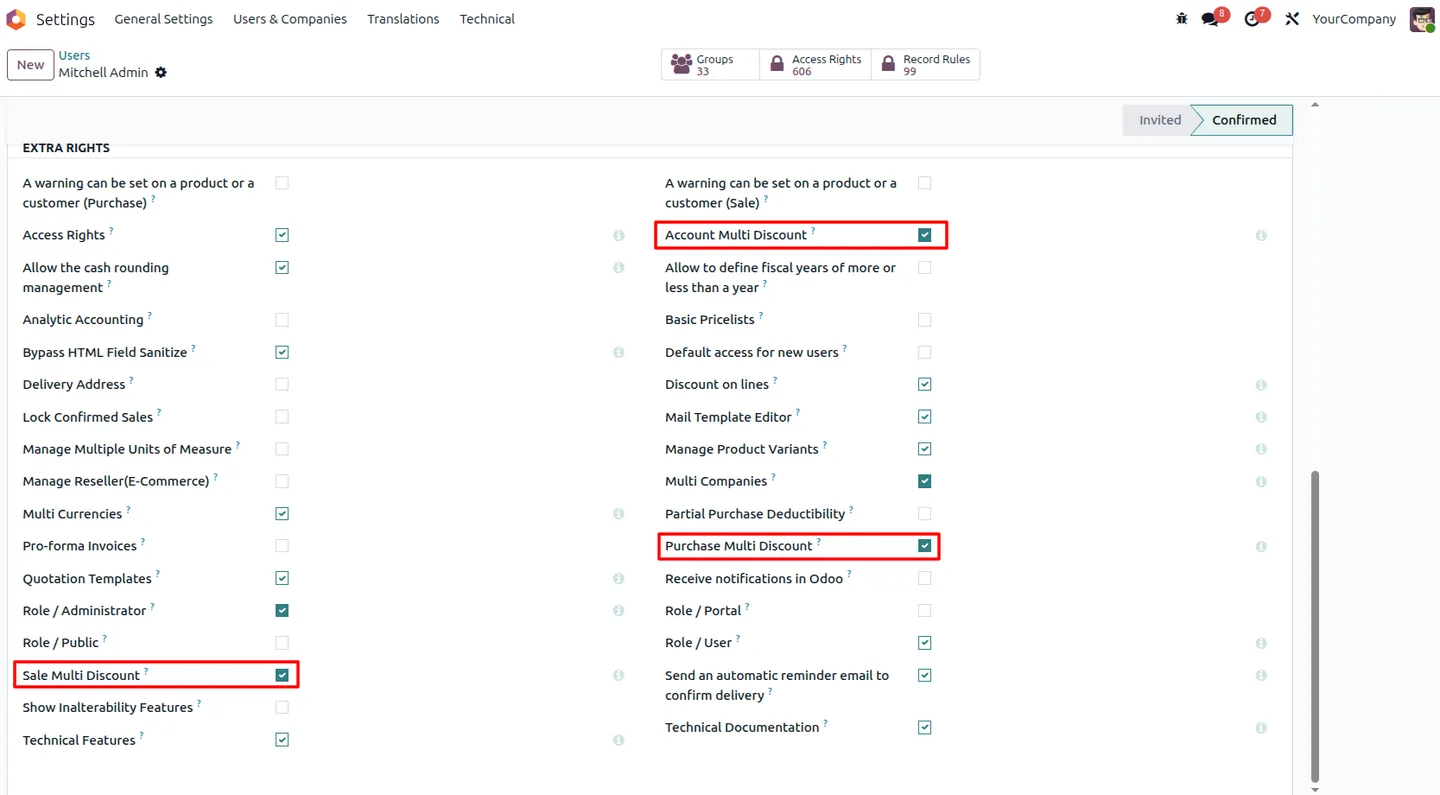
Administrators enable Multi Discount permissions individually for Sales, Purchase, and Accounting per user, keeping control over who can apply discounts.
-
No disruption to existing workflows
The extra discount layer fits real-world pricing without changing default Odoo workflows or altering historical orders and invoices.
Advanced Multi Discount in Odoo
Every screen, in the order you meet it — configuration first, then the module in use.
Technical details
Specification
- Publisher
- TechUltra Solutions Private Limited
- Technical name
- multi_discount_advanced
- Odoo versions
- 16.0, 17.0, 18.0, 19.0, 20.0
- Lines of code
- 326
- License
- Odoo Proprietary License v1.0 (OPL-1)
- Price
- $24.90 (one-time)
Deployment
- Odoo Online
- Odoo.sh
- On-premise
Odoo dependencies
- Sales
- Purchase
- Invoicing
- Discuss
Support
90 days of bug-fix support, Monday to Friday (10:00–19:00 IST). Raise a ticket at support@techultra.in.
Setup & configuration
From install to first call — here is the path.
- 1
Install the module
In Odoo, open Apps, remove the Apps filter, search for “Advanced Multi Discount”, and click Install.
- 2
Grant Multi Discount access
In Settings → Users & Companies → Users, enable the Multi Discount permissions for Sales, Purchase, and Accounting on each user who should apply the discount.
- 3
Enter a Multi Discount on a line
Open a sales order, purchase order, or customer invoice and set the fixed Multi Discount amount on a line alongside the standard percentage discount.
- 4
Review the calculated total
Confirm the line total: the fixed Multi Discount is deducted first, the percentage discount is applied next, and tax is calculated after both.
- 5
Enable Multi Discount on PDFs
Turn on the Multi Discount display option so the discount appears on printed quotations, purchase orders, and invoice PDFs.
Frequently asked questions
-
What does Advanced Multi Discount add to Odoo?
It adds a fixed-amount Multi Discount per unit to order and invoice lines, so each line can carry that fixed discount on top of Odoo's standard percentage discount.
-
In what order are the two discounts applied?
The fixed Multi Discount is deducted first, then the percentage discount is applied to the result. Taxes are calculated only after both discounts.
-
Does it affect tax calculation?
Taxes are computed after all discounts are applied, so subtotals and tax totals stay accurate and compliant. The module does not change how tax itself is configured.
-
Which documents support the Multi Discount?
The Multi Discount appears on sales quotations, purchase orders, and customer invoices, so layered pricing is consistent across the order-to-invoice flow.
-
Can the Multi Discount show on printed documents?
Yes. Displaying the Multi Discount on PDFs is optional and can be enabled for quotation reports, purchase order reports, and invoice PDFs.
-
Can I control who is allowed to apply it?
Yes. Multi Discount permissions are granted per user and separately for Sales, Purchase, and Accounting, so only authorised staff can use the extra discount layer.
-
Which Odoo versions are supported?
The module supports Odoo 16.0, 17.0, 18.0, 19.0, and 20.0, in both the Community and Enterprise editions.
-
Is support included?
Yes. The module includes 90 days of bug-fix support, Monday to Friday, 10:00–19:00 IST.
Listing verified against the Odoo App Store:
Related solutions
Whole-platform solutions that complement Advanced Multi Discount.
Odoo Sales
Odoo Sales module — quotations, pricing rules, sales orders, deliveries, returns. CRM-Inventory-Accounting integrated. Quote-to-cash unified.
Odoo CRM
Odoo CRM module — leads, opportunities, kanban pipeline, quotation, forecasting, email integration. Native with ERP. Mid-market alternative to Salesforce.
Related services
Get the most out of this module with senior TechUltra consultants.
Odoo Customization Services
Odoo customization from a Gold Partner: custom modules, workflows, reports and Studio changes, written upgrade-safe and quoted at a fixed scope. Free scoping call.
Hire Odoo Developers
Hire certified Odoo developers from a Gold Partner: one developer or a team, full-time or part-time, 70–160 hours a month. Silver, Gold or Platinum plan, free trial.
Odoo Support Services & Maintenance
Odoo support services from a Gold Partner: functional and technical support plus server cover for Enterprise and Community, 30-minute P1 response, 24/7 option.







