

Odoo App · Productivity
Menus Ascending Order (v15)
Sort the Odoo 15 main menu and every submenu alphabetically — no more hunting for apps in install order.
Overview
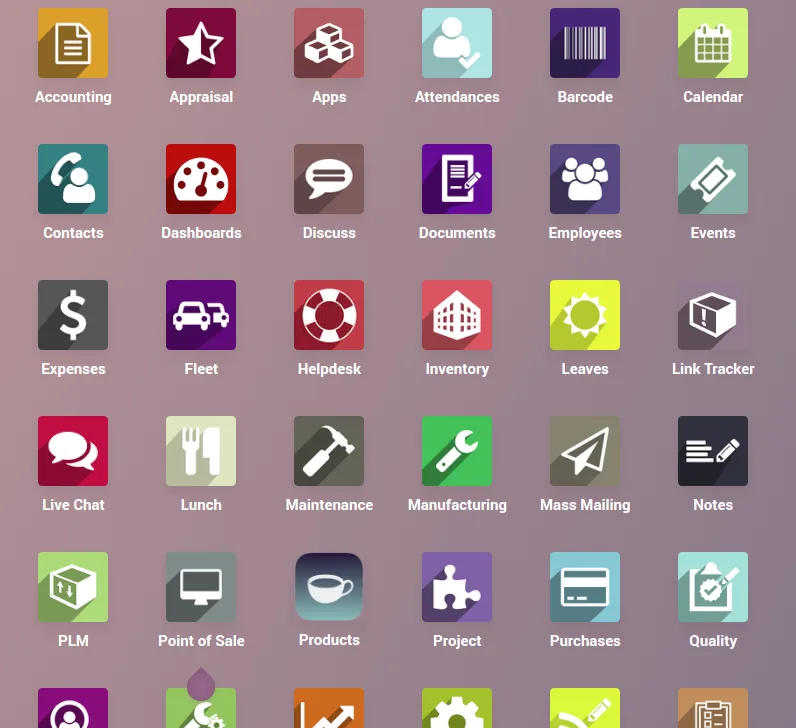
Menus Ascending Order (v15) is a tiny, drop-in Odoo 15 module that re-sorts the entire backend menu tree alphabetically in ascending order. By default Odoo orders menus by sequence, which tracks install order — so a long-running implementation ends up with the menu arranged in the order modules were added, not in any way a user can scan.
Built by TechUltra Solutions and weighing only 36 lines of code, the module fixes that without changing any business logic. Install it, refresh, and the main menu plus every parent and submenu is rendered A–Z.
It is genuinely free on the Odoo App Store under the OPL-1 licence, has no configuration screen, and ships compatible with Odoo 14, 15, and 16 so you can keep the same fix in place during a version upgrade.
Key features
-
Alphabetical main menu
The top-level Odoo app drawer is rendered A–Z instead of in install-order sequence, so users find apps by name rather than by where they sit in the list.
-
Alphabetical submenus
Every nested menu — Sales sub-actions, Accounting reports, Settings → Technical — is re-sorted ascending, so deep menus stop drifting as modules are added or upgraded.
-
Zero-configuration install
There is no settings screen and no field to toggle. Install the module, refresh the browser, and the menu re-sorts on the next render.
-
No business-logic impact
The module only changes the presentation order of menus. It does not touch records, access rights, automations, or any business data.
-
Lightweight footprint
Just 36 lines of code, no JavaScript bundle additions, and no extra database tables — safe to keep installed long-term without performance impact.
-
Multi-version compatibility
Ships against Odoo 14, 15, and 16, so the same menu fix carries forward across version upgrades without re-evaluation.
Menus Ascending Order (v15) in Odoo
Every screen, in the order you meet it — configuration first, then the module in use.




Technical details
Specification
- Publisher
- TechUltra Solutions Private Limited
- Technical name
- menus_ascending_order
- Odoo versions
- 14.0, 15.0, 16.0
- Lines of code
- 36
- License
- Odoo Proprietary License v1.0 (OPL-1)
- Price
- Free
Deployment
- Odoo Online
- Odoo.sh
- On-premise
Odoo dependencies
- Base
Support
90 days of bug-fix support, Monday to Friday (10:00–19:00 IST). Raise a ticket at support@techultra.in.
Setup & configuration
From install to first call — here is the path.
- 1
Install the module
In Odoo 15, open Apps, remove the Apps filter, search for “Menus Ascending Order”, and click Install. There is no extra configuration screen.
- 2
Refresh the browser
After install, do a hard refresh of the Odoo web client so the new menu order is fetched. The main app drawer should now be rendered A–Z.
- 3
Verify the submenus
Open a few parent menus — Sales, Inventory, Accounting, Settings → Technical — and confirm submenus are also sorted alphabetically.
- 4
Keep installed across upgrades
The module is compatible with Odoo 14, 15, and 16. Carry it forward in upgrade staging to keep the same menu behaviour after version migration.
Frequently asked questions
-
Does the module change record-level data?
No. It only re-sorts the presentation order of menu items in the Odoo web client. Records, access rights, automations, and business data are untouched.
-
Does it sort submenus too, or only the top level?
Both. The module sorts the top-level app drawer and every nested submenu — including deep paths such as Settings → Technical — alphabetically in ascending order.
-
Is there a settings screen?
No. The module is zero-configuration. Once installed, refresh the browser and menus are re-rendered in alphabetical order on the next load.
-
Which Odoo versions does it support?
Odoo 14.0, 15.0, and 16.0, in both Community and Enterprise editions. The same module carries forward across those versions during upgrade work.
-
Will it affect Odoo performance?
No. The module is 36 lines of code with no extra database tables and no JavaScript bundle bloat. It is safe to keep installed long-term.
-
What does it cost?
The module is free on the Odoo App Store under the Odoo Proprietary License v1.0 (OPL-1). TechUltra provides 90 days of bug-fix support at no additional cost.
-
Can it be uninstalled cleanly?
Yes. Uninstalling removes the sort override and the menu reverts to Odoo's default sequence-based order on the next refresh — no orphaned data is left behind.
Listing verified against the Odoo App Store:
Related services
Get the most out of this module with senior TechUltra consultants.
Odoo Customization Services
Odoo customization from a Gold Partner: custom modules, workflows, reports and Studio changes, written upgrade-safe and quoted at a fixed scope. Free scoping call.
Hire Odoo Developers
Hire certified Odoo developers from a Gold Partner: one developer or a team, full-time or part-time, 70–160 hours a month. Silver, Gold or Platinum plan, free trial.
Odoo Support Services & Maintenance
Odoo support services from a Gold Partner: functional and technical support plus server cover for Enterprise and Community, 30-minute P1 response, 24/7 option.







