

Odoo App · Productivity
Menus Ascending Order (v13)
Sort the Odoo 13 Apps menu alphabetically so installed modules are easy to find.
Overview
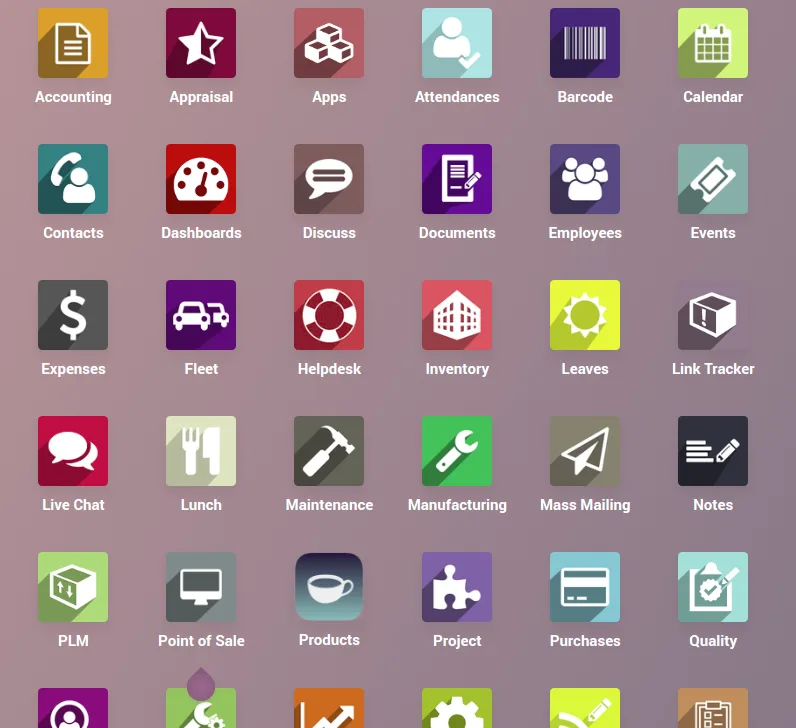
Menus Ascending Order (v13) does one job. Odoo's Apps screen lists installed modules in the order Odoo decides — based on install sequence and category — and on a busy database that quickly stops feeling intuitive.
Built by TechUltra Solutions, this module re-sorts that list into ascending alphabetical order. After install, opening Apps shows modules from A to Z, so users find what they need by name rather than by hunting through Odoo's default ordering.
It is a single-purpose utility for Odoo 13.0 only. There are no settings, no menus, and no dependencies to manage — install, refresh, done.
Key features
-
Alphabetical Apps list
The Apps screen is re-ordered so installed modules appear in ascending alphabetical order, regardless of their original install sequence or category grouping.
-
Zero configuration
There is nothing to set up. Install the module and the new sort order takes effect immediately on the Apps screen for every user.
-
Tiny footprint
Just six lines of code with no runtime services, scheduled jobs, or background processes. Performance impact is effectively zero.
-
No menu structure changes
Only the order of items on the Apps screen is affected. Application menus inside CRM, Sales, Inventory, and other modules are left untouched.
-
Easy to roll back
Because the module is self-contained and only changes a sort order, uninstalling restores Odoo's default Apps ordering with no leftover data to clean up.
-
Cleaner admin experience
Administrators managing dozens of installed modules can scan and locate any app by its first letter, reducing time spent searching for configuration entries.
-
Built for Odoo 13.0
Targeted specifically at Odoo 13.0 Community and Enterprise — no compatibility shims for other versions and nothing to deactivate after upgrade.
Menus Ascending Order (v13) in Odoo
Every screen, in the order you meet it — configuration first, then the module in use.


Technical details
Specification
- Publisher
- TechUltra Solutions Private Limited
- Technical name
- menus_13
- Odoo versions
- 13.0
- Lines of code
- 6
- License
- Odoo Proprietary License v1.0 (OPL-1)
- Price
- Free
Deployment
- Odoo Online
- Odoo.sh
- On-premise
Odoo dependencies
- Base
Support
90 days of bug-fix support, Monday to Friday (10:00–19:00 IST). Raise a ticket at support@techultra.in.
Setup & configuration
From install to first call — here is the path.
- 1
Install the module
In Odoo 13.0, open Apps, remove the Apps filter, search for “Menus Ascending Order”, and click Install.
- 2
Refresh the Apps screen
After installation completes, refresh the Apps screen. Installed modules will appear in ascending alphabetical order.
- 3
Verify the order
Scroll through Apps and confirm modules are now listed A to Z. No further configuration is required.
- 4
Communicate to admins
If multiple administrators manage the database, share that the Apps list is now alphabetical so they know what changed before reporting it as a bug.
Frequently asked questions
-
What does this module change in Odoo?
It re-orders the Apps screen so installed modules appear in ascending alphabetical order. Nothing else in the Odoo interface is changed.
-
Which Odoo versions are supported?
Odoo 13.0 only, in both the Community and Enterprise editions. The module is intentionally version-specific.
-
Does it re-order menus inside CRM, Sales, or other apps?
No. Only the Apps screen list of installed modules is affected. Menus inside each application (CRM, Sales, Inventory, and so on) keep their default order.
-
Is any configuration required?
None. There are no settings, no menus, and no permissions to grant — install the module and the alphabetical order takes effect immediately.
-
Will it slow Odoo down?
No. It is six lines of code that only adjusts the sort order on the Apps screen, with no background jobs and no runtime services.
-
Can I uninstall it cleanly?
Yes. Uninstalling restores Odoo's default Apps ordering with no leftover data, custom fields, or configuration to clean up.
-
Is support included?
Yes. The module includes 90 days of bug-fix support, Monday to Friday, 10:00–19:00 IST.
Listing verified against the Odoo App Store:
Related services
Get the most out of this module with senior TechUltra consultants.
Odoo Customization Services
Odoo customization from a Gold Partner: custom modules, workflows, reports and Studio changes, written upgrade-safe and quoted at a fixed scope. Free scoping call.
Hire Odoo Developers
Hire certified Odoo developers from a Gold Partner: one developer or a team, full-time or part-time, 70–160 hours a month. Silver, Gold or Platinum plan, free trial.
Odoo Support Services & Maintenance
Odoo support services from a Gold Partner: functional and technical support plus server cover for Enterprise and Community, 30-minute P1 response, 24/7 option.







