
Odoo App · Documents & Files
Mass Attachment Download
Download attachments from many Odoo records at once as a single ZIP file.

Overview
Mass Attachment Download removes the repetitive work of saving Odoo attachments one record at a time. When files are spread across dozens of sales orders, invoices, or project tasks, collecting them by hand is slow; this module packages them into a single ZIP instead.
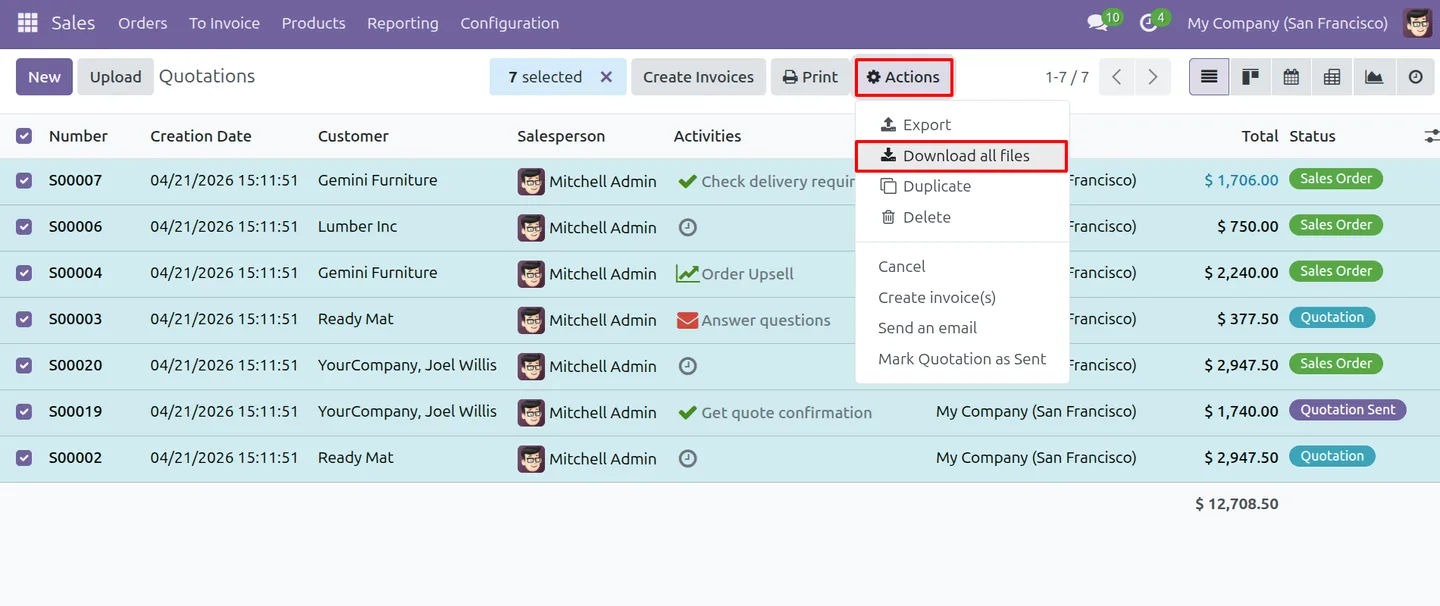
Built by TechUltra Solutions, the module adds a Download All Files action to the list view of any model. Select the records you want, run the action, and Odoo gathers every related file — record attachments, binary fields, and chatter attachments — into one compressed archive. It works the same across Sales, CRM, Accounting, HR, and Project workflows.
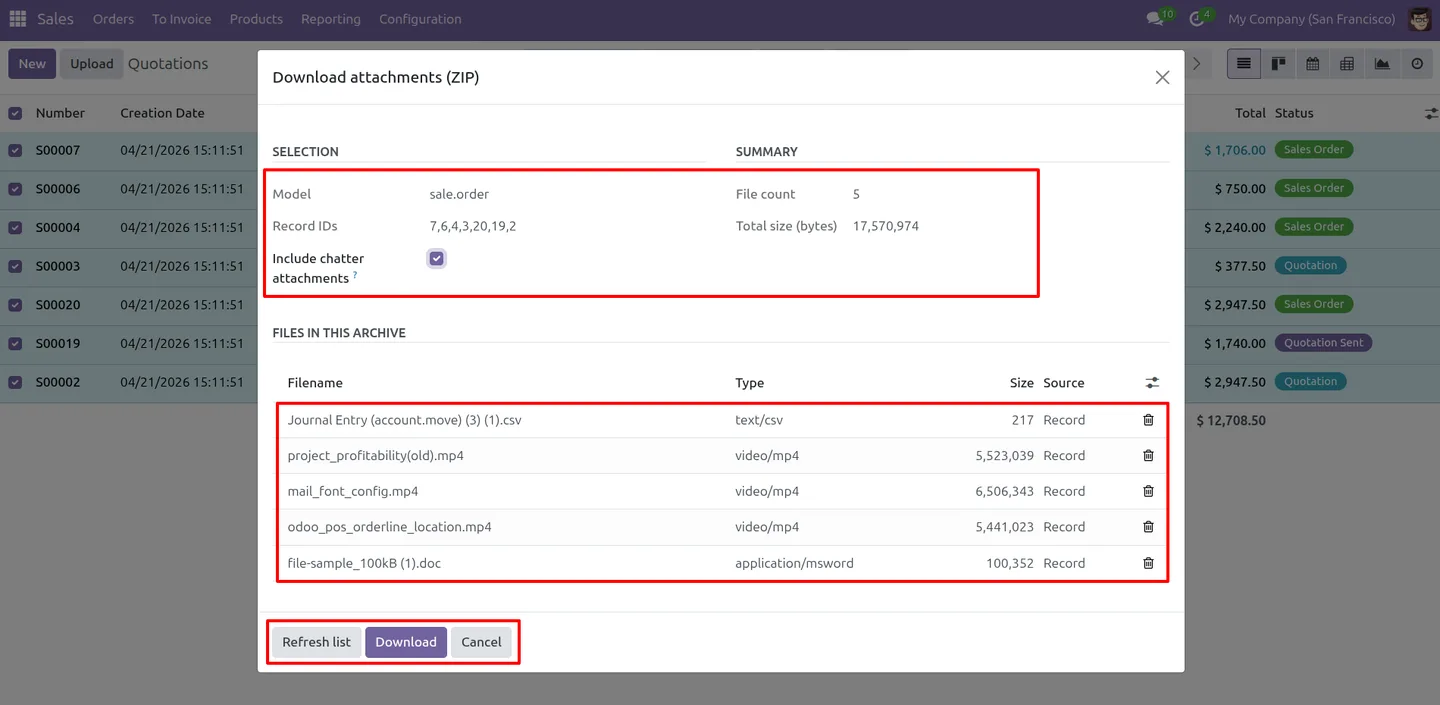
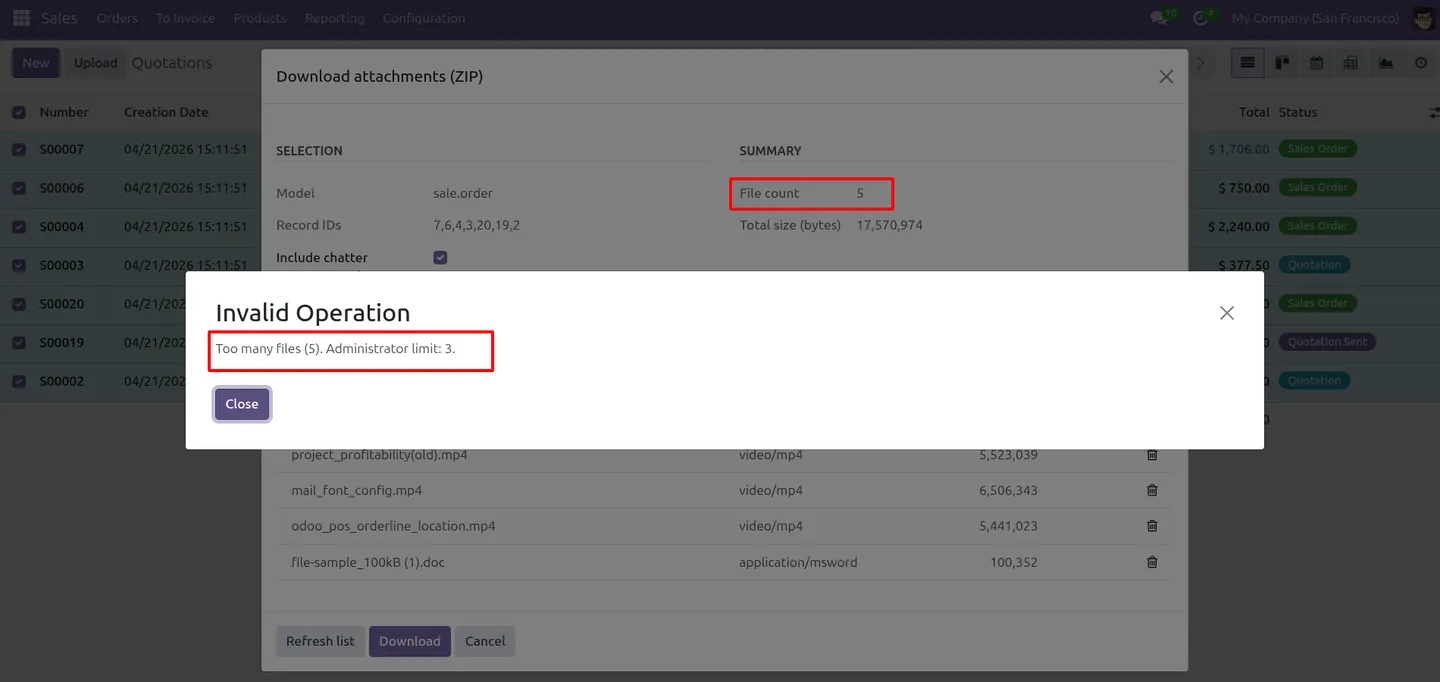
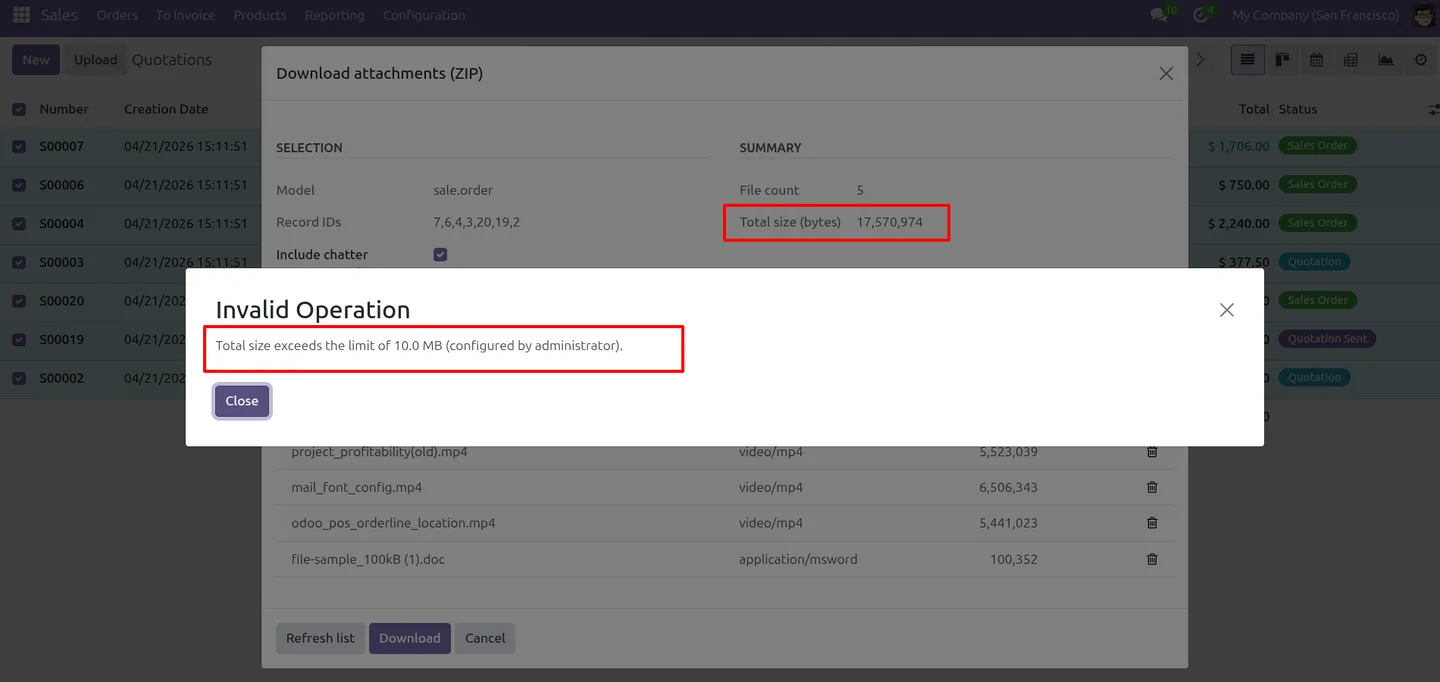
Before the download starts, a wizard shows the files with their total count and size, so you can review what is included and refresh the list. Configurable limits on maximum file count and total ZIP size keep large exports fast, and file names are sanitised automatically for a clean, safe archive.
Key features
-
Bulk attachment download
Download the attachments from multiple records in a single click instead of opening and saving each record one at a time.
-
Single ZIP export
All selected files are packaged into one compressed ZIP archive, so a large set of attachments arrives as a single download.
-
Record, binary, and chatter files
The export covers record attachments, binary-field files, and chatter attachments, so every file linked to a record is captured.
-
Works across all models
The Download All Files action is available on the list view of any model — Sales, CRM, Accounting, HR, Project, and custom models alike.
-
Preview wizard before download
A wizard lists every file with its total count and size before the ZIP is built, and lets you refresh the list so you know exactly what is included.
-
Configurable file and size limits
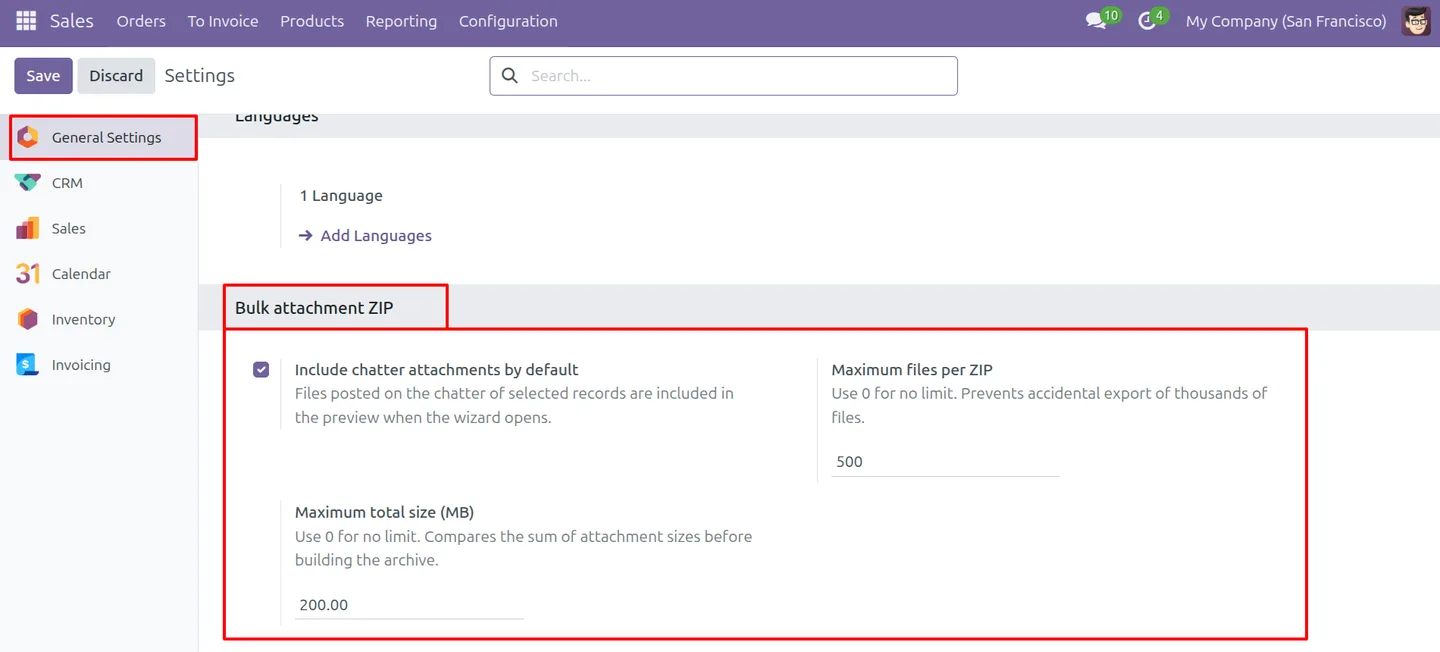
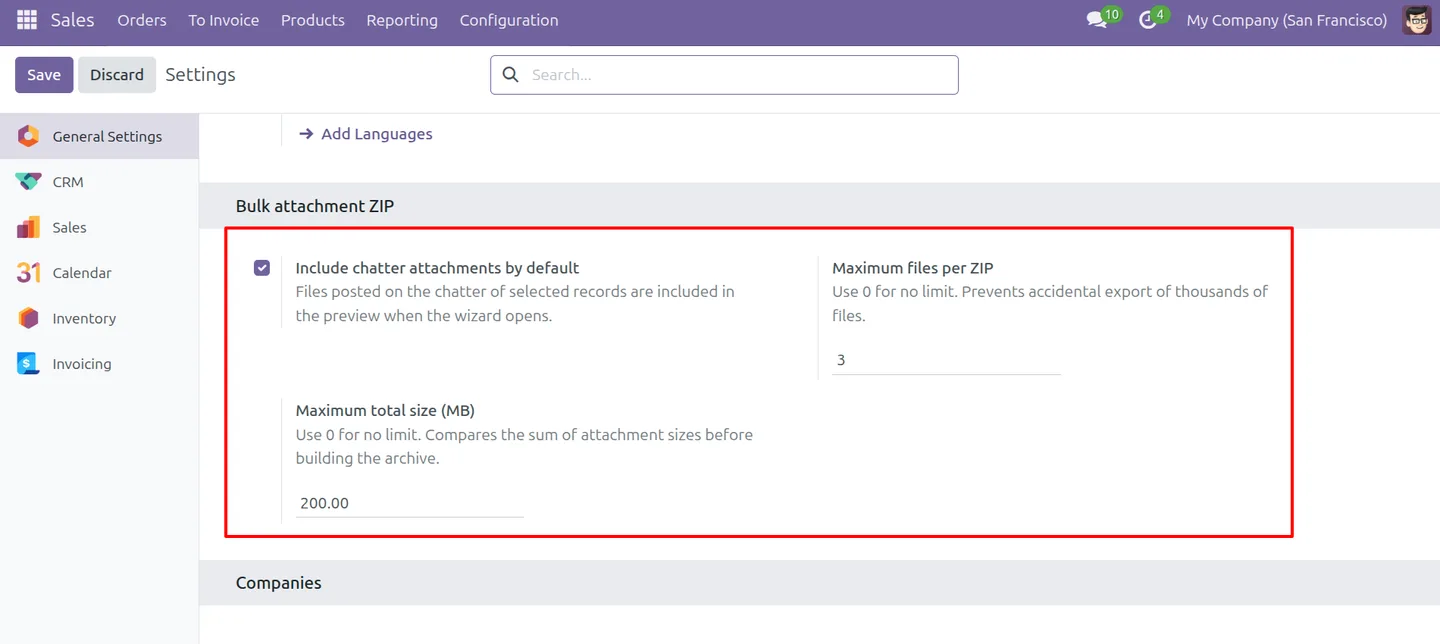
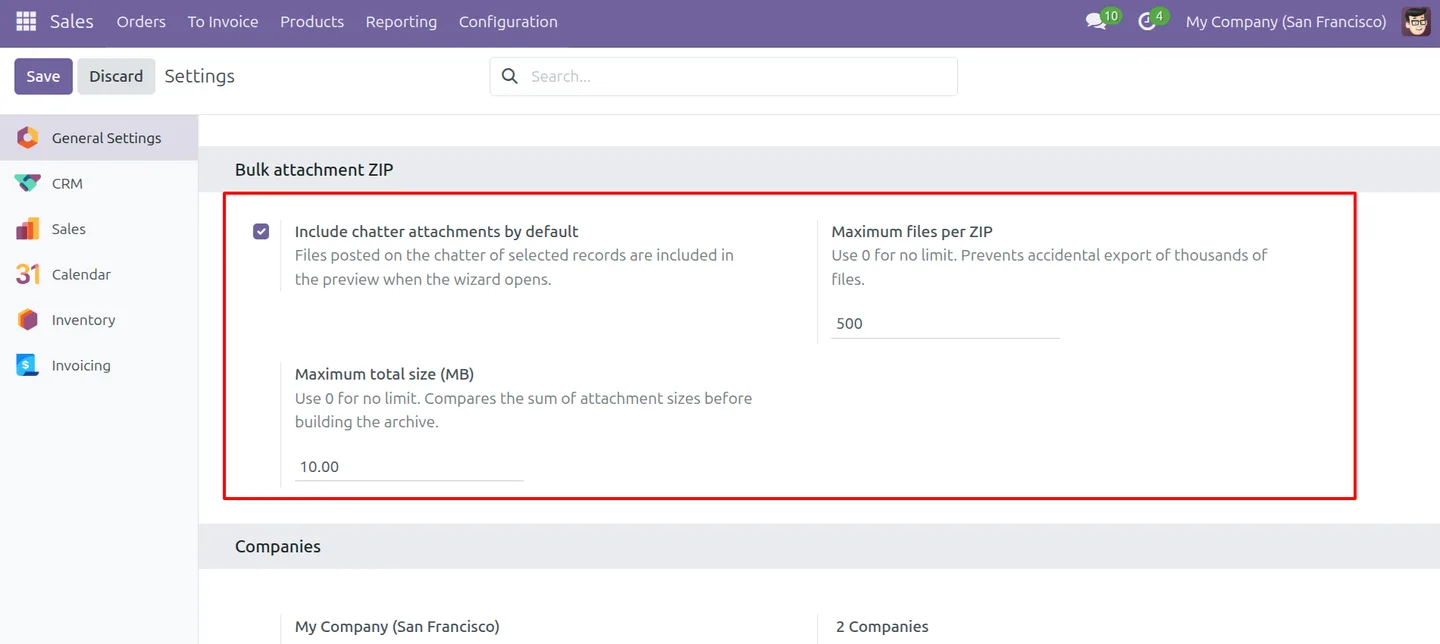
Set a maximum number of files per ZIP and a maximum total size in megabytes from settings, with validation that blocks exports over the limit.
-
Multi-record selection
Select many records at once in the list view for fast batch processing, rather than handling attachments record by record.
-
Automatic file-name sanitisation
File names are cleaned automatically so the ZIP has a safe, tidy structure with no invalid characters or naming conflicts.
Mass Attachment Download in Odoo
Every screen, in the order you meet it — configuration first, then the module in use.
Technical details
Specification
- Publisher
- TechUltra Solutions Private Limited
- Technical name
- bulk_attachments_zip_download
- Odoo versions
- 16.0, 17.0, 18.0, 19.0, 20.0
- Lines of code
- 379
- License
- Odoo Proprietary License v1.0 (OPL-1)
- Price
- $15 (one-time)
Deployment
- Odoo Online
- Odoo.sh
- On-premise
Odoo dependencies
- Discuss
Support
90 days of bug-fix support, Monday to Friday (10:00–19:00 IST). Raise a ticket at support@techultra.in.
Setup & configuration
From install to first call — here is the path.
- 1
Install the module
In Odoo, open Apps, remove the Apps filter, search for “Mass Attachment Download”, and click Install.
- 2
Set the download limits
Go to Settings → General Settings and, in the Bulk Attachment ZIP section, set the maximum total size in megabytes and the maximum number of files per ZIP.
- 3
Select records to export
Open any model, switch to the list view, and tick the records whose attachments you want to download.
- 4
Run Download All Files
In the Action dropdown, choose “Download All Files”. A popup shows every file with its total count and size, and lets you refresh the list.
- 5
Download the ZIP
Confirm to build and download the ZIP archive. If the selection exceeds the configured file count or size limit, the module shows a validation message instead.
Frequently asked questions
-
What types of files does the export include?
The ZIP includes record attachments, binary-field files, and chatter attachments, so every file linked to the selected records is captured in one download.
-
Which Odoo models does it work with?
The Download All Files action is available on the list view of any model, including Sales, CRM, Accounting, HR, Project, and custom models.
-
Can I see the files before downloading?
Yes. A wizard lists every file with its total count and size before the ZIP is built, and lets you refresh the list so you know exactly what is included.
-
Can I limit the size of an export?
Yes. You set a maximum number of files per ZIP and a maximum total size in megabytes in settings, and the module blocks exports that exceed either limit.
-
What happens if my selection is too large?
If the selected files exceed the configured file count or total size limit, the module shows a validation message instead of building the ZIP.
-
Are file names cleaned up in the ZIP?
Yes. File names are sanitised automatically, so the archive has a safe, tidy structure with no invalid characters or naming conflicts.
-
Which Odoo versions are supported?
The module supports Odoo 16.0, 17.0, 18.0, 19.0, and 20.0, in both the Community and Enterprise editions.
-
Is support included?
Yes. The module includes 90 days of bug-fix support, Monday to Friday, 10:00–19:00 IST.
Listing verified against the Odoo App Store:
Related solutions
Whole-platform solutions that complement Mass Attachment Download.
Related services
Get the most out of this module with senior TechUltra consultants.
Odoo Customization Services
Odoo customization from a Gold Partner: custom modules, workflows, reports and Studio changes, written upgrade-safe and quoted at a fixed scope. Free scoping call.
Hire Odoo Developers
Hire certified Odoo developers from a Gold Partner: one developer or a team, full-time or part-time, 70–160 hours a month. Silver, Gold or Platinum plan, free trial.
Odoo Support Services & Maintenance
Odoo support services from a Gold Partner: functional and technical support plus server cover for Enterprise and Community, 30-minute P1 response, 24/7 option.







