

Odoo App · Productivity
Listview Button Header
Show action-button labels in the Odoo tree view header for clearer list actions.

Overview
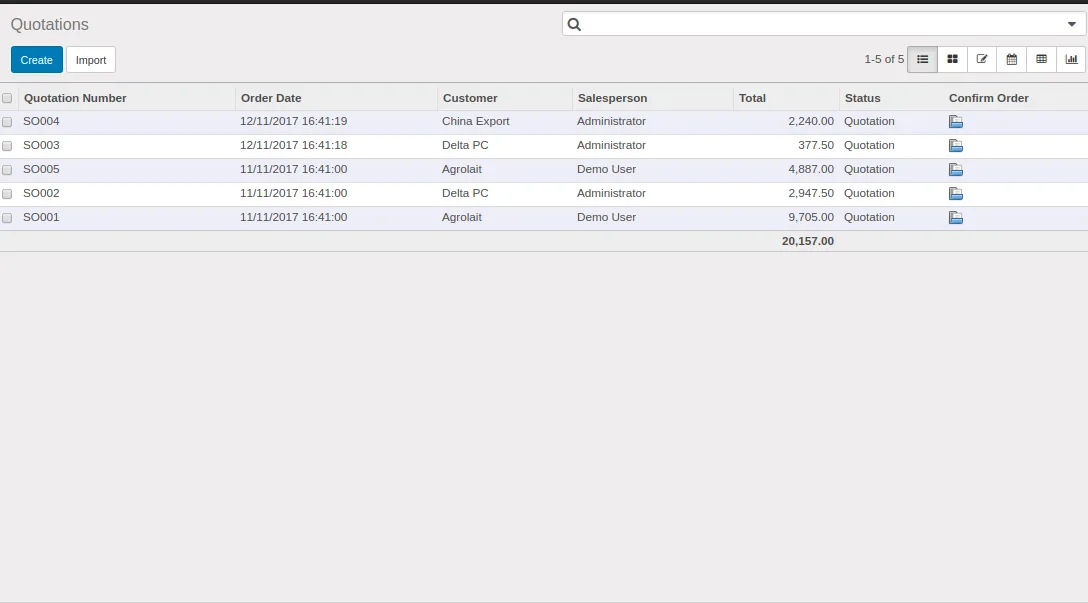
Listview Button Header is a small productivity module for Odoo 9.0 that brings list-level action buttons into the tree view header, alongside the standard search and filter controls.
By default, action buttons in Odoo's list views can be hidden from the user — the header shows the search box but not the actions tied to the selected records. This module surfaces the button labels in the header itself, so the available actions are visible without opening a second menu.
Built by TechUltra Solutions, the module is free, ships under the Odoo Proprietary License v1.0, and runs on Odoo Online, Odoo.sh, and on-premise installations of Odoo 9.0.
Key features
-
Button labels in the tree view header
List-level action buttons render with their string labels in the tree view header, so the available actions are visible directly above the records.
-
Works with standard Odoo list views
The module extends Odoo's core web tree-view rendering, so headers across MRP, Inventory, Invoicing, and Discuss list views pick up the change automatically.
-
No per-view configuration
Once installed, the module applies to existing tree views without per-screen setup, custom XML overrides, or developer-mode tweaks.
-
Lightweight and self-contained
The module depends only on Odoo's standard apps already present in most installs — MRP, Discuss, Inventory, and Invoicing — and adds no new menus or data.
-
Free under OPL-1
Released under the Odoo Proprietary License v1.0 at no cost on the Odoo App Store, so any Odoo 9.0 environment can install it without a paid licence.
-
Compatible with Community and Enterprise
Runs on both Odoo 9.0 Community and Enterprise installations, including Odoo Online and Odoo.sh deployments.
Listview Button Header in Odoo
Every screen, in the order you meet it — configuration first, then the module in use.
Technical details
Specification
- Publisher
- TechUltra Solutions Private Limited
- Technical name
- custom_list
- Odoo versions
- 9.0
- License
- Odoo Proprietary License v1.0 (OPL-1)
- Price
- Free
Deployment
- Odoo Online
- Odoo.sh
- On-premise
Odoo dependencies
- MRP
- Discuss
- Inventory
- Invoicing
Support
90 days of bug-fix support, Monday to Friday (10:00–19:00 IST). Raise a ticket at support@techultra.in.
Setup & configuration
From install to first call — here is the path.
- 1
Install the module
In Odoo 9.0, open Apps, remove the Apps filter, search for “Listview Button Header” (technical name custom_list), and click Install.
- 2
Confirm dependencies are present
The module depends on MRP, Discuss, Inventory Management, and Invoicing. These ship with most Odoo 9.0 installations; install any that are missing first.
- 3
Reload the web client
After installation, hard-refresh your browser so the updated tree-view assets load. No further configuration is required.
- 4
Verify in a list view
Open any standard tree view — Inventory operations, MRP orders, or Customer Invoices — and confirm the action-button labels now appear in the header.
Frequently asked questions
-
Which Odoo version does this module support?
Listview Button Header is published for Odoo 9.0 only. Newer Odoo releases use a different tree-view rendering pipeline and need a separate build.
-
Does the module work on Odoo Community?
Yes. It runs on both Odoo 9.0 Community and Enterprise, including Odoo Online and Odoo.sh deployments.
-
Is there a cost?
No. The module is free on the Odoo App Store and ships under the Odoo Proprietary License v1.0 (OPL-1).
-
Does it change how list-view actions behave?
No. The module only changes how the buttons are rendered in the tree view header. The underlying action behaviour stays exactly as Odoo defines it.
-
Do I need to edit any views or XML?
No. The module extends Odoo's core tree-view widget, so standard list views pick up the change without per-screen XML changes.
-
Which apps does it depend on?
The module depends on MRP, Discuss, Inventory Management, and Invoicing — all of which are part of a standard Odoo 9.0 install.
-
Is support included?
Yes. TechUltra Solutions provides 90 days of bug-fix support, Monday to Friday, 10:00–19:00 IST, via support@techultra.in.
Listing verified against the Odoo App Store:
Related services
Get the most out of this module with senior TechUltra consultants.
Odoo Customization Services
Odoo customization from a Gold Partner: custom modules, workflows, reports and Studio changes, written upgrade-safe and quoted at a fixed scope. Free scoping call.
Hire Odoo Developers
Hire certified Odoo developers from a Gold Partner: one developer or a team, full-time or part-time, 70–160 hours a month. Silver, Gold or Platinum plan, free trial.
Odoo Support Services & Maintenance
Odoo support services from a Gold Partner: functional and technical support plus server cover for Enterprise and Community, 30-minute P1 response, 24/7 option.







