
Odoo App · Productivity
Full Screen Form View
Toggle the Odoo chatter on or off with one click for a full-screen form view.

Overview
Full Screen Form View gives Odoo users back their screen space. The chatter panel is useful, but on wide records — sales orders, manufacturing orders, project tasks — it takes room that could go to the form itself. This module lets you tuck it away in one click.
Built by TechUltra Solutions, the module places a clean eye-shaped icon in the Odoo systray. Click it to hide the chatter on the current form view; the form expands to fill the freed space. Click it again to bring the chatter back. The toggle works on any form view across Odoo.
The implementation follows OWL best practices and modifies no core Odoo files, so it stays lightweight and easy to maintain through upgrades. It needs zero configuration and runs in both the Community and Enterprise editions.
Key features
-
Full-screen form view
Hiding the chatter lets the form expand across the freed space, giving wide records a genuine full-screen working area.
-
Eye-icon chatter toggle
An eye-shaped icon in the systray instantly shows or hides the chatter on any form view — one click to switch.
-
One-click control
Switching the chatter on or off takes a single click, so navigating large forms stays fast and uninterrupted.
-
Lightweight systray integration
The toggle is a small OWL systray component with no core overrides, keeping the module light and upgrade-safe.
-
No core file changes
The module follows OWL best practices and modifies no standard Odoo files, so it is simple to maintain across versions.
-
Works on every form view
The toggle is available on any Odoo form view — sales, inventory, projects, HR, and custom models alike.
-
Community and Enterprise support
The module runs in both the Odoo Community and Enterprise editions without any difference in behaviour.
-
Zero configuration
Install the module and the toggle appears. There are no settings to enable before you can use it.
Full Screen Form View in Odoo
Every screen, in the order you meet it — configuration first, then the module in use.
Technical details
Specification
- Publisher
- TechUltra Solutions Private Limited
- Technical name
- full_screen_chatter_toggle
- Odoo versions
- 16.0, 17.0, 18.0, 19.0, 20.0
- Lines of code
- 89
- License
- Odoo Proprietary License v1.0 (OPL-1)
- Price
- $15 (one-time)
Deployment
- Odoo Online
- Odoo.sh
- On-premise
Odoo dependencies
- Discuss
Support
90 days of bug-fix support, Monday to Friday (10:00–19:00 IST). Raise a ticket at support@techultra.in.
Setup & configuration
From install to first call — here is the path.
- 1
Install the module
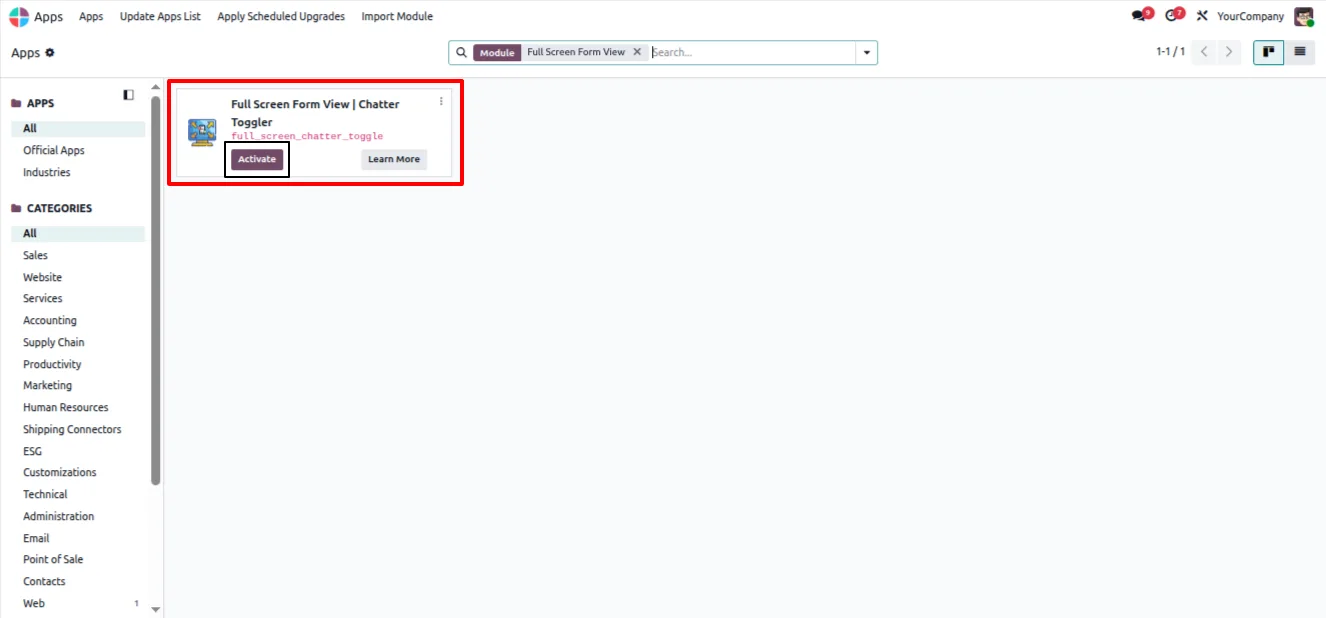
In Odoo, open Apps, remove the Apps filter, search for “Full Screen Form View”, and click Install.
- 2
Open any form view
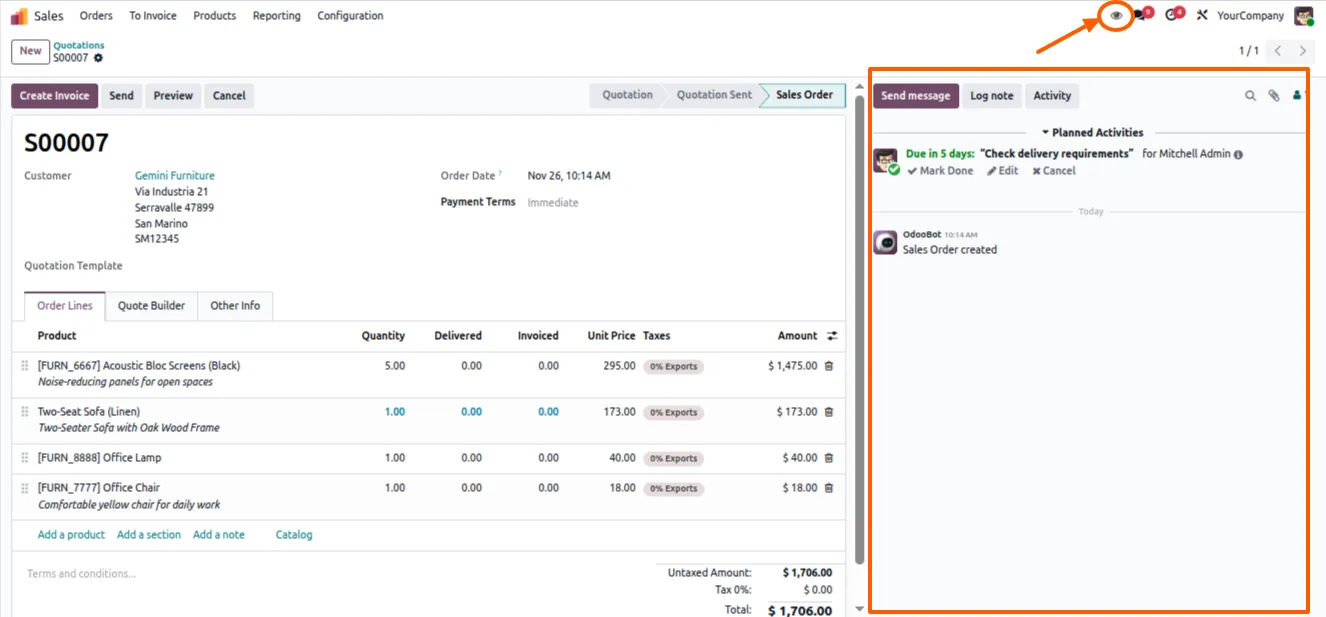
Open a record in any app — a sales order, task, or contact — to see the standard form with its chatter panel.
- 3
Hide the chatter
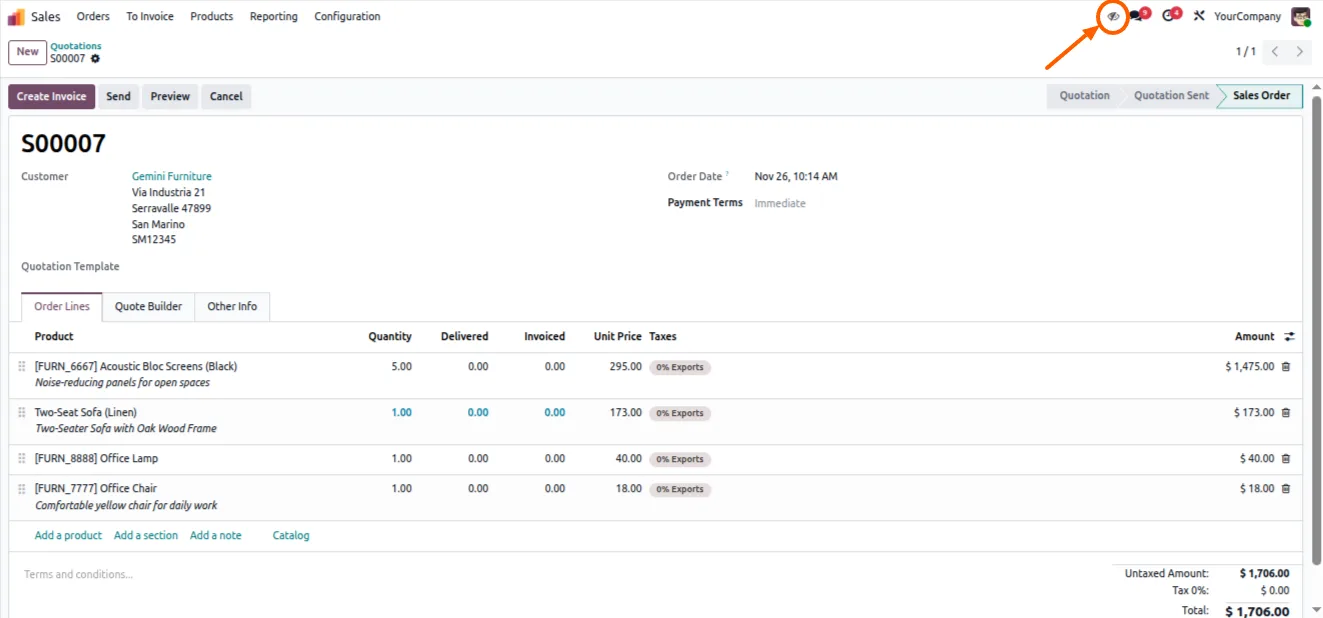
Click the eye-shaped icon in the upper-right systray. The chatter is hidden and the form expands to full screen.
- 4
Show the chatter again
Click the eye icon a second time to bring the chatter back. No configuration is needed at any step.
Frequently asked questions
-
How do I hide the chatter on a form?
Click the eye-shaped icon in the upper-right systray while viewing any form. The chatter is hidden and the form expands. Click the icon again to bring the chatter back.
-
Does the toggle work on every form view?
Yes. The eye-icon toggle is available on any Odoo form view, across sales, inventory, projects, HR, and custom models.
-
Does the module change any core Odoo files?
No. It is built as an OWL systray component and overrides no standard Odoo files, which keeps it lightweight and upgrade-safe.
-
Does it work in Odoo Community and Enterprise?
Yes. Full Screen Form View runs in both the Community and Enterprise editions with identical behaviour.
-
Is any configuration required?
No. Once the module is installed, the eye-icon toggle appears in the systray automatically. There is nothing to set up.
-
Which Odoo versions are supported?
The module supports Odoo 16.0, 17.0, 18.0, 19.0, and 20.0.
-
Does hiding the chatter affect messages or followers?
No. The toggle only controls whether the chatter panel is shown. Messages, activities, and followers are unchanged and reappear when you show the chatter again.
-
Is support included?
Yes. The module includes 90 days of bug-fix support, Monday to Friday, 10:00–19:00 IST.
Listing verified against the Odoo App Store:
Related services
Get the most out of this module with senior TechUltra consultants.
Odoo Customization Services
Odoo customization from a Gold Partner: custom modules, workflows, reports and Studio changes, written upgrade-safe and quoted at a fixed scope. Free scoping call.
Hire Odoo Developers
Hire certified Odoo developers from a Gold Partner: one developer or a team, full-time or part-time, 70–160 hours a month. Silver, Gold or Platinum plan, free trial.
Odoo Support Services & Maintenance
Odoo support services from a Gold Partner: functional and technical support plus server cover for Enterprise and Community, 30-minute P1 response, 24/7 option.







