

Odoo App · Product Management
Export Product Data with Images
Export Odoo products to Excel with embedded images in one click — single or bulk selection.

Overview
Export Product Data with Images turns Odoo's product catalogue into a structured Excel report — including the product images — without copying values out of the back office or chaining together standard Odoo exports.
Built by TechUltra Solutions, the module reads from the product.template model and adds an Export action to the product list view. Pick one product or a multi-select of products and the module generates a .xlsx file with the chosen attributes and image data ready to share with merchandisers, suppliers, or marketplaces.
Two export buttons keep the workflow simple: one generates an images-only file, the other a full data-and-images report. The .xlsx downloads automatically and opens in any spreadsheet tool, so there is no separate viewer to install for the people who only need the catalogue.
Key features
-
Export product data to Excel
Generate .xlsx files for single or multiple products straight from the product list view.
-
Embedded product images
Export product images alongside the essential product details, all inside the same Excel file.
-
Built on the product.template model
Fetches data directly from Odoo's standard product.template model, so the export reflects exactly what the back office stores.
-
Customisable data fields
Extract the key product attributes you actually need — no fixed report layout to fight against.
-
Quick export action
Generate structured Excel reports with just a few clicks from the product list — no developer mode or technical setup required.
-
User-friendly interface
Simple, intuitive functionality that makes product data export approachable for non-technical Odoo users.
-
Images-only export option
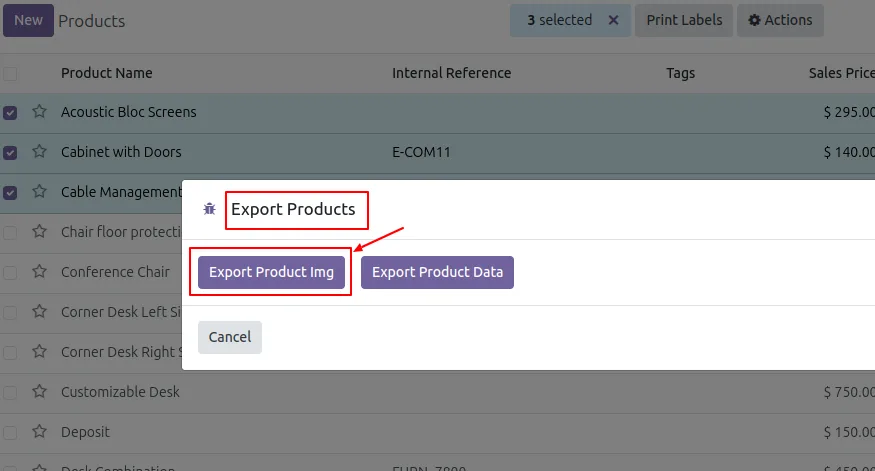
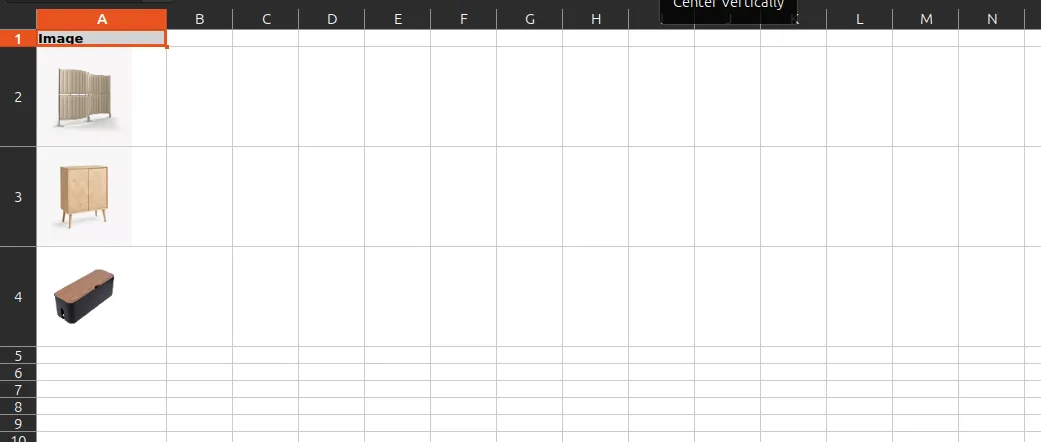
Use the Export Product Img action to download a .xlsx file containing only the product images when that is all the recipient needs.
-
Full data-and-images export option
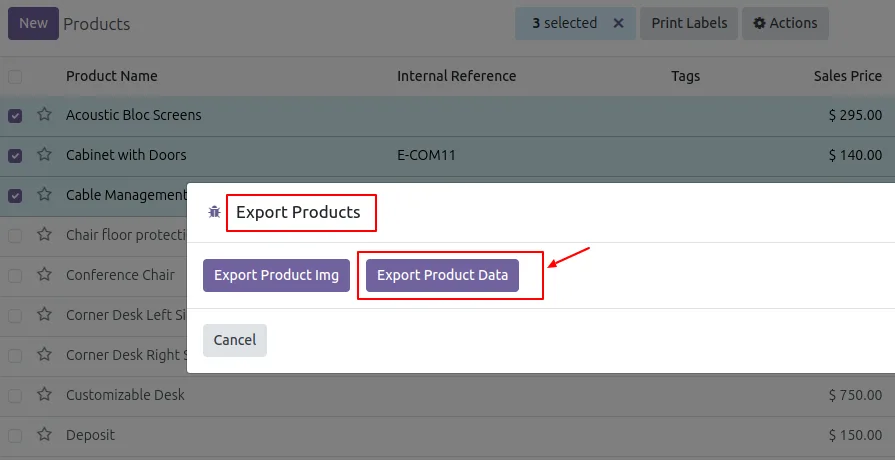
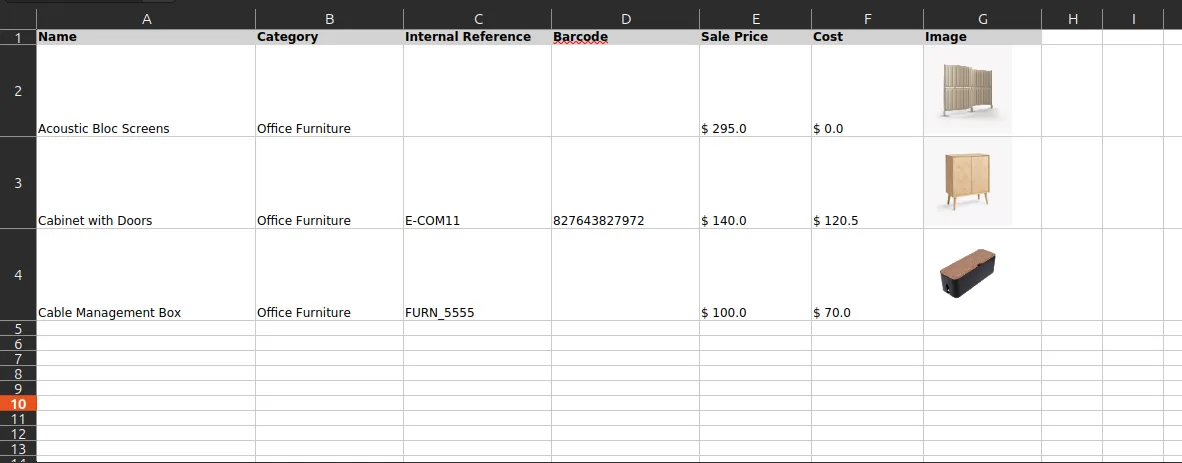
Use the Export Product Data action to download a .xlsx file with the complete product details and the matching images in one bundle.
Export Product Data with Images in Odoo
Every screen, in the order you meet it — configuration first, then the module in use.
Technical details
Specification
- Publisher
- TechUltra Solutions Private Limited
- Technical name
- export_products_with_images
- Odoo versions
- 16.0, 17.0, 18.0, 19.0, 20.0
- Lines of code
- 155
- License
- Odoo Proprietary License v1.0 (OPL-1)
- Price
- $16.31 (one-time)
Deployment
- Odoo Online
- Odoo.sh
- On-premise
Odoo dependencies
- Discuss
Support
90 days of bug-fix support, Monday to Friday (10:00–19:00 IST). Raise a ticket at support@techultra.in.
Setup & configuration
From install to first call — here is the path.
- 1
Install the module
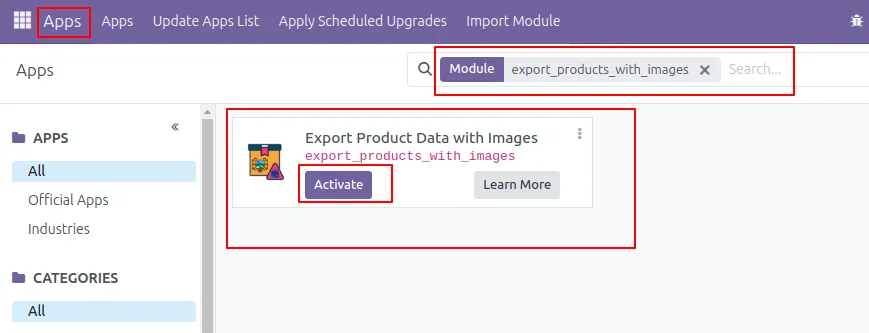
In Odoo, open Apps, remove the Apps filter, search for “Export Product Data with Images”, and click Install.
- 2
Open the product list
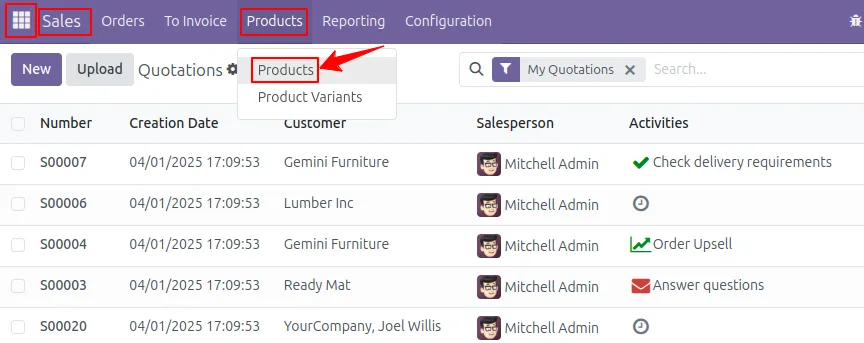
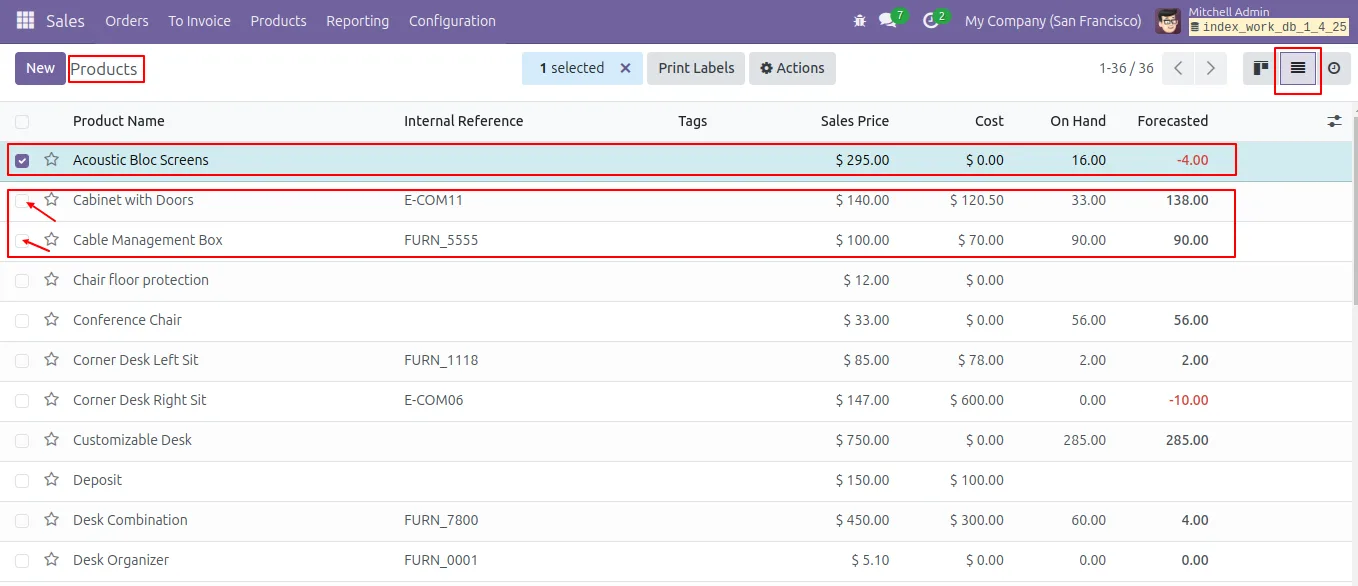
Go to Sales → Products → Products to load the product catalogue. Switch to List view so you can multi-select.
- 3
Select the products to export
Tick the checkbox for a single product or for any combination of products you want included in the report.
- 4
Open the Export action
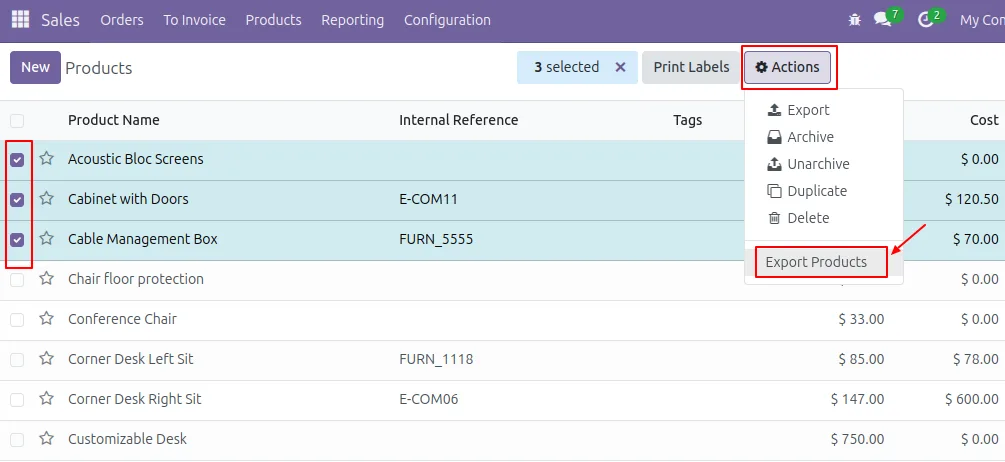
From the Actions menu above the list, choose Export Products. A wizard opens with the export options.
- 5
Choose what to export
Click Export Product Img for an images-only .xlsx file, or Export Product Data for a file with full product details and images.
- 6
Download the report
The .xlsx file downloads automatically. Open it in Excel or any spreadsheet tool to review or forward the product report.
Frequently asked questions
-
Which Odoo versions does the module support?
The module supports Odoo 16.0, 17.0, 18.0, 19.0, and 20.0, in both the Community and Enterprise editions.
-
Can I export images for many products at once?
Yes. Multi-select any number of products in the list view and the module bundles all of them — data and images — into a single .xlsx file.
-
Where does the exported data come from?
The export reads from Odoo's standard product.template model, so the fields and values match exactly what is stored on each product record.
-
What is the difference between the two export buttons?
Export Product Img generates a .xlsx file containing only product images. Export Product Data generates a .xlsx file with the full product details plus the matching images.
-
Do I need a developer to use this?
No. The export is a standard Action on the product list view — install the module, select the products, and click the export button.
-
Does the module change anything in standard Odoo product records?
No. It adds an Export action that reads from the product.template model. Your product data, images, and existing workflows stay untouched.
-
What file format does the report use?
Reports are generated as .xlsx (modern Excel) files, so they open directly in Excel, LibreOffice Calc, Google Sheets, and Numbers.
-
Is support included?
Yes. The module includes 90 days of bug-fix support, Monday to Friday, 10:00–19:00 IST.
Listing verified against the Odoo App Store:
Related services
Get the most out of this module with senior TechUltra consultants.
Odoo Customization Services
Odoo customization from a Gold Partner: custom modules, workflows, reports and Studio changes, written upgrade-safe and quoted at a fixed scope. Free scoping call.
Hire Odoo Developers
Hire certified Odoo developers from a Gold Partner: one developer or a team, full-time or part-time, 70–160 hours a month. Silver, Gold or Platinum plan, free trial.
Odoo Support Services & Maintenance
Odoo support services from a Gold Partner: functional and technical support plus server cover for Enterprise and Community, 30-minute P1 response, 24/7 option.







