

Odoo App · Email & Productivity
Email CC
Add CC recipients to sale order and invoice emails sent from Odoo.

Overview
Email CC fills a small but daily gap in Odoo: the built-in mail composers on sale orders and customer invoices do not expose a CC field, so account managers either forward emails manually or remove people from the conversation by accident.
Built by TechUltra Solutions, the module adds a clean Email CC field to both the Sale Order mail composer wizard and the Invoice send-email wizard. Users type one or more addresses, separated by commas, and the message goes out with those recipients copied.
The CC line is preserved in the email thread on the record, so the whole team can see who was kept in the loop on each quote, order confirmation, or invoice — without configuration or developer work.
Key features
-
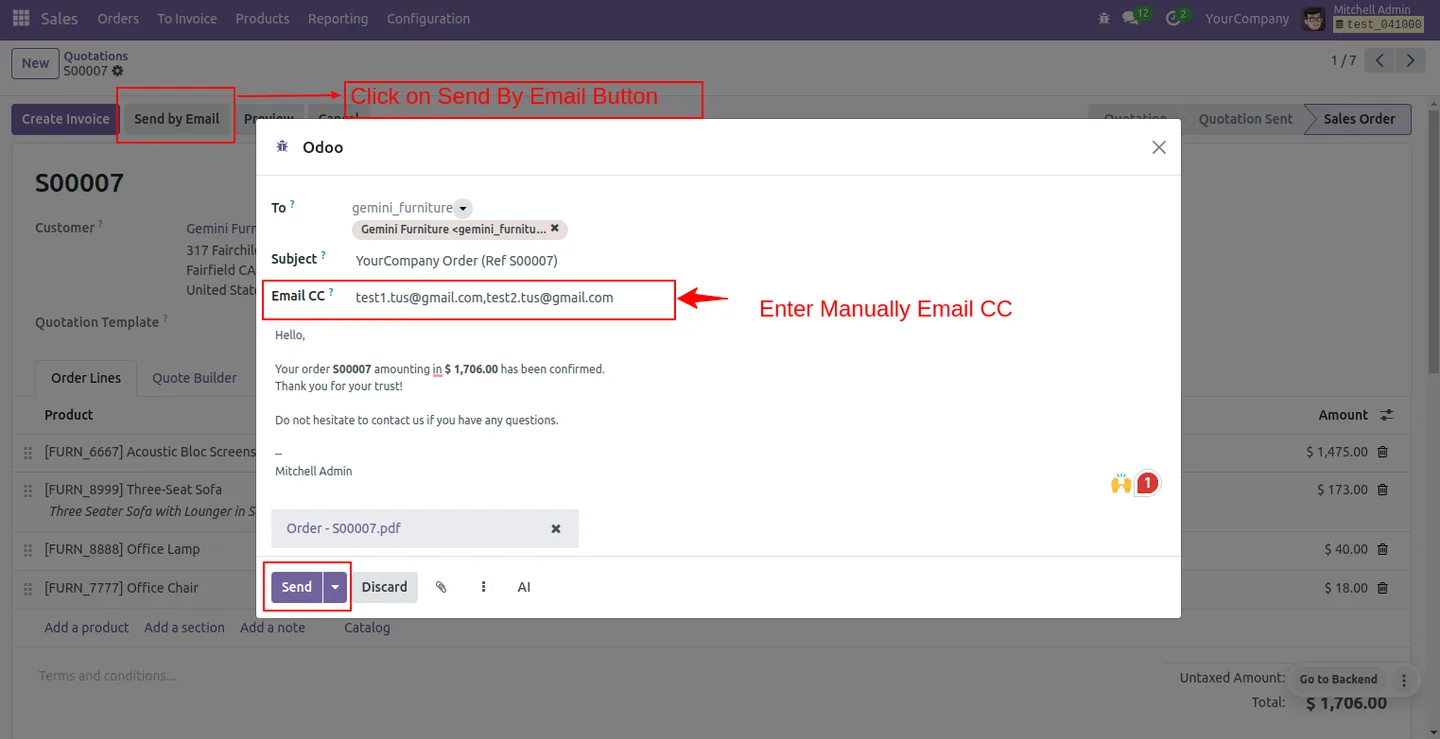
CC from the sale order mail composer
Add multiple email addresses, comma-separated, directly from the sales order mail composer so partners, managers, or finance contacts are kept in the loop on quotes and order confirmations.
-
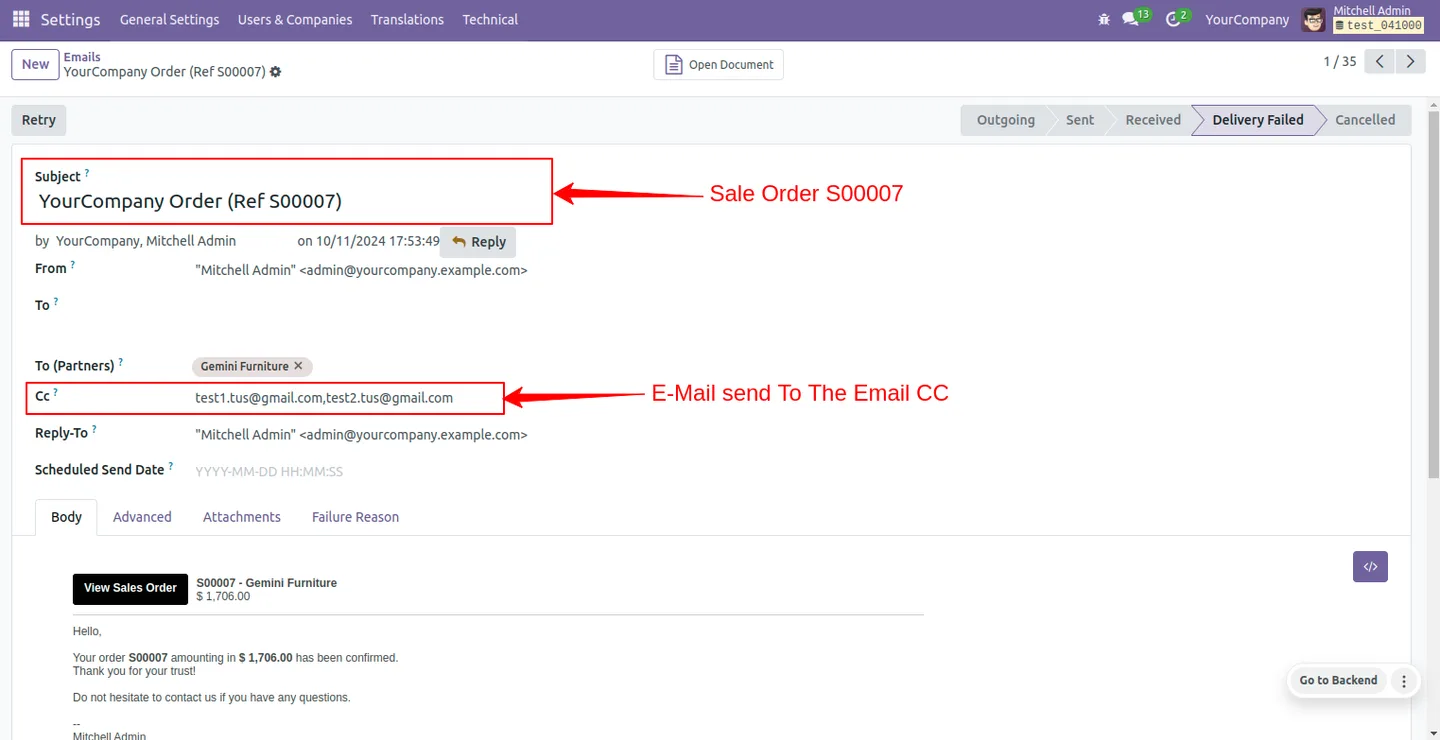
Sale order CC visible in the message thread
CC email addresses appear in the email thread on the sale order when the message is sent, so everyone on the record can see who was copied.
-
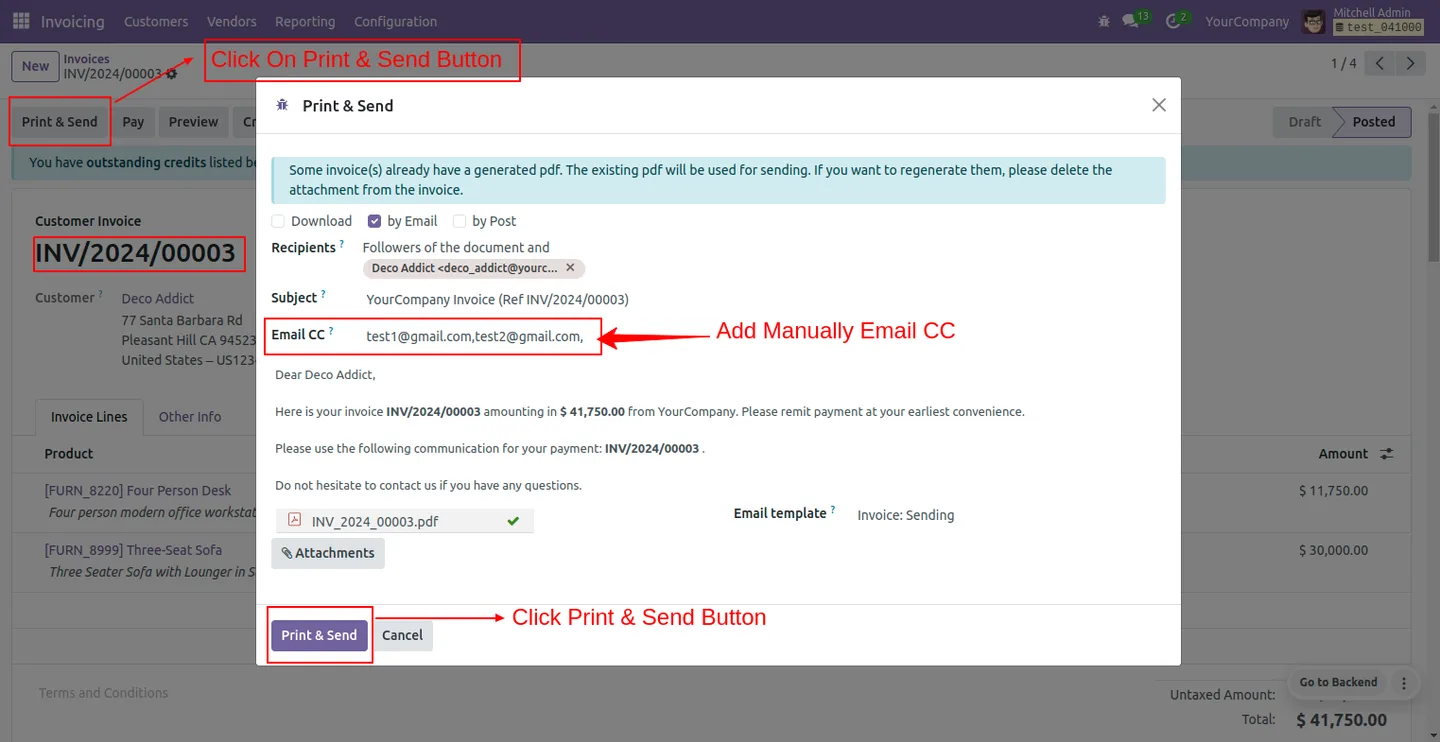
CC from the invoice send-email wizard
Set multiple CC email addresses, comma-separated, in the invoice email wizard for consistent multi-recipient communication on invoices and credit notes.
-
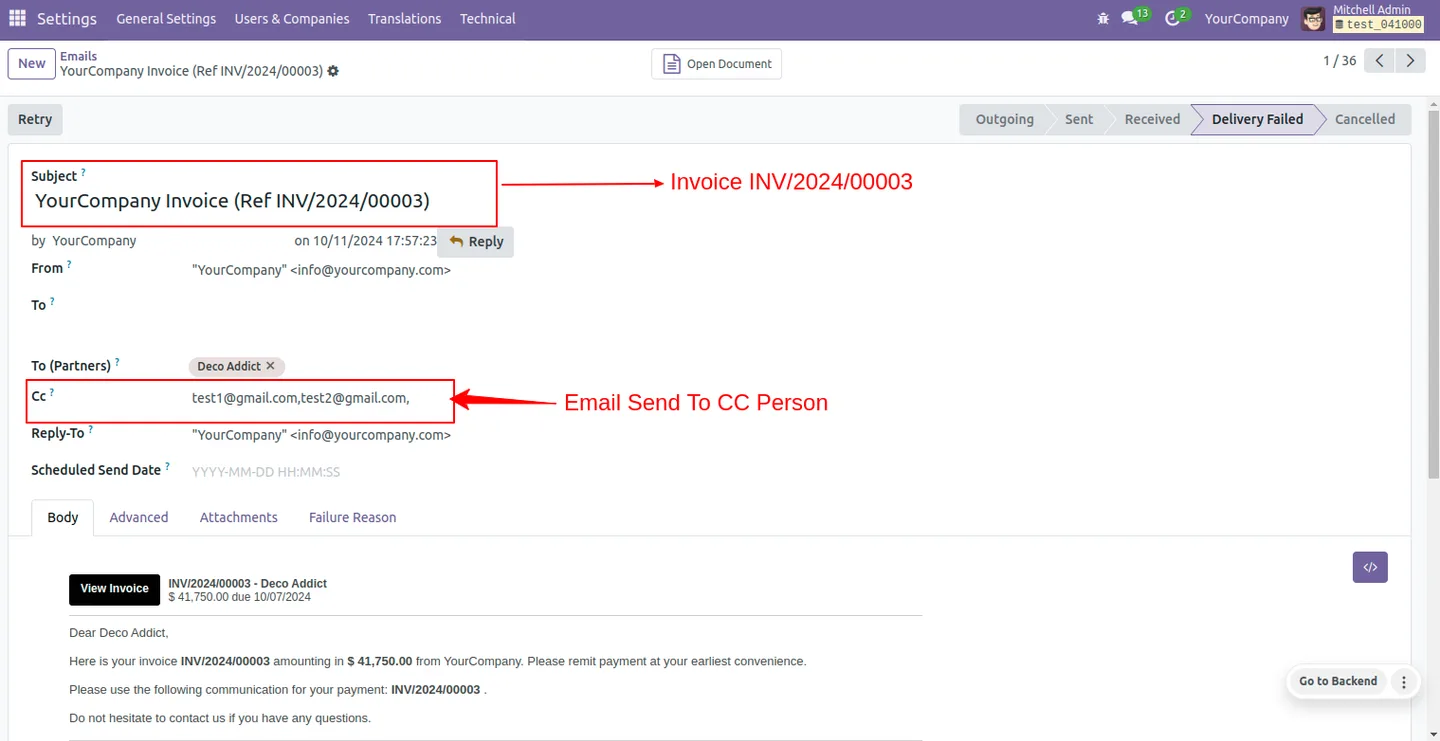
Invoice CC visible in the message thread
CC addresses display in the email thread for invoice communications, keeping an auditable record of who was notified on each billing event.
-
Comma-separated multi-recipient input
Type as many addresses as you need into a single CC field, separated by commas — no nested forms or contact look-ups required for ad-hoc recipients.
-
Native Odoo mail integration
The module hooks into Odoo's standard mail composers, so attachments, templates, and message tracking continue to behave the way users expect.
-
Zero configuration
Install the module and the Email CC field appears on the sale and invoice send wizards immediately — no settings, dependencies, or developer time required.
Email CC in Odoo
Every screen, in the order you meet it — configuration first, then the module in use.
Technical details
Specification
- Publisher
- TechUltra Solutions Private Limited
- Technical name
- tus_email_cc
- Odoo versions
- 16.0, 17.0, 18.0, 19.0, 20.0
- Lines of code
- 213
- License
- Odoo Proprietary License v1.0 (OPL-1)
- Price
- $14.99 (one-time)
Deployment
- Odoo Online
- Odoo.sh
- On-premise
Odoo dependencies
- Invoicing
- Discuss
Support
90 days of bug-fix support, Monday to Friday (10:00–19:00 IST). Raise a ticket at support@techultra.in.
Setup & configuration
From install to first call — here is the path.
- 1
Install the module
In Odoo, open Apps, remove the Apps filter, search for “Email CC”, and click Install.
- 2
Open a sale order email
Open any sale order or quotation and click Send by Email. The mail composer wizard now shows a new Email CC field.
- 3
Add CC recipients to a sale email
Type one or more email addresses in the Email CC field, separated by commas, and send the message. The CC line appears in the email thread on the sale order.
- 4
Add CC recipients to an invoice email
Open any customer invoice and click Send. Enter comma-separated CC addresses in the new Email CC field, then send. The CC line is preserved in the invoice's message thread.
Frequently asked questions
-
Where does the CC field appear in Odoo?
The Email CC field is added to the mail composer wizard on sale orders and to the send-email wizard on customer invoices — the two places where Odoo's built-in composer does not expose CC out of the box.
-
Can I add more than one CC address?
Yes. Enter as many addresses as you need in a single field, separated by commas. Every address is added to the outgoing email's CC line.
-
Are CC recipients visible in the email thread?
Yes. The CC addresses are stored on the sent message, so the email thread on the sale order or invoice shows who was copied on each communication.
-
Does the module replace Odoo's standard mail composer?
No. It extends the standard sale and invoice mail composers, so attachments, templates, follow-ups, and message tracking continue to work exactly as before.
-
Which Odoo versions are supported?
The module supports Odoo 16.0, 17.0, 18.0, 19.0, and 20.0, in both the Community and Enterprise editions.
-
Is any configuration required?
No. Install the module and the Email CC field is immediately available on the sale order and invoice send-email wizards.
-
Does it support email templates?
Yes. The CC field works alongside Odoo's email templates — pick a template, type the CC addresses, and send.
Listing verified against the Odoo App Store:
Related services
Get the most out of this module with senior TechUltra consultants.
Odoo Customization Services
Odoo customization from a Gold Partner: custom modules, workflows, reports and Studio changes, written upgrade-safe and quoted at a fixed scope. Free scoping call.
Hire Odoo Developers
Hire certified Odoo developers from a Gold Partner: one developer or a team, full-time or part-time, 70–160 hours a month. Silver, Gold or Platinum plan, free trial.
Odoo Support Services & Maintenance
Odoo support services from a Gold Partner: functional and technical support plus server cover for Enterprise and Community, 30-minute P1 response, 24/7 option.







