
Odoo App · Website & eCommerce
Ecommerce Barcode Search
Find products on your Odoo website by barcode — scan or type the number, get the product.

Overview
Ecommerce Barcode Search adds barcode lookup to the standard Odoo website search bar. Customers and staff find the right product by entering or scanning the barcode number printed on the product, box, or shelf label — no more guessing the product name or hunting through category trees.
Built by TechUltra Solutions, the module is a small, focused extension to the native eCommerce search. It plugs into the same search input shoppers already use, so there is nothing extra to teach customers and nothing new to bolt onto the storefront layout.
When a barcode matches a product, the website returns that product immediately and offers a quick-view shortcut for browsing related items. When it does not match, the standard not-found result is shown. The module supports Odoo 16, 17, 18, 19, and 20 in both Community and Enterprise editions.
Key features
-
Barcode lookup in the website search bar
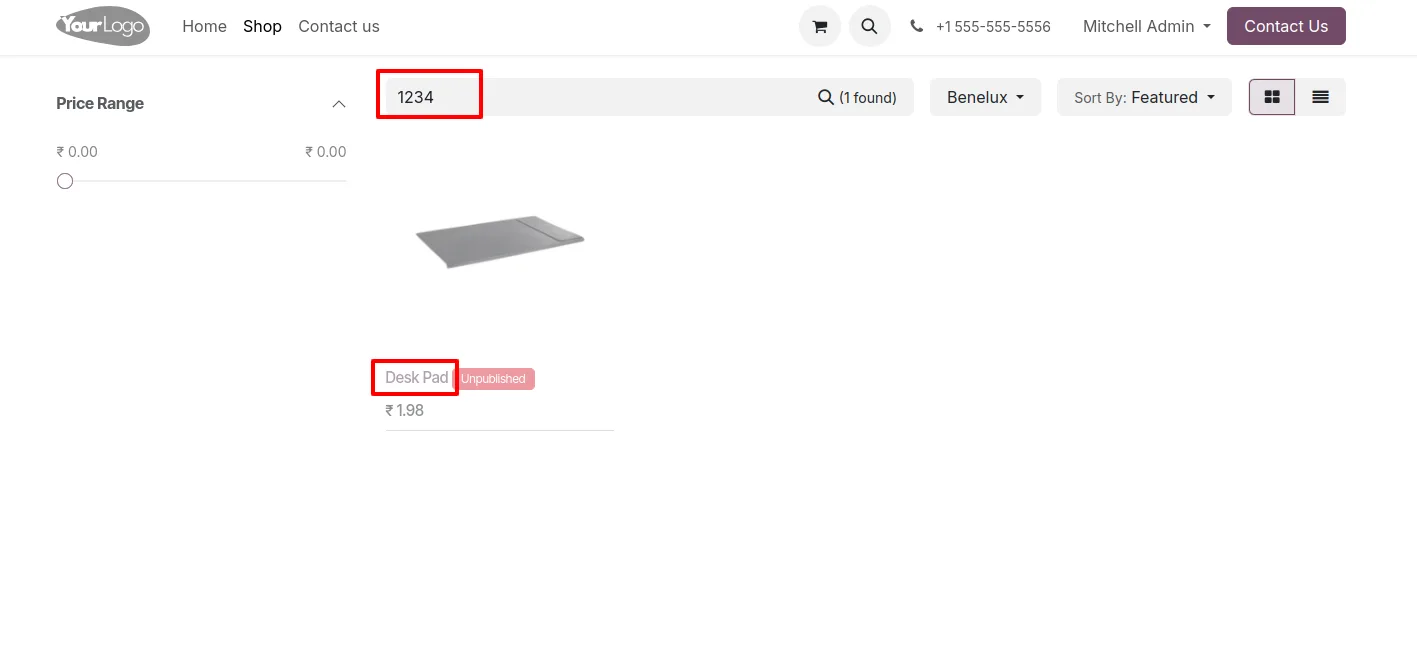
Customers and staff enter a barcode number in the standard website search to retrieve the matching product instantly from the Odoo catalogue.
-
Scanner-friendly input
Hardware barcode scanners that emit keyboard input work out of the box. Point the scanner at the search bar and the product opens — useful at trade-show kiosks, in-store tablets, and warehouse pickup counters.
-
Quick view on related products
When a barcode resolves to a product, related products are shown with a quick-view shortcut so shoppers can compare and browse without leaving the result page.
-
Works with the existing search filters
Barcode results combine cleanly with the standard website filters — category, attribute, and price — so staff can narrow scanned results the same way they narrow a normal search.
-
Graceful not-found state
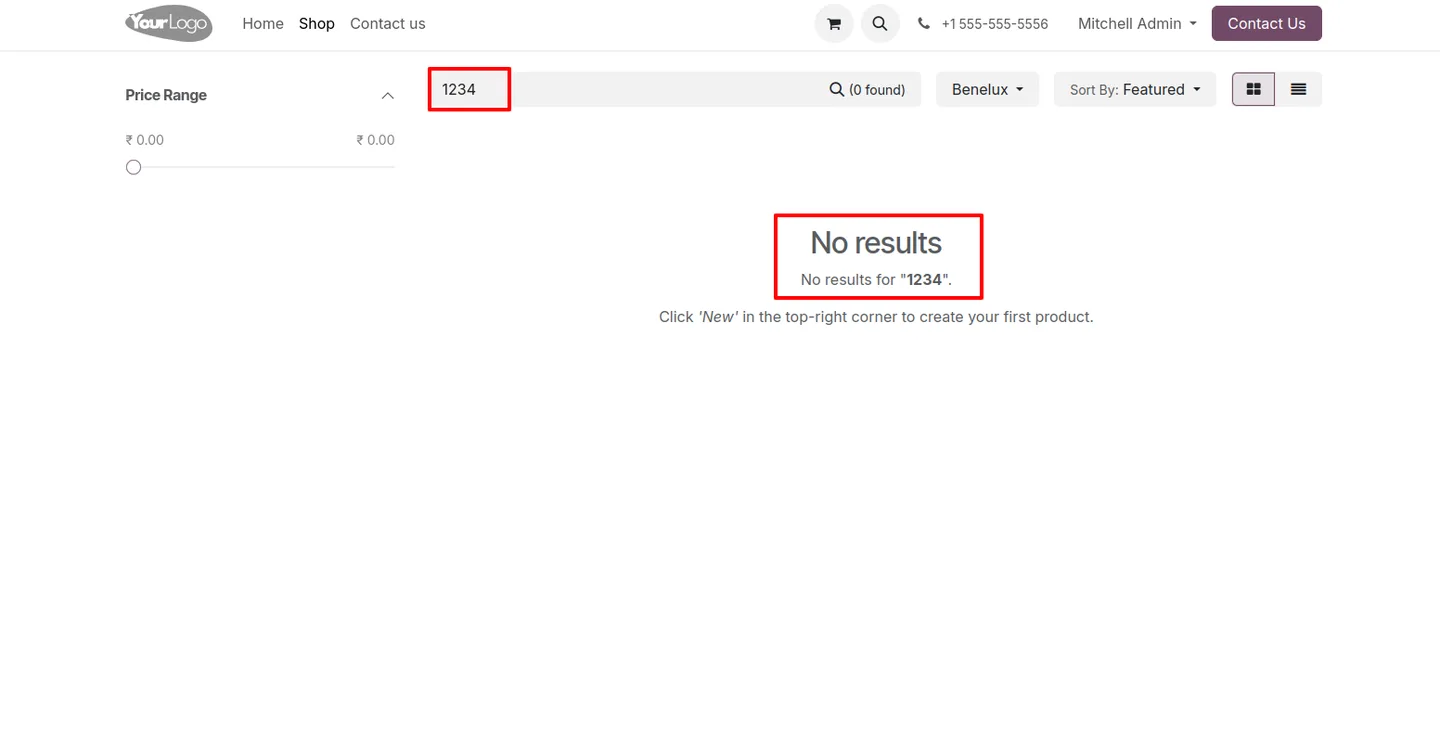
If no product matches the barcode, the standard Odoo no-results page is shown so the shopper journey stays familiar and unbroken.
-
Multi-version support
The module is published for Odoo 16, 17, 18, 19, and 20, so you stay on the same workflow as you upgrade your eCommerce site across releases.
-
Zero-config install
Install the module and the barcode search is live. No new menus to set up, no templates to override, and no settings to tune before the first scan.
Ecommerce Barcode Search in Odoo
Every screen, in the order you meet it — configuration first, then the module in use.
Technical details
Specification
- Publisher
- TechUltra Solutions Private Limited
- Technical name
- tus_ecommerce_barcode_search
- Odoo versions
- 16.0, 17.0, 18.0, 19.0, 20.0
- Lines of code
- 12
- License
- Odoo Proprietary License v1.0 (OPL-1)
- Price
- $15.32 (one-time)
Deployment
- Odoo Online
- Odoo.sh
- On-premise
Odoo dependencies
- eCommerce
- Website
- Invoicing
- Discuss
Support
90 days of bug-fix support, Monday to Friday (10:00–19:00 IST). Raise a ticket at support@techultra.in.
Setup & configuration
From install to first call — here is the path.
- 1
Install the module
In Odoo, open Apps, remove the Apps filter, search for “Ecommerce Barcode Search”, and click Install.
- 2
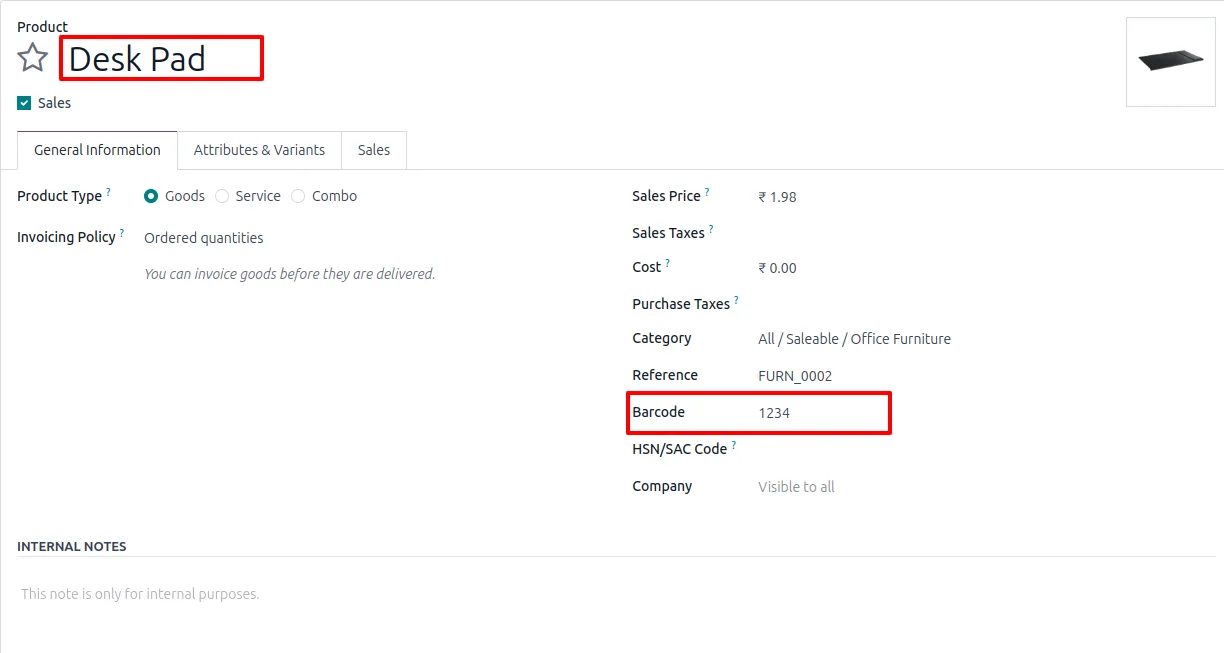
Make sure products have barcodes
Open each website product and confirm a barcode is stored in the Barcode field. Use Odoo's standard import or the Barcode app to backfill barcodes for the full catalogue if needed.
- 3
Publish the products
Confirm that the products you want shoppers to find are published on the website. Unpublished products will not appear in the barcode result, even if the barcode matches.
- 4
Test a lookup
Visit the storefront, type or scan a known barcode in the search bar, and confirm the product opens. Repeat with a barcode that does not exist to confirm the standard no-results page is shown.
- 5
Hook up scanners if you use them
Plug any USB or Bluetooth barcode scanner that emits keyboard input into the kiosk or staff device, focus the website search bar, and scan. No additional driver or Odoo configuration is required.
Frequently asked questions
-
Where does the barcode search appear on the website?
It extends the standard Odoo website search bar — the same input shoppers already use to search by name. There is no separate page or widget to add.
-
Do I need a hardware scanner?
No. Anyone can type a barcode number into the search bar. Hardware scanners that emit keyboard input also work out of the box, which is helpful for in-store tablets, kiosks, and pickup counters.
-
What happens if the barcode does not match any product?
The standard Odoo no-results page is shown, so the shopper experience stays consistent with a normal name-based search.
-
Does the search still work with filters like category and price?
Yes. Barcode results combine with the standard website filters, so staff can narrow a scanned result the same way they narrow a normal search.
-
Which Odoo versions are supported?
The module is published for Odoo 16.0, 17.0, 18.0, 19, and 20.0, in both Community and Enterprise editions.
-
Does it work with the standard Inventory barcodes I already use?
Yes. It uses the same barcode field on the product record that the Inventory and Barcode apps use, so the codes printed on your products work without any duplication.
-
Is any extra configuration needed after install?
No. Install the module and the barcode lookup is live on the website search bar. Make sure each product has a barcode and is published, and you are done.
Listing verified against the Odoo App Store:
Related solutions
Whole-platform solutions that complement Ecommerce Barcode Search.
Shopify + Odoo Integration
Native Shopify-to-Odoo bidirectional sync. Products, inventory, orders, customers, refunds, accounting entries in real time. Multi-store, multi-currency, B2B.
WooCommerce + Odoo Integration
Native WooCommerce-to-Odoo bidirectional sync. Products, inventory, orders, refunds, subscriptions, accounting entries. WP-Cron-free, reliable, B2B-ready.
Amazon (Seller / Vendor Central) + Odoo Integration
Native Amazon-to-Odoo sync — Seller Central (FBM/FBA), Vendor Central, multi-marketplace. Orders, inventory, fees, reimbursements reconciled to Odoo accounting.
Related services
Get the most out of this module with senior TechUltra consultants.
Odoo Customization Services
Odoo customization from a Gold Partner: custom modules, workflows, reports and Studio changes, written upgrade-safe and quoted at a fixed scope. Free scoping call.
Hire Odoo Developers
Hire certified Odoo developers from a Gold Partner: one developer or a team, full-time or part-time, 70–160 hours a month. Silver, Gold or Platinum plan, free trial.
Odoo Support Services & Maintenance
Odoo support services from a Gold Partner: functional and technical support plus server cover for Enterprise and Community, 30-minute P1 response, 24/7 option.







