

Odoo App · Inventory & Reporting
Daily Inventory Report
Date- and warehouse-scoped stock reports for Odoo 14 — generate and download in one click.
Overview
Daily Inventory Report turns Odoo into the single source of truth for daily stock numbers. Pick a date, pick a warehouse, and the module generates a stock snapshot you can review on screen and download — no manual spreadsheets, no exports stitched together by hand.
Built by TechUltra Solutions, the report supports multiple warehouses, so multi-location businesses can produce the same snapshot per site or combined across sites without writing custom reports.
It is designed for the operational rhythm of warehouse teams: a once-a-day report that ties out closing stock for finance, that auditors can re-run for any historical date, and that managers can save alongside delivery and purchase reports to investigate variances.
Key features
-
Date-scoped inventory snapshot
Choose any date — today or historical — and the module generates the on-hand inventory position for that day, so you can re-run yesterday's closing stock or pull a snapshot for an audit date.
-
Per-warehouse and multi-warehouse
Pick a single warehouse or run the report across multiple warehouses. Multi-location businesses get one consistent snapshot format per site instead of cobbled-together exports.
-
Downloadable report output
Generate the report and download it in one click — useful for emailing finance, attaching to audit packs, or archiving daily snapshots outside Odoo.
-
Visual stock summary
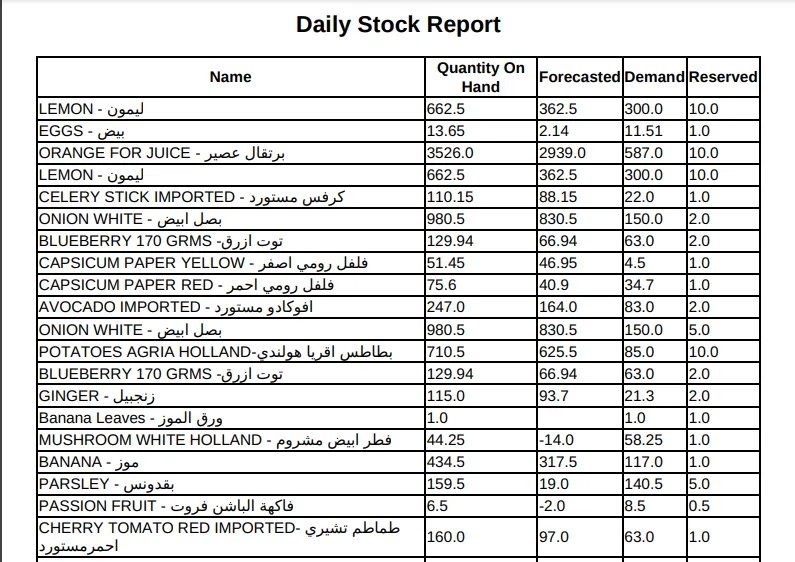
The report renders the inventory data with clear visual summaries on screen, so managers can scan it without exporting first — exports are a convenience, not a requirement.
-
Operational daily-rhythm fit
Designed for the once-a-day report most warehouse teams already produce by hand: pick date, pick warehouse, generate, share — no custom report writing required.
-
Ties into Purchase, Sales, and Invoicing
Built on top of Odoo's standard Inventory, Purchase, Sales, and Invoicing modules, so the numbers tie out with the rest of your back office without parallel data feeds.
-
Chatter-tracked for audit
Depends on Odoo's Discuss/chatter so report generation, downloads, and sharing leave the standard audit trail on the records they relate to.
-
Replaces manual stock-card spreadsheets
Designed to replace the manual stock-card spreadsheets warehouse staff often maintain alongside Odoo — one report, one date filter, one download.
Daily Inventory Report in Odoo
Every screen, in the order you meet it — configuration first, then the module in use.




Technical details
Specification
- Publisher
- TechUltra Solutions Private Limited
- Technical name
- tus_daily_inventory_report
- Odoo versions
- 14.0
- Lines of code
- 189
- License
- Odoo Proprietary License v1.0 (OPL-1)
- Price
- $11.65 (one-time)
Deployment
- Odoo Online
- Odoo.sh
- On-premise
Odoo dependencies
- Inventory
- Purchase
- Sales
- Discuss
- Invoicing
Support
90 days of bug-fix support, Monday to Friday (10:00–19:00 IST). Raise a ticket at support@techultra.in.
Setup & configuration
From install to first call — here is the path.
- 1
Install the module
In Odoo, open Apps, remove the default Apps filter, search for “Daily Inventory Report” or “tus_daily_inventory_report”, and click Install. The module pulls in the required Inventory, Purchase, Sales, and Invoicing dependencies.
- 2
Grant access to the report
Make sure the users who need the report have access to Inventory and the report menu added by this module. Warehouse managers typically get access by default; operators can be added on the user record.
- 3
Open the Daily Inventory Report wizard
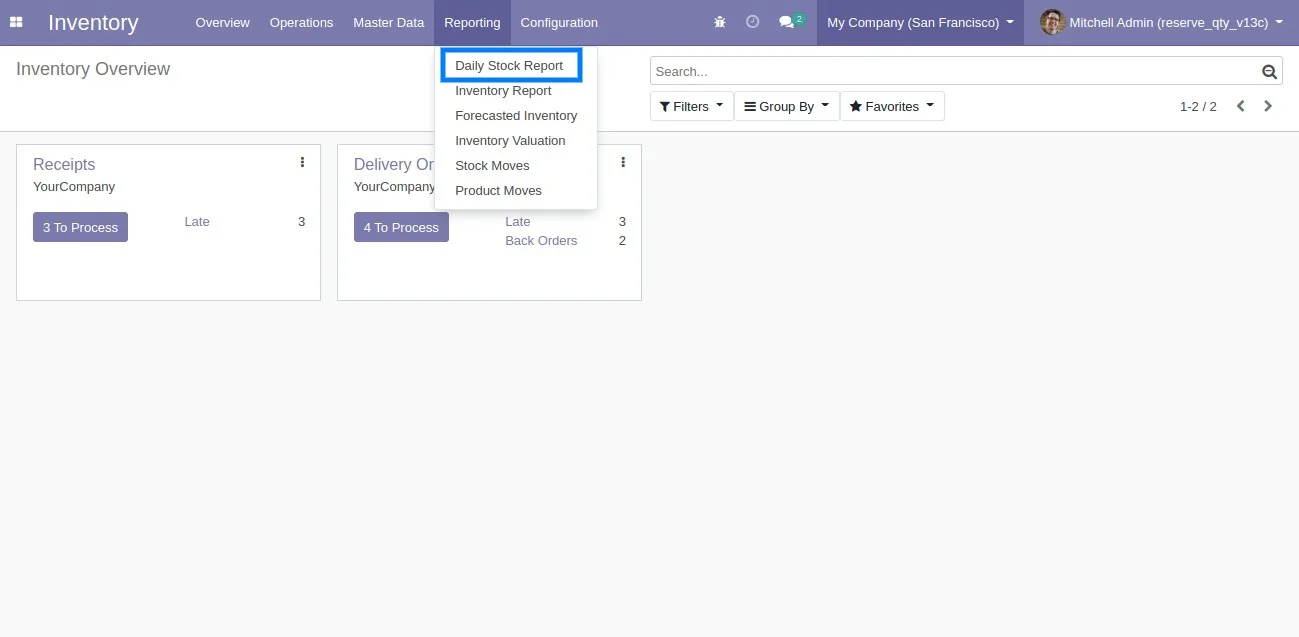
Go to the Inventory app and open the Daily Inventory Report menu added by the module to launch the report wizard.
- 4
Pick a date and warehouse
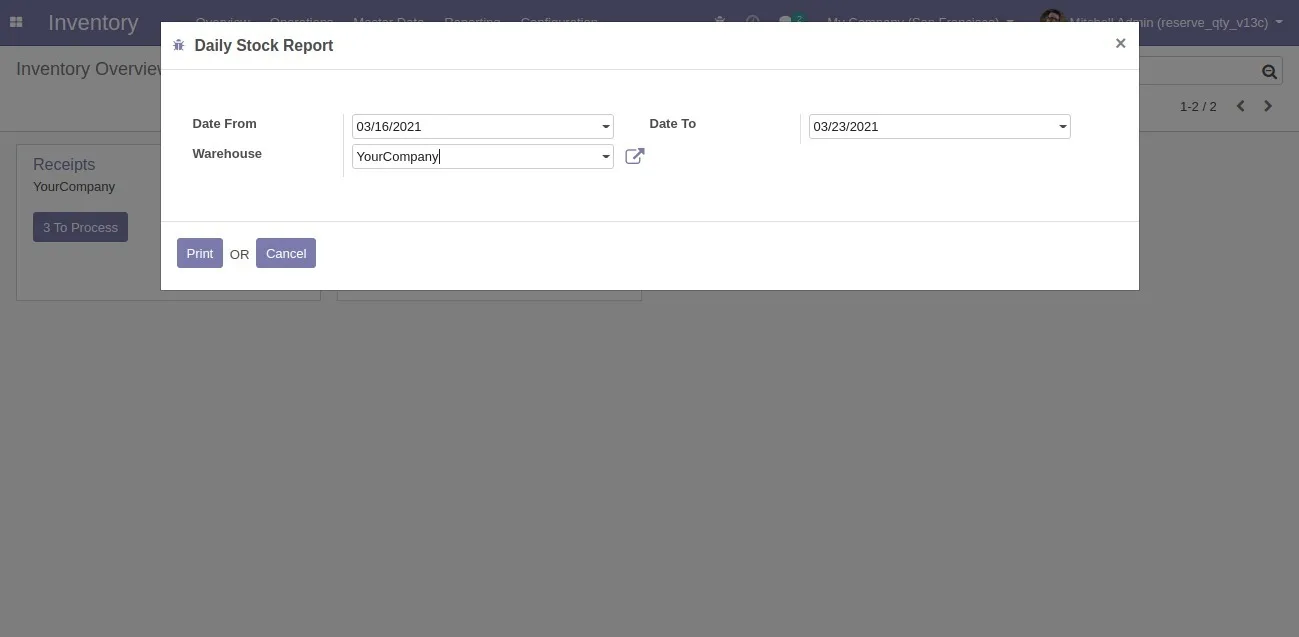
Select the date you want the snapshot for and choose the warehouse — or warehouses — to include. You can re-run the report for any historical date as needed.
- 5
Generate and download
Click the generate action to render the report on screen, then download it for archiving, sharing with finance, or attaching to an audit pack.
Frequently asked questions
-
Can I run the report for a historical date?
Yes. The wizard lets you pick any date — including past dates — and reproduces the inventory snapshot for that day, which is what auditors and finance usually need.
-
Does it support multiple warehouses?
Yes. You can run the report against a single warehouse or pick multiple warehouses, which is essential for multi-location businesses that need consistent snapshots per site.
-
Can I download the report?
Yes. The report is generated on screen and can be downloaded in one click, so it can be emailed, archived, or attached to audit packs outside Odoo.
-
Does it replace manual stock-card spreadsheets?
Yes. It is designed to replace the daily stock-card spreadsheets warehouse staff often maintain in parallel with Odoo — same data, one consistent report, no manual reconciliation.
-
Which Odoo apps does it depend on?
Inventory, Purchase, Sales, Invoicing, and Discuss. Those should be installed (or be installable) for the report to read stock movements and tie out with the rest of the back office.
-
Which Odoo versions are supported?
This build targets Odoo 14.0 in both the Community and Enterprise editions. Match the listing version to your Odoo release.
-
Can I automate the daily report run?
The module focuses on on-demand generation. Teams that need a fully automatic schedule typically pair it with an Odoo scheduled action emailing the downloaded report — TechUltra can quote that as a small extension.
-
Is support included?
Yes. The module includes 90 days of bug-fix support, Monday to Friday, 10:00–19:00 IST.
Listing verified against the Odoo App Store:
Related services
Get the most out of this module with senior TechUltra consultants.
Odoo Customization Services
Odoo customization from a Gold Partner: custom modules, workflows, reports and Studio changes, written upgrade-safe and quoted at a fixed scope. Free scoping call.
Hire Odoo Developers
Hire certified Odoo developers from a Gold Partner: one developer or a team, full-time or part-time, 70–160 hours a month. Silver, Gold or Platinum plan, free trial.
Odoo Support Services & Maintenance
Odoo support services from a Gold Partner: functional and technical support plus server cover for Enterprise and Community, 30-minute P1 response, 24/7 option.







