

Odoo App · Sales & Pricing
Cumulative Variant Discount
Sum quantities across product variants to unlock bulk pricelist discounts in Odoo.

Overview
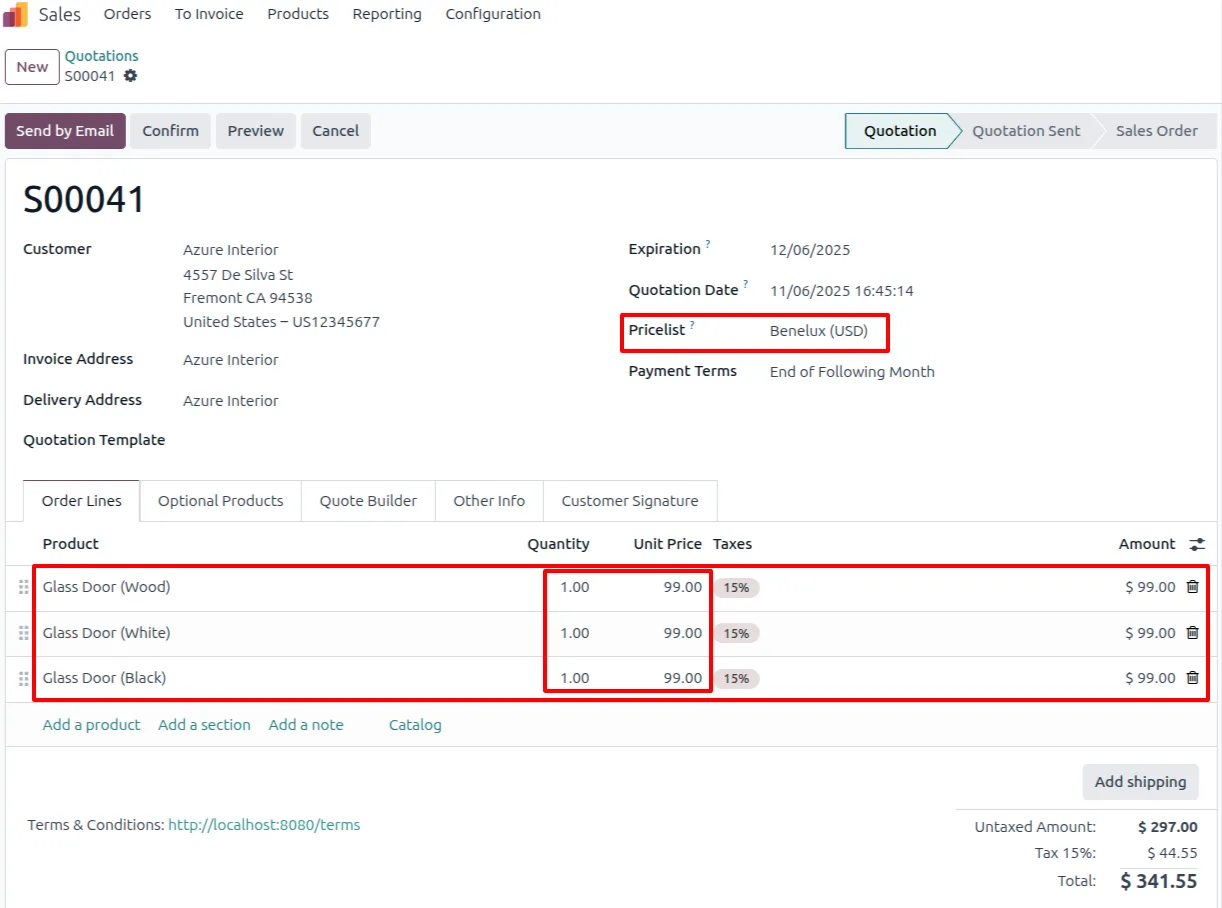
Cumulative Variant Discount changes how Odoo pricelists count quantity for bulk discounts. The standard pricelist evaluates each product variant separately, so a customer who buys several variants of the same product — different sizes or colours — may never reach a quantity break, even though the total order is large.
Built by TechUltra Solutions, the module adds a Cumulative by Product Template option to pricelist rules. When it is enabled, Odoo sums the quantities of all variants of a template and applies the discount once the combined quantity reaches the threshold, instead of treating each variant in isolation.
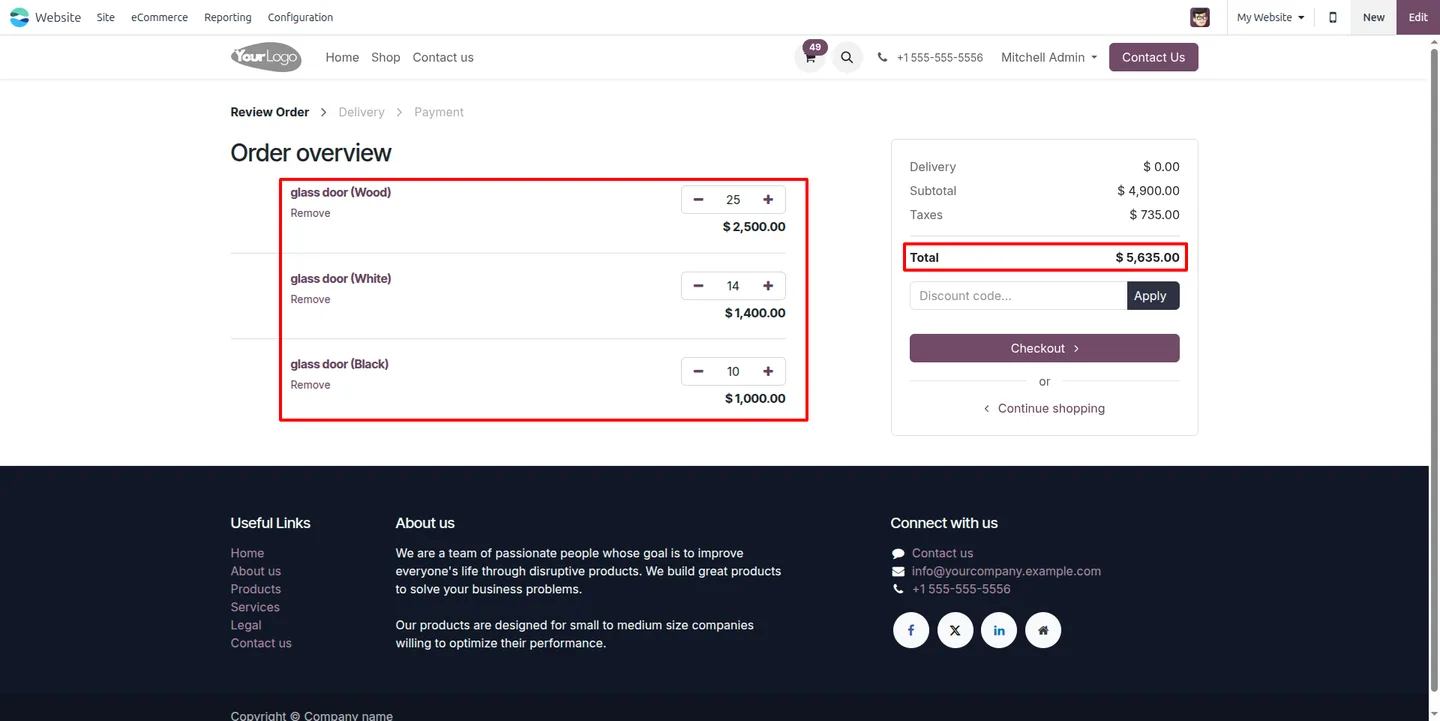
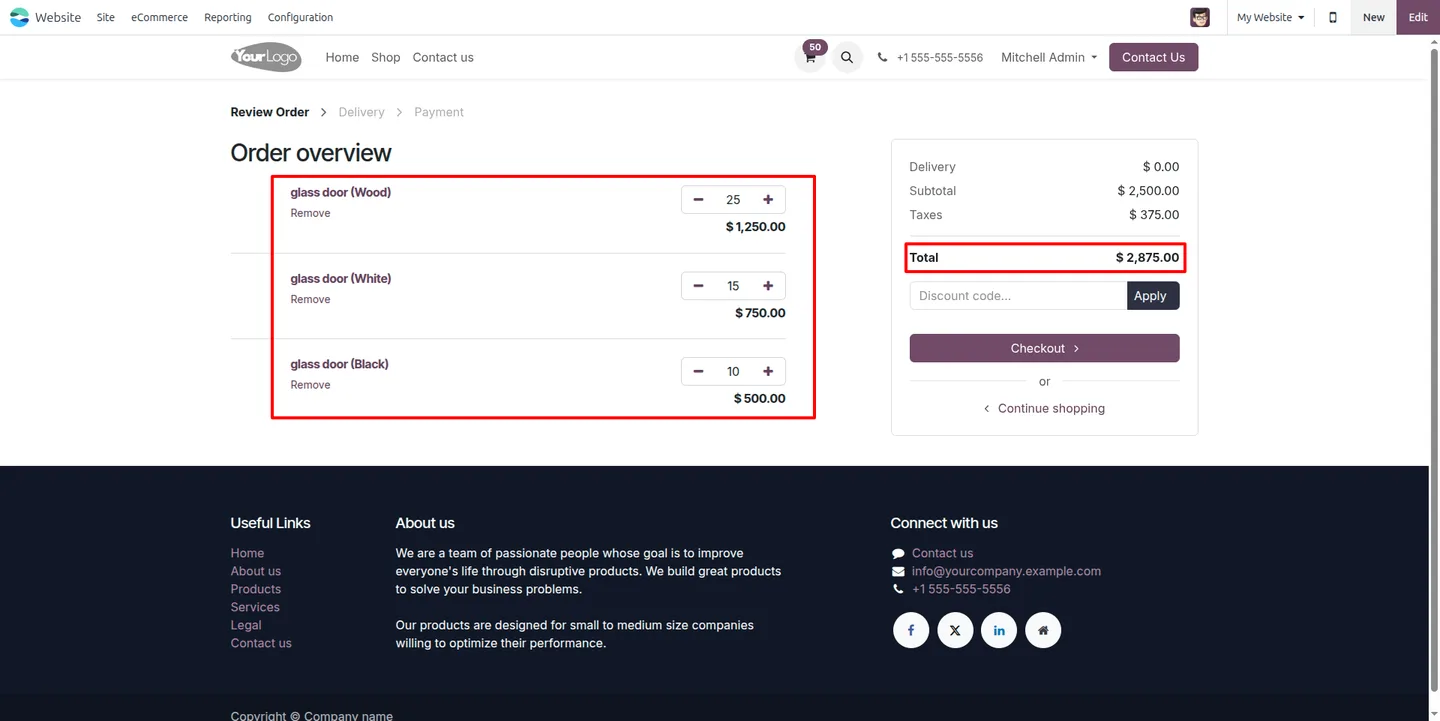
Prices recalculate automatically as variant lines are added or changed in quotations and sales orders, the same logic carries through to the eCommerce shop, and taxes are computed on the discounted price. The result is consistent bulk pricing across Sales and the website with no custom development.
Key features
-
Cumulative discounts across variants
Quantity discounts apply across every variant of a product template, so mixed orders of sizes or colours still earn the bulk rate in both Sales and eCommerce.
-
Variant-aware sales handling
The module tracks and prices product variations together, giving accurate variant-based pricing across the sales process.
-
Unified pricing for a template
A single, centralised rule keeps discount and pricing logic consistent across all variants that belong to the same product template.
-
Quantity aggregation across variants
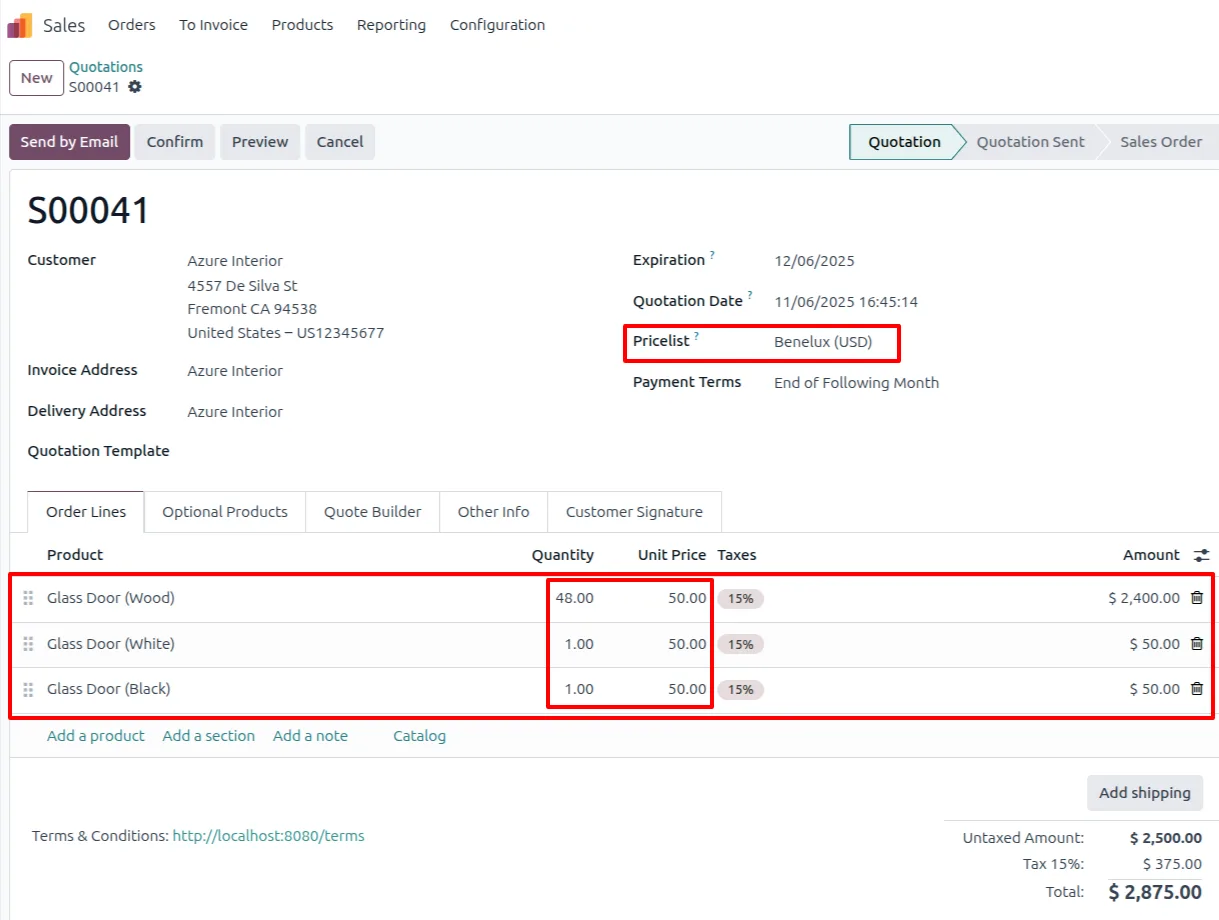
Odoo sums the quantities of all variants of a template; when the combined quantity reaches the pricelist threshold, the discounted price applies.
-
Dynamic price recalculation
Prices update automatically in quotations and sales orders as variant quantities are added or changed, always reflecting the current cumulative discount.
-
Sales and eCommerce coverage
The cumulative logic works in the Odoo Sales app and on the eCommerce shop, so customers see the same discounted variant pricing on the website.
-
Tax applied on discounted price
Taxes are calculated on the unit price after the cumulative discount has been applied, keeping order totals accurate.
-
Quick rule configuration
Cumulative discount rules are set up directly on the pricelist with a short configuration, with no customization required.
Cumulative Variant Discount in Odoo
Every screen, in the order you meet it — configuration first, then the module in use.


Technical details
Specification
- Publisher
- TechUltra Solutions Private Limited
- Technical name
- sale_pricelist_cumulative_template
- Odoo versions
- 16.0, 17.0, 18.0, 19.0, 20.0
- Lines of code
- 131
- License
- Odoo Proprietary License v1.0 (OPL-1)
- Price
- $23.95 (one-time)
Deployment
- Odoo Online
- Odoo.sh
- On-premise
Odoo dependencies
- Sales
- eCommerce
- Website
- Invoicing
- Discuss
Support
90 days of bug-fix support, Monday to Friday (10:00–19:00 IST). Raise a ticket at support@techultra.in.
Setup & configuration
From install to first call — here is the path.
- 1
Install the module
In Odoo, open Apps, remove the Apps filter, search for “Cumulative Variant Discount”, and click Install.
- 2
Configure the pricelist rule
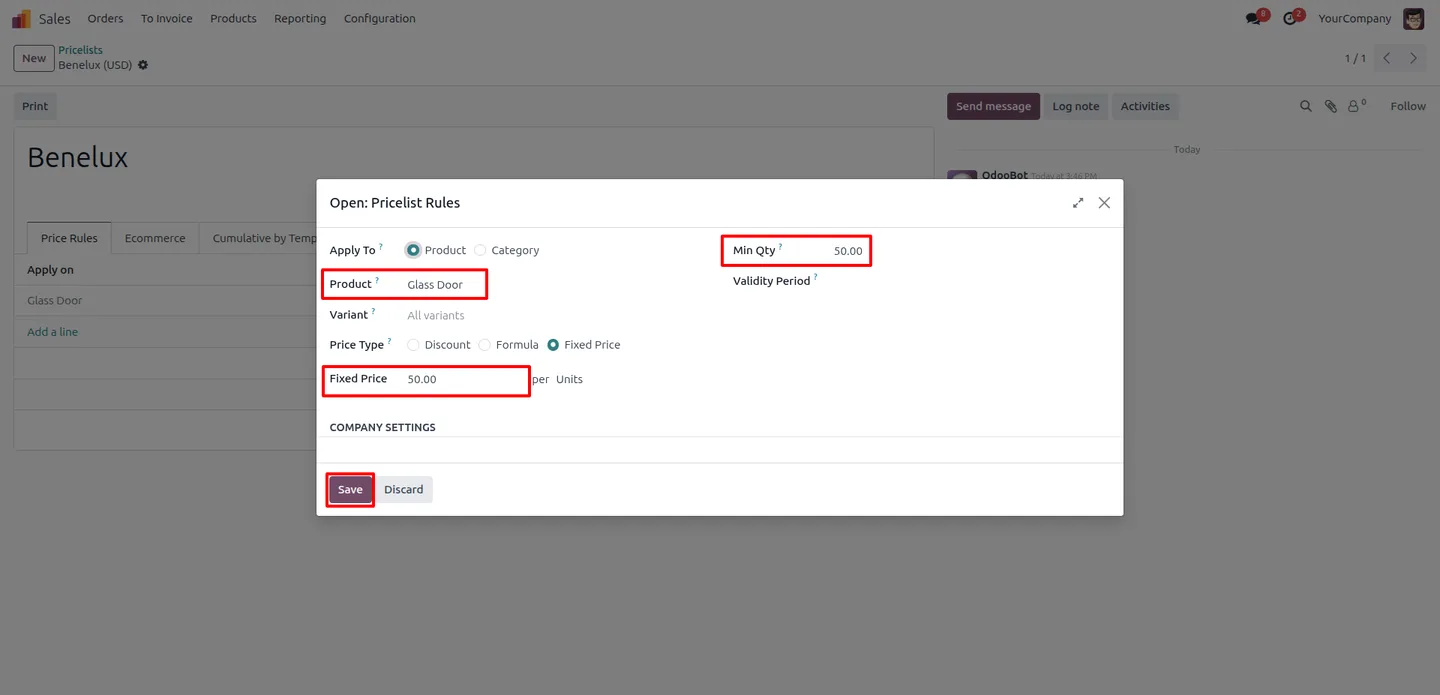
Open the pricelist and add a standard rule with a minimum quantity and price — for example, a fixed price of 50 for a minimum of 50 units.
- 3
Enable cumulative by template
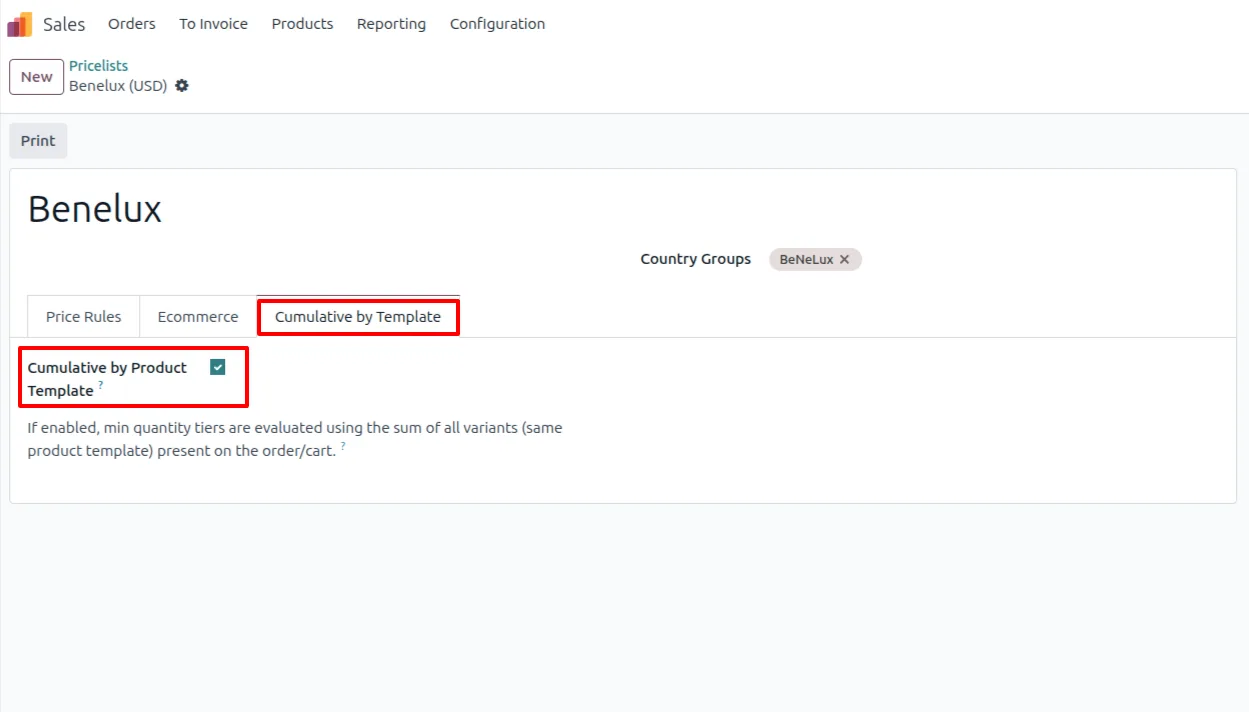
On the pricelist, open the Cumulative by Template tab and switch on the Cumulative by Product Template field to turn on the cumulative discount logic.
- 4
Add variants to an order
Create a quotation or sales order and add lines for different variants of the same template. Odoo sums their quantities against the pricelist threshold.
- 5
Check the discounted price
Once the combined variant quantity reaches the threshold, the discounted price applies and recalculates automatically. The same logic appears on the eCommerce shop.
Frequently asked questions
-
What does Cumulative Variant Discount do?
It makes Odoo pricelists sum the quantities of every variant of a product template when applying quantity-based discounts, instead of counting each variant separately.
-
Why doesn't standard Odoo handle this?
The default Odoo pricelist evaluates each variant on its own. A customer buying several variants of one product may never reach a quantity break, even when the total order is large.
-
How do I turn on the cumulative logic?
On the pricelist, open the Cumulative by Template tab and enable the Cumulative by Product Template field. The rule then sums variant quantities against its threshold.
-
Does it work in the eCommerce shop?
Yes. The cumulative discount logic applies in both the Odoo Sales app and the eCommerce website, so customers see the same discounted variant pricing online.
-
How is tax calculated?
Taxes are calculated on the unit price after the cumulative discount has been applied, so order totals stay accurate.
-
Do prices update as I change quantities?
Yes. Prices recalculate automatically in quotations and sales orders as variant quantities are added or modified, always reflecting the current cumulative discount.
-
Which Odoo versions are supported?
The module supports Odoo 16.0, 17.0, 18.0, 19.0, and 20.0.
-
Is support included?
Yes. The module includes 90 days of bug-fix support, Monday to Friday, 10:00–19:00 IST.
Listing verified against the Odoo App Store:
Related solutions
Whole-platform solutions that complement Cumulative Variant Discount.
Odoo Sales
Odoo Sales module — quotations, pricing rules, sales orders, deliveries, returns. CRM-Inventory-Accounting integrated. Quote-to-cash unified.
Odoo CRM
Odoo CRM module — leads, opportunities, kanban pipeline, quotation, forecasting, email integration. Native with ERP. Mid-market alternative to Salesforce.
Related services
Get the most out of this module with senior TechUltra consultants.
Odoo Customization Services
Odoo customization from a Gold Partner: custom modules, workflows, reports and Studio changes, written upgrade-safe and quoted at a fixed scope. Free scoping call.
Hire Odoo Developers
Hire certified Odoo developers from a Gold Partner: one developer or a team, full-time or part-time, 70–160 hours a month. Silver, Gold or Platinum plan, free trial.
Odoo Support Services & Maintenance
Odoo support services from a Gold Partner: functional and technical support plus server cover for Enterprise and Community, 30-minute P1 response, 24/7 option.







