
Odoo App · SMS & Messaging
BulkGate SMS Integration
Send individual and bulk SMS from Odoo through the BulkGate gateway.
Overview
BulkGate SMS Integration connects Odoo to BulkGate, an SMS gateway service, so your team can send messages to customers without switching to a separate platform. Messages are sent straight from Odoo contacts and records.
Built by TechUltra Solutions, the module supports every BulkGate sender type: the shared System Number, a registered personal number, an alphanumeric text Sender ID, and configured Sender ID profiles. You build SMS templates once inside the module and reuse them, with dynamic variables — customer name, order details, and more — filling in the right content for each recipient.
Connecting to BulkGate takes a one-time API key configuration. From there, all SMS activity runs through a single dashboard in Odoo, keeping messaging centralized alongside your customer data.
Key features
-
Direct SMS from Odoo
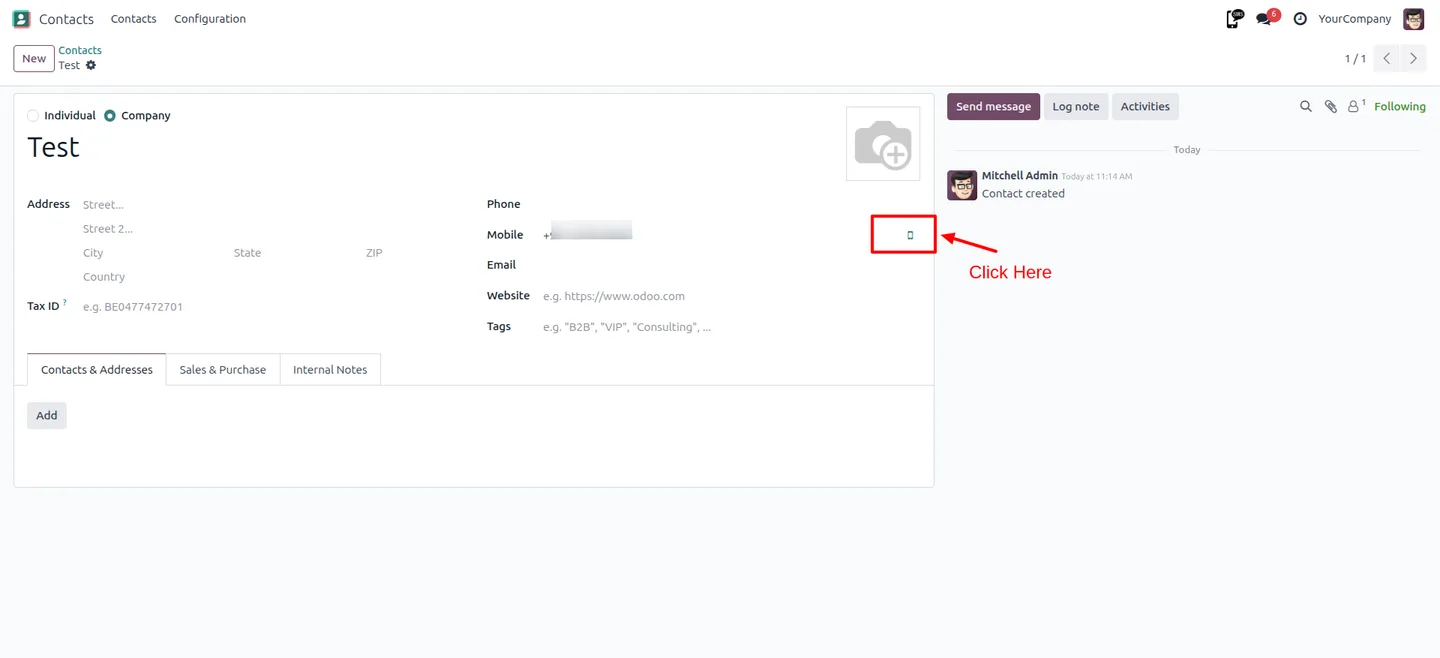
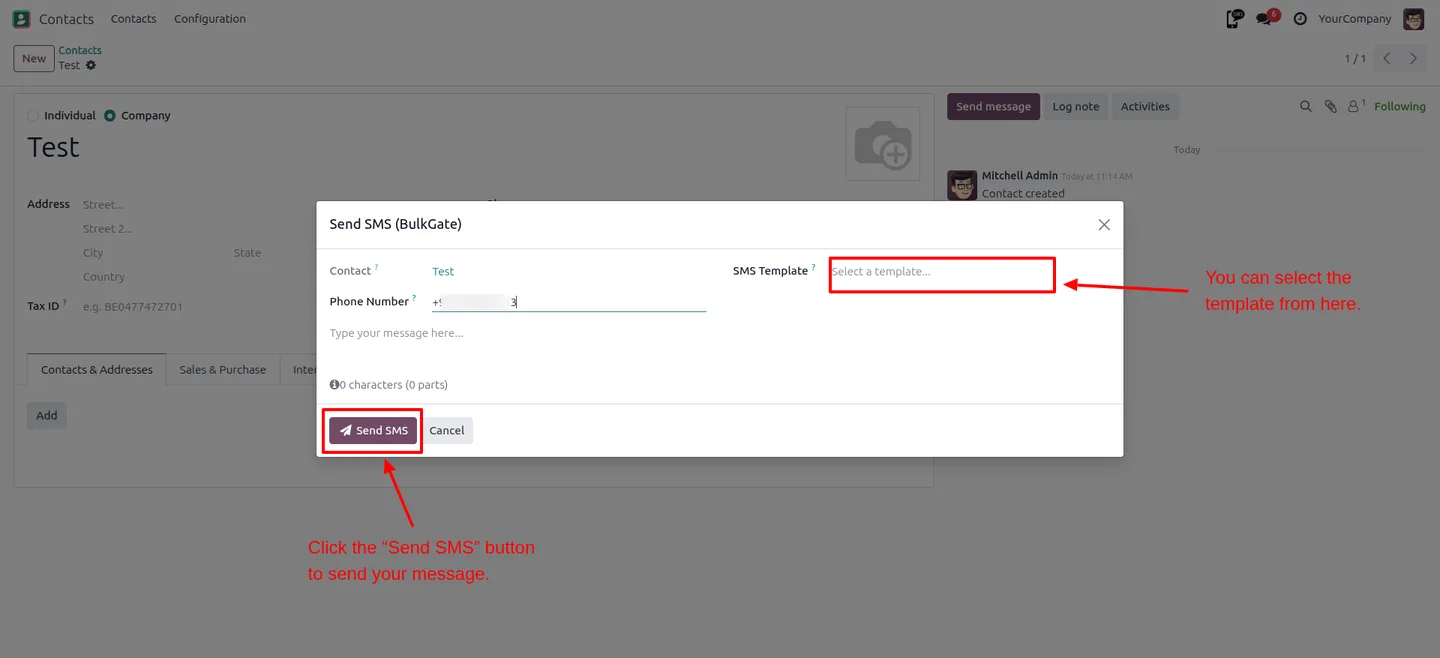
Send messages to customers directly from Odoo contacts or records, with no need to switch to a separate SMS platform.
-
Individual and bulk messaging
Send a single message to one contact or run a bulk send to many recipients, all from the same module.
-
Multiple sender options
Works with every BulkGate sender type — the shared System Number, your own registered number, a text Sender ID, and configured Sender ID profiles.
-
Dynamic variables
Personalize messages with dynamic variables such as customer name and order details, so each recipient gets relevant content.
-
Template management
Create reusable SMS templates inside the module and apply them to new messages, keeping communication consistent and quick to send.
-
BulkGate API integration
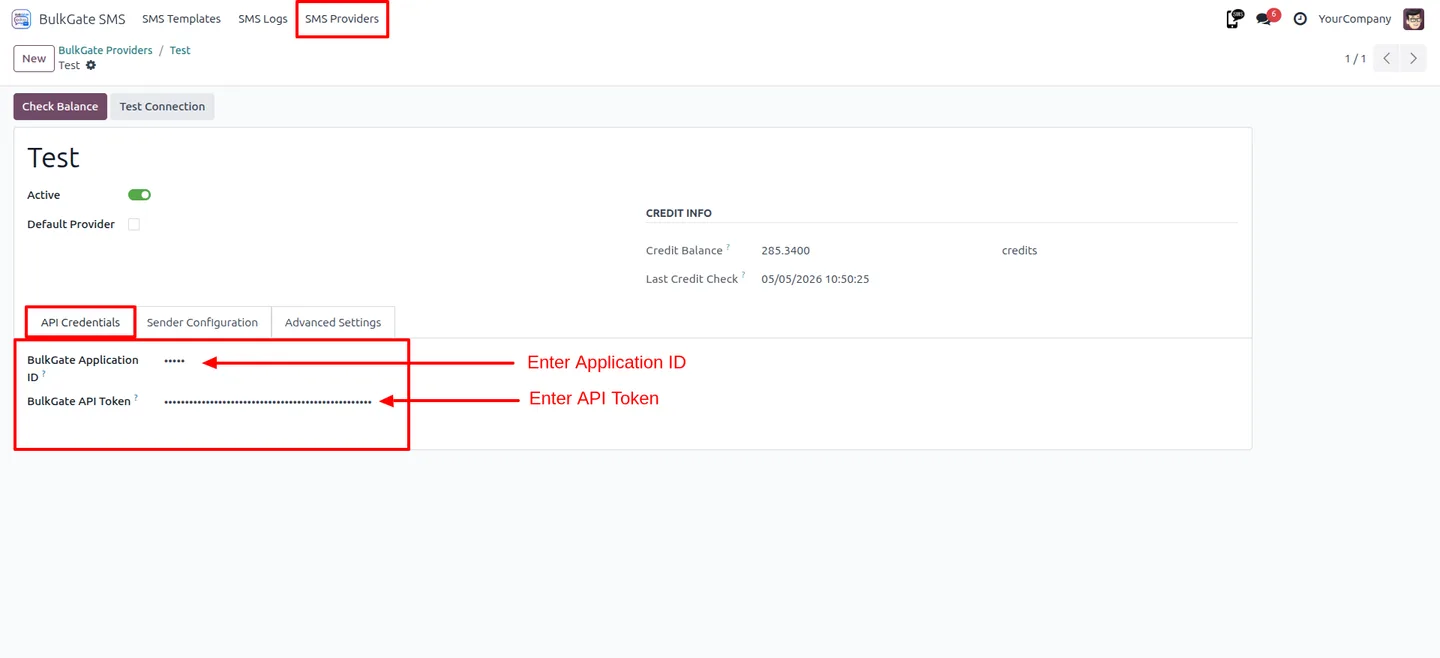
Connect Odoo to BulkGate with an API key and a short configuration — a one-time setup before you start sending.
-
Centralized SMS dashboard
Manage all SMS activity from one place inside Odoo, keeping messaging operations together with your customer data.
BulkGate SMS Integration in Odoo
Every screen, in the order you meet it — configuration first, then the module in use.
Technical details
Specification
- Publisher
- TechUltra Solutions Private Limited
- Technical name
- odoo_bulkgate_sms
- Odoo versions
- 18.0
- Lines of code
- 2,750
- License
- Odoo Proprietary License v1.0 (OPL-1)
- Price
- $29 (one-time)
Deployment
- Odoo Online
- Odoo.sh
- On-premise
Odoo dependencies
- Contacts
- Discuss
Support
90 days of bug-fix support, Monday to Friday (10:00–19:00 IST). Raise a ticket at support@techultra.in.
Setup & configuration
From install to first call — here is the path.
- 1
Install the module
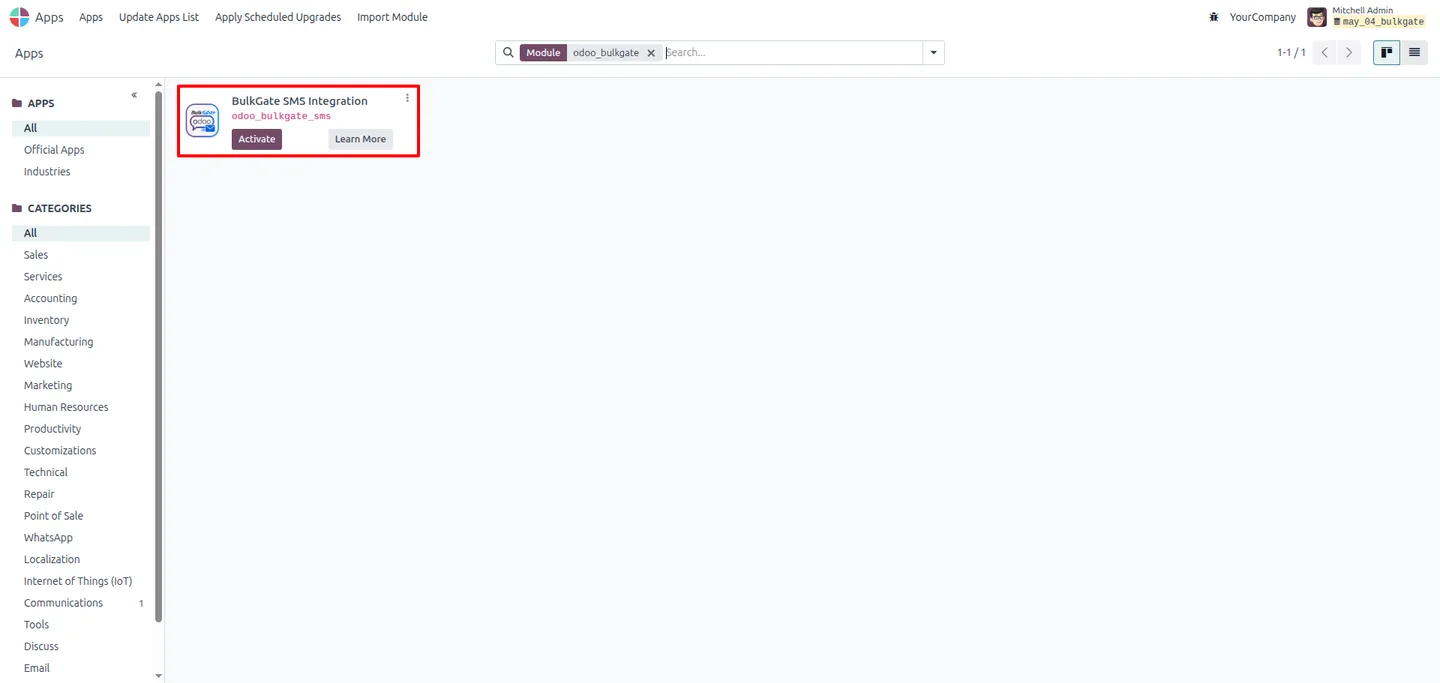
In Odoo, open Apps, remove the Apps filter, search for “BulkGate SMS Integration”, and click Install.
- 2
Get your BulkGate API key
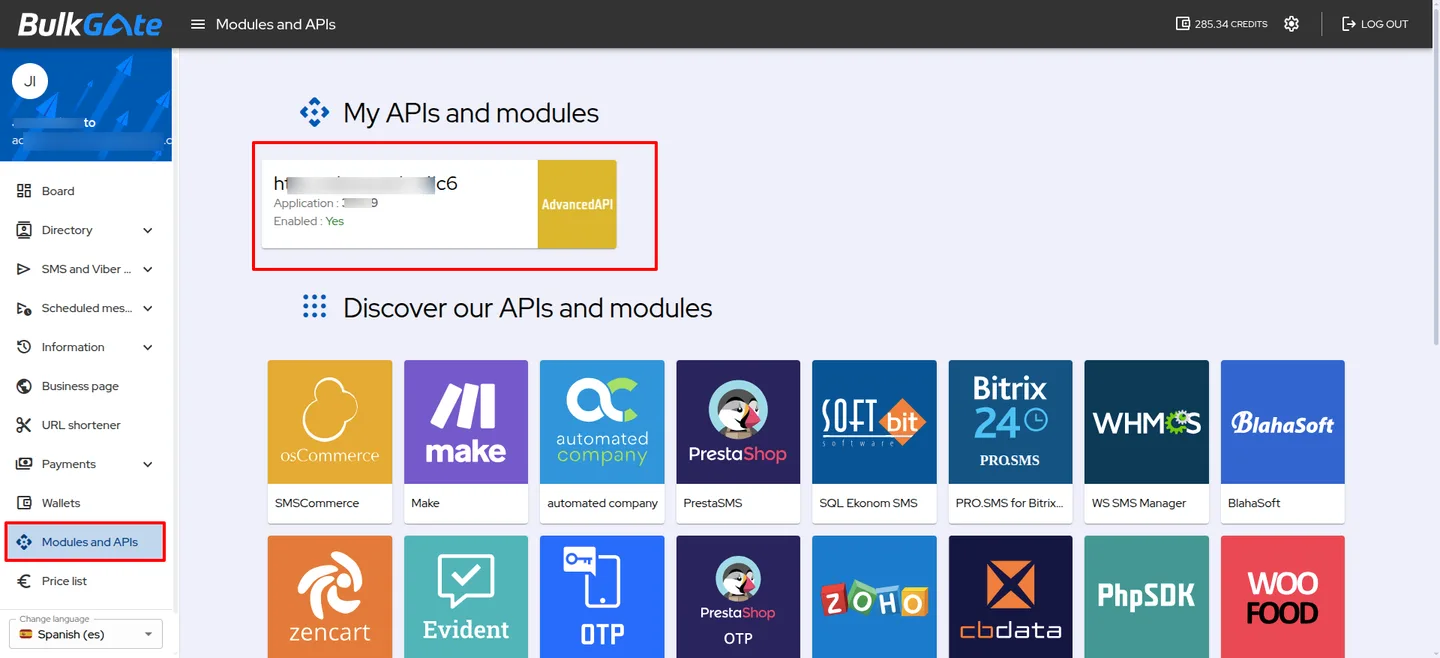
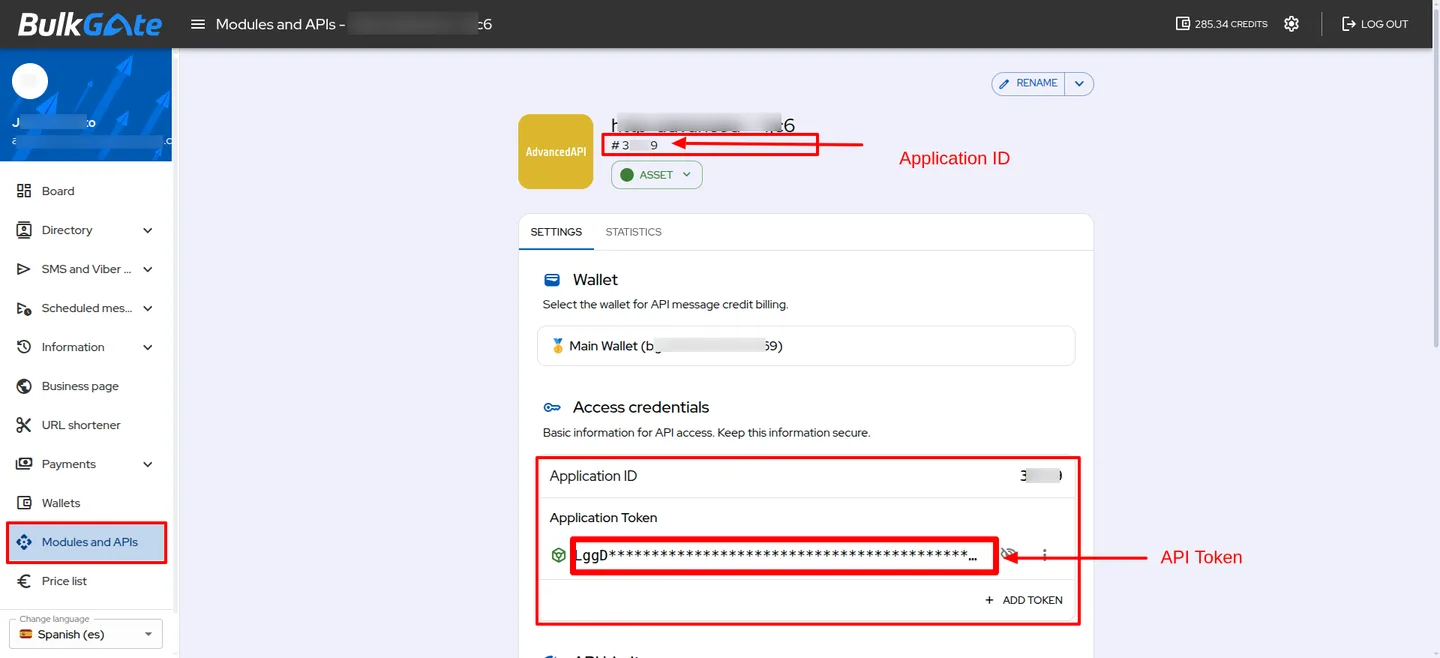
Sign in to your BulkGate account and create an Application Token, which the module uses as the API key to connect.
- 3
Configure the connection in Odoo
Open the BulkGate SMS configuration in Odoo and enter your API key along with the sender details you want to use.
- 4
Choose a sender type
Select the BulkGate sender — System Number, your own registered number, a text Sender ID, or a Sender ID profile — for outgoing messages.
- 5
Build SMS templates
Create reusable SMS templates inside the module and add dynamic variables such as customer name and order details.
- 6
Test before going live
Send a test SMS to a valid mobile number to confirm the connection works, then start sending to customers.
Frequently asked questions
-
What is BulkGate?
BulkGate is an SMS gateway service that delivers text messages to mobile numbers. This module connects your Odoo instance to BulkGate so you can send SMS without leaving Odoo.
-
Can I send both single and bulk messages?
Yes. You can send a single SMS to one contact or run a bulk send to many recipients, both from the same module.
-
What sender types are supported?
The module supports every BulkGate sender type: the shared System Number, your own registered personal number, an alphanumeric text Sender ID, and configured Sender ID profiles.
-
Which Odoo version is supported?
BulkGate SMS Integration supports Odoo 18.0, in both the Community and Enterprise editions.
-
How do I connect Odoo to BulkGate?
You create an Application Token in your BulkGate account and enter it as the API key in the module's configuration, along with your sender details. It is a one-time setup.
-
Can I personalize messages?
Yes. The module supports dynamic variables such as customer name and order details, so each message is tailored to its recipient.
-
Can I reuse message content?
Yes. You build SMS templates once inside the module and apply them to new messages, which keeps communication consistent and faster to send.
-
Is support included with the module?
Yes. The module includes 90 days of bug-fix support, Monday to Friday, 10:00–19:00 IST.
Listing verified against the Odoo App Store:
Related services
Get the most out of this module with senior TechUltra consultants.
Odoo Customization Services
Odoo customization from a Gold Partner: custom modules, workflows, reports and Studio changes, written upgrade-safe and quoted at a fixed scope. Free scoping call.
Hire Odoo Developers
Hire certified Odoo developers from a Gold Partner: one developer or a team, full-time or part-time, 70–160 hours a month. Silver, Gold or Platinum plan, free trial.
Odoo Support Services & Maintenance
Odoo support services from a Gold Partner: functional and technical support plus server cover for Enterprise and Community, 30-minute P1 response, 24/7 option.







