

Odoo App · Sales
Bulk Add Products to Sale Order
Mass product and variant selector for Odoo Sales — add dozens of lines from one grid.

Overview
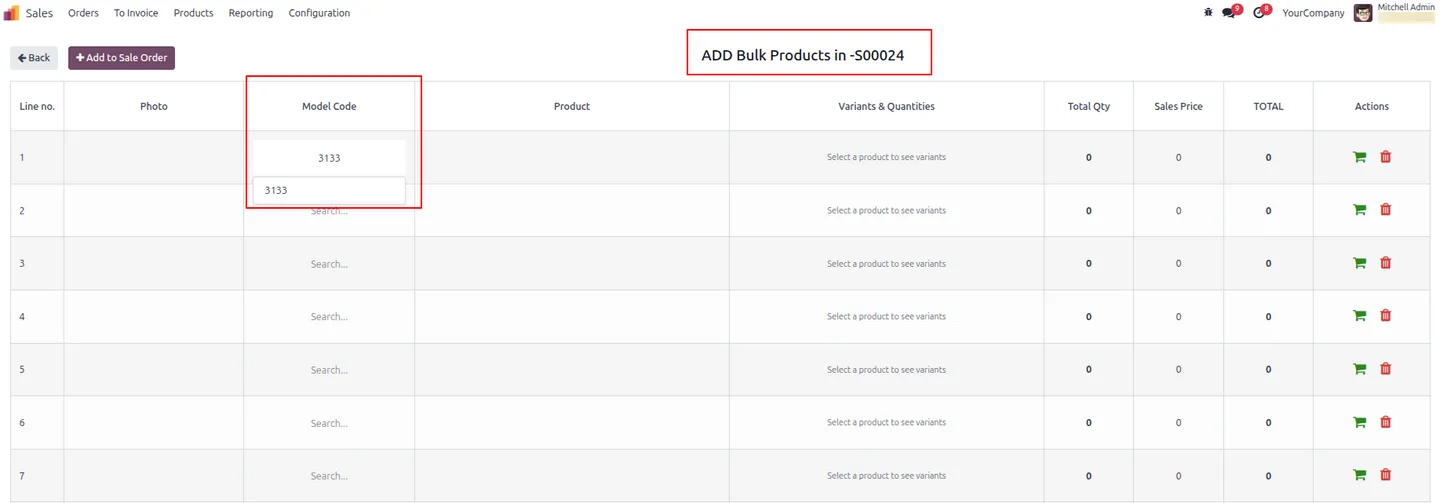
Bulk Add Products to Sale Order removes the one-by-one product entry that slows down wholesale and B2B quoting in Odoo. From a draft Sale Order, sales reps open a single grid, search products by their model code, and build a long order in a fraction of the time.
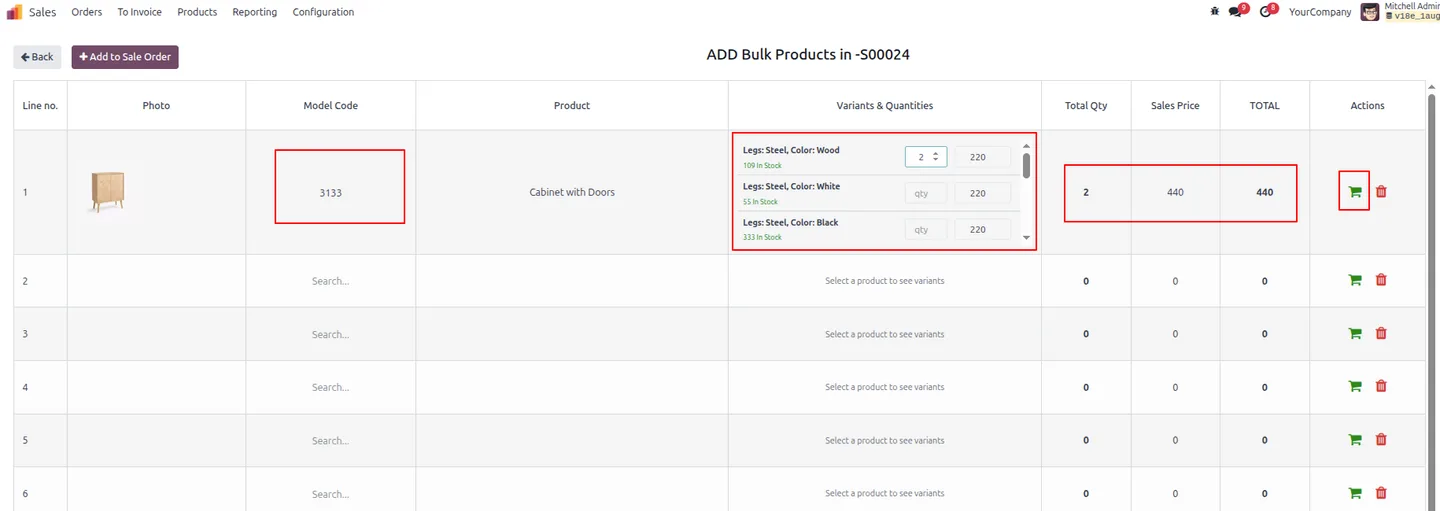
Built by TechUltra Solutions, the module shows every variant of a product alongside its attributes, live stock, unit price, line total, and a per-variant price override. Reps either push one row at a time with the cart icon or send every filled row into the quotation in a single click.
Because lines are created through Odoo's standard Sale Order line API, the module does not break pricing rules, taxes, or reporting — it simply replaces the bottleneck that high-volume sales teams hit when entering 30, 50, or 100 lines manually.
Key features
-
Bulk product selection
Add multiple products and variants to a Sale Order from one smart grid — no more line-by-line entry.
-
Variant and quantity grid
Enter quantities for every variant of a product in a single screen, with attribute display and validation.
-
Real-time stock visibility
See live In Stock and Out of Stock indicators for every variant before you commit them to the order.
-
Auto total recalculation
Total Quantity, Sales Price, and Line Total recalculate instantly as you type a quantity or price.
-
Search by model code
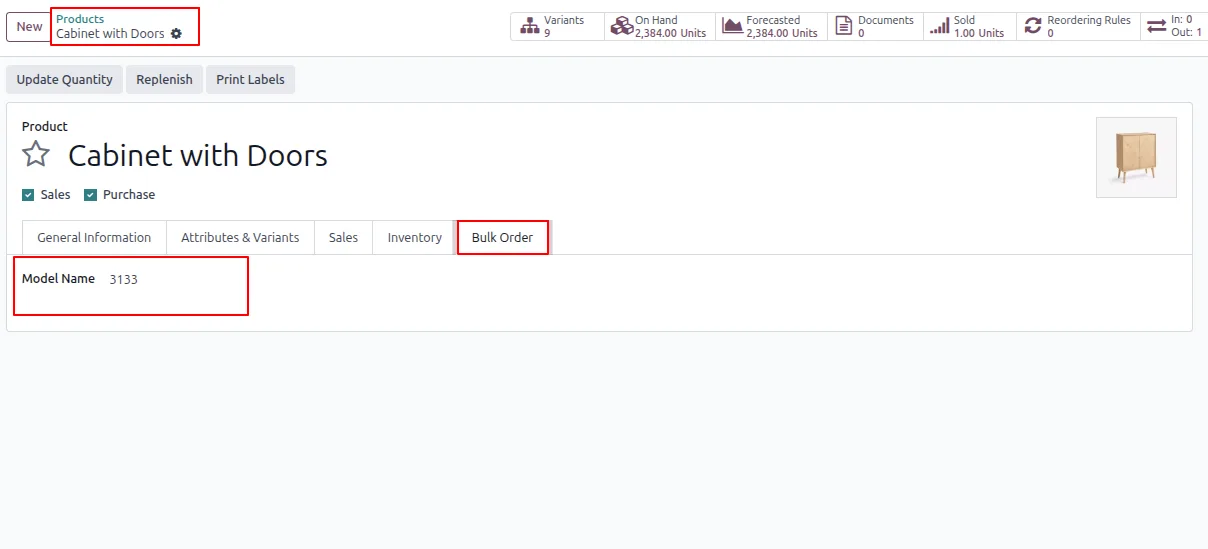
Use the unique Model Name field on each product for fast, error-proof picker search by SKU or model code.
-
Per-variant price override
Override the unit price of any variant before pushing it into the Sale Order line.
-
Add single row or push all
Send one row to the Sale Order with the cart icon, or push every filled row in a single click.
-
Native sale workflow
Lines are created through the standard Odoo Sale Order line API, so pricing rules, taxes, and reports keep working unchanged.
-
Zero configuration
Install the module, set a Model Name on your products, and you are ready — no developer required.
Bulk Add Products to Sale Order in Odoo
Every screen, in the order you meet it — configuration first, then the module in use.
Technical details
Specification
- Publisher
- TechUltra Solutions Private Limited
- Technical name
- tus_add_bulk_order
- Odoo versions
- 16.0, 17.0, 18.0, 19.0, 20.0
- Lines of code
- 587
- License
- Odoo Proprietary License v1.0 (OPL-1)
- Price
- $23.30 (one-time)
Deployment
- Odoo Online
- Odoo.sh
- On-premise
Odoo dependencies
- Inventory
- Sales
- Invoicing
- Discuss
Support
90 days of bug-fix support, Monday to Friday (10:00–19:00 IST). Raise a ticket at support@techultra.in.
Setup & configuration
From install to first call — here is the path.
- 1
Install the module
In Odoo, open Apps, remove the Apps filter, search for “Bulk Add Products to Sale Order”, and click Install.
- 2
Set a Model Name on products
After installation, a Bulk Order tab appears on every product form. Enter a unique Model Name on each product — this is the SKU or model code used to search the picker.
- 3
Open the bulk picker
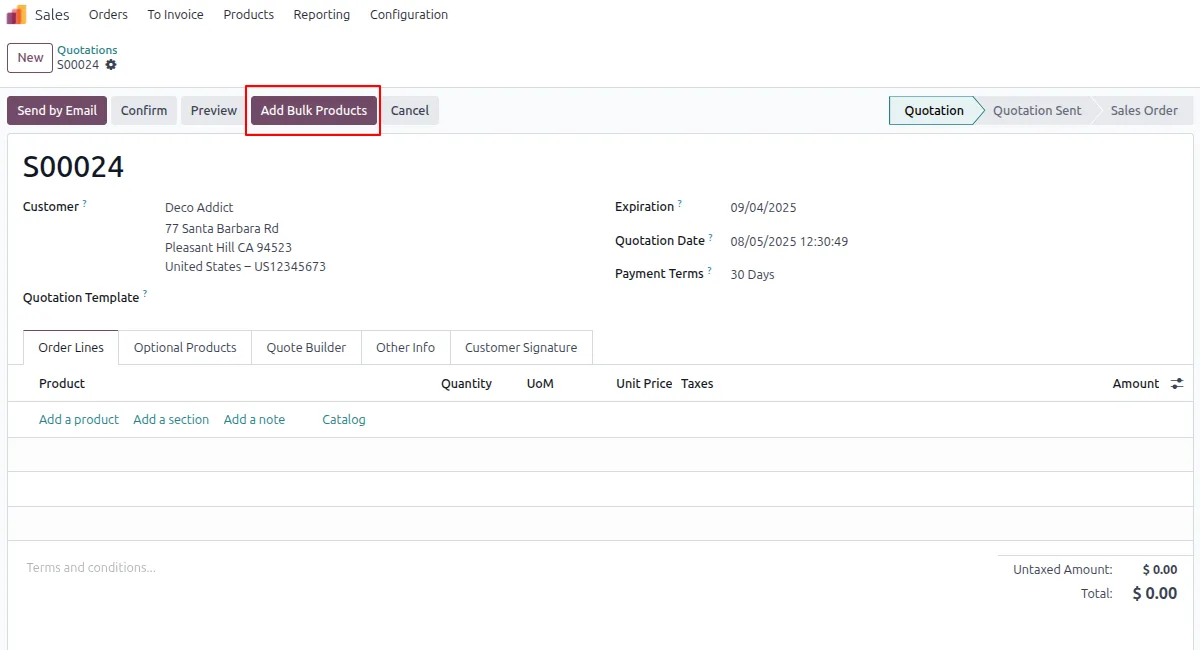
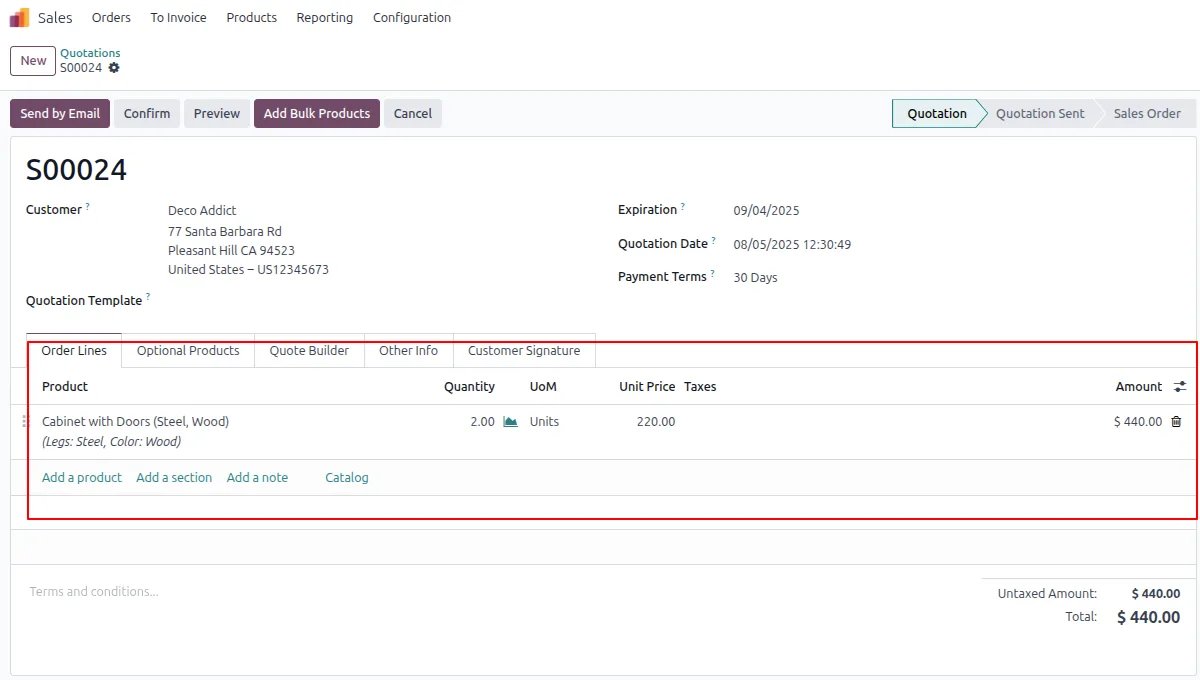
Open a draft Sale Order and click the Add Bulk Products button in the toolbar to open the grid.
- 4
Build the selection
Search products by Model Name, review variant attributes and live stock, enter quantities, and override unit prices where needed.
- 5
Push rows into the quotation
Use the cart icon to send a single row to the Sale Order, or click Add to Sale Order to push every filled row at once.
Frequently asked questions
-
How is this different from Odoo's standard product picker?
The standard picker adds one product per line. Bulk Add Products opens a grid that shows every variant of a product with quantities, prices, and live stock side by side, so a rep can build dozens of lines in one screen instead of repeating the picker.
-
Does it work with pricelists, taxes, and reports?
Yes. Lines are created through Odoo's standard Sale Order line API, so pricelists, taxes, fiscal positions, and standard reports continue to work without changes.
-
Can I search products by SKU or model code?
Yes. Set a unique Model Name on each product and the grid searches by that field — useful when teams quote by internal SKU or manufacturer code instead of the product name.
-
Does it show stock availability before I add a line?
Yes. Every variant displays a live In Stock or Out of Stock indicator in the grid, so reps can avoid quoting items that cannot be fulfilled.
-
Can I override the unit price for individual variants?
Yes. Each row has a per-variant price override that takes effect when the line is pushed into the Sale Order.
-
Which Odoo versions are supported?
The module supports Odoo 16.0, 17.0, 18.0, 19.0, and 20.0, in both the Community and Enterprise editions.
-
Is configuration required?
Install the module and set a Model Name on the products you want to expose in the grid. There is no other configuration step.
Listing verified against the Odoo App Store:
Related solutions
Whole-platform solutions that complement Bulk Add Products to Sale Order.
Odoo Sales
Odoo Sales module — quotations, pricing rules, sales orders, deliveries, returns. CRM-Inventory-Accounting integrated. Quote-to-cash unified.
Odoo CRM
Odoo CRM module — leads, opportunities, kanban pipeline, quotation, forecasting, email integration. Native with ERP. Mid-market alternative to Salesforce.
Related services
Get the most out of this module with senior TechUltra consultants.
Odoo Customization Services
Odoo customization from a Gold Partner: custom modules, workflows, reports and Studio changes, written upgrade-safe and quoted at a fixed scope. Free scoping call.
Hire Odoo Developers
Hire certified Odoo developers from a Gold Partner: one developer or a team, full-time or part-time, 70–160 hours a month. Silver, Gold or Platinum plan, free trial.
Odoo Support Services & Maintenance
Odoo support services from a Gold Partner: functional and technical support plus server cover for Enterprise and Community, 30-minute P1 response, 24/7 option.







