
Odoo App · HR & Attendance
Attendance Face Capture
Capture an employee photo on every Odoo Attendances check-in and check-out.

Overview
Attendance Face Capture adds a live video stream to the Odoo Attendances kiosk and self-service screens, then saves a still image of the employee whenever they check in or out. Every attendance line carries proof of who marked it, so HR and managers can audit attendance without a separate biometric reader.
Built by TechUltra Solutions, the module sits on top of the standard hr_attendance app and works on any device with a webcam — kiosk, laptop, or tablet. It does not gate the check-in: the photo is captured and stored alongside the existing time stamp, employee, and check-in/out direction.
Because the captured image is attached to the attendance form view, supervisors can scroll the standard attendance list and open any record to see the employee's face at that moment. The module supports every Odoo release from 13.0 through 19.0 in both Community and Enterprise editions.
Key features
-
Live video on check-in
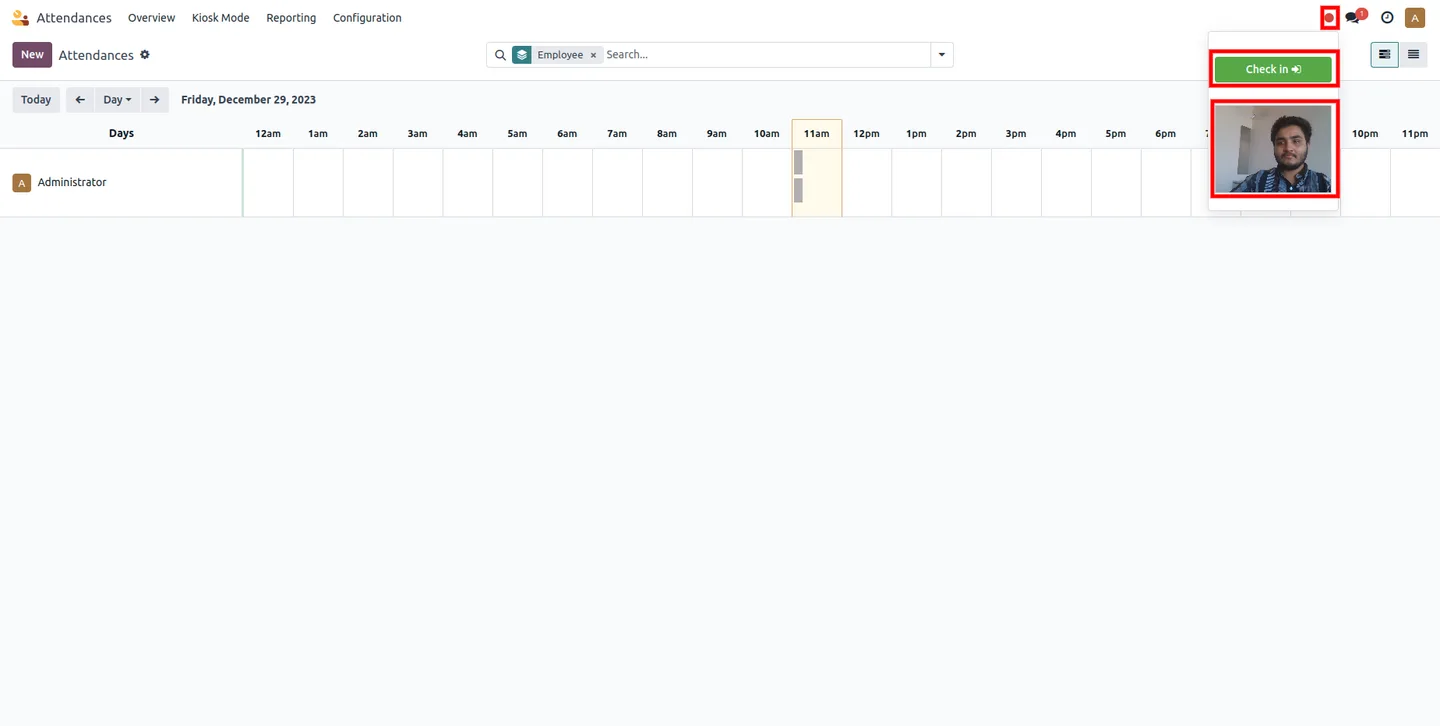
When an employee opens Odoo Attendances to check in, the module activates the device camera and shows a live video stream so they can frame their face before confirming.
-
Live video on check-out
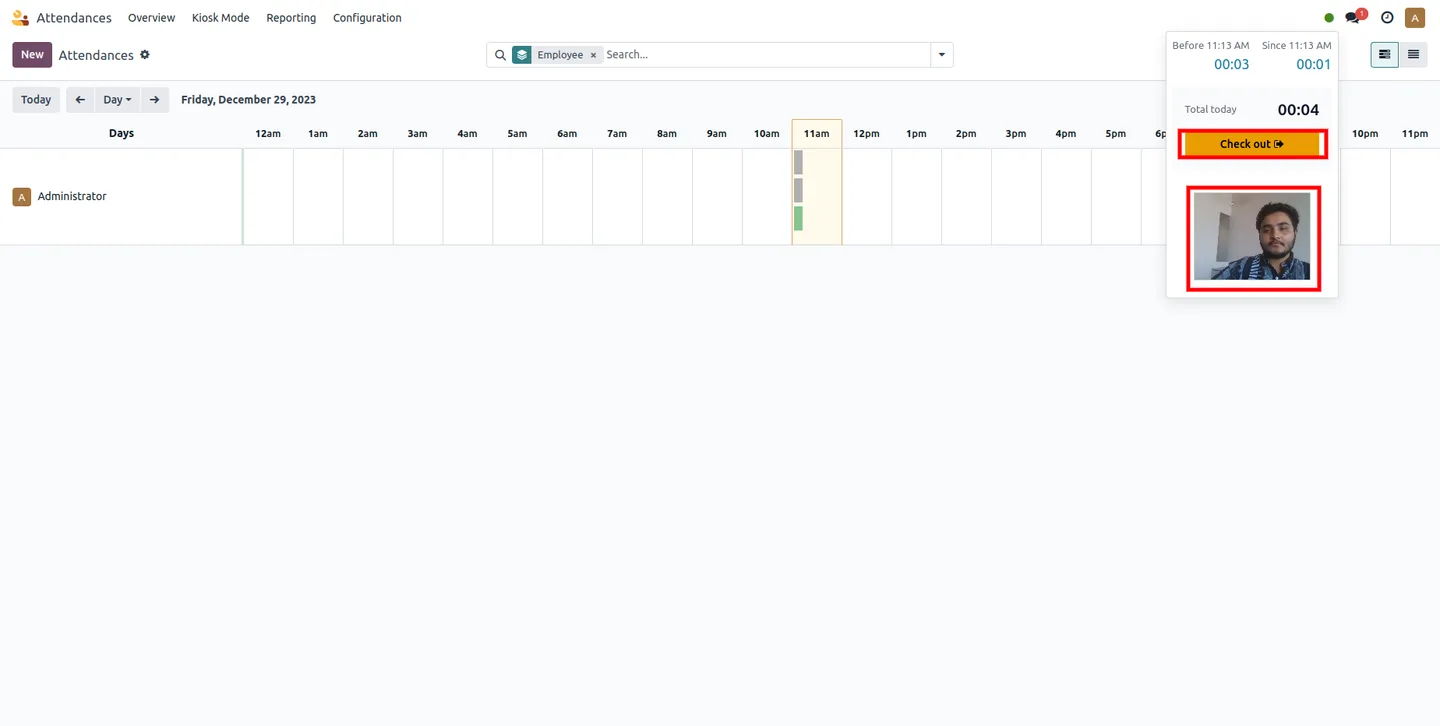
The same live video stream is shown at check-out, capturing a fresh photo of the employee leaving rather than relying on a stale earlier image.
-
Automatic photo storage
A still image is saved against the attendance record on both check-in and check-out, so every line has a captured photo without manual upload.
-
Photos on the attendance form view
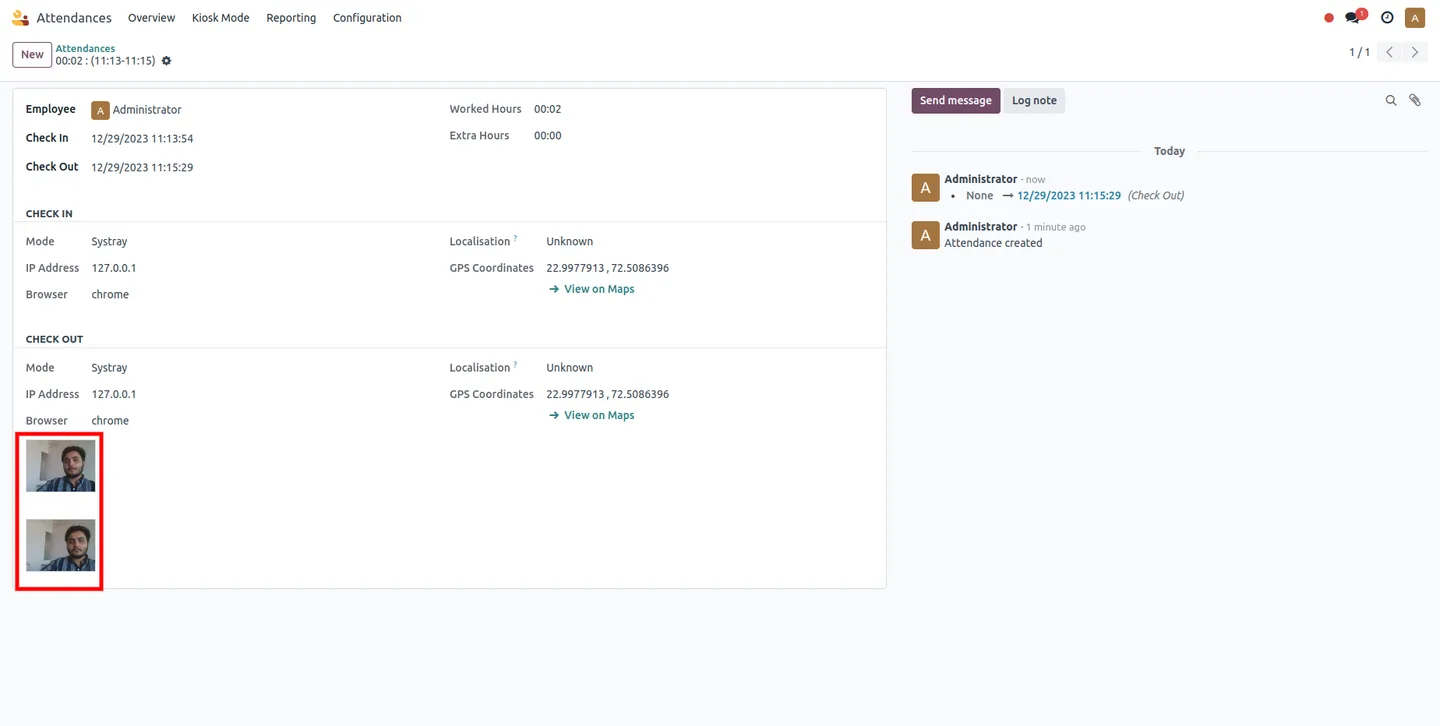
The attendance form view shows the captured check-in and check-out images side by side, giving HR a quick visual audit alongside the time stamps.
-
Works on any webcam-equipped device
Uses the browser's standard media APIs, so it works on the Odoo Attendances kiosk, a shared laptop, or a tablet with a built-in camera — no proprietary hardware needed.
-
Wide Odoo version coverage
Supports every Odoo release from 13.0 to 19.0, so existing deployments on older majors can adopt face capture without a migration first.
-
Sits on top of standard hr_attendance
Extends the official Attendances app rather than replacing it — existing kiosks, modes, and reports keep working, with photos added as an extra column of evidence.
Attendance Face Capture in Odoo
Every screen, in the order you meet it — configuration first, then the module in use.
Technical details
Specification
- Publisher
- TechUltra Solutions Private Limited
- Technical name
- tus_screenshort_by_attendence
- Odoo versions
- 13.0, 14.0, 15.0, 16.0, 17.0, 18.0, 19.0, 20.0
- Lines of code
- 225
- License
- GNU Affero General Public License v3.0 (AGPL-3)
- Price
- $24.90 (one-time)
Deployment
- Odoo Online
- Odoo.sh
- On-premise
Odoo dependencies
- Attendances
- Employees
- Discuss
Support
90 days of bug-fix support, Monday to Friday (10:00–19:00 IST). Raise a ticket at support@techultra.in.
Setup & configuration
From install to first call — here is the path.
- 1
Install the module
In Odoo, open Apps, remove the Apps filter, search for “Attendance Face Capture” (technical name tus_screenshort_by_attendence), and click Install. The Attendances app is installed automatically as a dependency if it is not already present.
- 2
Open the Attendances kiosk on a webcam device
Launch Attendances on the device employees will use to check in — kiosk, shared laptop, or tablet. The browser will request camera access on first use; approve the prompt so the module can capture the photo.
- 3
Have an employee check in
The kiosk now shows a live video preview. The employee frames their face, confirms the check-in, and the module saves the photo against the new attendance line.
- 4
Have an employee check out
On check-out the live preview is shown again and a second photo is captured and attached to the same attendance record.
- 5
Review captured photos
Open Attendances → Attendances, click any line, and the form view shows both the check-in and check-out photos next to the standard time stamps.
Frequently asked questions
-
Does this replace Odoo Attendances or work on top of it?
It works on top of the standard Attendances (hr_attendance) app. All existing kiosks, modes, and reports keep working — the module just adds a live video preview and captures a photo on check-in and check-out.
-
Where are the captured photos stored?
Each photo is attached directly to the attendance record in Odoo, alongside the existing time stamp, employee, and direction. You can see both check-in and check-out images on the attendance form view.
-
Do I need a special biometric device?
No. Any device with a webcam works — kiosk, laptop, or tablet — because the module uses the browser's standard camera APIs.
-
Which Odoo versions are supported?
Odoo 13.0, 14.0, 15.0, 16.0, 17.0, 18.0, 19, and 20.0, in both Community and Enterprise editions.
-
Is this true facial recognition?
No. The module captures and stores a photo — it does not match faces or block check-ins based on identity. It is designed as a low-friction audit trail of who marked each attendance line.
-
What permissions does the browser need?
The browser must be allowed access to the device camera. Employees are prompted on first use; once approved, the live preview shows automatically on every check-in and check-out.
-
Is support included?
Yes. The module includes 90 days of bug-fix support, Monday to Friday, 10:00–19:00 IST. Tickets go to support@techultra.in.
Listing verified against the Odoo App Store:
Related solutions
Whole-platform solutions that complement Attendance Face Capture.
Related services
Get the most out of this module with senior TechUltra consultants.
Odoo Customization Services
Odoo customization from a Gold Partner: custom modules, workflows, reports and Studio changes, written upgrade-safe and quoted at a fixed scope. Free scoping call.
Hire Odoo Developers
Hire certified Odoo developers from a Gold Partner: one developer or a team, full-time or part-time, 70–160 hours a month. Silver, Gold or Platinum plan, free trial.
Odoo Support Services & Maintenance
Odoo support services from a Gold Partner: functional and technical support plus server cover for Enterprise and Community, 30-minute P1 response, 24/7 option.







