
Odoo App · Documents & Files
Attachment ZIP Download
Bundle every attachment on any Odoo record into one ZIP file you can download in a click.

Overview
Attachment ZIP Download solves a small but persistent Odoo annoyance: gathering every file attached to a record — drawings on a sales order, supplier docs on a purchase order, client deliverables on a project task — without downloading them one by one.
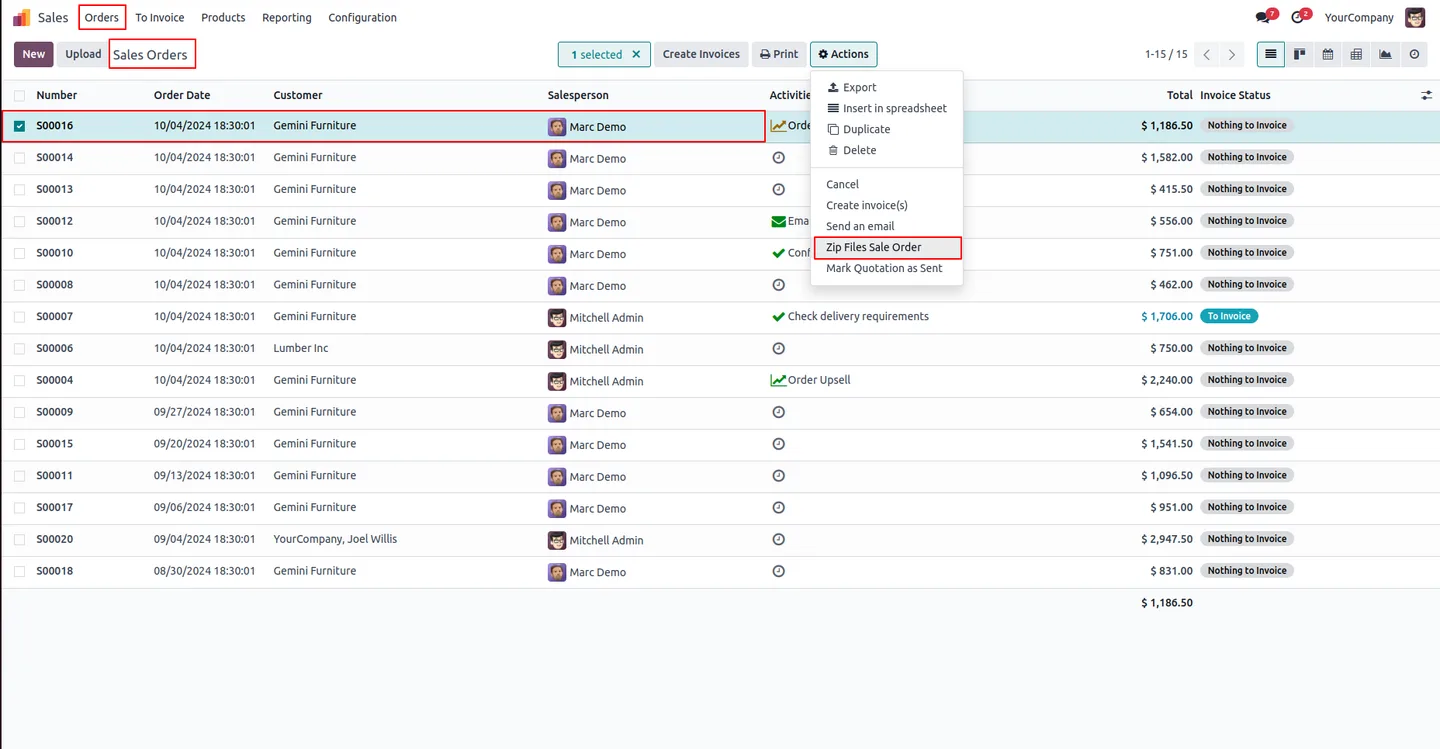
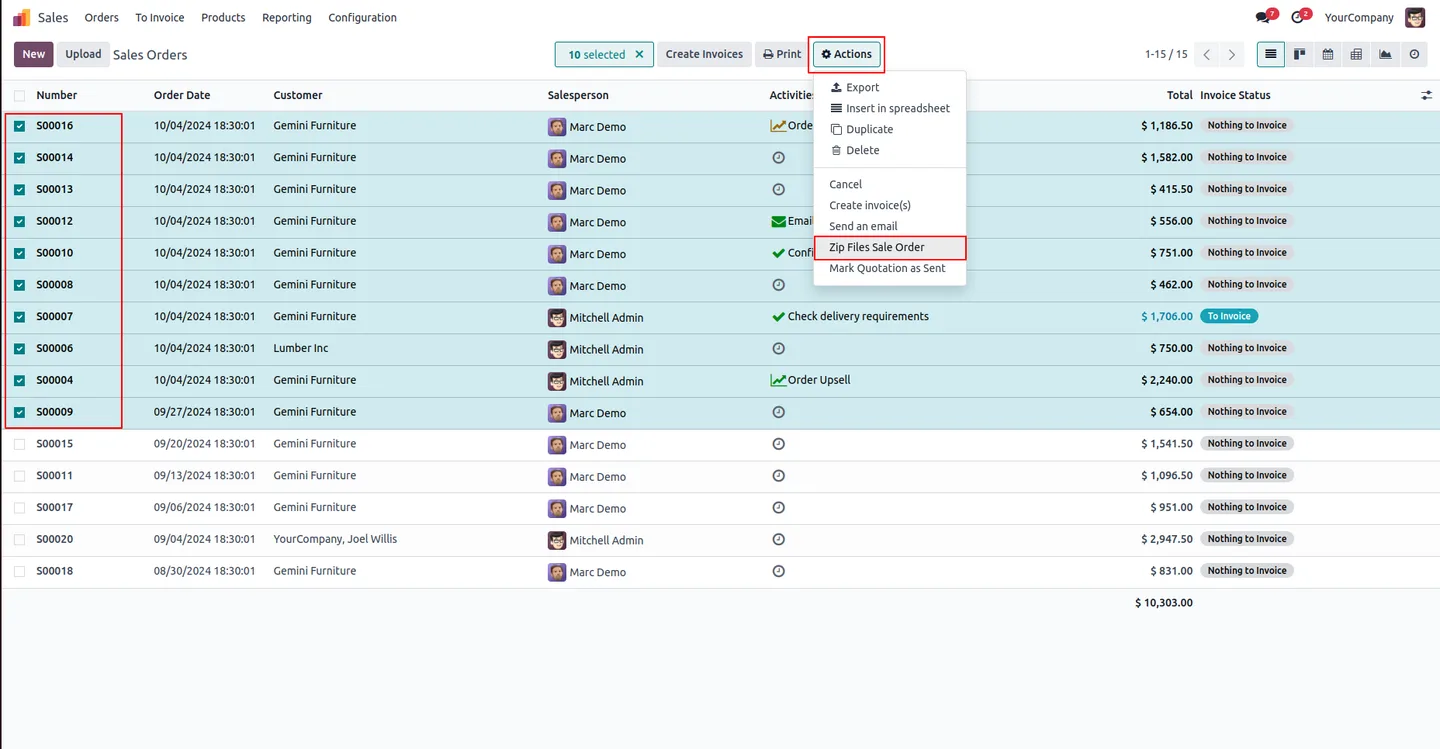
Built by TechUltra Solutions, the module adds a Zip File server-action type that any administrator can attach to any Odoo model. Once configured, a contextual action appears on the target model: pick a record, click the action, and the module compresses every attachment into a single ZIP file and triggers the download in the browser.
It works on standard apps — Sales, Purchase, Projects, Helpdesk, Contacts — and on custom models you have built yourself. If a record has no attachments, the user sees a clean warning instead of an empty file, so the workflow is predictable in every edge case.
Key features
-
Create a ZIP from any record's attachments
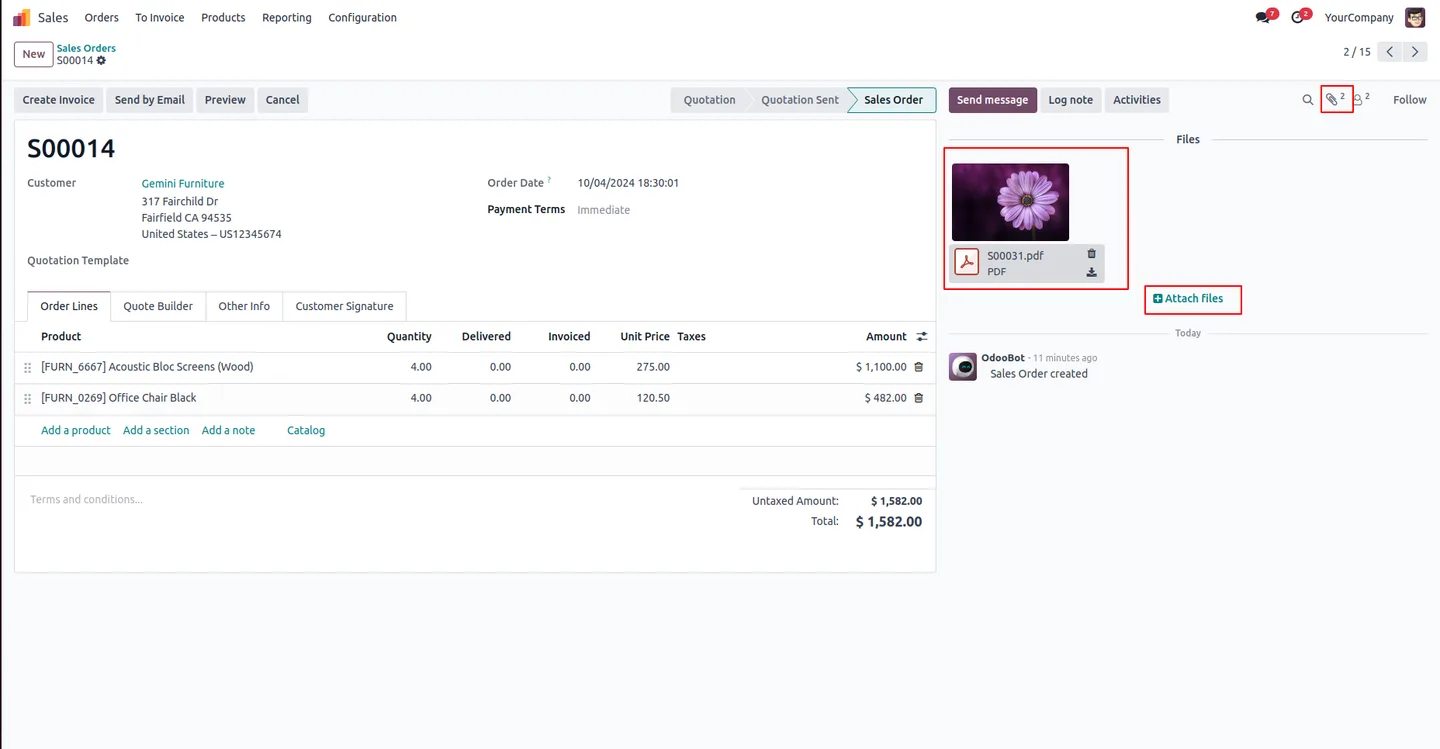
Create a Zip file from the attachments on any Odoo record in one click — drawings, contracts, scans, photos, and exported reports all bundled into a single archive.
-
Works on any Odoo model
Can generate a Zip file from any module if a server action is created for that model — standard apps like Sales, Purchase, Projects and Helpdesk, or custom models built for your business.
-
Broad file-format support
Supports a wide range of file formats, including audio, video, XML, PDF, and images — no restriction on what can be bundled into the archive.
-
Helpful empty-record warning
If you try to zip from an empty record, a warning message will appear — no silent failures and no empty ZIP files cluttering the user's downloads folder.
-
Server-action driven
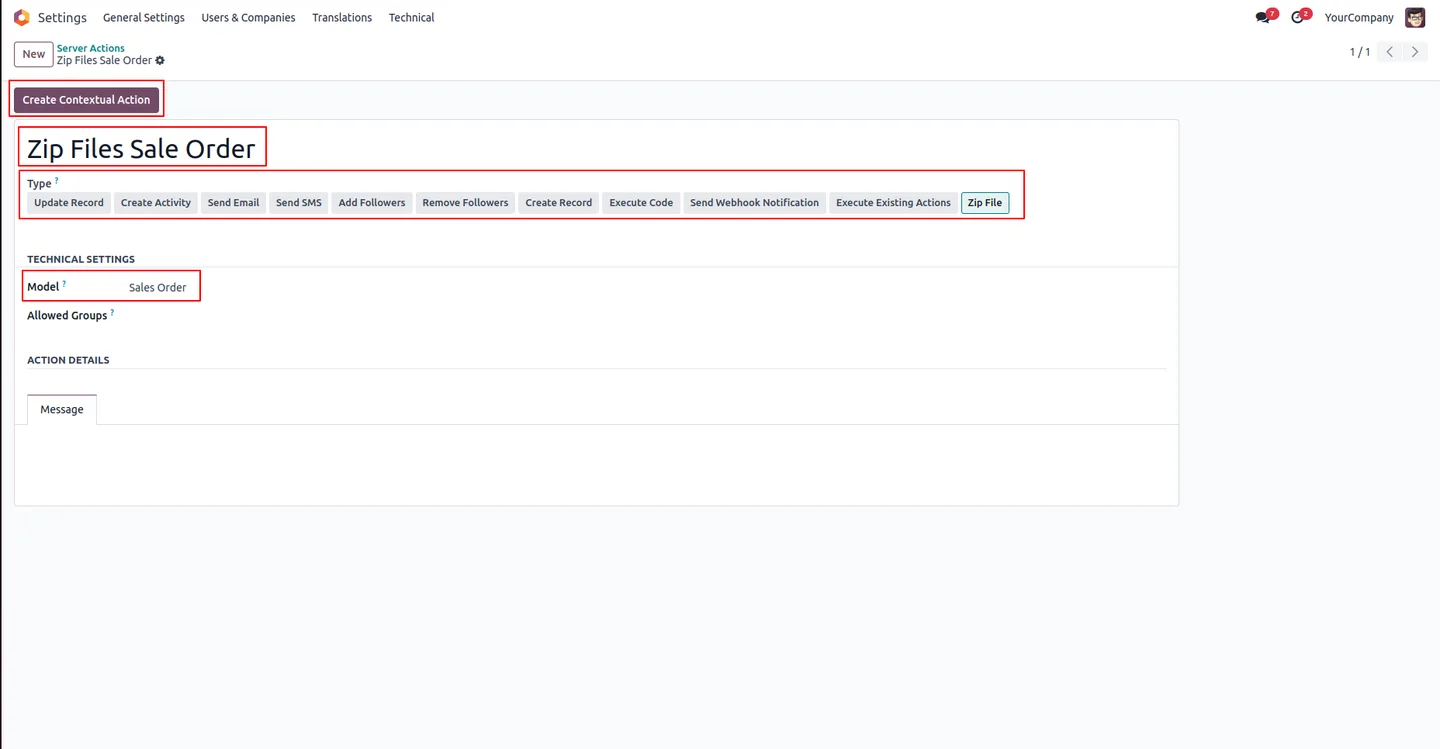
Create the Zip File server action once in Settings → Technical → Server Actions, mark it as a contextual action, and it becomes available across every record of the target model.
-
Automatic browser download
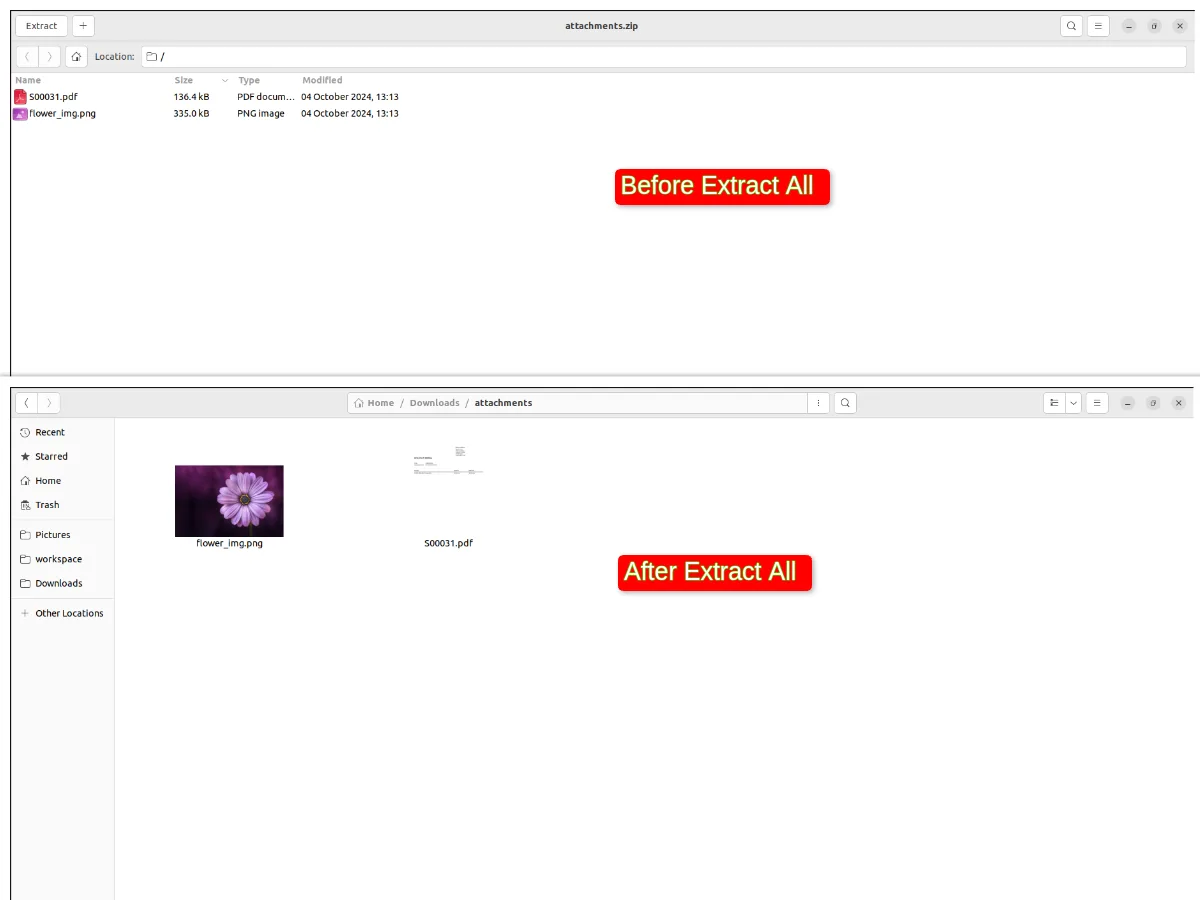
Automatically downloads the ZIP after creation, so the user does not need to navigate to a separate Attachments view or chase the archive through Odoo's file manager.
-
Lightweight by design
Adds the bundling behaviour without changing existing models, views, or business logic — install, configure the server action, and the action is live.
Attachment ZIP Download in Odoo
Every screen, in the order you meet it — configuration first, then the module in use.

Technical details
Specification
- Publisher
- TechUltra Solutions Private Limited
- Technical name
- attachment_zip_download_tus
- Odoo versions
- 16.0, 17.0, 18.0, 19.0, 20.0
- Lines of code
- 104
- License
- Odoo Proprietary License v1.0 (OPL-1)
- Price
- $12.99 (one-time)
Deployment
- Odoo Online
- Odoo.sh
- On-premise
Odoo dependencies
- Discuss
Support
90 days of bug-fix support, Monday to Friday (10:00–19:00 IST). Raise a ticket at support@techultra.in.
Setup & configuration
From install to first call — here is the path.
- 1
Install the module
In Odoo, open Apps, remove the Apps filter, search for “Attachment Zip File Download”, and click Install.
- 2
Enable developer mode
Open Settings → General Settings, scroll to the bottom, and click Activate the developer mode. The Technical menu becomes available.
- 3
Open Server Actions
Navigate to Settings → Technical → Actions → Server Actions to manage the actions installed with the module.
- 4
Create the Zip File server action
Add a server action — set a clear Action Name (for example, “Download Attachments ZIP”), pick the target Model (for example, Sales Order or Project Task), and set the Type to Zip File.
- 5
Make it a contextual action
Click Create Contextual Action so the new action shows up under the Actions menu of the target model. Save the server action.
- 6
Use it on a record
Open any record on the target model that has attachments, choose Actions → Download Attachments ZIP, and Odoo bundles every attachment into a ZIP file and downloads it automatically. Records with no attachments show a warning instead.
Frequently asked questions
-
Which Odoo versions does this module support?
The module supports Odoo 16.0, 17.0, 18.0, 19.0, and 20.0 in both the Community and Enterprise editions.
-
Can I use this on custom models, or only standard Odoo apps?
Both. The module adds a Zip File server-action type that can be attached to any Odoo model — standard apps such as Sales, Purchase, Projects, and Helpdesk, or fully custom models built for your business.
-
What file formats are supported?
The module supports a wide range of formats, including audio, video, XML, PDF, and images. Any file Odoo can store as an attachment can be bundled into the archive.
-
What happens if a record has no attachments?
The module shows a warning message instead of generating an empty ZIP. The user gets clear feedback and no junk download lands in the browser.
-
Do I need developer mode to use it?
You need developer mode to create the underlying server action once, but end users do not — once the contextual action is configured, it appears for everyone with access to the target model.
-
Does the download happen automatically?
Yes. After the action runs, the ZIP is created and the browser starts the download automatically, so there is no separate Attachments view to navigate to.
-
Can I configure multiple Zip File actions on different models?
Yes. Create one server action per model — Sales Order, Project Task, Helpdesk Ticket, and so on — and each one appears as a contextual action on its own model.
-
Is support included with the purchase?
Yes. The module includes 90 days of bug-fix support, Monday to Friday, 10:00–19:00 IST. Raise a ticket at support@techultra.in.
Listing verified against the Odoo App Store:
Related solutions
Whole-platform solutions that complement Attachment ZIP Download.
Related services
Get the most out of this module with senior TechUltra consultants.
Odoo Customization Services
Odoo customization from a Gold Partner: custom modules, workflows, reports and Studio changes, written upgrade-safe and quoted at a fixed scope. Free scoping call.
Hire Odoo Developers
Hire certified Odoo developers from a Gold Partner: one developer or a team, full-time or part-time, 70–160 hours a month. Silver, Gold or Platinum plan, free trial.
Odoo Support Services & Maintenance
Odoo support services from a Gold Partner: functional and technical support plus server cover for Enterprise and Community, 30-minute P1 response, 24/7 option.







