

Odoo App · CRM & Sales
Assign Salesperson
Bulk-assign or reassign salespersons to many CRM leads in a single wizard.
Overview
Assign Salesperson streamlines CRM operations by adding a bulk assignment wizard to the standard Odoo lead pipeline. Sales managers select any number of leads from the list view, run the wizard, choose a salesperson, and the change is applied in a single step — replacing the slow, lead-by-lead workflow that standard Odoo forces.
Built by TechUltra Solutions, the module is built for businesses that distribute high lead volumes across large sales teams. Round-robin redistribution after a hire or departure, territory rebalancing, and reassignment after a campaign import all become a few clicks instead of an afternoon of clicking.
The module is lightweight and easy to install — it adds a single wizard to the CRM module and ships with broad Odoo version support, from Odoo 10 through Odoo 19, in both Community and Enterprise editions.
Key features
-
Bulk salesperson assignment
Assign or reassign a salesperson to many CRM leads in a single action — select the leads from the list and run the wizard once.
-
Wizard integrated in CRM
The bulk assignment action lives inside the standard Odoo CRM module, so users keep working in the familiar pipeline and list views.
-
Productivity boost for sales ops
Replaces the manual workflow of opening each lead, changing the salesperson field, and saving — a multi-hour task becomes a few clicks.
-
Accurate ownership tracking
Ensures every lead has the correct salesperson assigned, so commission calculations, activity reports, and pipeline reviews reflect real responsibility.
-
Broad Odoo version support
Supports Odoo 10.0, 11.0, 12.0, 13.0, 14.0, 16.0, 17.0, 18.0, and 19.0 — useful for businesses still standardising on older versions.
-
Lightweight install
The module is small and focused — install, refresh the CRM module, and the bulk action is available immediately.
-
Works with standard CRM rules
Reassignments respect Odoo's standard CRM access rules and stage-based automations, so existing pipeline behaviour stays intact.
Assign Salesperson in Odoo
Every screen, in the order you meet it — configuration first, then the module in use.
Technical details
Specification
- Publisher
- TechUltra Solutions Private Limited
- Technical name
- assign_salesperson
- Odoo versions
- 10.0, 11.0, 12.0, 13.0, 14.0, 16.0, 17.0, 18.0, 19.0
- Lines of code
- 145
- License
- Odoo Proprietary License v1.0 (OPL-1)
- Price
- Free
Deployment
- Odoo Online
- Odoo.sh
- On-premise
Odoo dependencies
- CRM
- Calendar
- Contacts
- Discuss
Support
90 days of bug-fix support, Monday to Friday (10:00–19:00 IST). Raise a ticket at support@techultra.in.
Setup & configuration
From install to first call — here is the path.
- 1
Install the module
In Odoo, open Apps, remove the Apps filter, search for “Assign Salesperson”, and click Install.
- 2
Open the CRM lead list
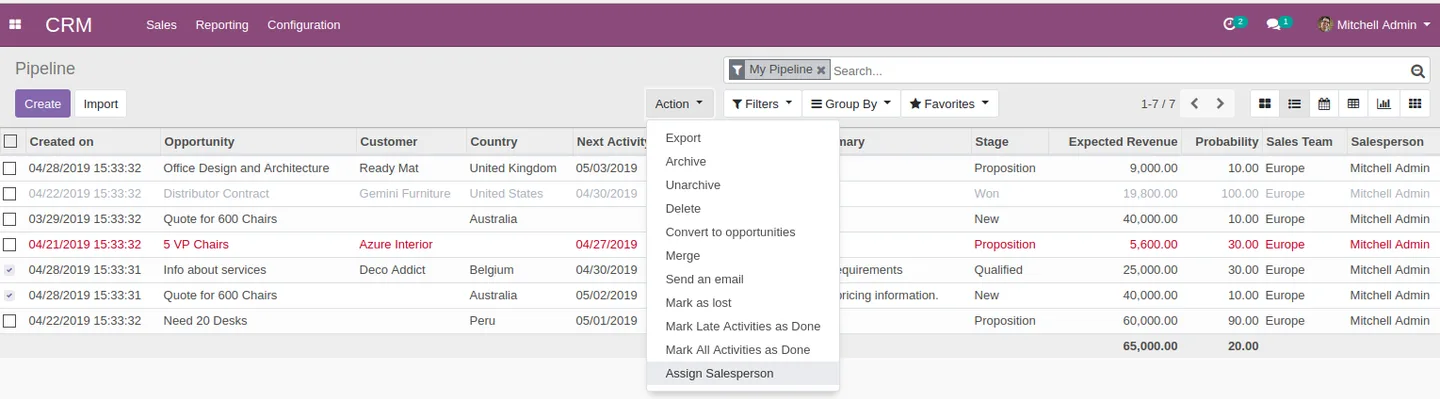
Go to CRM → Leads and switch to the list view so you can select multiple leads at once.
- 3
Select the leads to reassign
Use the row checkboxes or the header checkbox to select every lead that should be reassigned — filters can help narrow the list to a campaign, territory, or stage first.
- 4
Run the assignment action
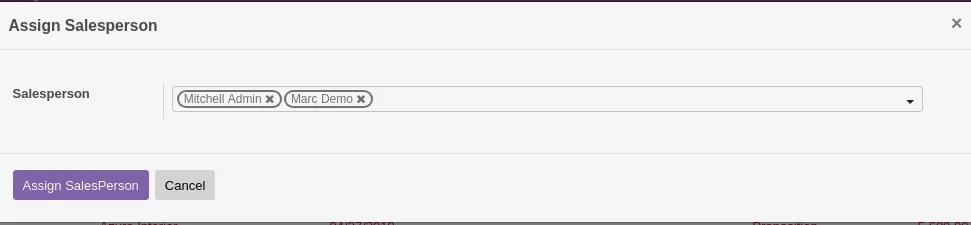
From the Action menu, choose the Assign Salesperson option to open the wizard.
- 5
Pick the salesperson and confirm
Select the target salesperson, confirm, and the wizard applies the change to every selected lead in a single step.
Frequently asked questions
-
Which records can I reassign in bulk?
The module is built for CRM leads. Filter or select the leads you want to reassign from the standard CRM list and apply the wizard in one action.
-
How many leads can I update in a single run?
There is no hard limit beyond standard Odoo selection limits — typical users update hundreds of leads at once after a territory rebalance or a sales hire.
-
Does it work with Odoo 19?
Yes. The module supports Odoo 19.0, and also Odoo 10 through 18, in both Community and Enterprise editions.
-
Will reassignment trigger CRM automations?
Yes. Because the wizard updates the standard salesperson field, any Odoo automation that listens to changes on that field continues to fire as it normally would.
-
Can I undo a bulk reassignment?
Re-run the wizard with the original salesperson selected on the same lead list. The module rewrites the field, so reverting is a second bulk action.
-
Is the module really free?
Yes. Assign Salesperson is published as Free on the Odoo App Store and ships with the OPL-1 license.
-
Will I see the wizard everywhere or only in CRM?
The bulk action is added to the CRM lead view where it belongs — it does not appear on unrelated models such as sales orders or contacts.
-
Is support included?
Yes. The module includes 90 days of bug-fix support, Monday to Friday, 10:00–19:00 IST.
Listing verified against the Odoo App Store:
Related solutions
Whole-platform solutions that complement Assign Salesperson.
Odoo CRM
Odoo CRM module — leads, opportunities, kanban pipeline, quotation, forecasting, email integration. Native with ERP. Mid-market alternative to Salesforce.
Odoo Sales
Odoo Sales module — quotations, pricing rules, sales orders, deliveries, returns. CRM-Inventory-Accounting integrated. Quote-to-cash unified.
Related services
Get the most out of this module with senior TechUltra consultants.
Odoo Customization Services
Odoo customization from a Gold Partner: custom modules, workflows, reports and Studio changes, written upgrade-safe and quoted at a fixed scope. Free scoping call.
Hire Odoo Developers
Hire certified Odoo developers from a Gold Partner: one developer or a team, full-time or part-time, 70–160 hours a month. Silver, Gold or Platinum plan, free trial.
Odoo Support Services & Maintenance
Odoo support services from a Gold Partner: functional and technical support plus server cover for Enterprise and Community, 30-minute P1 response, 24/7 option.







