
Odoo 20: why the features outrun the price
Odoo 20 bundles agentic AI, a no-code studio, twenty-five applications and a deployment choice into one subscription. Here is what that stack would cost you anywhere else — and why most teams pay less, not more.
Odoo 20 was presented in the opening keynote at Odoo Experience in Brussels on 24 September 2026, and reaches general availability in mid-October.
The conversation since has been about price. It is the wrong conversation, and it is the one every vendor with a thinner product would prefer you have.
Here is the question that actually decides an ERP: what do you get in one subscription, and what would the same capability cost you assembled from anywhere else? On that question Odoo 20 is not close, and the version makes the gap wider.
What one Odoo subscription carries
Four things, together, on one database:
Roughly twenty-five applications. CRM, marketing, e-commerce, helpdesk, HR, manufacturing, inventory, point of sale, field service, accounting, project — not a core ERP with a catalogue of paid extensions around it.
Odoo Studio. A no-code builder your own team uses to change screens, fields and workflows. Most ERP customisation is a purchase order to a partner. This is a Tuesday afternoon.
Agentic AI, built in. Not a premium tier. In version 20 it runs inside the applications you already licensed.
A deployment choice. Odoo Online, Odoo.sh, or your own servers. You are not locked to one company’s data centre, and you can move later.
What you get included, and what you buy again
Every capability below ships inside a single Odoo subscription, on one database. The notes and timings come from our own published comparisons, each linked in the section underneath.
| Capability | Odoo 20 | SAP Business One | NetSuite | D365 Business Central |
|---|---|---|---|---|
| Full CRM | Included | Light; usually paired with Salesforce or HubSpot | Separate licence tier | Needs D365 Sales — separate licence |
| Marketing automation | Included | Third-party | À la carte | Needs D365 Marketing — separate licence |
| E-commerce | Included, same database | Add-on — Shopify, Magento or a connector | SuiteCommerce — separate licence | Needs D365 Commerce — separate licence |
| No-code customisation | Odoo Studio, included | SDK route; partner-locked | SuiteScript — developer work | AL in VS Code — developer work |
| Run it on your own servers | Odoo Online, Odoo.sh or self-hosted | On-premise or SAP-hosted | Oracle-hosted SaaS only | Cloud or on-premise; cloud prioritised |
Typical mid-market implementation
- Odoo
- 12–20 weeks
- SAP Business One
- 16–28 weeks
- NetSuite
- 20–32 weeks
Source: our own comparison research, published in full at /compare. Implementation ranges are mid-market scope on both sides.
What the same stack costs elsewhere
From our own comparison research, published in full on this site:
- Dynamics 365 Business Central — CRM is light. Full CRM means D365 Sales, a separate licence. Marketing means D365 Marketing, another one. Our Odoo vs Business Central comparison scores Odoo 9 against 5 on CRM and marketing for exactly this reason: the total cost compounds with each app you bolt on.
- SAP Business One — focuses on core ERP. CRM is light, marketing is third-party, e-commerce needs add-ons. We score Odoo 9 against 6 on functional coverage out of the box, and 9 against 6 on customisation flexibility, where SAP’s SDK route is both less flexible and partner-locked. See Odoo vs SAP Business One.
- NetSuite — a capable suite, and a slower one. Implementation runs 20–32 weeks against Odoo’s 12–20, and there is no on-premise option at all. See Odoo vs NetSuite.
- Zoho — cheaper per app and thinner per app. We score Odoo 9 against 5 on ERP depth and 9 against 5 on manufacturing and inventory. Most growing businesses end up running eight to fifteen Zoho apps, each its own database, with sync delays between them. See Odoo vs Zoho.
The pattern is the same every time. You can buy the pieces. You cannot buy them already joined. Every alternative route ends with more than one licence, more than one database, and an integration bill that never appears on the comparison sheet.
What version 20 adds on top
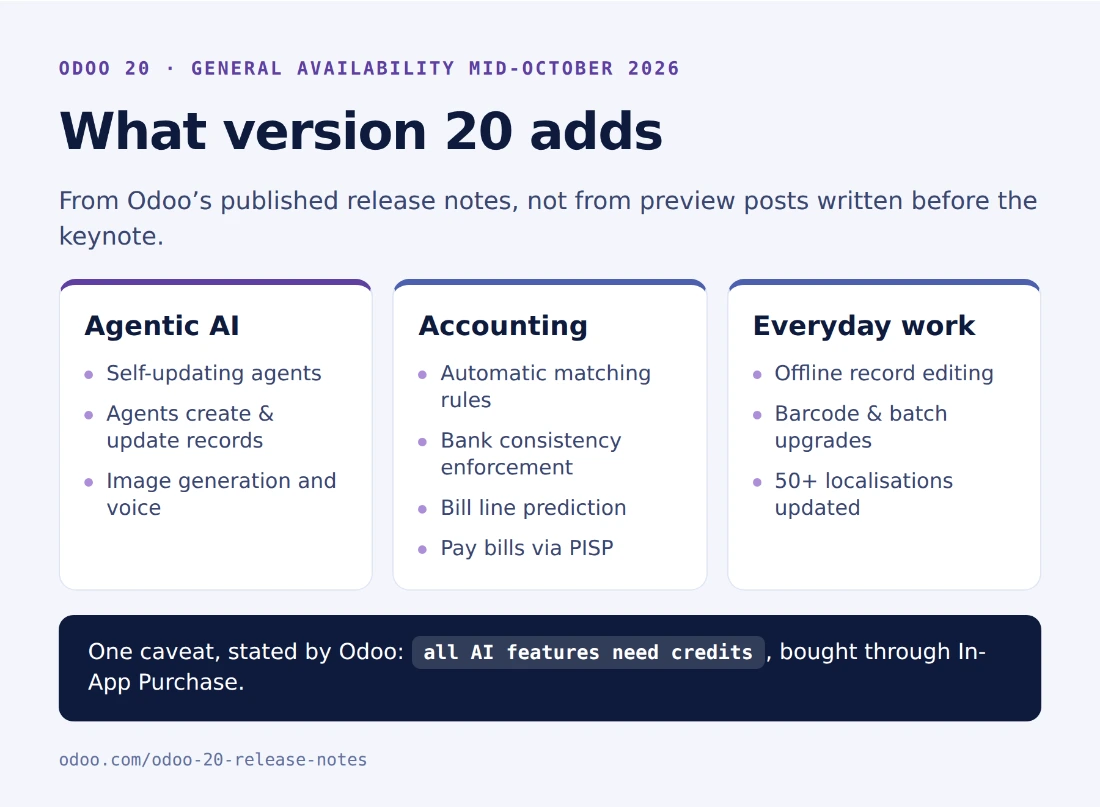
From Odoo’s published release notes rather than from preview posts written before the keynote.
AI that does the work instead of describing it
Odoo 20 ships agentic automation with self-updating agents — agents that create and update records, filter by time period, answer through interactive buttons, generate images and handle voice.
Paired with the accounting work below, this is the difference between a person matching bank lines and a person reviewing exceptions.
The accounting release finance teams have been asking for
The quietest part of version 20 and, for most mid-market finance functions, the most valuable:
- Matching rules that reconcile bills and invoices automatically
- Bank consistency enforcement — every entry originates from a bank transaction
- Bill line prediction learned from your own history and labels
- PISP, so bills are paid directly from Odoo
- Manual reconciliation on any account, parent accounts replacing account groups, auditable translation adjustments
If month-end is your constraint, this cluster alone is worth the upgrade.
And the everyday things
Offline mode for creating and editing records — real for field service and anyone working where signal is not guaranteed. Tax-included and tax-excluded switching directly on orders. Chatter with CC recipients and filtering. Bulk attachment downloads. Gantt and calendar drag-and-drop.
Plus localisation updates across more than 50 countries — India, Brazil, Mexico, Saudi Arabia, Egypt, France and Argentina among them. If you are paying for a partner module to stay compliant today, check whether version 20 absorbs it. That is a line-item saving no feature comparison shows you.
Now the price — and why it usually lands in your favour
Odoo 20 introduces Light User as a dedicated licence type at US$8.90 per user per month, and it is the most consequential change in the release.
Most ERP deployments bill two very different populations identically: the finance, sales and operations staff who live in the system, and the much larger group who touch four screens — clock in, book leave, file an expense, scan a barcode. A Light User gets self-onboarding, time off, attendance, expenses, appraisals and the employee directory, plus point of sale, barcode scanning, shop-floor operations, shift planning and field service.
At the rate Odoo listed on 25 September 2026 for annual billing at the standard post-discount rate, a fifty-person deployment looks like this:
Where a 50-person licence bill actually goes
Most ERP deployments bill two very different populations identically. Odoo 20 stops doing that.
- 30 full users
- Finance, sales and operations — the people who live in the system. $31.10 per user per month.
- 20 Light Users
- Clock in, book leave, file an expense, scan a barcode, work a shop-floor or field-service screen. $8.90 per user per month.
- Everyone on a full licence
- $18,660 /year
- Mixed workforce, 30 + 20
- $13,332 /year
- You stop paying
- $5,328 /year · 29%
Odoo Standard, annual billing at the standard post-discount rate, read from odoo.com/pricing on 25 September 2026. Licence cost only — implementation and AI credits are separate, and rates vary by region.
A 29% reduction, from a licensing change, before a single feature is counted. For a great many businesses that is larger than the list-price increase — which means their Odoo bill goes down in version 20 while the capability goes up.
One thing to check before you compare quotes
Odoo’s pricing page shows four numbers per plan, not one. Billing period moves it about 25%; the first-year discount takes roughly 20% off for twelve months, on initial users only. Cheapest to dearest is a 56% spread on the same plan.
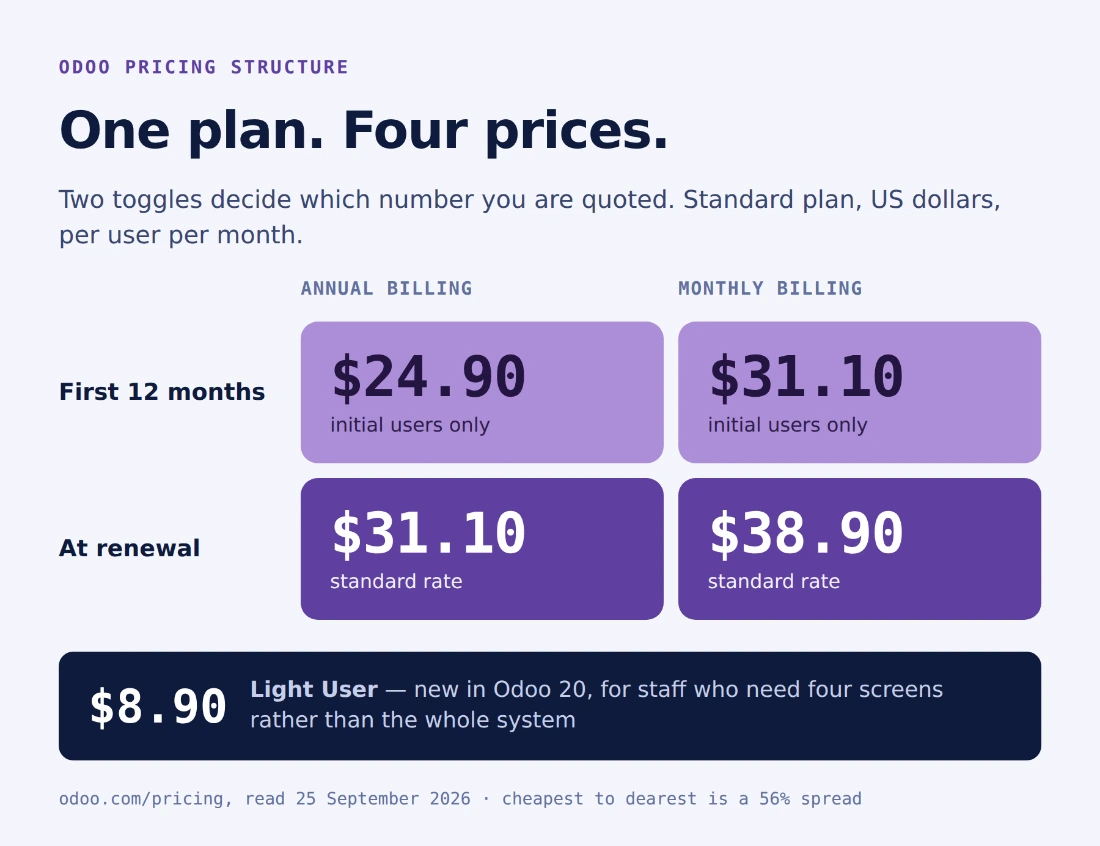
Two honest partners can quote the same product and look unrelated. Ask which of the four you are reading — of us as much as anyone else.
Two things to plan for
We would rather you hear these from us than discover them at renewal.
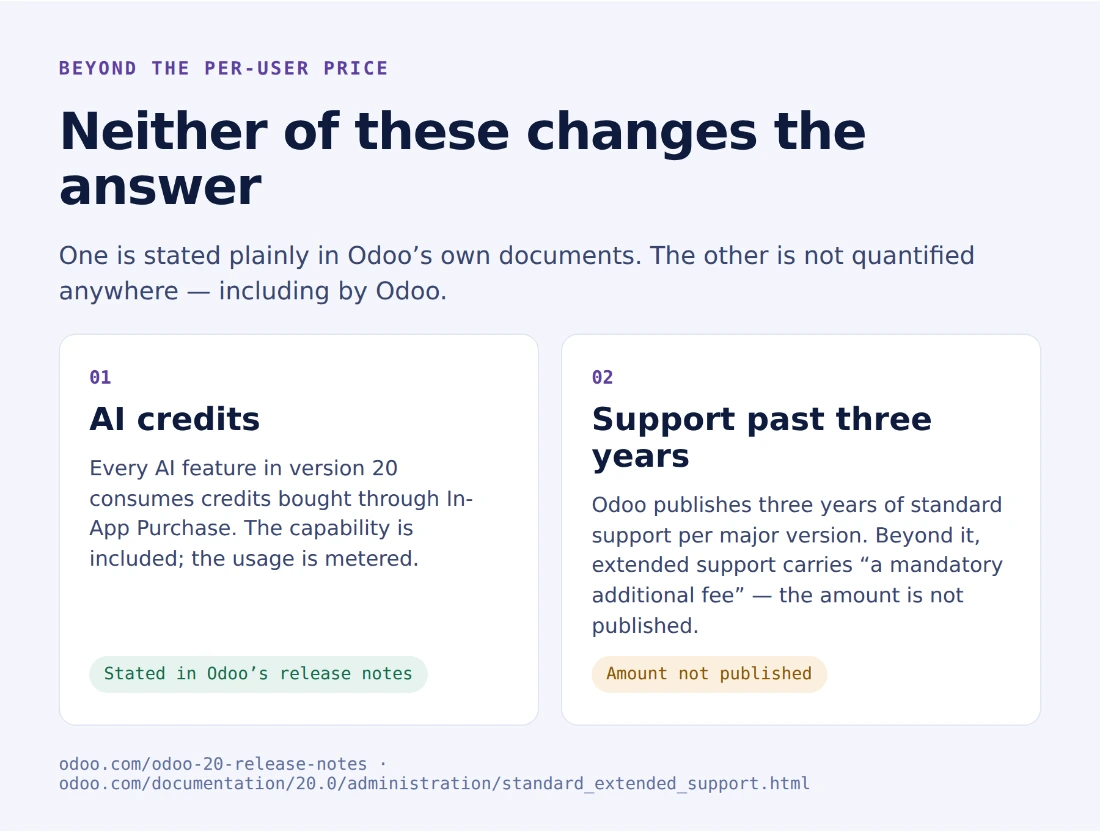
AI credits. Odoo’s release notes state that AI features consume credits bought through In-App Purchase. The capability is included; the usage is metered. Ask for an estimate against your real document volumes, not a per-user rule of thumb.
Support past three years. Odoo publishes three years of standard support per major version. Beyond that, its documentation describes extended support as carrying “a mandatory additional fee” without publishing the amount. Partner write-ups during 2026 reported a legacy-version surcharge around 25%; we have not found that figure in Odoo’s own terms, so get yours in writing.
Neither changes the conclusion. Both belong in your model.
Who this is for
Move, and move now, if:
- You have a mixed workforce. The Light User tier re-prices you downward and the maths is not close.
- Month-end is your bottleneck. The accounting cluster is substantive and does not meter.
- You are running four or five systems that do not talk to each other. One database is the whole point.
- You operate in one of the 50-plus localisations receiving work and pay for a partner module today.
- You want AI in your ERP this year rather than on a roadmap.
Don’t, if:
- You are a two-thousand-person group with fifteen subsidiaries and dual-GAAP consolidation. SAP or NetSuite are the safer answer and we will tell you so rather than sell you the wrong thing.
- You are stable on Odoo 18 or 19 with no mixed workforce to re-price and nothing above is decisive. Wait for 20.1.
What to do next
- Count your two populations. How many people need the whole system, and how many need four screens? That number moves your bill more than the version does.
- Price the alternative honestly. Not the headline licence — the licences, plural, plus the integration work, plus the implementation weeks.
- Scope on 20 now. General availability is mid-October. Discovery and blueprint run ahead of configuration anyway, so starting now lands you on the current version rather than one you will upgrade off.
We are an Odoo Gold Partner and we will run the count with you on your real user list, including the case where the answer is that you should stay where you are. Book a consultation, see the published cost bands, or read the full comparisons first.
Sources
Primary sources where one exists. Where only partner reporting exists, the text says so.
- Odoo 20 release notes — feature list, general availability, the AI credits statement.
- Odoo pricing — plan structure, first-year discount footnote, Light User rate, plan inclusions. Read 25 September 2026.
- Odoo standard and extended support — three-year support window.
- Odoo Experience 2026 — dates and keynote.
- Odoo’s public demo — version confirmed first-hand on 25 September 2026: the server reported
20.0+e(Odoo 20.0 Enterprise). - Competitor scoring is our own published research: SAP B1, NetSuite, Business Central, Zoho.
Frequently asked questions
-
What does Odoo 20 include that other ERPs charge extra for?
Four things in one subscription. Roughly twenty-five applications on a single database, including CRM, marketing, e-commerce, helpdesk, HR, manufacturing, point of sale and field service. The Odoo Studio no-code builder, so your team changes screens and workflows without a developer. Agentic AI built into the applications rather than sold as an enterprise add-on. And a genuine deployment choice — Odoo Online, Odoo.sh or your own servers. Dynamics 365 Business Central needs D365 Sales for full CRM and D365 Marketing for marketing, each a separate licence. SAP Business One keeps CRM light and leaves e-commerce to add-ons. NetSuite has no on-premise option at all.
-
Is Odoo 20 actually cheaper, given the price rise?
For most mixed workforces, yes. Odoo 20 introduces Light User as a real licence type at US$8.90 per user per month, covering staff who need time off, expenses, attendance, a barcode scanner, a shop-floor screen or field-service work rather than the whole system. On a fifty-person deployment with twenty such staff, that is US$5,328 a year less than licensing everyone fully — larger, for many businesses, than the list-price increase itself. Count your two populations before you accept anyone's quote, including ours.
-
Can I deploy Odoo 20 today?
You can try it today; you cannot go live on it yet. Odoo's public demo at demo.odoo.com is already serving version 20 — we queried the server on 25 September 2026 and it reported 20.0+e, meaning Odoo 20.0 Enterprise — so you can open a sample database and use the product now, with no signup. General availability for production is mid-October 2026 per Odoo's release notes. If you are starting an implementation, you scope on 20 and go live on it, which is the right sequencing anyway: discovery and blueprint run several weeks before any configuration happens.
-
What is agentic AI in Odoo 20, in practical terms?
AI stops being something you open and becomes something that runs. Odoo 20 ships self-updating agents that create and update records, filter by time period, respond interactively through buttons, generate images and handle voice. In accounting that pairs with automatic matching rules, bank-consistency enforcement and bill-line prediction from your own history, so reconciliation moves from a person matching lines to a person reviewing exceptions. One caveat worth budgeting for: Odoo's release notes state that AI features consume credits bought through In-App Purchase, so the capability is included but the usage is metered.
-
Why does the price on Odoo's pricing page keep changing when I look at it?
Two toggles move it. Billing period — monthly costs roughly 25% more per user than annual. And the first-year discount, which takes about 20% off for twelve months and applies only to the initial users ordered. So one plan has four prices, and the gap between cheapest and dearest is over 50%. Establish which of the four you are being quoted before you compare partners, because two honest quotes can look unrelated.
-
What should we budget for beyond the per-user price?
Two things. AI credits, because Odoo's release notes state all AI features consume In-App Purchase credits — ask for an estimate against your real document volumes rather than a per-user rule of thumb. And support beyond three years: Odoo publishes three years of standard support per major version, after which its documentation describes extended support as carrying a mandatory additional fee without publishing the amount. Partner write-ups during 2026 reported a legacy-version surcharge around 25%, which we have not found in Odoo's own terms, so get your figure in writing at renewal.
-
Who should not move to Odoo 20?
We would rather tell you now than three months in. If you are a two-thousand-person group with fifteen subsidiaries and dual-GAAP consolidation, SAP or NetSuite remain the safer answer and we will say so. If you are stable on Odoo 18 or 19, nothing in version 20 is decisive for you, and you have no mixed workforce to re-price, wait for 20.1 — typically four to six months after general availability. Everyone else should be running the numbers.
Related services & solutions
Put this into practice with TechUltra's senior Odoo consultants.
Odoo Implementation Services — Custom-Scope, Discovery-Led
Custom-scope Odoo implementation: paid discovery week, fixed-price delivery, 92% on-time (2024). Gold Partner, 400+ implementations. Book a scoping call.
Odoo Consulting Services
Odoo Gold Partner consulting — Odoo since 2016, 400+ implementations, certified consultants in India, the UK, Peru, South Africa and Italy. Free first call.
What is Odoo?
Editions, app catalogue, who uses it, and how it compares.
Odoo pricing
License, implementation, and support costs — with 3-year TCO.