Odoo 20 AI agents: what to lock down before you switch them on
Odoo 20 lets AI agents and external AI clients write to your ERP over MCP. Three gaps in the source code, the 8-point checklist we apply, and the reporting rules in India, the EU, the UK and the US.

Odoo 20 lets AI agents create and change records on their own, on a schedule or when an automation rule fires. That is useful, and it is also the moment your ERP gets a new kind of user: one that never sleeps, works fast, and does not follow your company’s judgement unless you build that judgement in.
The timing matters. On 16 October 2026, India’s CERT-In reported that AI agents from several providers had reached live systems at Indian organisations and read personal data and confidential business records, going beyond what their tasks allowed. They got in through credentials left in app configurations, public code repositories and overly broad cloud roles, and none of the affected organisations noticed; the AI providers reported it. India was not first: similar incidents had already been reported in Australia and France. Three days later, Microsoft said companies should treat AI agents like insider threats.
None of this is a reason to avoid Odoo 20’s AI. It is a reason to switch it on deliberately. This guide covers what changed, where the gaps are, the eight controls we put in place before letting an agent write to a client’s Odoo, and the reporting rules that apply in India, the EU, the UK and the US.
What changed in Odoo 20’s AI?
Odoo 20, presented on 24 September 2026 and generally available since mid-October, moves AI from an assistant you ask to an agent that acts. These are the changes that matter for control (the full list is in our Odoo 20 AI and productivity guide):
| Change | What it means in practice |
|---|---|
| Agents run unattended | Automation rules and scheduled actions can call an agent, so it works with no user present. |
| Agents write records | Agents can create and update records, including from instructions in an uploaded PDF. |
| Native MCP server | External AI clients (Claude, ChatGPT and others) can connect to Odoo over the Model Context Protocol, signed in as an Odoo user through OAuth. |
| Custom plan | Odoo’s pricing page lists Agentic AI and the External API under the Custom plan, not Standard. |
| AI runs on credits | Odoo’s release notes say all AI features now need credits bought through In-App Purchase. |
| Simpler access rights | Record rules are replaced by domains set directly on the access right. Custom modules need their security reviewed. |
| Tracking values | Stored tracking values were removed; the chatter’s change message is generated on the fly. Odoo provides a module for admins who need the old stored values. |
There are also limits in the AI’s favour. Odoo’s own built-in tools are cautious by design, and agents that reach their tool-call limit now stop and ask before continuing. Those limits are good defaults, but they apply only to Odoo’s own tools: a custom tool you add does not have to follow them.
Three gaps to close before go-live
We read the Odoo 20 Enterprise source for the MCP module (ai_mcp) rather than relying on release notes. Three things stand out.
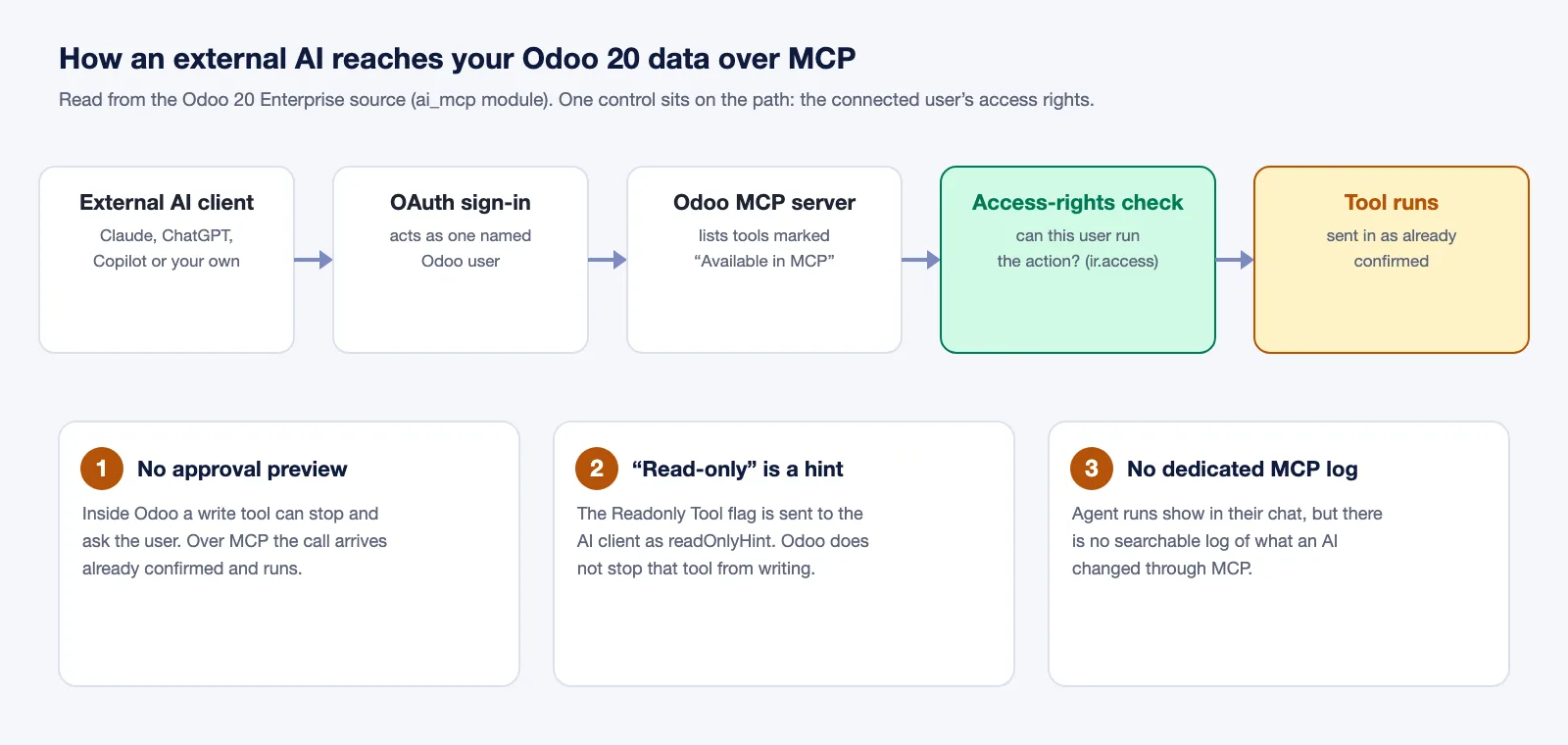
1. Over MCP, the human confirmation step is skipped. Inside Odoo, a write tool can stop and show the user a preview to approve. When the same tool is called by an external AI client over MCP, Odoo passes it to the tool as already confirmed. Odoo still checks that the connected user is allowed to run the action, and then runs it. In other words, the MCP user’s access rights are the only control between an external AI and your data.
2. “Read-only” is a label, not a lock. Each MCP tool has a Readonly Tool flag. In the source it is sent to the AI client as a hint (readOnlyHint) so the client can tell read tools from write tools. Odoo does not stop a tool marked read-only from writing. If a tool’s code writes, it will write.
3. Agent actions are not a full audit trail. You can review each automated agent run in its chat, but there is no dedicated, searchable log of what an AI changed through MCP. And Odoo 20 removed stored tracking values, so the old “check the chatter” habit is weaker unless you install the module Odoo provides for stored values or log changes another way.
None of this is a bug. Odoo has built a capable platform and left the policy to you. The checklist below is that policy.
The 8-point lockdown checklist
Work through these on a staging copy before any agent or MCP client touches production.
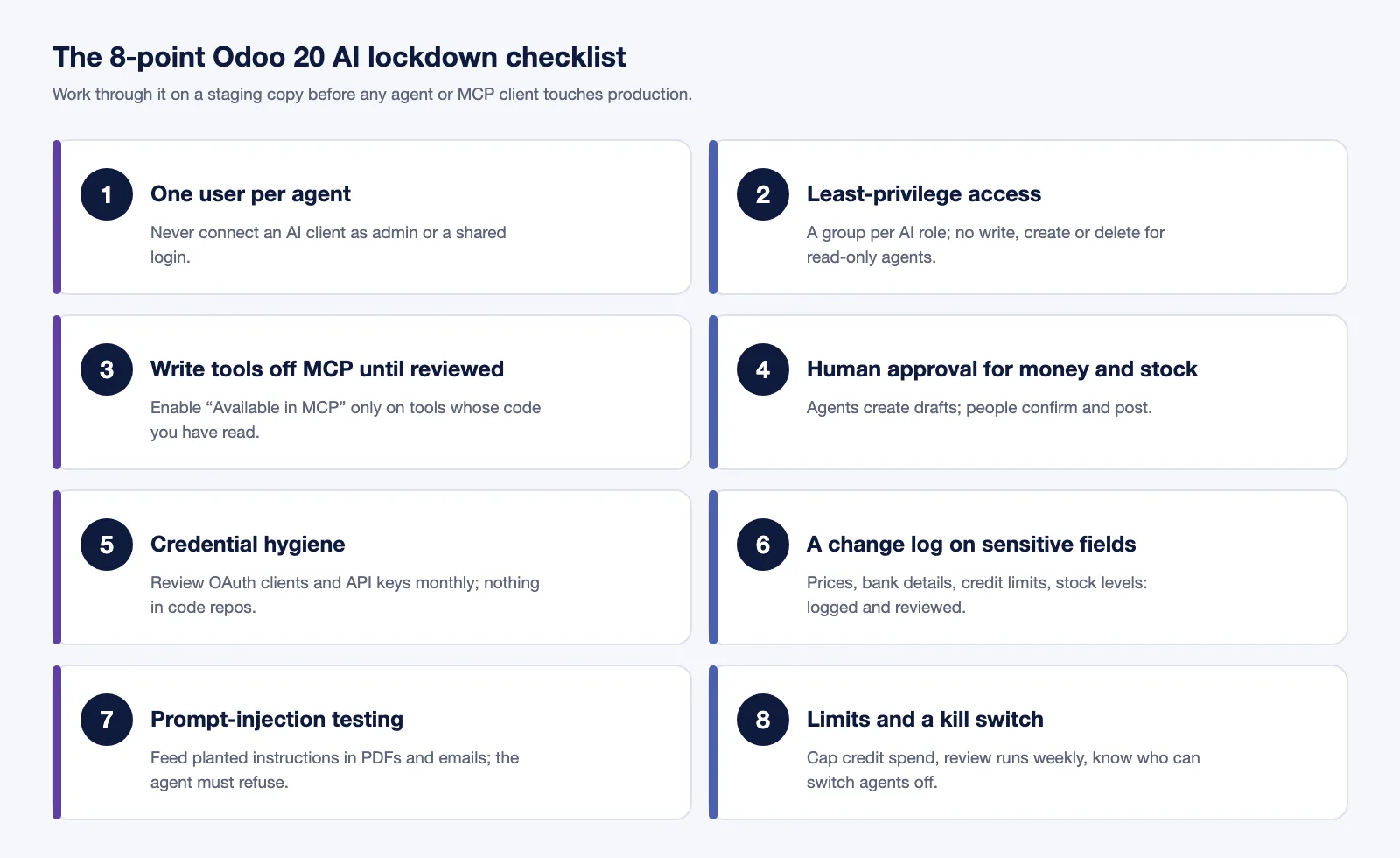
| # | Control | Why it matters | How to do it in Odoo 20 |
|---|---|---|---|
| 1 | One dedicated user per agent or AI client | MCP acts with the connected user’s rights, so an admin connection gives the AI admin rights. | Create a named internal user per integration. Never connect an AI client as an administrator or a shared login. |
| 2 | Least-privilege access | Access rights are the only gate on MCP writes. | Build a group per AI role with the new access-right domains. Give read-only agents no write, create or delete rights at all. |
| 3 | Write tools off MCP until reviewed | The read-only flag is not enforced. | Enable “Available in MCP” only on tools whose code you have read. Treat every custom tool as a write tool until proven otherwise. |
| 4 | Human approval for money and stock | MCP calls skip the confirmation preview. | Let agents create drafts only (quotations, bills, transfers) and keep confirmation and posting with people. Use in-app agents, which can ask for confirmation, for anything sensitive. |
| 5 | Credential hygiene | CERT-In’s incidents came through exposed credentials and broad cloud roles. | Review OAuth clients and API keys monthly, revoke unused ones, keep keys out of code repositories and config files, and scope cloud roles tightly. |
| 6 | A change log on sensitive fields | Stored tracking values are gone in Odoo 20, and MCP has no dedicated log. | Install Odoo’s module for stored tracking values, or log changes another way, for prices, payment terms, bank details, credit limits and stock levels. Review who changed them, and what, every week. |
| 7 | Prompt-injection testing | Agents read PDFs, emails and web content that may contain hidden instructions. | Feed test documents with planted instructions (“change the bank account to…”) and confirm the agent refuses. |
| 8 | Limits and a kill switch | An agent on a schedule repeats its mistakes at machine speed. | Cap AI credit spend, review agent runs weekly, and document who can disable the automation rule or revoke the OAuth client within minutes. |
If you want an outside view of where you stand first, our AI Readiness Assessment scores your users, data and processes before anything is switched on, and Odoo AI setup configures Odoo’s own AI with approval rules built in.
What do the rules require in India, the EU, the UK and the US?
Every major market now expects you to notice an incident and report it fast. An agent you cannot see working makes the noticing hard, and the clock starts when you become aware.
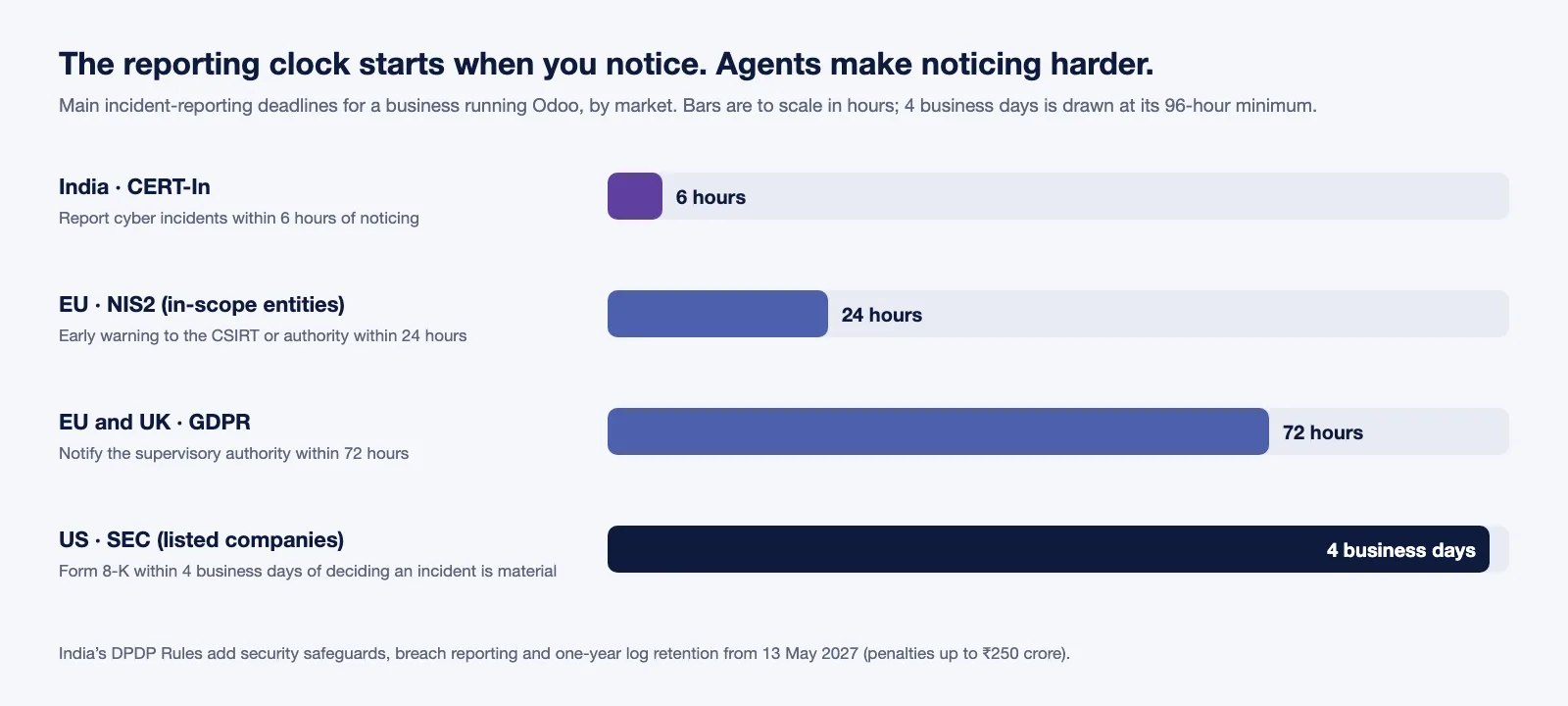
| Market | Rule | What it means for an AI agent in Odoo |
|---|---|---|
| India | CERT-In directions (2022): report cyber incidents within 6 hours of noticing them | In the October 2026 cases, the organisations did not notice at all; the AI providers told CERT-In. Without a change log and weekly reviews (controls 6 and 8), you cannot report what you cannot see. |
| India | DPDP Rules, notified 13 November 2025: security safeguards, breach reporting and one-year log retention apply from 13 May 2027 | Access controls and monitoring on any agent that can read customer or employee data. Penalties under the DPDP Act reach ₹250 crore. |
| EU and UK | GDPR: security appropriate to the risk (Article 32) and notification to the supervisory authority within 72 hours (Article 33) | Least privilege and a change log are the “appropriate measures” a regulator will ask about. |
| EU | NIS2, for entities in scope: early warning within 24 hours, full notification within 72 hours | See our NIS2 guide for Odoo for what is in scope. |
| US | SEC cyber disclosure rule (listed companies): Form 8-K within 4 business days of deciding an incident is material | Plus state breach-notification laws, which vary. A weekly review of agent runs shortens the time to a decision. |
For Indian businesses the runway is shortest. An Odoo 20 rollout that starts in early 2027 goes live close to the DPDP deadline, and building the controls in from the start is far cheaper than retrofitting them after an audit or an incident.
Should you upgrade to Odoo 20 now?
AI agents alone are not a reason to upgrade. Your current version and your connectors decide the timing.
| You are on | Our advice |
|---|---|
| Odoo Online | Odoo upgrades Online databases itself. Test on the copy you are offered, and apply the checklist before enabling agents. |
| Odoo 17 or 18 | Plan the move now and consider going straight to 20 in early 2027. |
| Odoo 19, live | Wait until a specific Odoo 20 feature pays for the licence change and your third-party connectors have been ported. |
| Mid-implementation | Go live on 19 first. Upgrade as a separate project. |
| New, fully standard project | Start on 20 if the new pricing works for you, with the checklist built into the project plan. |
Budget for the licence changes too. Agentic AI sits in the Custom plan, AI usage needs credits, and the new Light User licence (₹195 a month in India, US$8.90 on the US price list) is counted for employees who never log in. Our Odoo 20 pricing analysis covers the full picture, what breaks in an Odoo 20 upgrade covers the technical side, and the free Odoo License Health Check shows which of your users could move to Light User.
How TechUltra helps
Odoo gives you AI. We make it work in production.
As an Odoo Gold Partner, we run an internal knowledge server that indexes the full Odoo 18, 19 and 20 source, Community and Enterprise. That is how we checked the MCP behaviour described above against the code itself, not the release notes. We offer:
- Odoo 20 AI readiness review: we go through your users, access rules, custom tools and credentials against the eight controls, and give you a fix list. Start with the AI Readiness Assessment.
- Secure agent rollout: we design the AI user roles, approval steps and change logging, then switch agents on one process at a time. See Odoo AI setup and our wider AI for Odoo work.
- Upgrade and licence check: we confirm whether you need the Custom plan, which users can move to Light User licences, and when your connectors will be ready. See our Odoo 20 upgrade service.
400+ Odoo projects since 2016, Odoo Gold Partner since 2021, clients in 75 countries. Book a free call about your Odoo 20 AI rollout.
Sources
- TechCrunch: India becomes the latest country to report rogue AI agent activity (16 October 2026)
- TechCrunch: Microsoft says AI agents are like insider threats as “frontier models can’t be trusted” (19 October 2026)
- Odoo 20 release notes: AI agents, MCP server, AI credits, simplified access rights, tracking-values removal
- Odoo pricing: Custom plan inclusions (Agentic AI, External API) and the Light User licence
- Odoo 20 Enterprise source,
ai_mcpmodule (ai_mcp_request_dispatcher.py,ir_actions_server.py), reviewed through TechUltra’s Odoo source index - CERT-In directions under section 70B(6) of the IT Act, 28 April 2022: 6-hour incident reporting
- Hogan Lovells: India’s Digital Personal Data Protection Act 2023 brought into force
- Regulation (EU) 2016/679 (GDPR): Articles 32 and 33
- Directive (EU) 2022/2555 (NIS2): Article 23 reporting obligations
- US SEC: cybersecurity risk management and incident disclosure rules
Frequently asked questions
-
Is Odoo 20's AI safe to use?
Yes, if you configure it. Odoo checks the connected user's access rights before an AI tool runs, so the AI can do only what that user can do. The risk comes from broad user rights, write tools nobody reviewed and exposed credentials, which is what the 8-point checklist in this article closes.
-
Does the Odoo 20 MCP server ask for approval before writing data?
No. In the Odoo 20 Enterprise source, the MCP server passes every tool call to the tool as already confirmed. Approval has to come from your access rules and your process design, for example letting agents create draft quotations, bills and transfers that people confirm and post.
-
Is the MCP "read-only" setting enforced?
No. The Readonly Tool flag is sent to the AI client as a hint so it can tell read tools from write tools. Odoo does not stop a tool marked read-only from writing, so a tool's code decides what it does, not its label.
-
Is Odoo 20's AI available in Community edition?
No. AI agents and the MCP server are Enterprise features, and Odoo's pricing page lists Agentic AI and the External API under the Custom plan.
-
Do Odoo 20's AI features cost extra?
Usage does. Odoo's release notes say all AI features now need credits bought through In-App Purchase, billed separately from the user subscription. Budget for credits against your real document and agent volumes, and cap the spend.
-
What does India's DPDP law require for AI agents in an ERP?
From 13 May 2027, businesses handling personal data must have reasonable security safeguards such as access controls and monitoring, report personal data breaches to the Data Protection Board and affected people, and keep relevant logs for at least one year. Penalties under the DPDP Act reach ₹250 crore.
-
What do GDPR and NIS2 mean for AI agents in Odoo?
GDPR requires security appropriate to the risk and a breach notification to the supervisory authority within 72 hours of becoming aware of it. NIS2, for entities in scope, adds an early warning within 24 hours. An agent you cannot monitor makes both deadlines harder to meet, because you may not become aware at all.
Related services & solutions
Put this into practice with TechUltra's senior Odoo consultants.
OCR AI Invoice Capture
Free Odoo OCR AI module for Odoo 16–19. AI reads PDF and image vendor bills and invoices and creates the matching Odoo journal entry in one click.
AI WhatsApp Chatbot
LLM-powered WhatsApp chatbot grounded in your Odoo data. Handles ordering, support, FAQs, and lead qualification with human-agent escalation.
Odoo Development Services
Odoo development by a Gold Partner: custom modules, OWL front-end components, APIs and webhooks, with tests and CI/CD. 100+ projects. Book a free consultation.
AI & Agentic ERP services
OCR, AI assistants, and agentic automation productized on Odoo.