Odoo 19 + RingCentral Integration: Features & Setup Guide
TechUltra's RingCentral Integration module for Odoo 18 and 19 — embedded calling, automatic call logging, recordings, AI transcripts, and a KPI dashboard. Features and full setup guide.
RingCentral is one of the most widely used cloud communication platforms in the world — calling, business SMS, voicemail, call recording, and analytics delivered as a single cloud service. On its own, though, it sits in a separate app. Every time a sales or support agent leaves Odoo to dial a customer, or copies a call outcome back into a record by hand, you lose time and you lose data.
The RingCentral Integration module — built and published by TechUltra Solutions on the Odoo App Store — closes that gap. It brings RingCentral’s calling experience directly inside Odoo and ties every call to the Contacts, CRM, and Helpdesk records your team already works in.
This guide explains what the module does, how it works, and how to set it up.
What is the RingCentral Integration module?
RingCentral Integration is a Computer Telephony Integration (CTI) connector between Odoo and RingCentral — CTI simply means your phone system and your business software behave as one. Once the module is installed and authorized, your team can place and receive calls, browse call history, play recordings, and read AI-generated transcripts without ever leaving Odoo.
The module embeds the official RingCentral Embeddable Widget, so what you get is the genuine RingCentral calling interface docked inside the Odoo web client — not a thin re-build of it. It is designed for Odoo 18.0 and 19.0, authenticates through OAuth 2.0, and keeps call data current with real-time webhooks backed by a scheduled background sync.
It depends only on Odoo’s standard Contacts and Discuss apps, and runs on Odoo Online, Odoo.sh, and on-premise deployments. Wiring it in cleanly is the same disciplined Odoo integration work TechUltra delivers for clients across five countries.
Why connect RingCentral with Odoo?
Keeping telephony and your ERP in separate tools creates predictable friction. Bringing them together removes it:
- One workspace. Agents stay in Odoo — no switching between the phone app and the customer record.
- No manual call logging. Every inbound and outbound call is recorded against the right contact automatically.
- Full context on every call. Open a contact and see the complete call history beside their opportunities, quotations, and tickets.
- Recordings and transcripts where the work happens. Both are attached to the Odoo record, ready for coaching, QA, or dispute resolution.
- Measurable performance. A built-in dashboard turns raw call data into KPIs managers can act on.
Key features
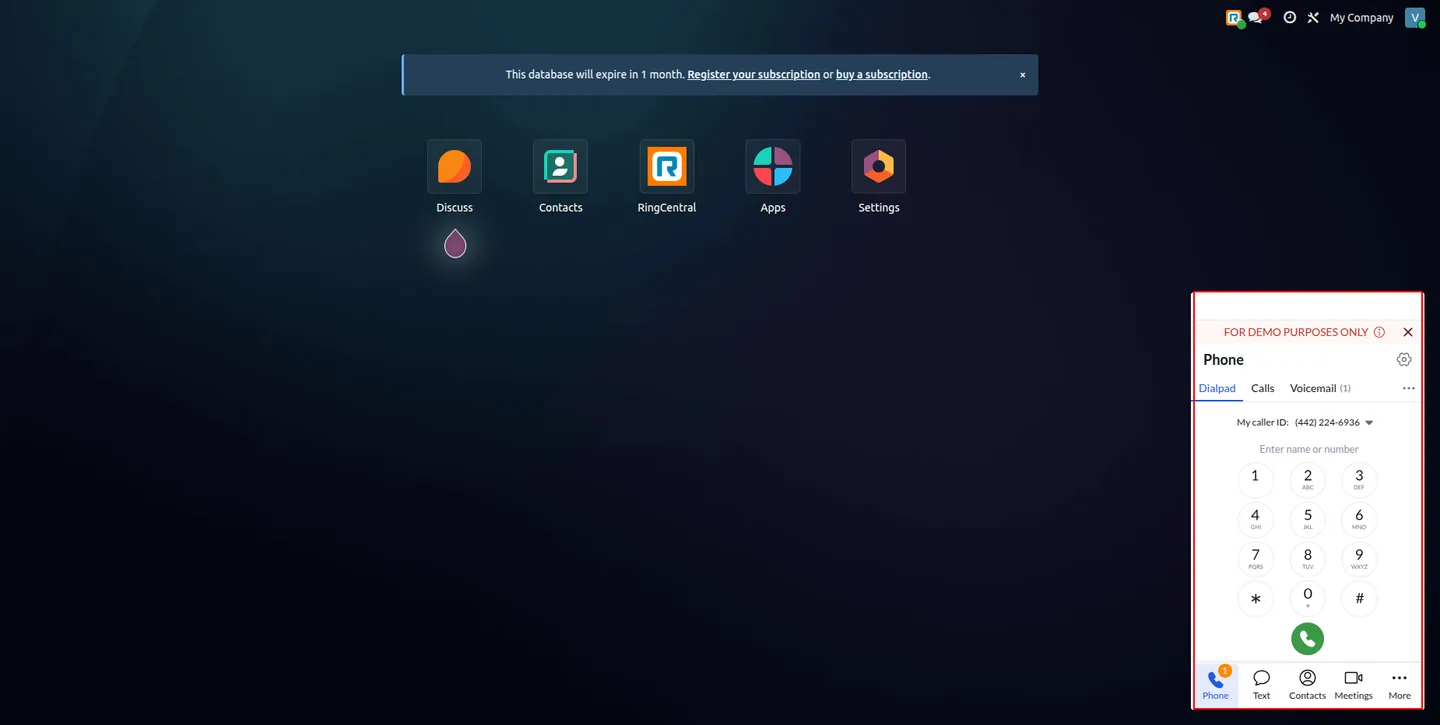
Embedded RingCentral calling
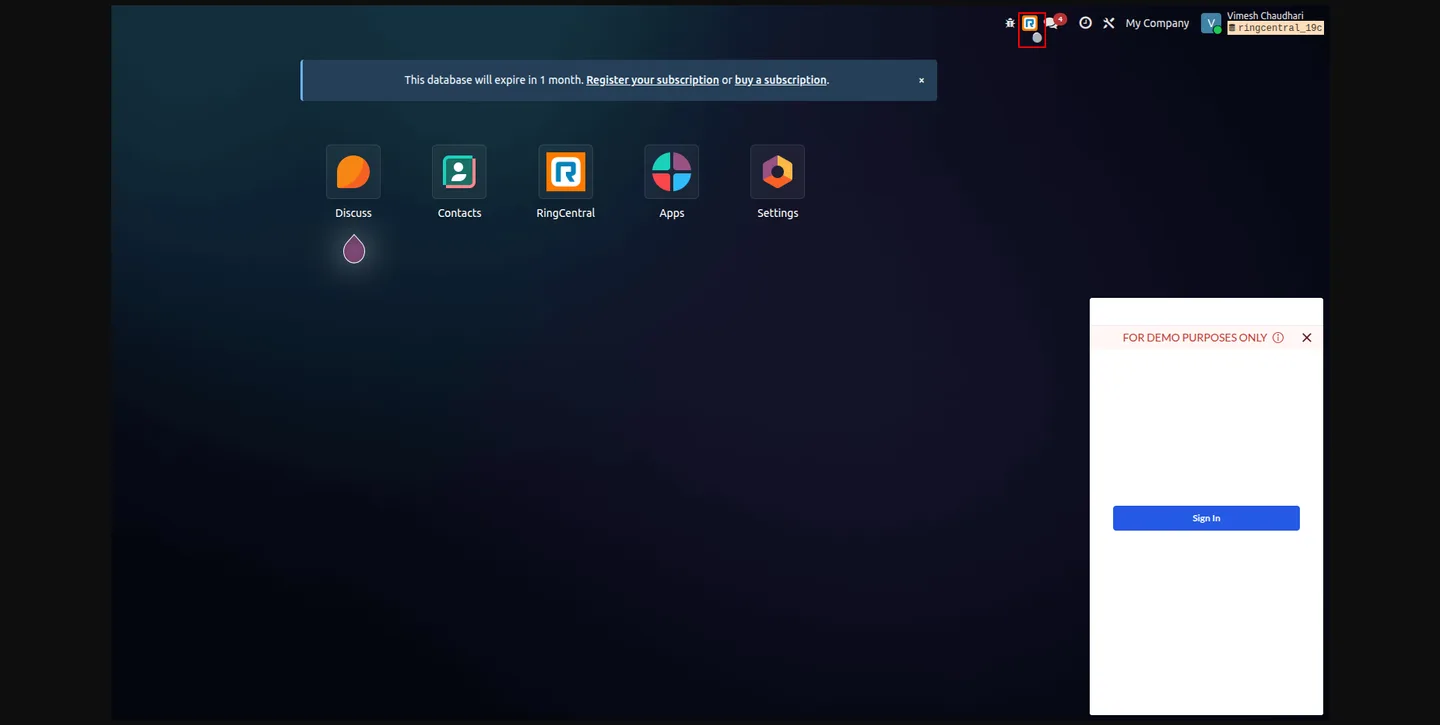
The RingCentral Embeddable Widget docks inside Odoo as a softphone. Agents search numbers, dial, answer, and manage calls without leaving the page — dialpad, call logs, voicemail, SMS, contacts, and meetings all in one panel.
One-click dialing from any record
Phone-number fields across Odoo become click-to-call. A single click on a number in a lead, opportunity, contact, vendor, or Helpdesk ticket starts the call through RingCentral.
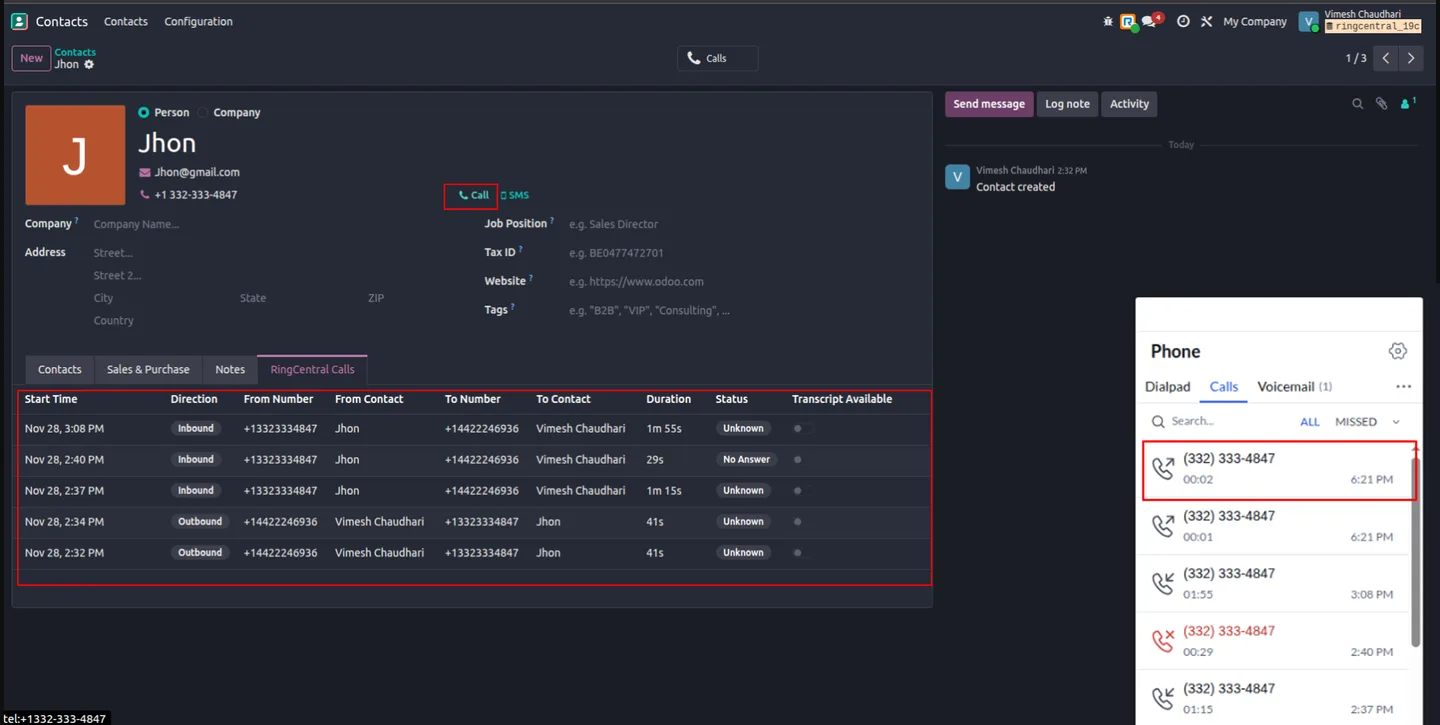
Automatic call history with contact linking
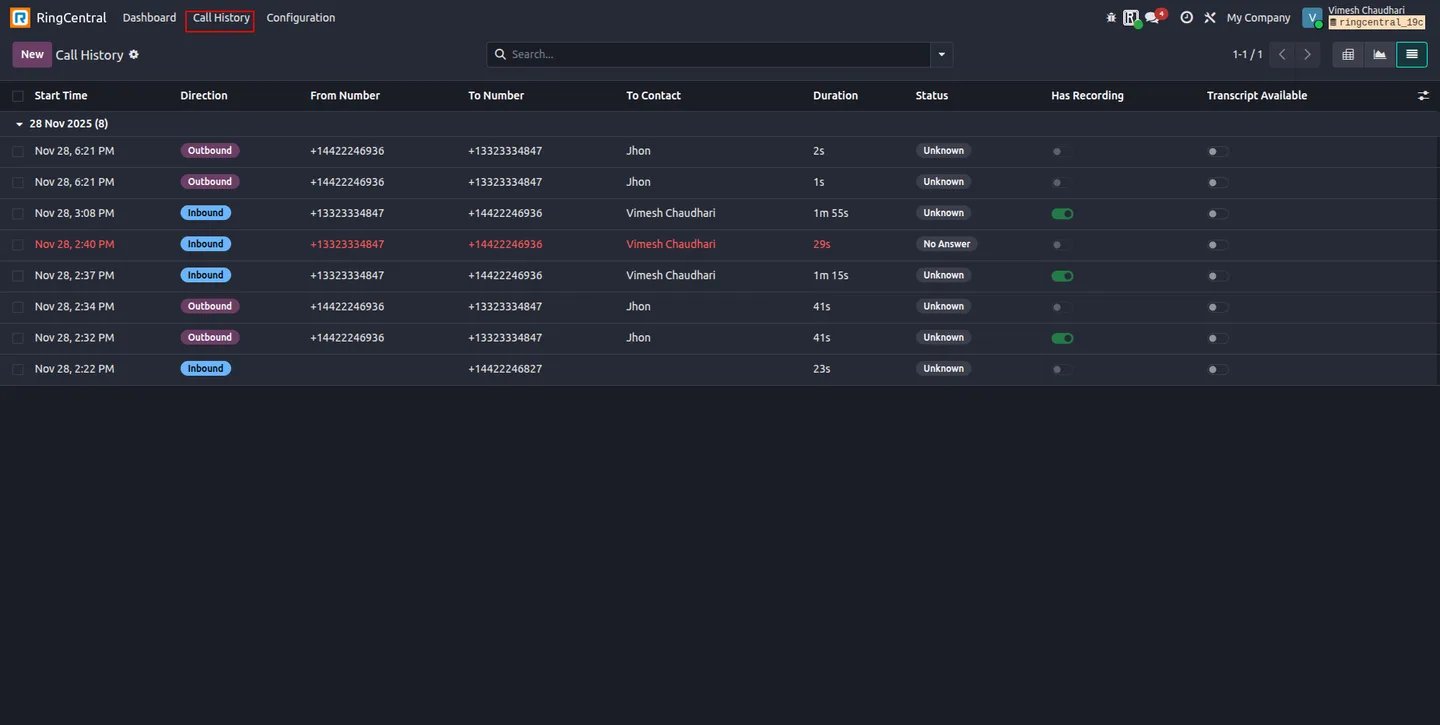
Every call — inbound and outbound — is logged automatically and linked to the matching Odoo contact, with direction, duration, timestamp, and status. No manual data entry, and no calls missing from your reporting.
Call recording playback
Where your RingCentral plan includes recording, the module retrieves the recording and makes it playable from the linked Odoo record — through an authenticated proxy, so access stays secure.
AI call transcripts
RingCentral’s AI-generated transcripts are stored against the call record and can be retrieved later — useful for training, quality review, and keeping an accurate account of what was agreed.
Real-time sync, with a safety net
The module subscribes to RingCentral webhook events, so call logs update in Odoo the moment a call ends. A scheduled background synchronization fills in anything a missed webhook or a brief outage would otherwise drop.
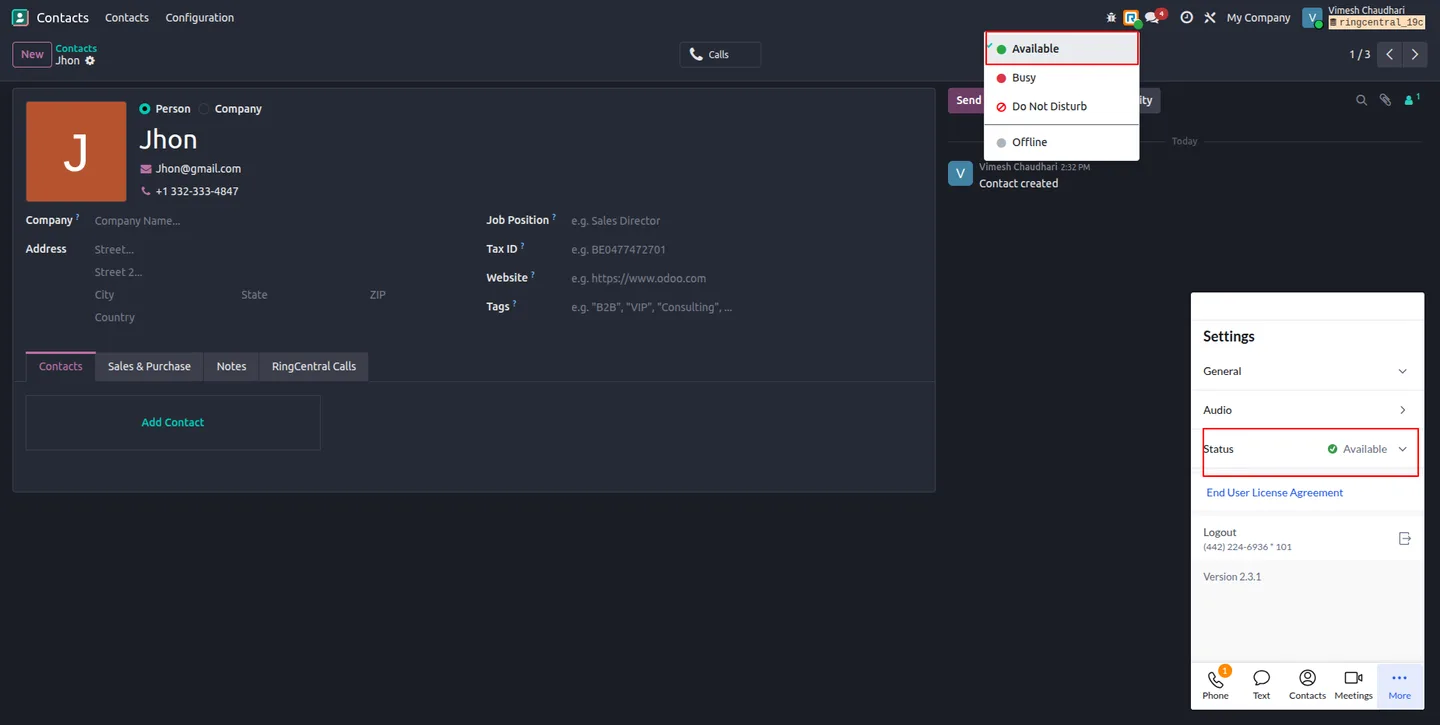
Presence and status indicators
Live presence shows whether a user is available, busy, on Do Not Disturb, or offline, and a system-tray indicator keeps that state visible. Changing your status in Odoo syncs it to the RingCentral dialer in real time.
Advanced analytics
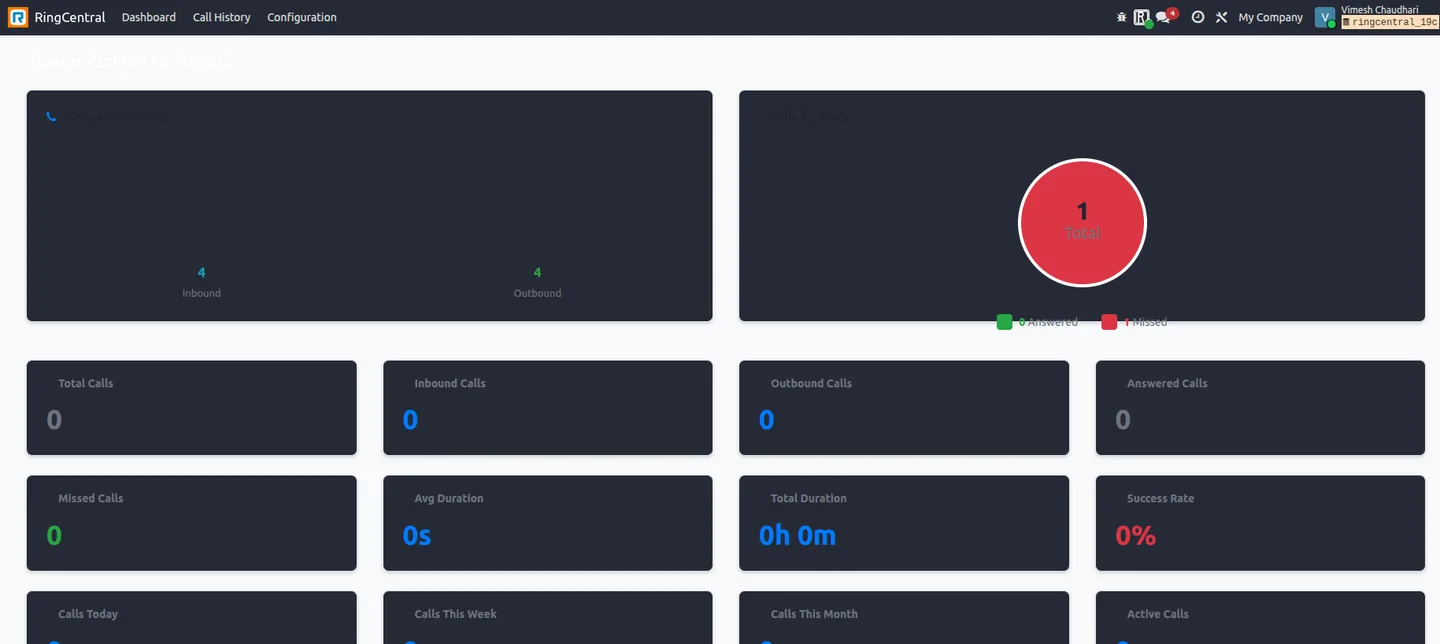
A KPI dashboard reports total, inbound, outbound, answered, and missed calls, average and total talk time, success rate, and calls today / this week / this month — with several chart types for managers reviewing sales and support performance.
How the integration works
Four pieces do the work:
- The RingCentral Embeddable Widget provides the calling UI inside Odoo — the same interface RingCentral ships, embedded rather than rebuilt.
- OAuth 2.0 authentication secures the connection. Each user authorizes through the widget, and the module refreshes access tokens automatically so sessions don’t drop.
- Webhook subscriptions push call events from RingCentral to Odoo in real time.
- A scheduled background sync reconciles call history, so nothing is lost if a webhook fails or the network blips.
For environments that route outbound traffic through a proxy, the module supports HTTP/HTTPS proxy configuration for both API calls and recording retrieval.
How to set up RingCentral in Odoo
Setup is five steps.
1. Install the module
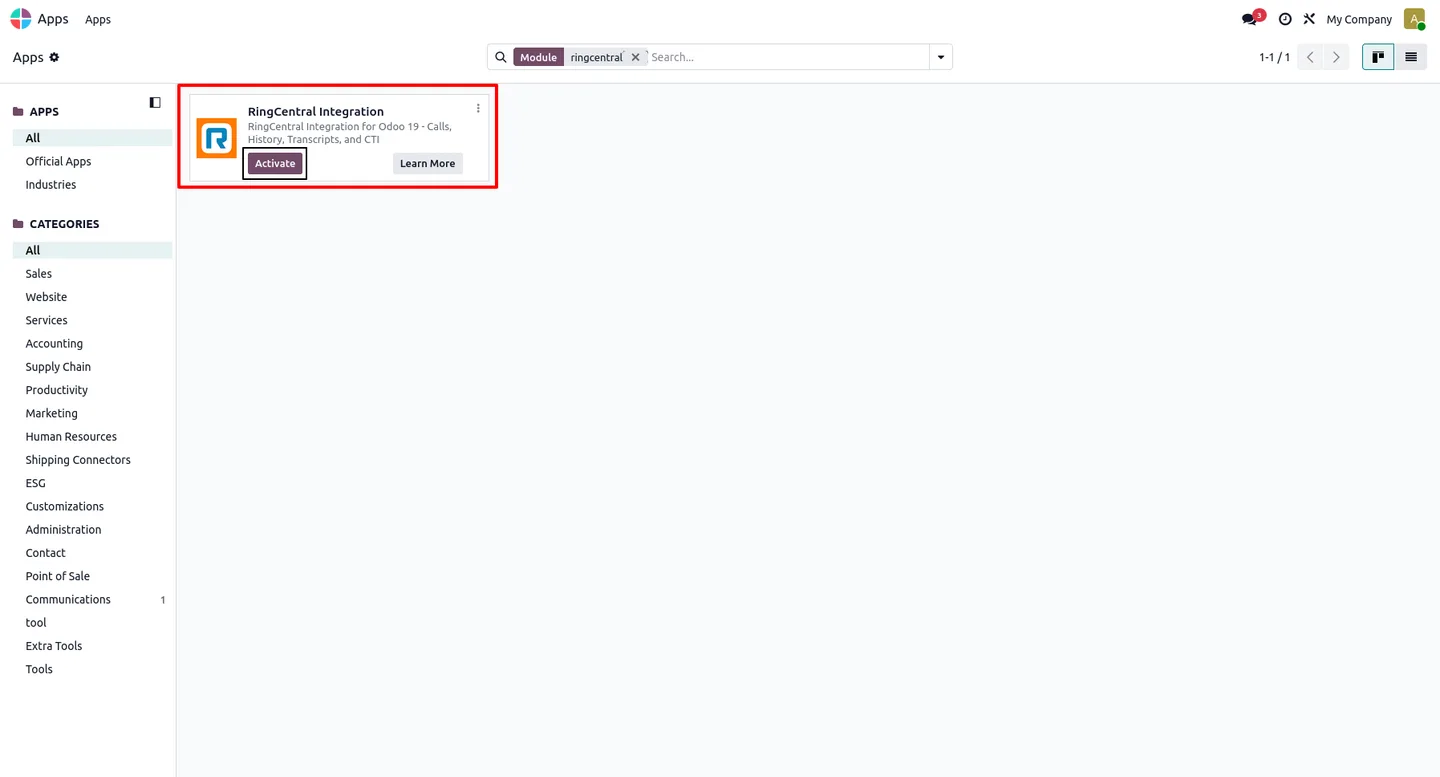
In Odoo, open Apps, remove the Apps filter, search for RingCentral Integration, and click Install.
2. Create a RingCentral app
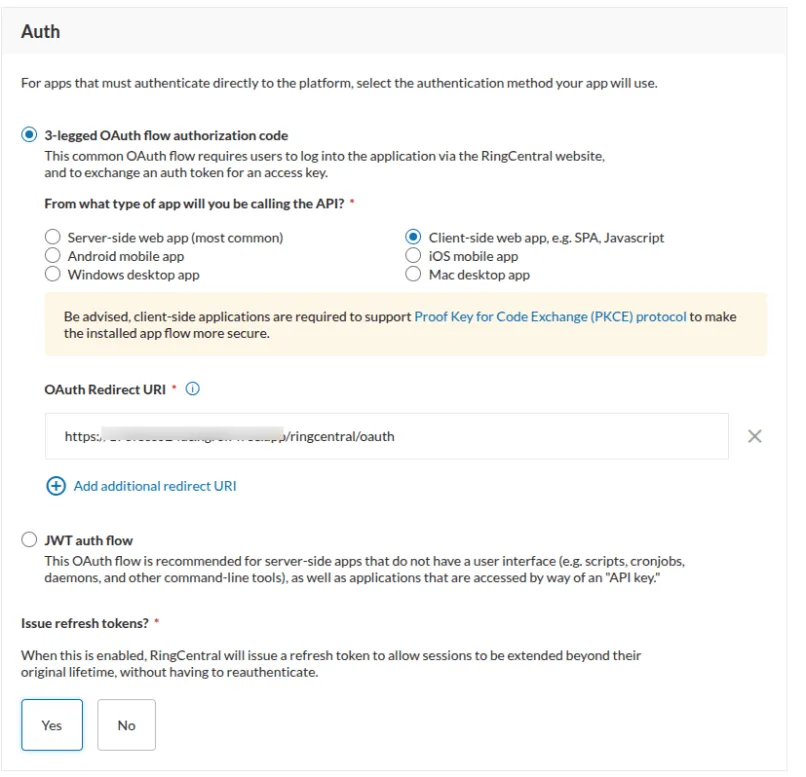
In the RingCentral Developer Portal, register an application (or reuse an existing one). Under Auth, choose the 3-legged OAuth authorization-code flow, add your OAuth redirect URIs, and enable refresh tokens. Then select the application scopes the integration needs — call control, call log, recordings, contacts, presence, SMS, webhook subscriptions, and VoIP calling. Copy the app’s Client ID and Client Secret.
3. Configure the connection in Odoo
Go to RingCentral → Configuration in Odoo, create a configuration record, and enter the Client ID, Client Secret, and server environment. Use Test Connection to confirm DNS resolution, HTTPS connectivity, proxy settings, and SSL validation are all healthy.
4. Authorize
Click Connect (OAuth), sign in with your RingCentral account, and authorize the application. On first connection RingCentral asks you to confirm an emergency-calling address. Once authorized, the module creates the webhook subscription, sets up automatic token refresh, and enables scheduled history sync.
5. Assign user roles
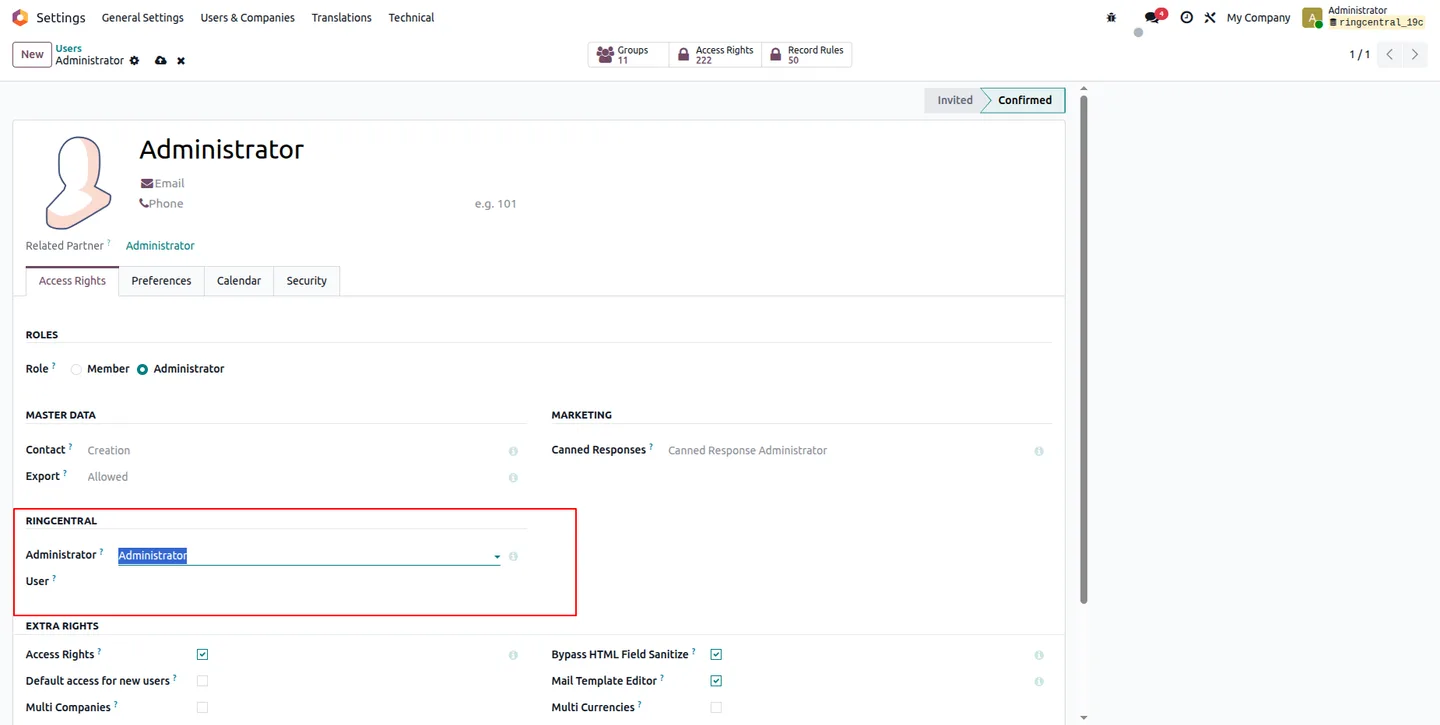
On each Odoo user, set the RingCentral role: Administrator for those who manage configuration and see all call data, User for agents who make and log calls. Sales, support, and service staff are typically Users; a technical or operations lead holds Administrator.
After that, agents call straight from any contact, and managers open the KPI dashboard to track activity. Teams that want ongoing tuning often pair the module with an Odoo support retainer.
Module at a glance
- Publisher: TechUltra Solutions Private Limited
- Odoo versions: 18.0 and 19.0
- Dependencies: Contacts, Discuss
- Deployment: Odoo Online, Odoo.sh, on-premise
- Price: $499 (one-time)
- License: Odoo Proprietary License v1.0 (OPL-1)
- Support: 90 days of bug-fix support, Monday to Friday
Whether you are already live on Odoo or planning an Odoo implementation, the RingCentral Integration module removes the manual step between the phone and the ERP — so every call counts, and every call is counted.
Frequently asked questions
-
Which Odoo versions and deployments does the module support?
Odoo 18.0 and 19.0, on Odoo Online, Odoo.sh and on-premise installations. It depends only on Odoo's standard Contacts and Discuss apps, so there is no wider module prerequisite to satisfy first.
-
What does the RingCentral Integration module cost?
$499 as a one-time purchase on the Odoo App Store, under the Odoo Proprietary License v1.0 (OPL-1), with 90 days of bug-fix support from TechUltra Solutions, Monday to Friday.
-
Is this a rebuild of the RingCentral interface inside Odoo?
No. The module embeds the official RingCentral Embeddable Widget, so agents work in the genuine RingCentral calling interface docked inside the Odoo web client rather than a thin re-implementation of it.
-
How does it authenticate and stay in sync with RingCentral?
Authentication is OAuth 2.0. Call data is kept current by real-time webhooks, backed by a scheduled background sync so nothing is lost if a webhook delivery fails.
-
What gets logged automatically?
Every inbound and outbound call is logged against the right contact without manual entry, along with call recordings and AI-generated transcripts, and the activity rolls up into a KPI dashboard. Agents browse call history, play recordings and read transcripts without leaving Odoo.
-
What is the difference between the Administrator and User roles?
The role is set per Odoo user. Administrators manage the module configuration and can see all call data; Users make and log calls. Sales, support and service staff are typically Users, with a technical or operations lead holding Administrator.
Related services & solutions
Put this into practice with TechUltra's senior Odoo consultants.
Shopify + Odoo Integration
Native Shopify-to-Odoo bidirectional sync. Products, inventory, orders, customers, refunds, accounting entries in real time. Multi-store, multi-currency, B2B.
HubSpot + Odoo Integration
Native HubSpot-to-Odoo bidirectional sync. Companies, contacts, deals, orders, invoices, payment status. Keep HubSpot marketing + sales; run Odoo as ERP.
Odoo Integration Services
Two-way Odoo integrations with Magento, Shopify, Salesforce, Amazon, QuickBooks, payment gateways. 200+ shipped integrations — free consultation call.
Odoo App Store catalogue
240 TechUltra modules — AI, WhatsApp, automation, accounting, and more.