How to Connect WhatsApp to Odoo Community: Setup Guide
Step-by-step setup for WhatsApp on Odoo 17 Community using Meta's official Cloud API — templates, media sharing, broadcasts and chatbots, config included.

Editor’s note (August 2026): this article covers WhatsApp integration with Odoo 17 Community as it stood at the time; the current release is Odoo 19 — see Odoo 19 features for what has changed since.
Benefits of Using Odoo 17 Community with WhatsApp
25-40%
increase in Revenue
5X
Increase in conversion rates
45-60%
Abandoned Carts reconverted
24/7
Availability
Saved 30%
Customer service, support & operation costs
2.5 Billion
hours saved with WhatsApp Chatbot
67%
of people relied on Chatbot support
75%
of Online Shoppers Prefer Personalized messages
WhatsApp integration features in Odoo 17 version Community
Frequently Asked Questions on Odoo Community WhatsApp Integration
Can WhatsApp be integrated with Odoo Community Edition?
Yes, it is possible with the help of TechUltra Solutions’ services on WhatsApp Odoo Community integration services. We can easily integrate both the enterprise edition and the community edition of Odoo with WhatsApp for flawless communication and lead generation.
What are the benefits of integrating the Odoo Community with WhatsApp?
There are many benefits of using Odoo community with WhatsApp such as:
- Easily add predefined templates from WhatsApp messages.
- Get all WhatsApp notifications in Odoo.
- Message from any module to WhatsApp
- Access all the chats from any Odoo module
- Multi Companies and Multi Providers
- Official WhatsApp Cloud API - By Meta(Facebook)
- WhatsApp Templates: Simple, Dynamic, With/Without Attachment, Multilingual, Multi Categories and Multi Models wise Templates.
- Add/Remove Agents/Internal Users in particular WhatsApp Conversation in Odoo.
- Media files such as product videos, pictures, PDF, .doc files etc can be sent within a single click.
What are the advantages of using Odoo community version?
- Improved efficiency.
- Free Odoo ERP software for use.
- Capable of providing Distinctive operational tools.
- Easily manage a moderate level of business operation.
- Best Option for businesses who want to get acquainted with Odoo
What kind of growth can I expect after WhatsApp Odoo Community integration?
Here is the growth that one can expect after WhatsApp Odoo Community Integration with some statistics that can help in making a clear-cut decision regarding the integration.
- 25-40% increase in Revenue
- 5X Increase in conversion rates
- 45-60% Abandoned Carts reconverted
- 24/7 Availability
- Saved 30% Customer service, support & operation costs
- 2.5 Billion hours saved with WhatsApp Chatbot
- 67% of people relied on Chatbot support
- 75% of Online Shoppers Prefer Personalised messages
Is WhatsApp Odoo integration secure?
Yes, the integration is designed with security in mind. It adheres to industry-standard encryption protocols, ensuring the confidentiality of your communication.
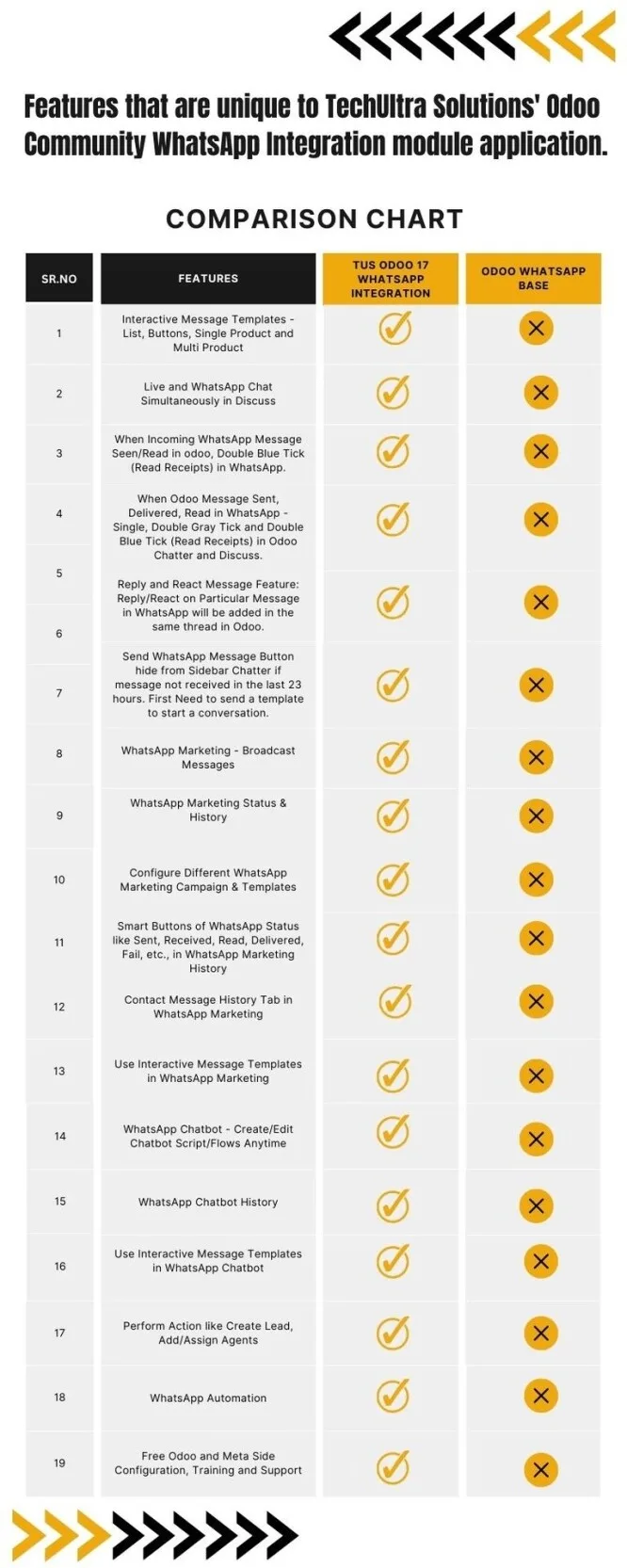
Features that are unique to TechUltra Solutions’ Odoo Community WhatsApp Integration module
- Interactive Message Templates - List, Buttons, Single Product and Multi Product
- Live and WhatsApp Chat Simultaneously in Discuss
- When Incoming WhatsApp Message Seen/Read in odoo, Double Blue Tick (Read Receipts) in WhatsApp.
- When Odoo Message Sent, Delivered, Read in WhatsApp - Single, Double Gray Tick and Double Blue Tick (Read Receipts) in Odoo Chatter and Discuss.
- Reply and React Message Feature: Reply/React on Particular Message in WhatsApp will be added in the same thread in Odoo.
- Send WhatsApp Message Button hide from Sidebar Chatter if message not received in the last 23 hours. First Need to send a template to start a conversation.
- WhatsApp Marketing - Broadcast Messages
- WhatsApp Marketing Status & History
- Configure, Send and Schedule Different WhatsApp Marketing Campaign & Templates
- Configure Different WhatsApp Marketing Campaign & Templates
- Smart Buttons of WhatsApp Status like Sent, Received, Read, Delivered, Fail, etc., in WhatsApp Marketing History
- Contact Message History Tab in WhatsApp Marketing
- Use Interactive Message Templates in WhatsApp Marketing
- WhatsApp Chatbot - Create/Edit Chatbot Script/Flows Anytime
- WhatsApp Chatbot History
- Use Interactive Message Templates in WhatsApp Chatbot
- Perform Action like Create Lead, Add/Assign Agents
- WhatsApp Automation
- Free Odoo and Meta Side Configuration, Training and Support
See the WhatsApp Odoo integration page for the current module line-up.
Frequently asked questions
-
Can WhatsApp be integrated with the free Odoo Community Edition?
Yes. TechUltra Solutions integrates both the Community and Enterprise editions of Odoo with WhatsApp using the official WhatsApp Cloud API by Meta.
-
What features does the Odoo Community WhatsApp integration include?
Predefined and dynamic templates, WhatsApp notifications and chats inside Odoo, messaging from any module, multi-company and multi-provider support, media sharing, read receipts in both directions, reply and react threading, WhatsApp marketing broadcasts with status history, and a configurable WhatsApp chatbot that can create leads and assign agents.
-
Is the WhatsApp Odoo integration secure?
The post states the integration adheres to industry-standard encryption protocols to keep communication confidential.
-
Which Odoo version does the Community WhatsApp integration cover?
The post describes WhatsApp integration features for Odoo 17 Community.
Related services & solutions
Put this into practice with TechUltra's senior Odoo consultants.
WhatsApp ↔ Odoo Integration
Two-way WhatsApp Business API integration with Odoo. Customer messages, order updates, invoices, and payment links — unified inbox for agents.
AI WhatsApp Chatbot
LLM-powered WhatsApp chatbot grounded in your Odoo data. Handles ordering, support, FAQs, and lead qualification with human-agent escalation.
Odoo WhatsApp Push Notifications
Real-time WhatsApp push notifications in Odoo — web, Android, iOS. Customer names in Discuss instead of phone numbers. Compatible with Odoo V12–V18 (as of 2025).
Odoo Integration Services
Two-way Odoo integrations with Magento, Shopify, Salesforce, Amazon, QuickBooks, payment gateways. 200+ shipped integrations — free consultation call.