

Odoo App · Purchase
Purchase Cancel, Reverse & Reset
Cancel, reverse, or reset validated purchase orders, receipts, and vendor bills with a full audit trail.
Overview
In standard Odoo, once a purchase order, receipt, or vendor bill is validated, the system locks it down — undoing a mistake usually means manual workarounds that are slow and easy to get wrong. Purchase Cancel, Reverse & Reset removes that dead end.
Built by TechUltra Solutions, the module adds Cancel, Reverse, and Reset to Draft actions across the purchasing workflow. Documents can be corrected after validation while data integrity is preserved, so stock moves and accounting entries stay consistent.
Every action is logged for traceability, and reversal audit logs are visible only to users with the Reversal Manager role. Configurable policies and access rights let a finance lead decide who is allowed to cancel a bill or reverse a receipt, and an Include Dependencies option keeps related documents in step.
Key features
-
Advanced purchase order cancellation
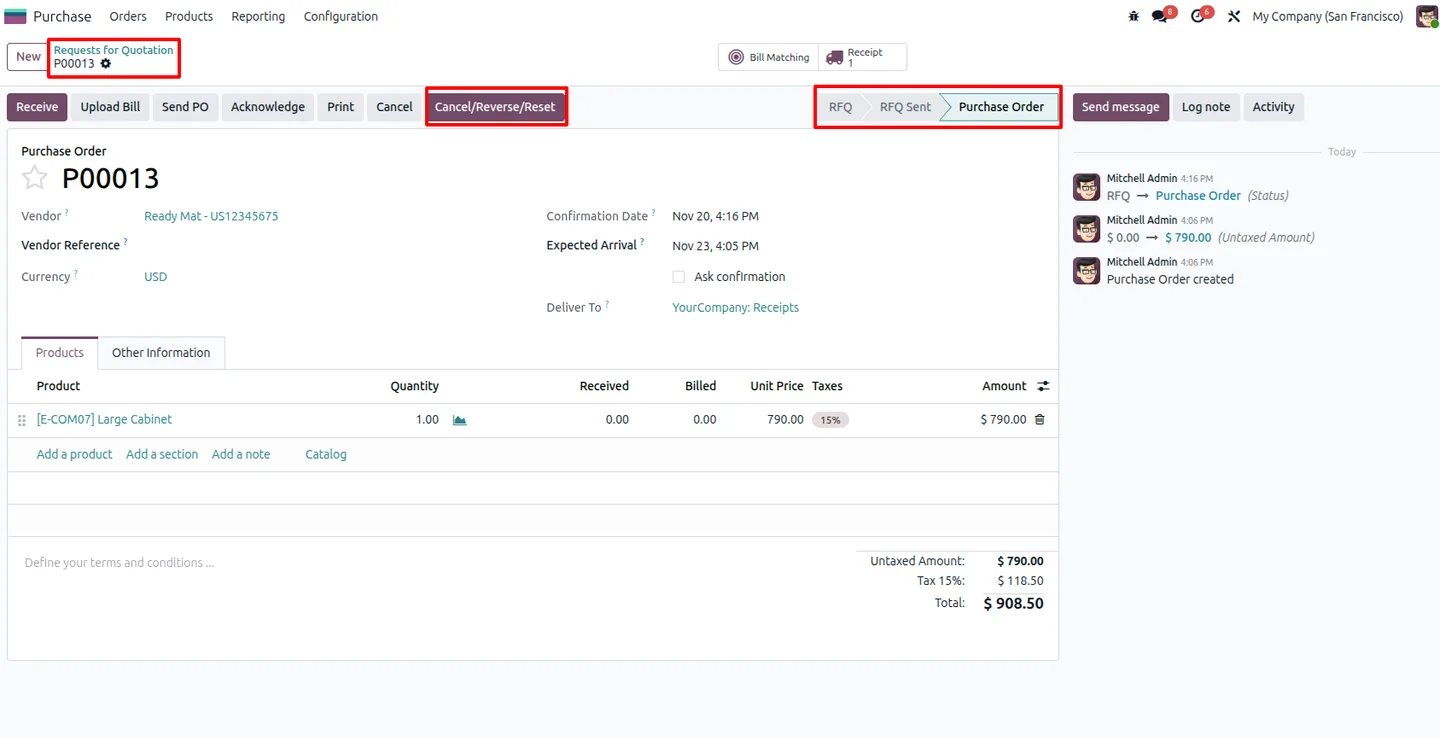
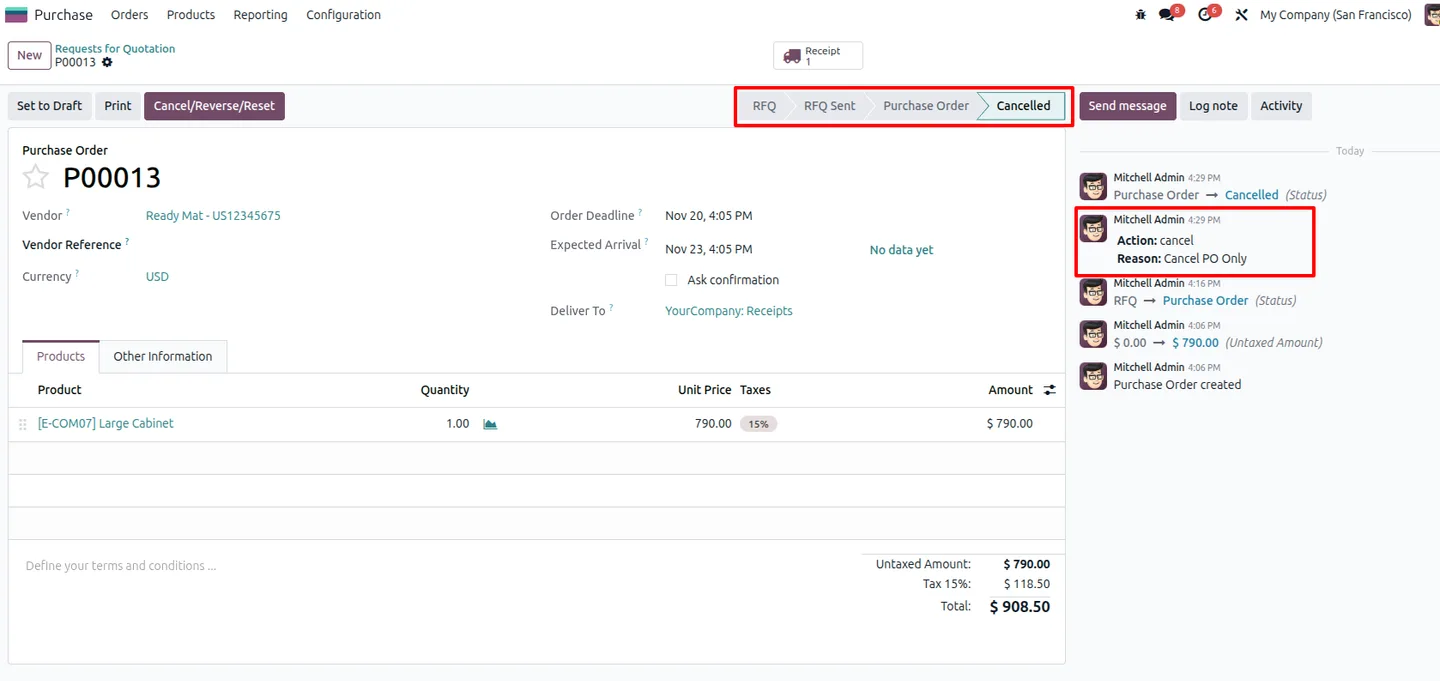
Cancel purchase orders that have already been validated, without the manual workarounds standard Odoo would otherwise require.
-
Reverse receipts and vendor bills
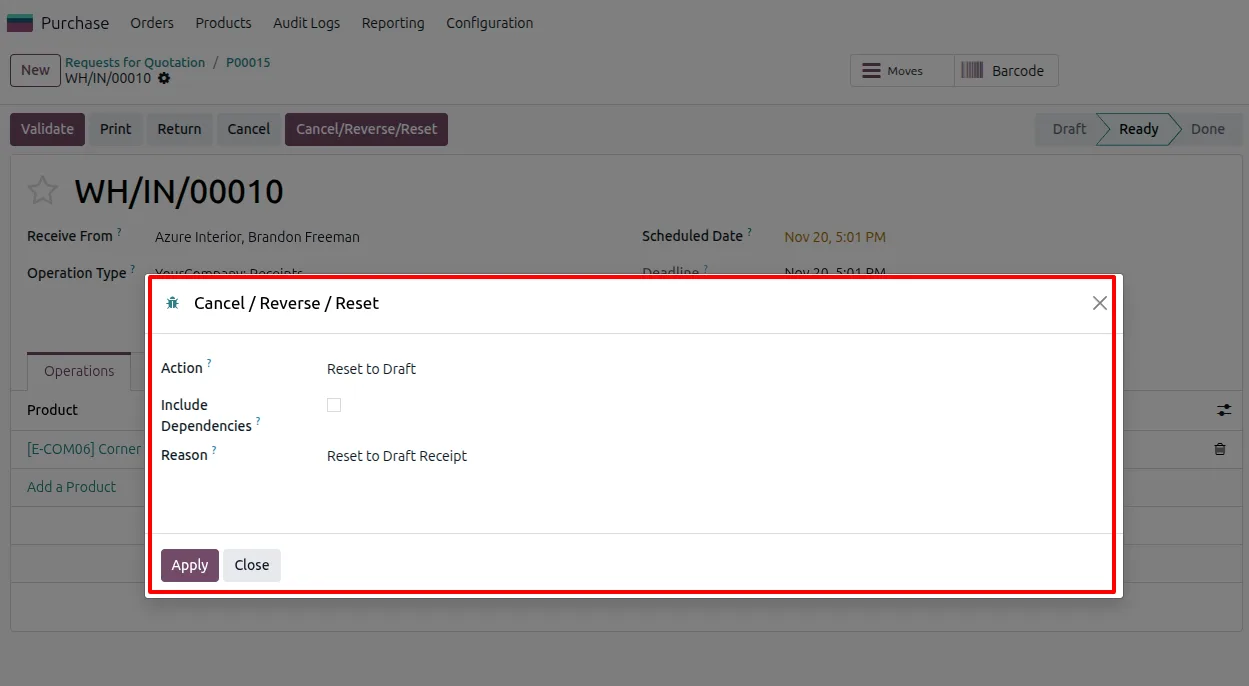
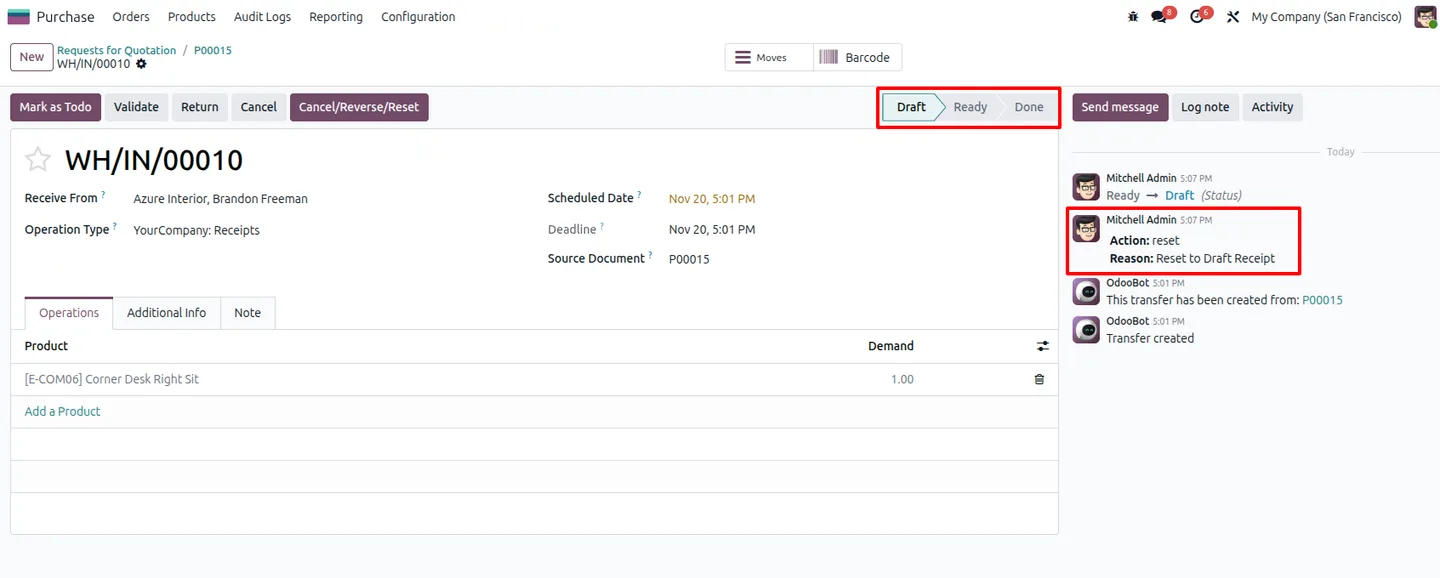
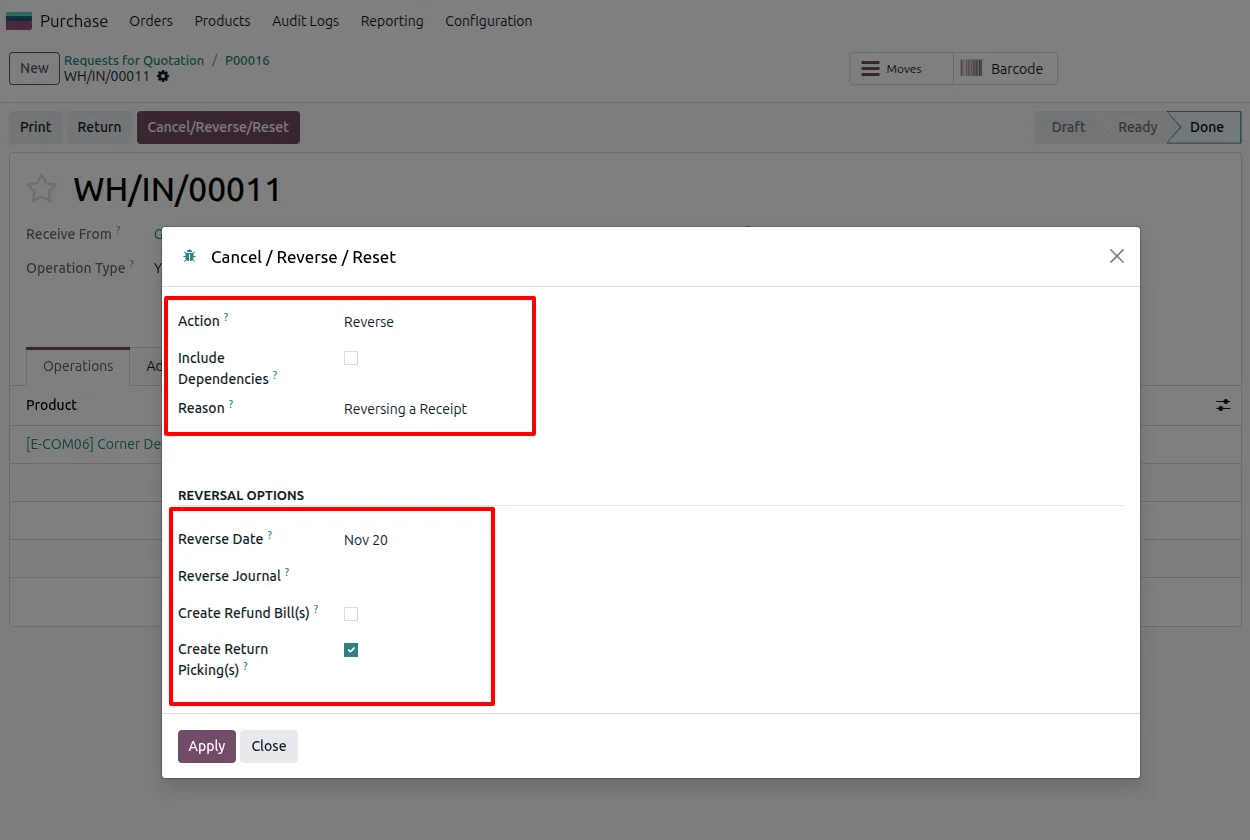
Reverse validated receipts and vendor bills so stock moves and accounting entries can be corrected after the fact.
-
Reset documents to draft
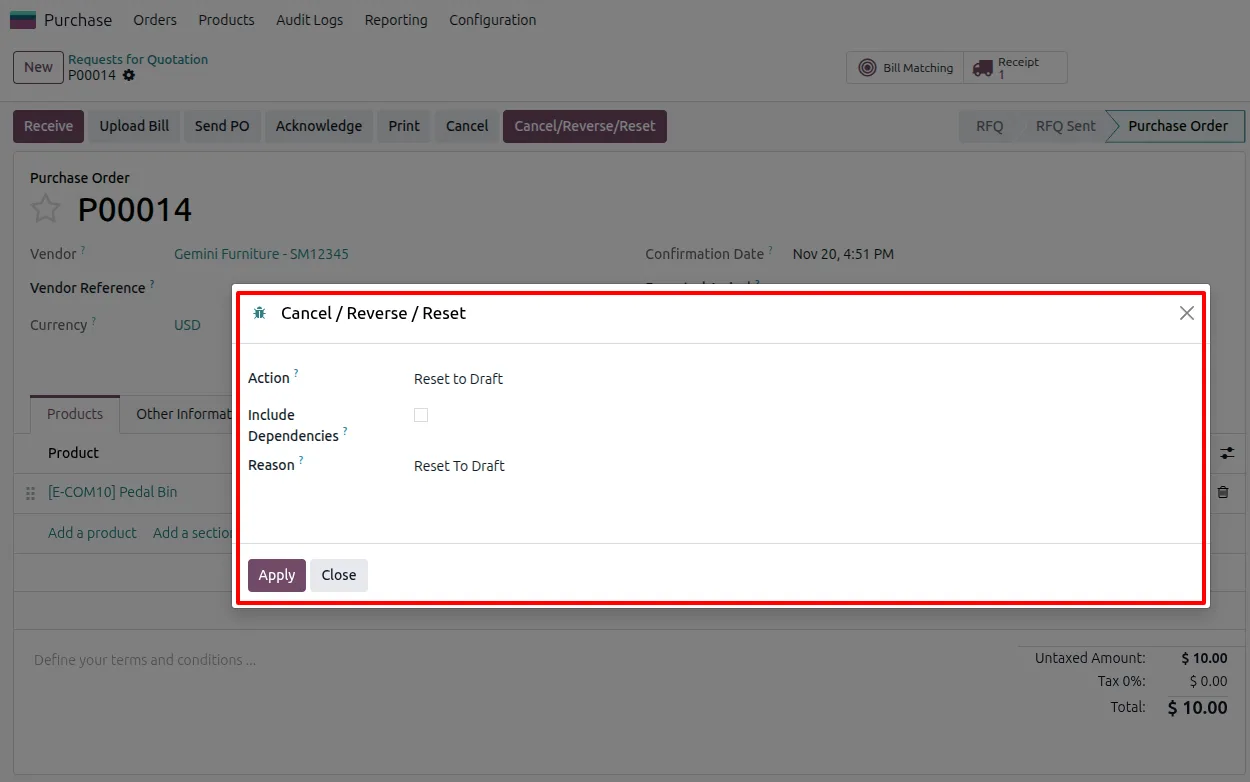
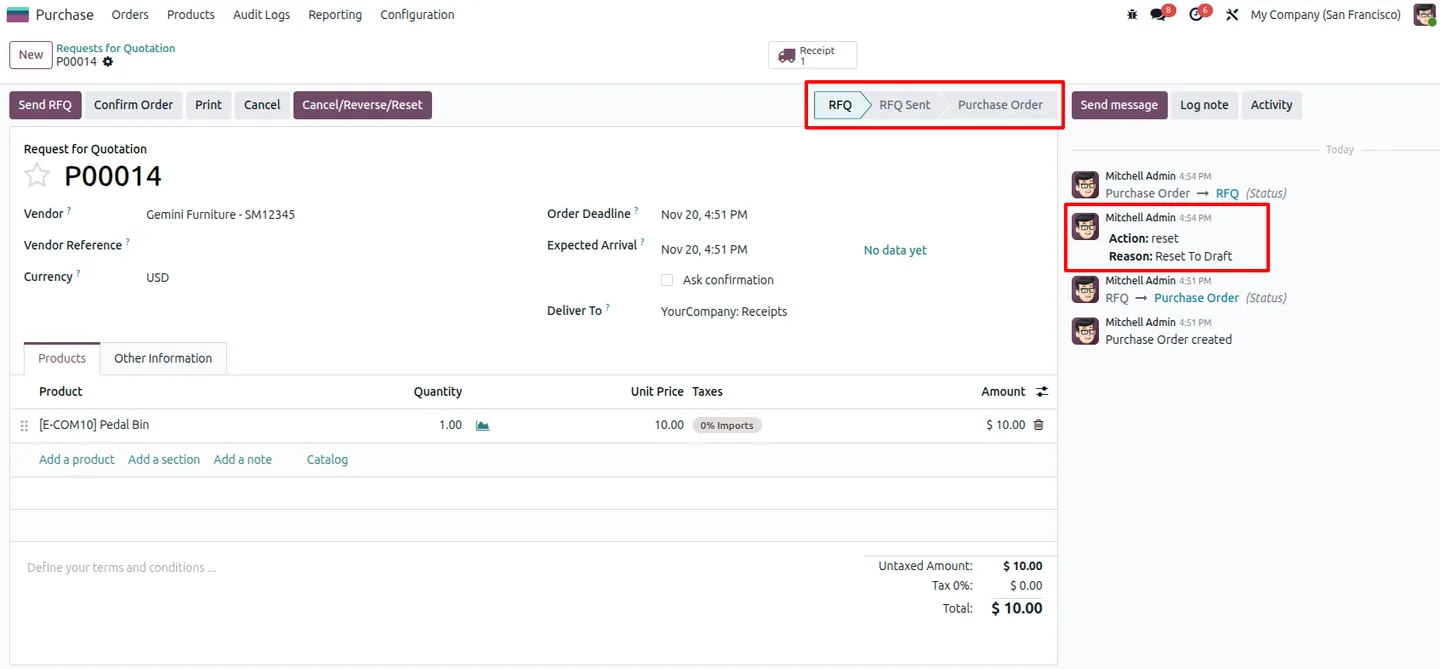
Return a purchase document to the draft state, with valid state rules applied so the document moves back through the workflow cleanly.
-
Dependency-aware with user control
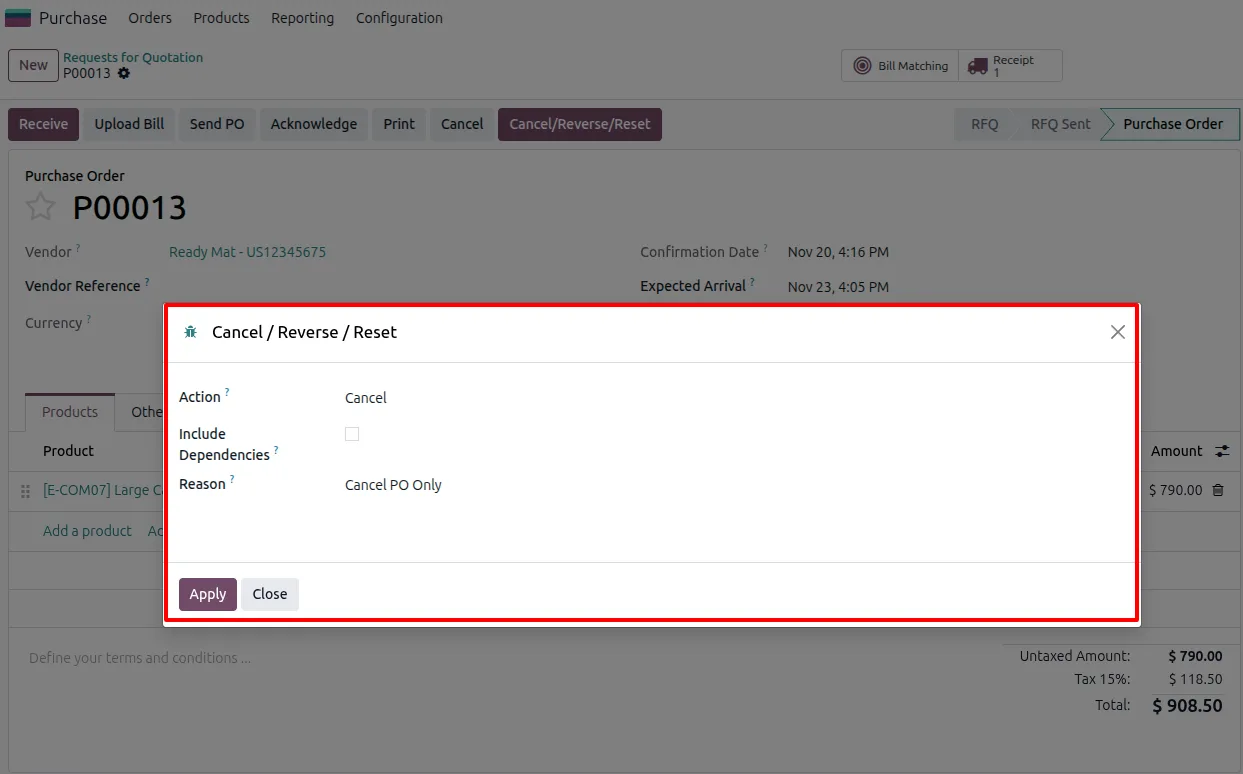
Related documents are handled together, and an Include Dependencies option lets the user decide whether linked records are cancelled along with the main document.
-
Audit trail and security
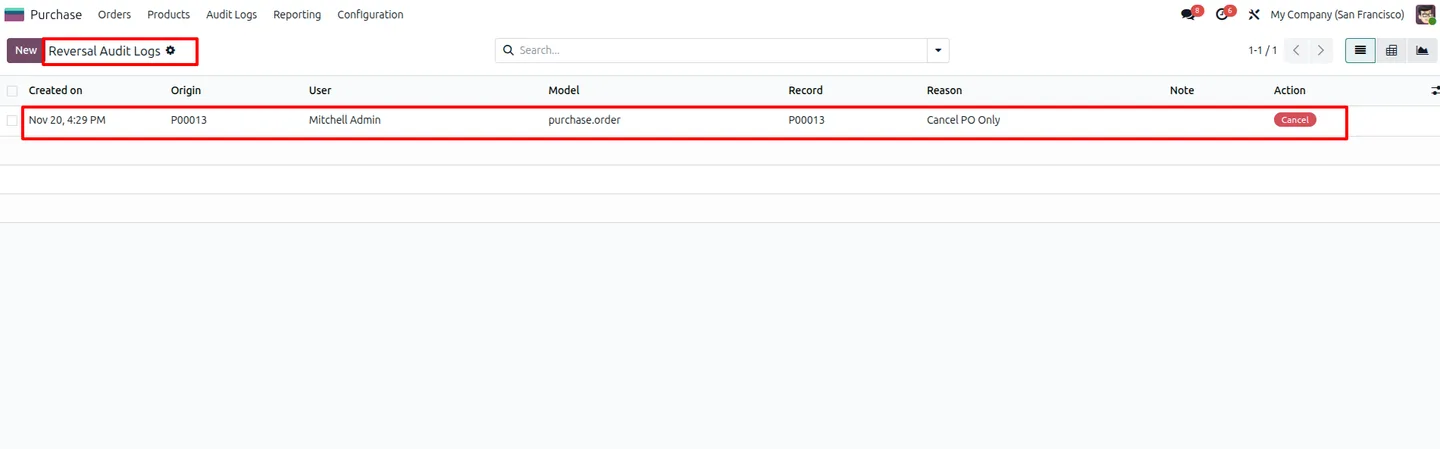
Every cancel, reverse, and reset action is logged. Reversal audit logs are available to users who hold the Reversal Manager access rights.
-
Configurable permissions
Access rights control who can run sensitive operations such as cancelling a vendor bill or reversing a receipt, so changes stay with authorised staff.
-
Clean, user-friendly interface
Cancel, Reverse, and Reset buttons sit directly on purchase documents, giving teams a straightforward way to manage the document lifecycle.
Purchase Cancel, Reverse & Reset in Odoo
Every screen, in the order you meet it — configuration first, then the module in use.
Technical details
Specification
- Publisher
- TechUltra Solutions Private Limited
- Technical name
- tus_po_reversal_advanced
- Odoo versions
- 16.0, 17.0, 18.0, 19.0, 20.0
- Lines of code
- 456
- License
- Odoo Proprietary License v1.0 (OPL-1)
- Price
- $25 (one-time)
Deployment
- Odoo Online
- Odoo.sh
- On-premise
Odoo dependencies
- Purchase
- Inventory
- Invoicing
Support
90 days of bug-fix support, Monday to Friday (10:00–19:00 IST). Raise a ticket at support@techultra.in.
Setup & configuration
From install to first call — here is the path.
- 1
Install the module
In Odoo, open Apps, remove the Apps filter, search for “Purchase Cancel, Reverse & Reset”, and click Install.
- 2
Open the configuration
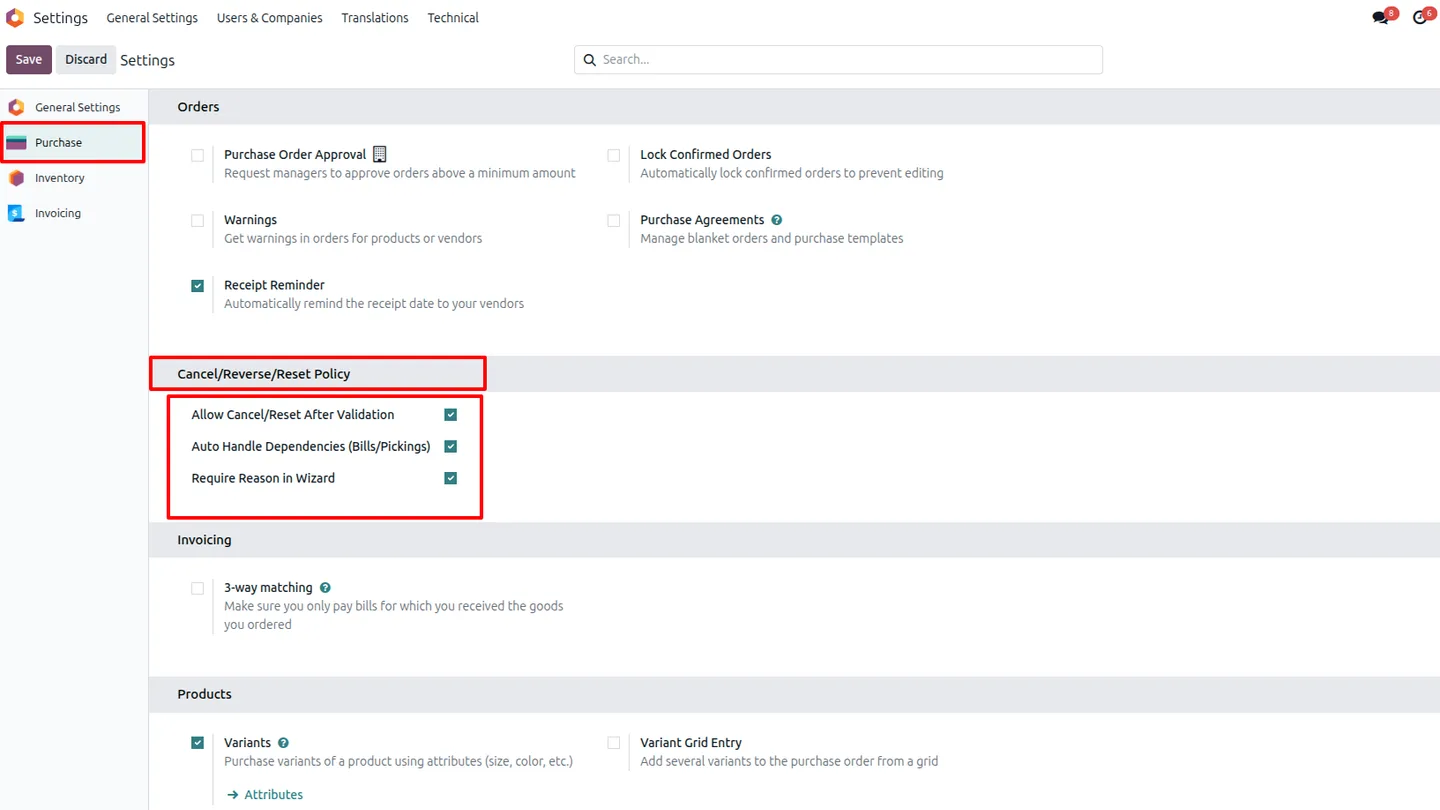
Go to Settings → Purchase to review the module's configuration options before letting your team use it.
- 3
Assign access rights
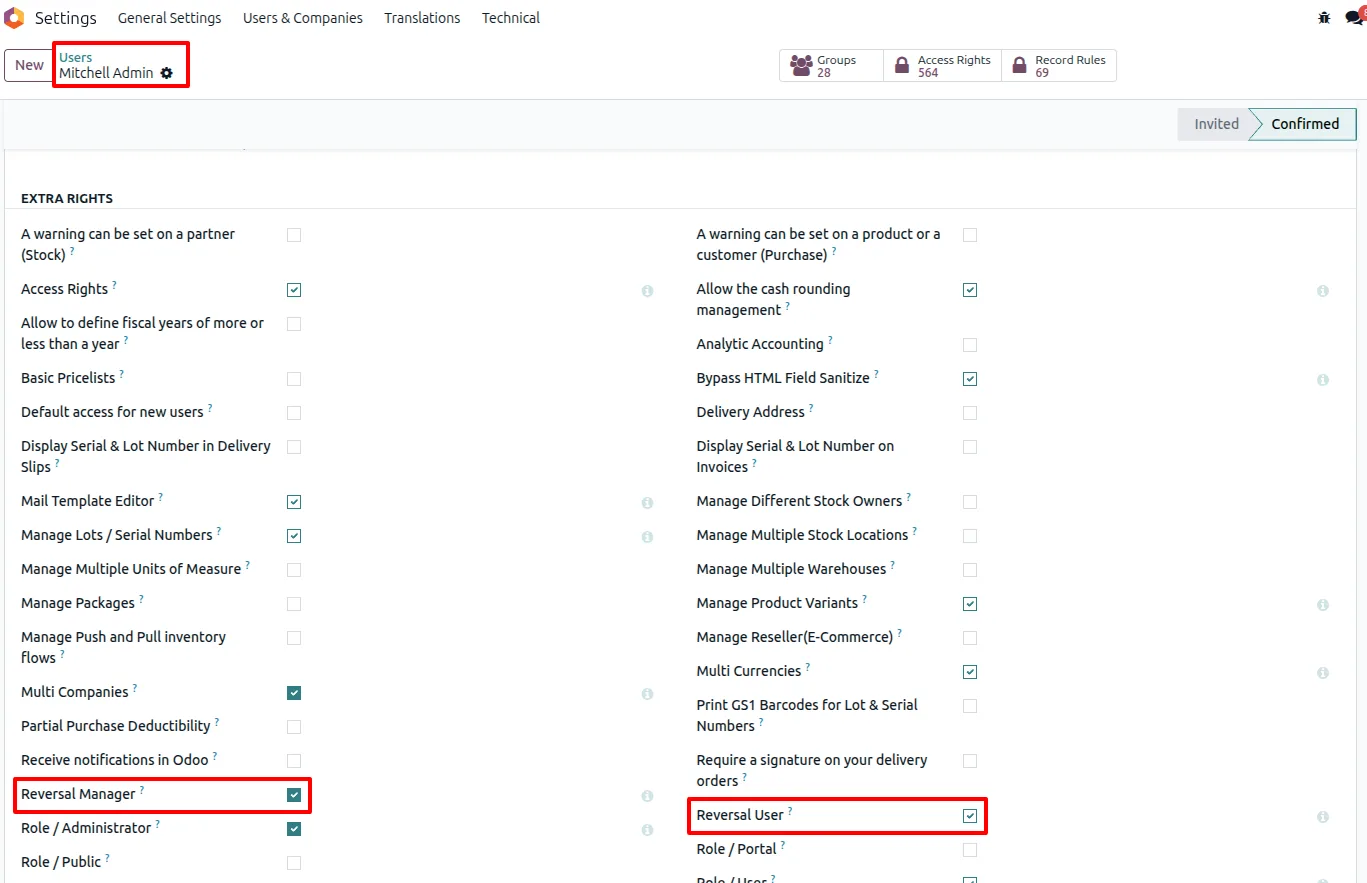
In Settings → Users & Companies → Users, grant the Reversal Manager role and other access rights so the right people can cancel bills, reverse receipts, and view audit logs.
- 4
Set dependency policies
Configure how related documents are handled, including the Include Dependencies option used when cancelling linked records together.
- 5
Use the lifecycle actions
On a purchase order, receipt, or vendor bill, use the Cancel, Reverse, or Reset button to correct the document as needed.
- 6
Review the audit log
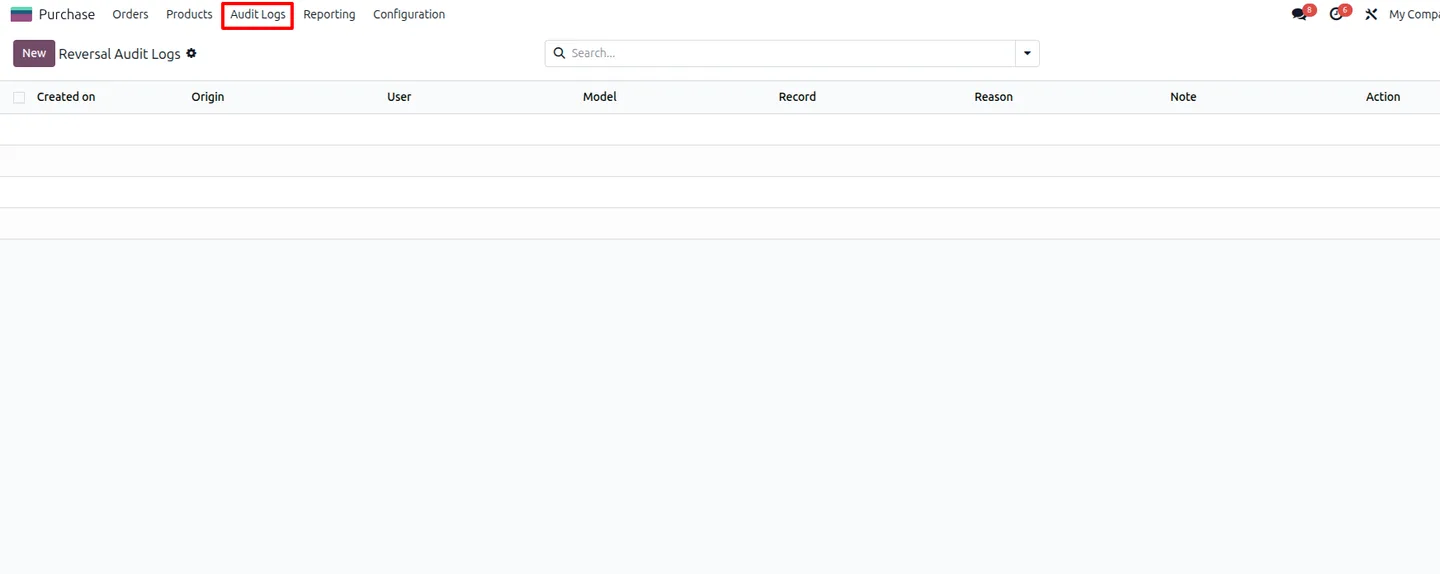
Open the Reversal Audit Logs, visible to users with Reversal Manager access, to confirm each action was recorded.
Frequently asked questions
-
Can I cancel a purchase order after it is validated?
Yes. The module enables cancellation of validated purchase orders, so you do not need the manual workarounds standard Odoo would otherwise require.
-
Does it work on receipts and vendor bills too?
Yes. You can reverse validated receipts and vendor bills, and reset purchase documents back to draft, all from buttons on the document itself.
-
What happens to documents linked to the one I cancel?
The module is dependency-aware. An Include Dependencies option lets you choose whether related documents are cancelled together with the main document.
-
Is there a record of who reversed what?
Yes. Every cancel, reverse, and reset action is logged. The Reversal Audit Logs are visible to users who hold the Reversal Manager access rights.
-
Can I control who is allowed to use these actions?
Yes. Access rights control sensitive operations such as cancelling vendor bills or reversing receipts, so only authorised staff can run them.
-
Does reversing a document keep my data consistent?
Yes. The module preserves data integrity when documents are reversed or reset, so stock moves and accounting entries stay consistent.
-
Which Odoo versions are supported?
The module supports Odoo 16.0, 17.0, 18.0, 19.0, and 20.0, in both the Community and Enterprise editions.
Listing verified against the Odoo App Store:
Related solutions
Whole-platform solutions that complement Purchase Cancel, Reverse & Reset.
Odoo Purchase
Odoo Purchase module — RFQ, PO, supplier portal, three-way match, blanket PO, drop-ship, sub-contracting. Integrated with Inventory + MRP + Accounting.
Odoo Inventory + Warehouse Management
Odoo Inventory module — multi-warehouse, batch/serial, putaway, barcode, replenishment, cross-docking, dropship, consignment. Full WMS in your ERP.
Related services
Get the most out of this module with senior TechUltra consultants.
Odoo Customization Services
Odoo customization from a Gold Partner: custom modules, workflows, reports and Studio changes, written upgrade-safe and quoted at a fixed scope. Free scoping call.
Hire Odoo Developers
Hire certified Odoo developers from a Gold Partner: one developer or a team, full-time or part-time, 70–160 hours a month. Silver, Gold or Platinum plan, free trial.
Odoo Support Services & Maintenance
Odoo support services from a Gold Partner: functional and technical support plus server cover for Enterprise and Community, 30-minute P1 response, 24/7 option.







