
Odoo App · Accounting & Finance
Multi-Invoice Payment
Register one payment across many customer invoices or vendor bills in Odoo.

Overview
When a customer settles five invoices with one transfer, standard Odoo makes the accountant register and reconcile each invoice separately. Multi-Invoice Payment replaces that with a single operation: one payment, allocated across every open document for the partner.
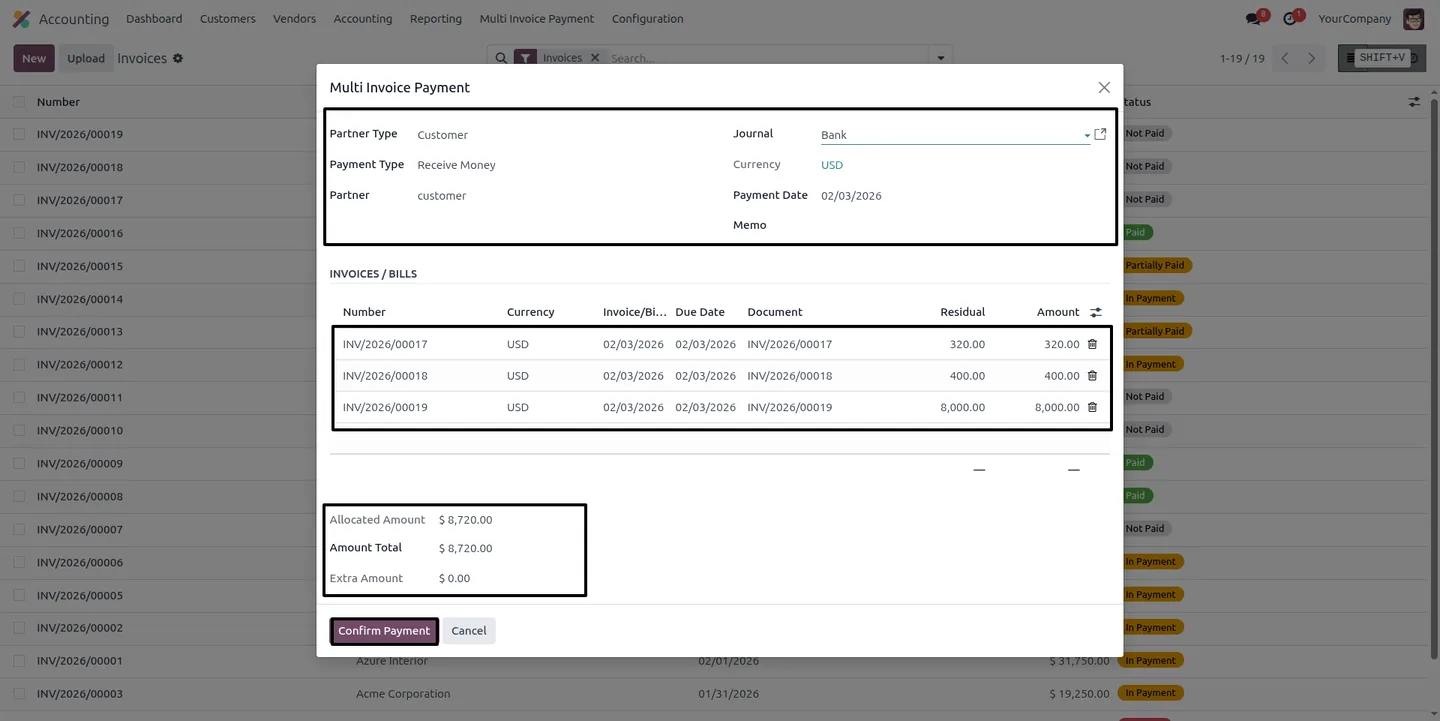
Built by TechUltra Solutions, the module adds a Multi Invoice Payment wizard to the Accounting app. Choose a partner and the wizard loads all their open invoices or bills; the accountant decides how the payment is split, including partial amounts on any document, and sees the allocated, remaining, and extra amounts update as they go.
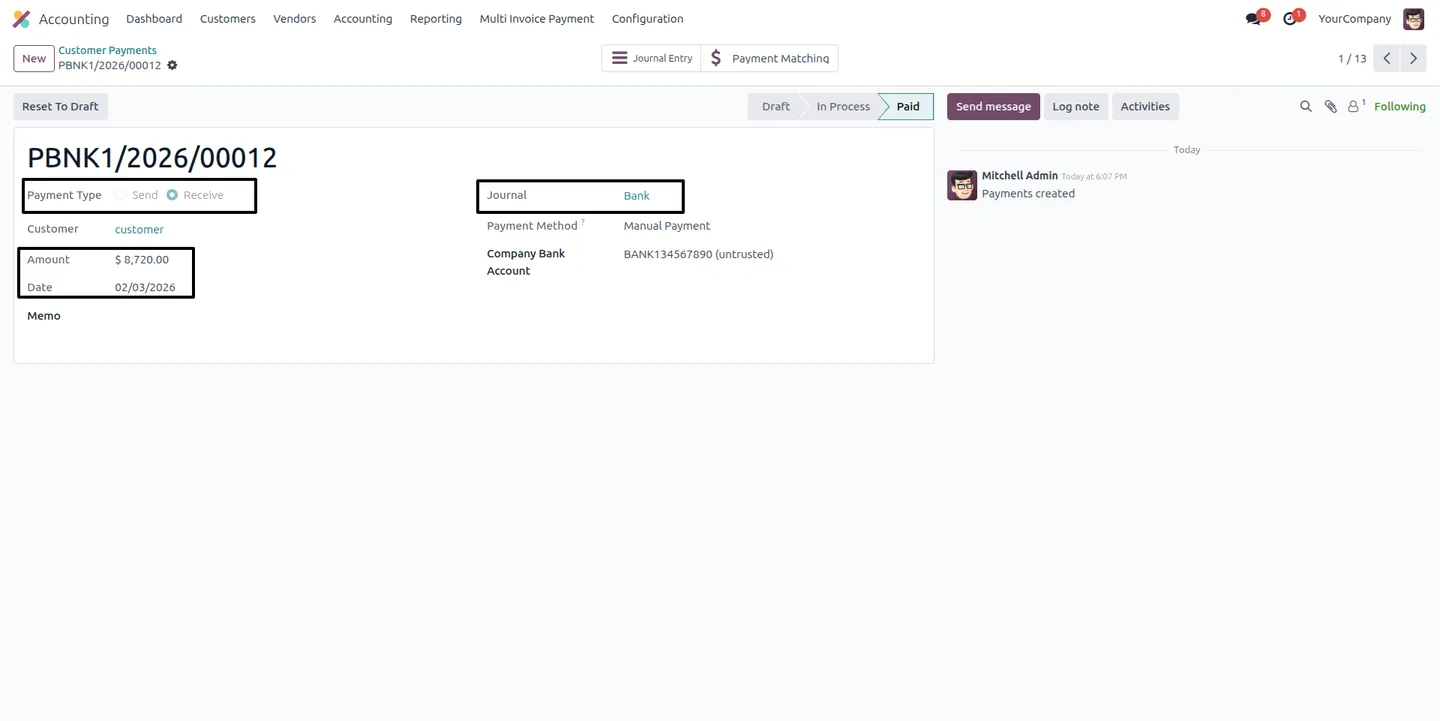
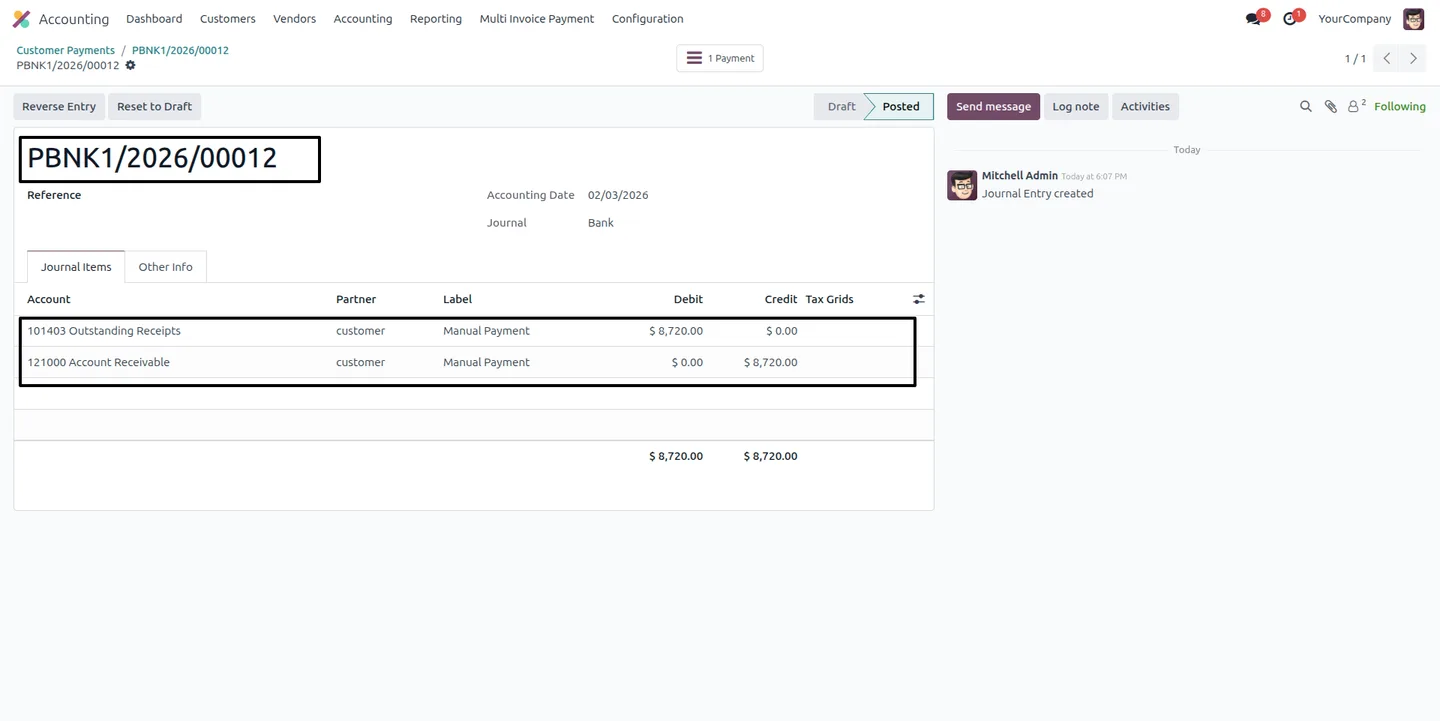
It handles both directions — inbound customer payments and outbound vendor payments — and creates a standard, posted payment with the matching journal entry. The result fits normal Odoo accounting workflows, so reporting and reconciliation behave exactly as expected.
Key features
-
One payment for many documents
Register a single payment against multiple customer invoices or vendor bills through a simple popup wizard, instead of one entry per document.
-
Customer and vendor payments
The wizard handles both inbound customer payments and outbound vendor payments, so receivables and payables use the same tool.
-
Manual allocation control
The accountant keeps full discretion over how the payment is distributed across the selected invoices or bills.
-
Partial payment support
Allocate part of the payment to any document, so under-payments and split settlements are handled in the same operation.
-
Live balance tracking
The wizard shows allocated, remaining, and extra amounts in real time, so the accountant always knows where the payment stands.
-
Automatic partner document loading
Selecting a partner loads all their related open invoices or bills into the wizard, with no manual lookup.
-
Standard payment and journal entry
The wizard creates a normal posted payment with its matching journal entry, so the result fits standard Odoo accounting workflows.
Multi-Invoice Payment in Odoo
Every screen, in the order you meet it — configuration first, then the module in use.
Technical details
Specification
- Publisher
- TechUltra Solutions Private Limited
- Technical name
- multi_invoice_payment_reconcile
- Odoo versions
- 16.0, 17.0, 18.0, 19.0, 20.0
- Lines of code
- 261
- License
- Odoo Proprietary License v1.0 (OPL-1)
- Price
- $14.90 (one-time)
Deployment
- Odoo Online
- Odoo.sh
- On-premise
Odoo dependencies
- Accounting
- Invoicing
- Discuss
Support
90 days of bug-fix support, Monday to Friday (10:00–19:00 IST). Raise a ticket at support@techultra.in.
Setup & configuration
From install to first call — here is the path.
- 1
Install the module
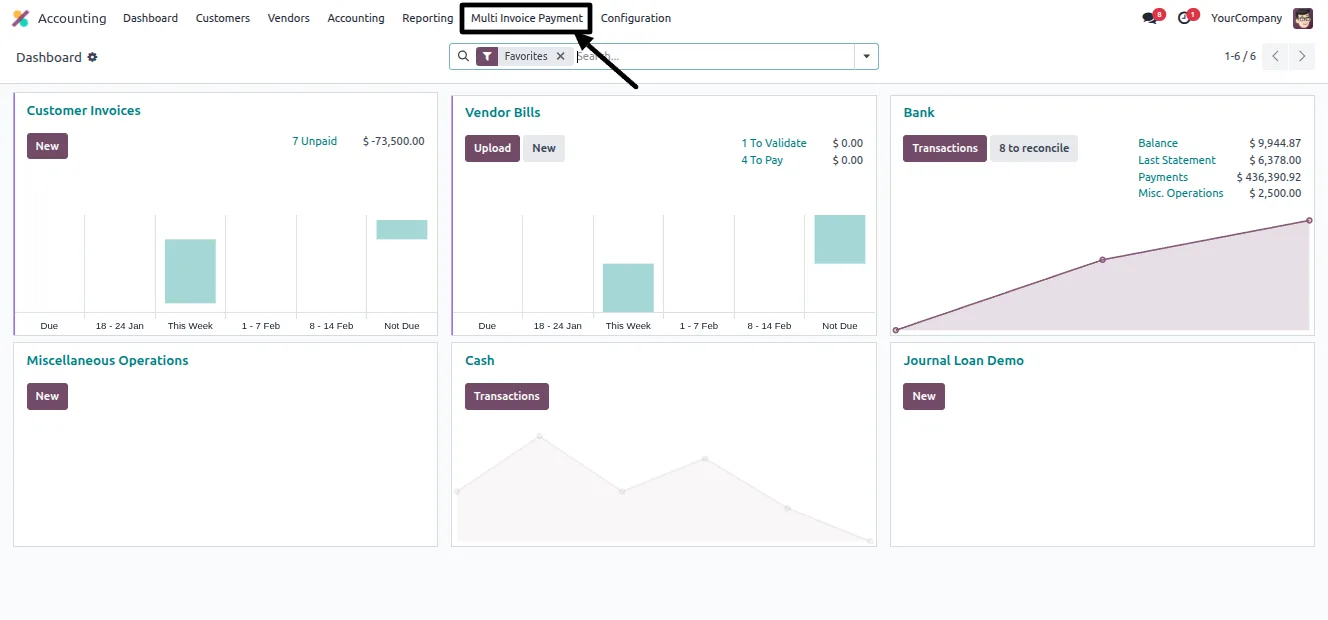
In Odoo, open Apps, remove the Apps filter, search for “Multi-Invoice Payment”, and click Install. A Multi Invoice Payment menu then appears in the Accounting app.
- 2
Configure the bank journal
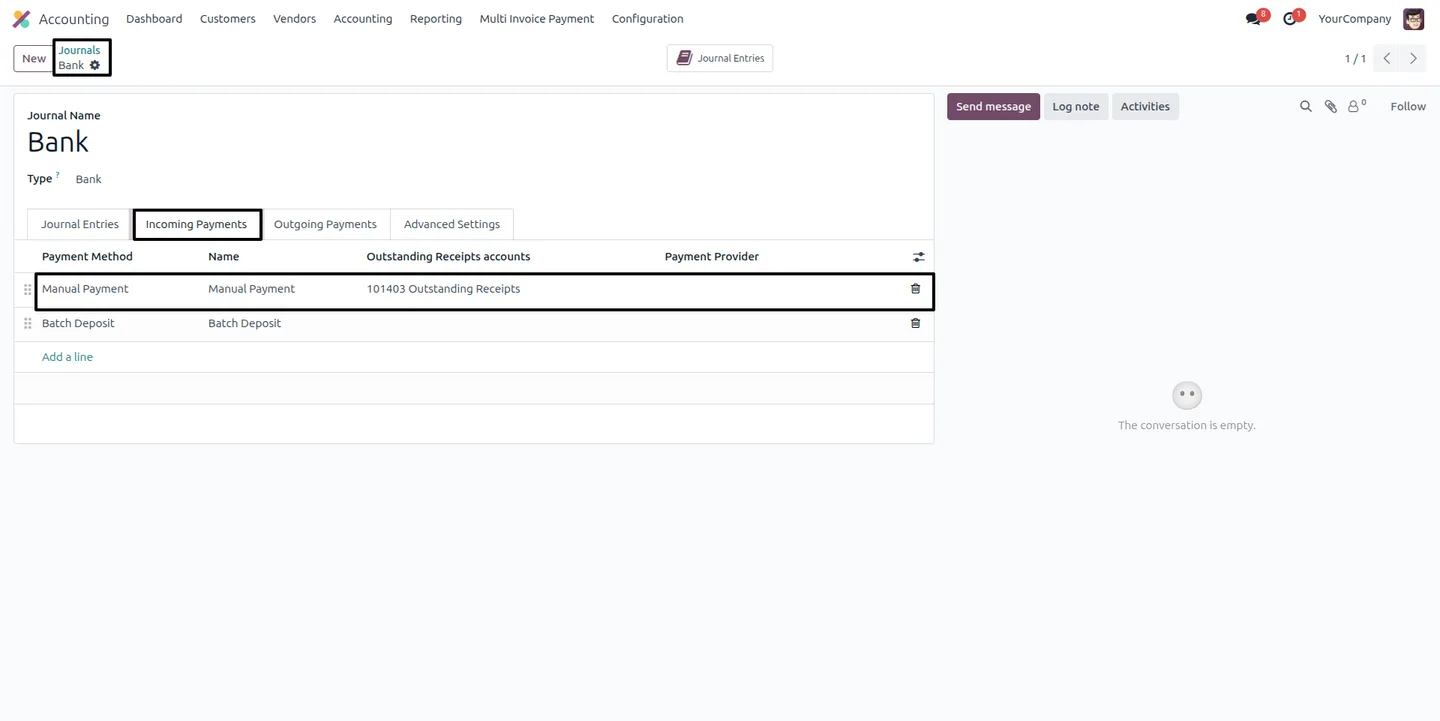
Go to Accounting → Configuration → Journals, open the Bank journal, and set the Outstanding Receipts account for the payment method.
- 3
Open the wizard
Click Multi Invoice Payment to open the popup wizard.
- 4
Select partner and payment details
Choose the Partner Type, which sets the Payment Type, then select the Partner — the wizard loads all related open documents. Pick the Journal, such as Bank, and set the Payment Date.
- 5
Allocate and confirm
Distribute the payment across the invoices or bills, using partial amounts where needed, and confirm. The wizard creates the payment and posts its journal entry.
- 6
Verify the result
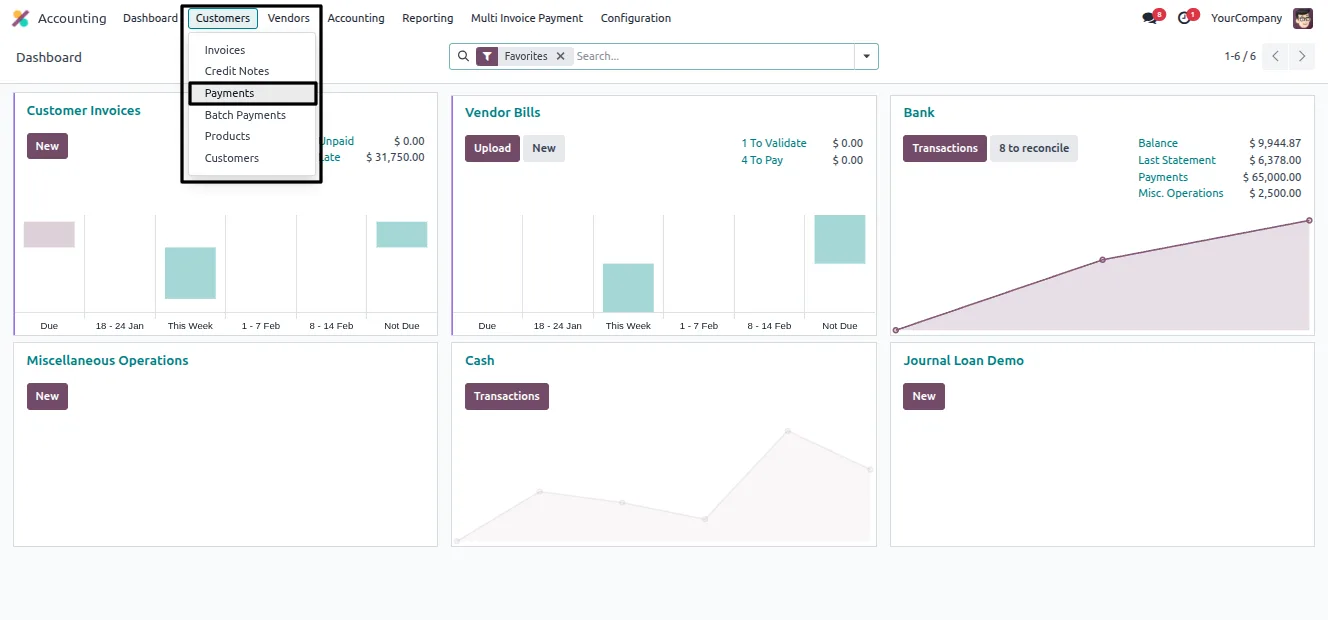
Check the payment under Accounting → Customers → Payments and confirm the posted journal entry under Accounting → Accounting → Journal Entries.
Frequently asked questions
-
What problem does Multi-Invoice Payment solve?
When one payment settles several invoices, standard Odoo requires registering each invoice separately. This module allocates a single payment across all of a partner's open documents in one operation.
-
Does it work for vendor bills as well as customer invoices?
Yes. The wizard supports both inbound customer payments and outbound vendor payments, so receivables and payables use the same tool.
-
Can I pay an invoice only partly?
Yes. You can allocate part of the payment to any document, so partial payments and split settlements are handled within the same operation.
-
How do I know how much is left to allocate?
The wizard tracks allocated, remaining, and extra amounts in real time, so you always see where the payment stands as you distribute it.
-
Do I have to look up the partner's open documents?
No. Selecting a partner loads all of their related open invoices or bills into the wizard automatically.
-
Does it create a standard Odoo payment?
Yes. The wizard creates a normal posted payment with its matching journal entry, so reporting and reconciliation work as usual.
-
Which Odoo versions are supported?
The module supports Odoo 16.0, 17.0, 18.0, 19.0, and 20.0, in both the Community and Enterprise editions.
-
Is support included?
Yes. The module includes 90 days of bug-fix support, Monday to Friday, 10:00–19:00 IST.
Listing verified against the Odoo App Store:
Related solutions
Whole-platform solutions that complement Multi-Invoice Payment.
Odoo Accounting
Odoo Accounting — multi-entity, multi-currency, bank-feed integration, reconciliation, deferred revenue, GAAP / IFRS. 60+ country localisations.
Odoo as Accounting Software
Odoo Accounting standalone — alternative to QuickBooks, Tally, Xero, Zoho Books. Real GL, multi-entity, statutory compliance, scales into full ERP.
E-Invoicing on Odoo
Native e-invoicing for Odoo — India GST, Italy FatturaPA, Saudi ZATCA, Mexico CFDI, EU EN 16931. IRN registration, statutory submission, audit archives.
Related services
Get the most out of this module with senior TechUltra consultants.
Odoo Customization Services
Odoo customization from a Gold Partner: custom modules, workflows, reports and Studio changes, written upgrade-safe and quoted at a fixed scope. Free scoping call.
Hire Odoo Developers
Hire certified Odoo developers from a Gold Partner: one developer or a team, full-time or part-time, 70–160 hours a month. Silver, Gold or Platinum plan, free trial.
Odoo Support Services & Maintenance
Odoo support services from a Gold Partner: functional and technical support plus server cover for Enterprise and Community, 30-minute P1 response, 24/7 option.







