

Odoo App · Inventory & Purchase
Material Requisition Management
Raise, approve, and fulfil internal material requests inside Odoo.

Overview
Material Requisition Management gives Odoo a structured way to handle internal material requests. Employees raise a requisition for the parts or supplies they need, and the request moves through a defined approval chain before procurement acts on it.
Built by TechUltra Solutions, the module covers the complete lifecycle in one place: request, multi-level approval, and fulfilment. Each approved requisition can be turned into a purchase order when stock has to be bought, or into an internal stock transfer when the goods are already on hand — so the same workflow serves both procurement and warehouse moves.
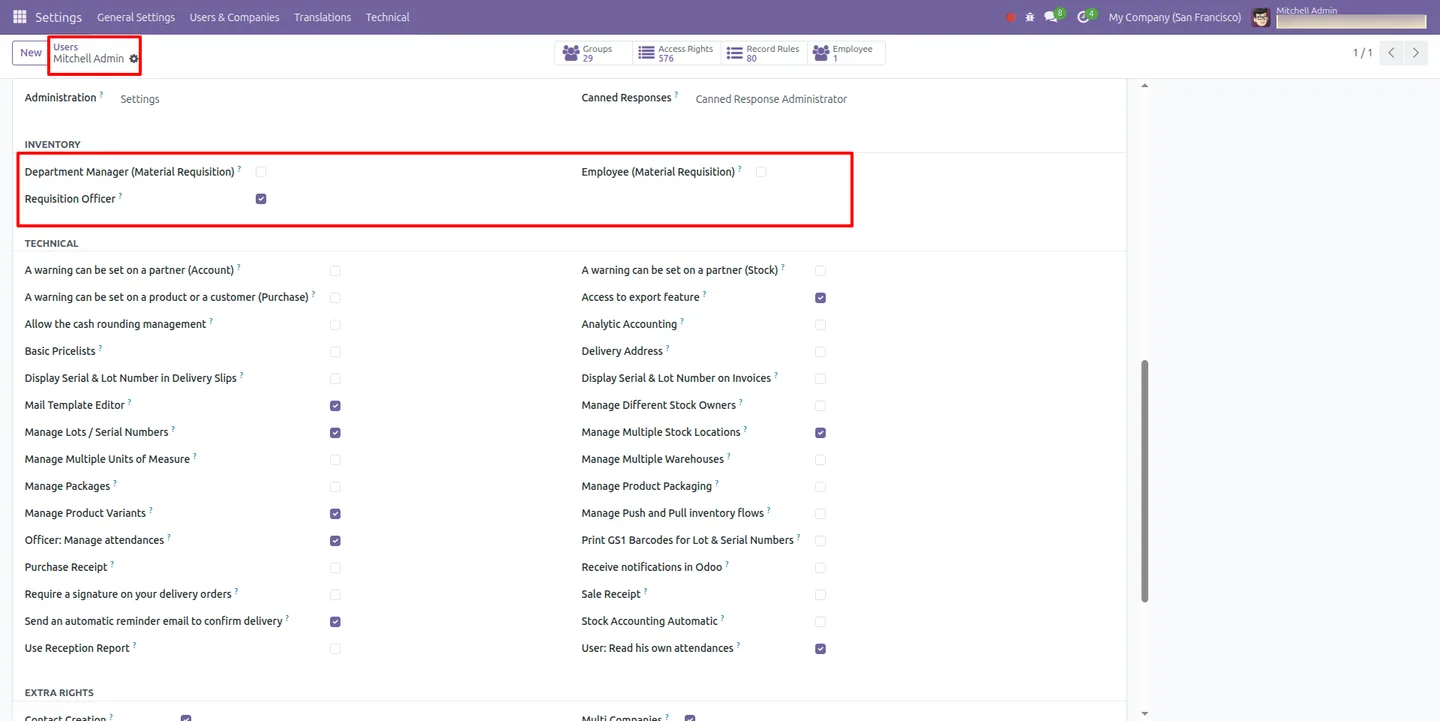
Role-based access keeps the process controlled: requisition officers, department managers, and employees each see only what their role allows. Automated email notifications, real-time status tracking, and printable PDF requisition reports give every department a clear, auditable view of who asked for what and where it stands.
Key features
-
Centralised material requisition
A single place inside Odoo for every internal material request, so employees stop chasing supplies through email and spreadsheets.
-
Multi-level approval workflow
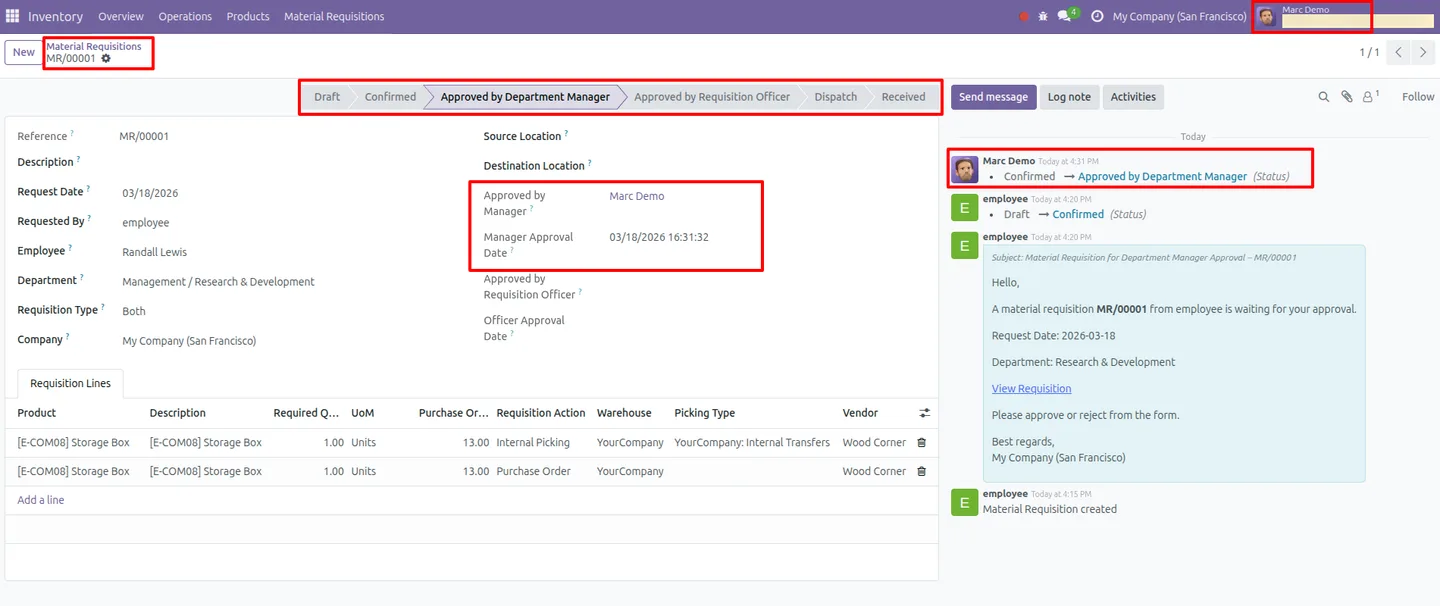
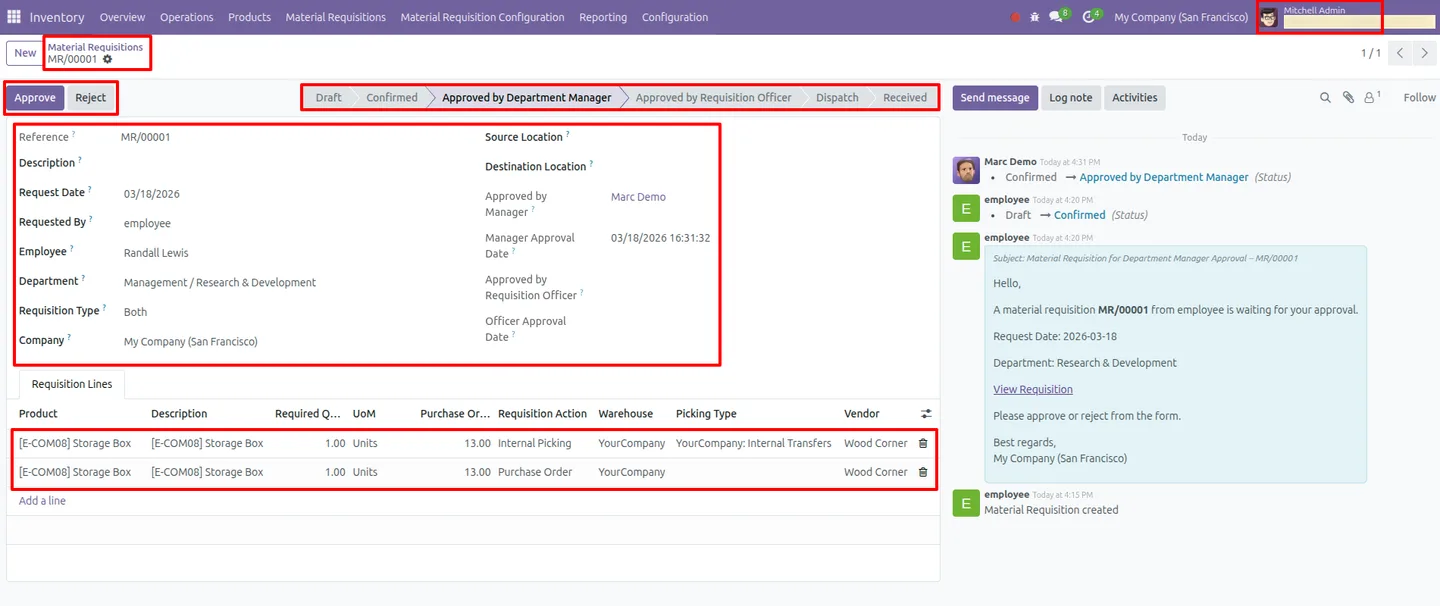
Each requisition moves through a configurable review and authorisation chain before procurement acts on it, with department managers signing off on their team's requests.
-
Dual fulfilment — purchase or transfer
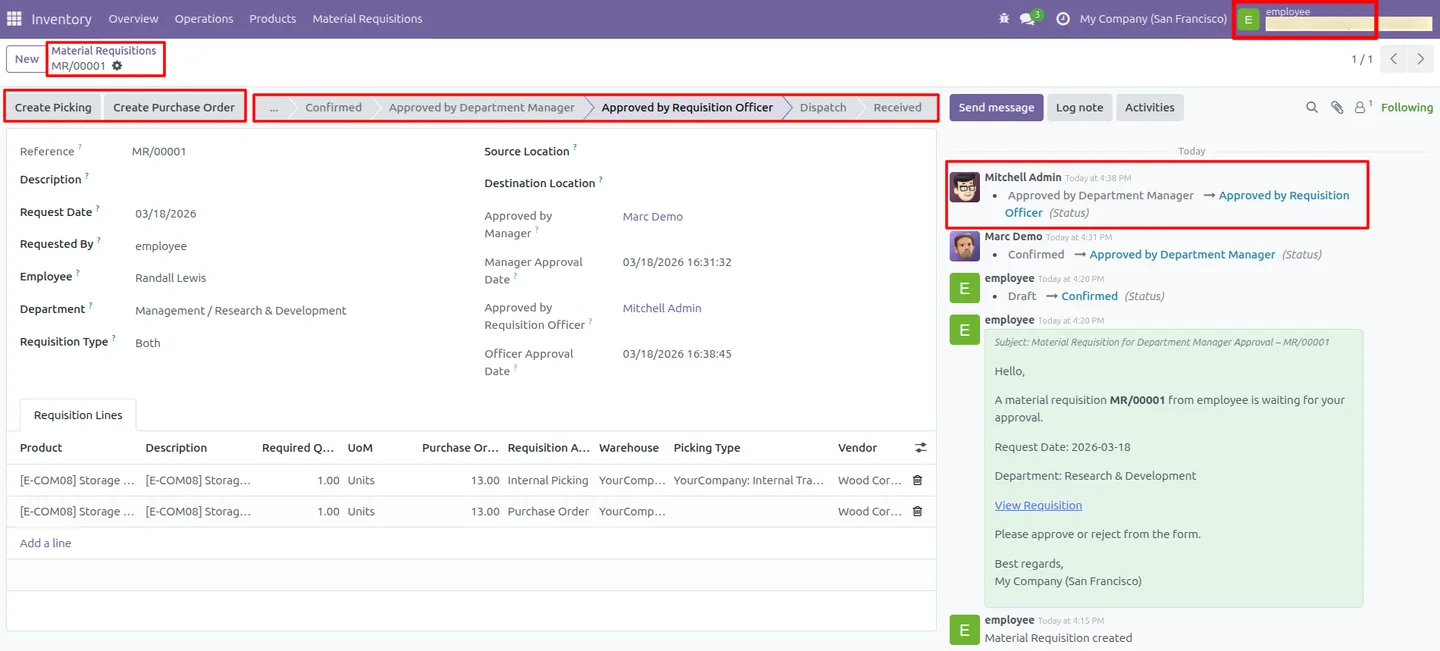
Turn an approved requisition into a purchase order when stock must be bought, or into an internal stock transfer when the goods are already in the warehouse.
-
Automated email notifications
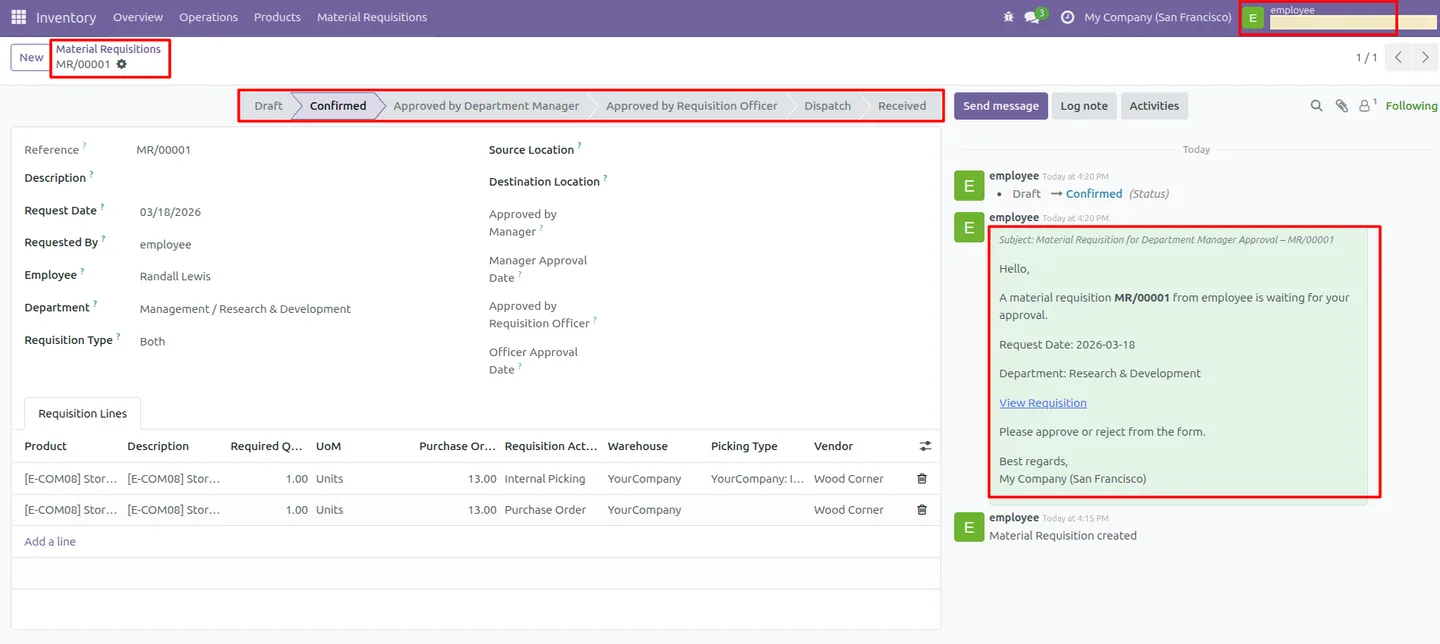
Requesters and approvers receive email alerts at the key workflow stages, so requisitions do not stall waiting for someone to notice them.
-
Inventory transfer automation
When a requisition is fulfilled from stock, the module creates the internal transfer for you, moving goods to the requested location without manual data entry.
-
Location-based stock control
Set the destination stock location per user so material transfers always land at the right warehouse or department location.
-
Real-time status tracking
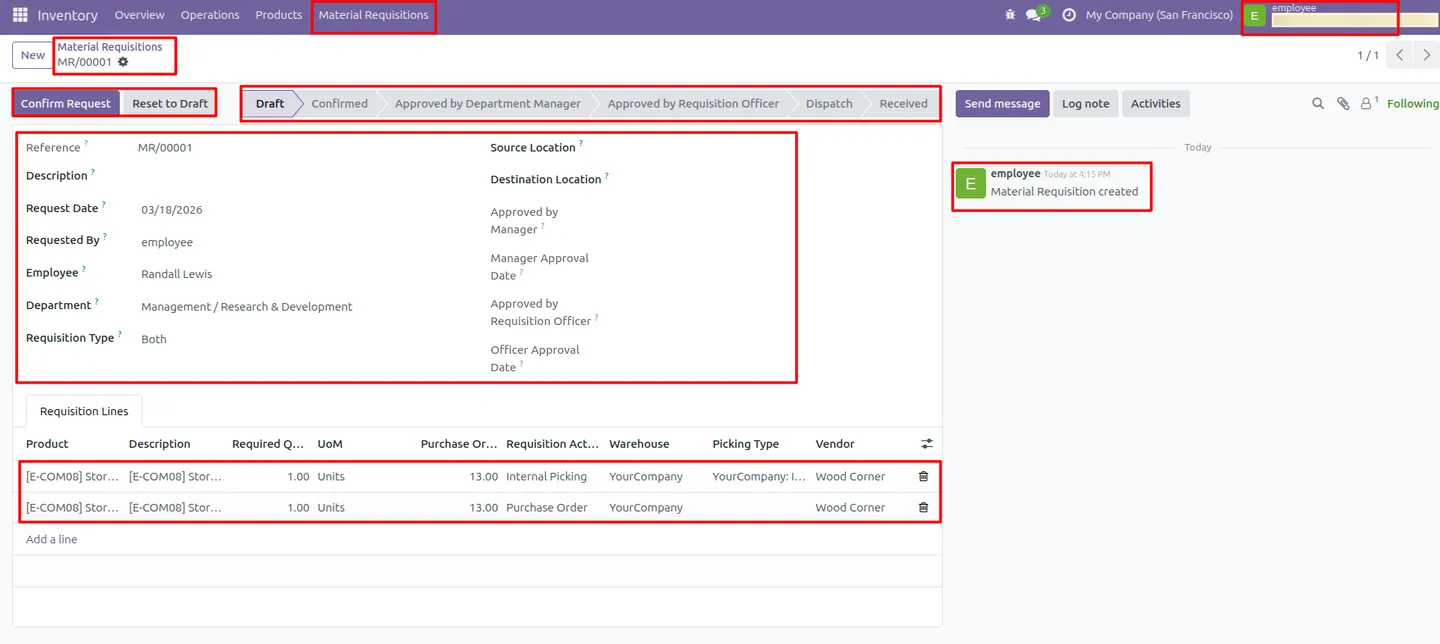
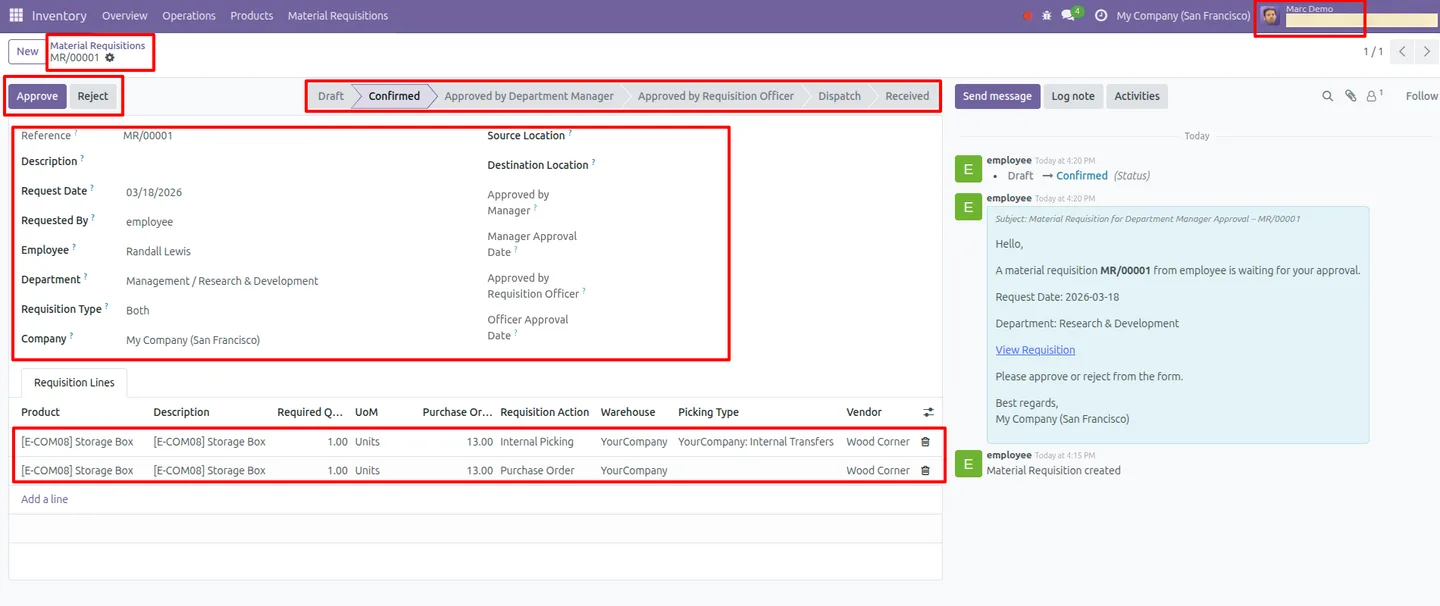
Every requisition shows its current stage — draft, awaiting approval, approved, or fulfilled — so requesters and managers always know where a request stands.
-
Professional PDF reports
Generate detailed requisition reports as PDF documents for record-keeping, audits, and sharing with stakeholders outside Odoo.
-
Role-based access control
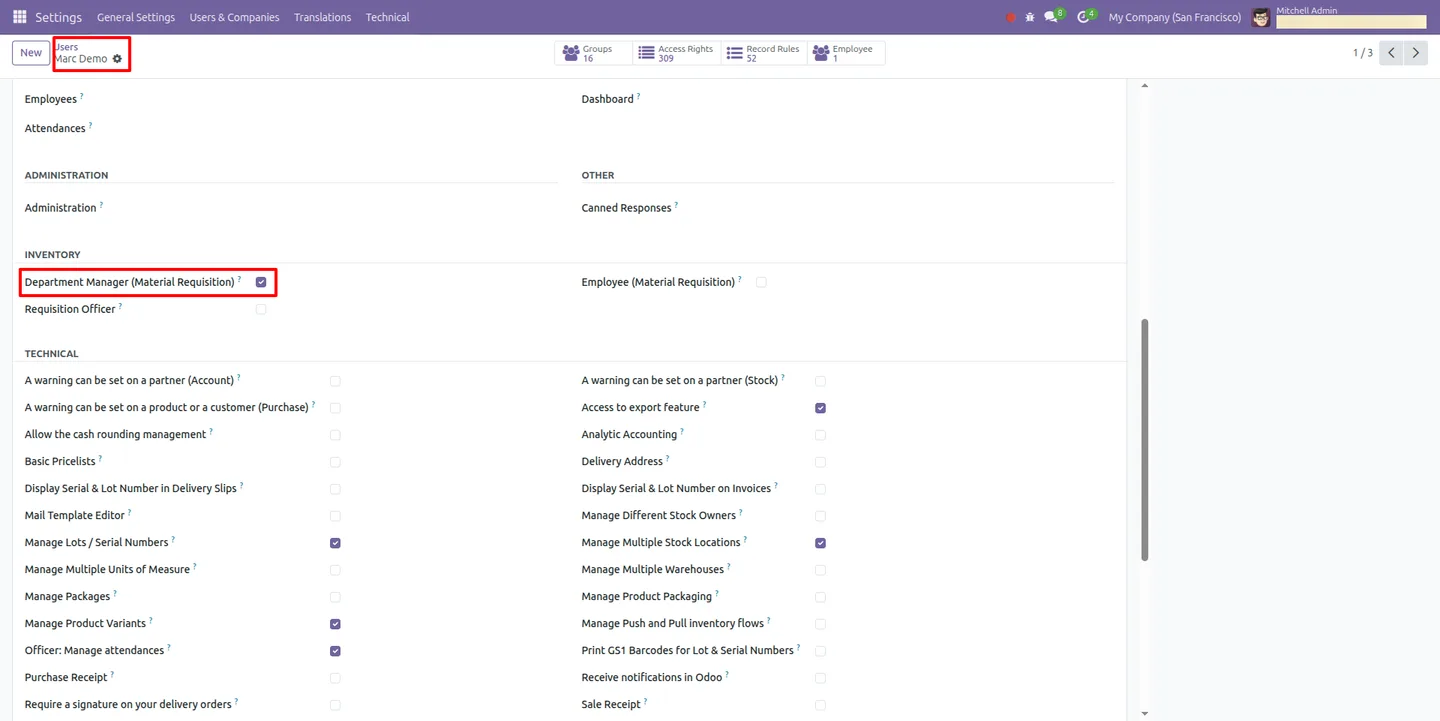
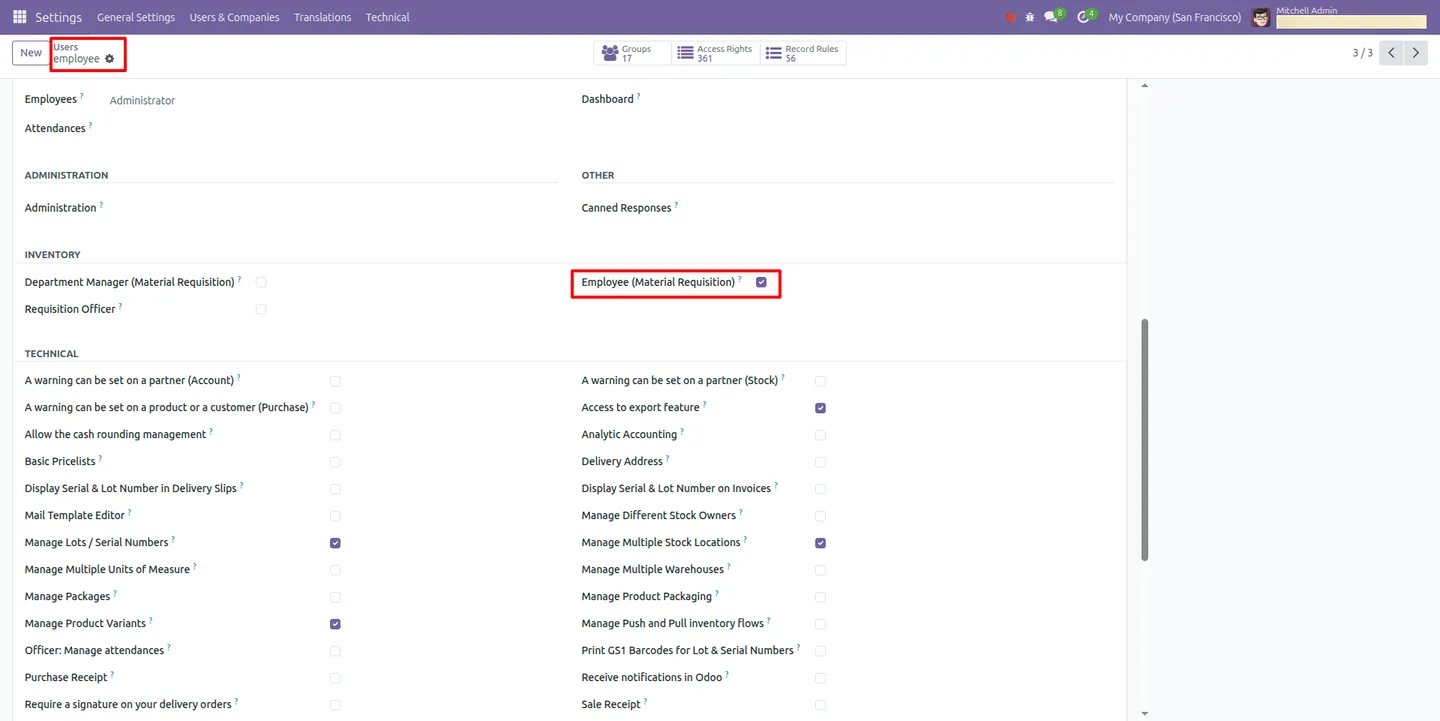
Requisition Officer, Department Manager, and Employee roles each grant the right level of access, keeping the requisition process secure and orderly.
Material Requisition Management in Odoo
Every screen, in the order you meet it — configuration first, then the module in use.
Technical details
Specification
- Publisher
- TechUltra Solutions Private Limited
- Technical name
- material_requisition_advanced
- Odoo versions
- 16.0, 17.0, 18.0, 19.0, 20.0
- Lines of code
- 992
- License
- Odoo Proprietary License v1.0 (OPL-1)
- Price
- $35 (one-time)
Deployment
- Odoo Online
- Odoo.sh
- On-premise
Odoo dependencies
- Inventory
- Purchase
- Employees
- Invoicing
- Discuss
Support
90 days of bug-fix support, Monday to Friday (10:00–19:00 IST). Raise a ticket at support@techultra.in.
Setup & configuration
From install to first call — here is the path.
- 1
Install the module
In Odoo, open Apps, remove the Apps filter, search for “Material Requisition Management”, and click Install.
- 2
Assign user roles
Go to Settings → Users & Companies → Users and give each user the right role: Requisition Officer, Department Manager (Material Requisition), or Employee (Material Requisition).
- 3
Check department assignments
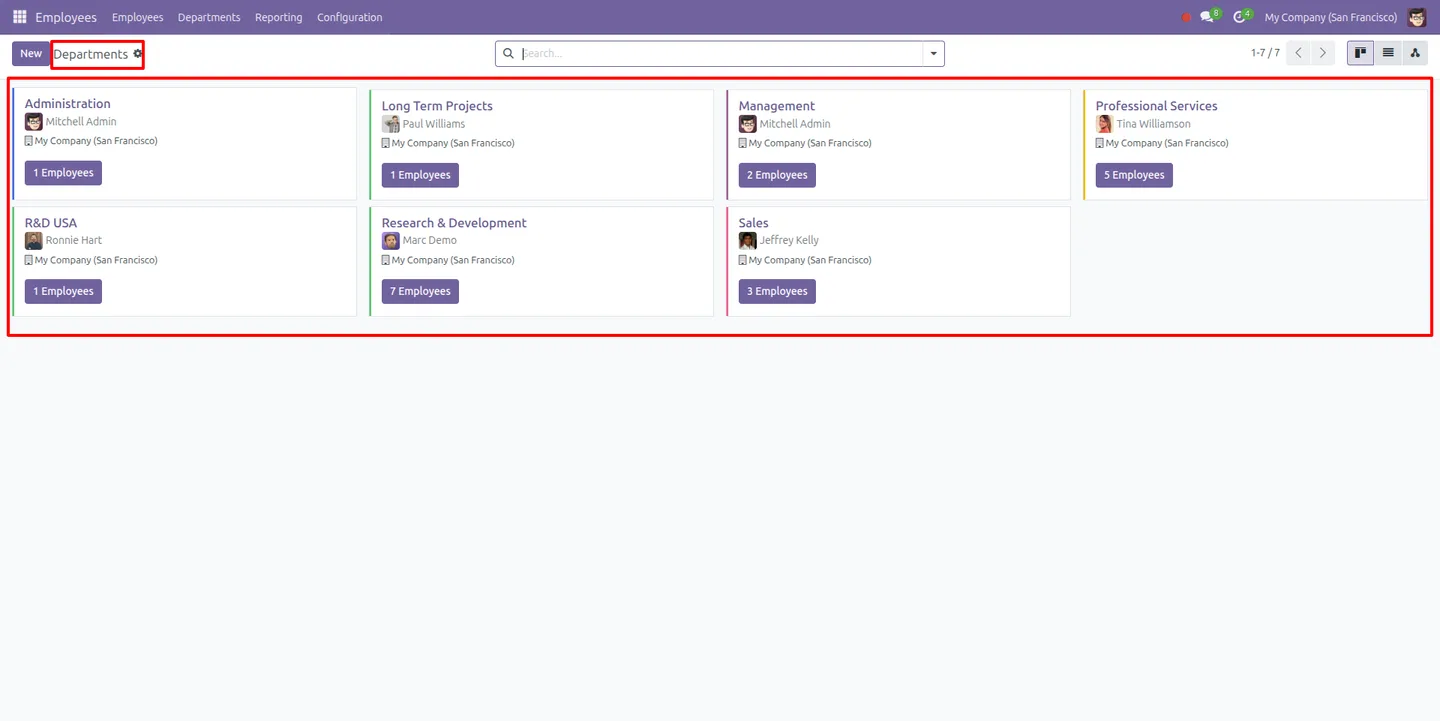
Open Employees → Departments to confirm employees are mapped to the correct departments, since approvals route through the department manager.
- 4
Configure the approval workflow
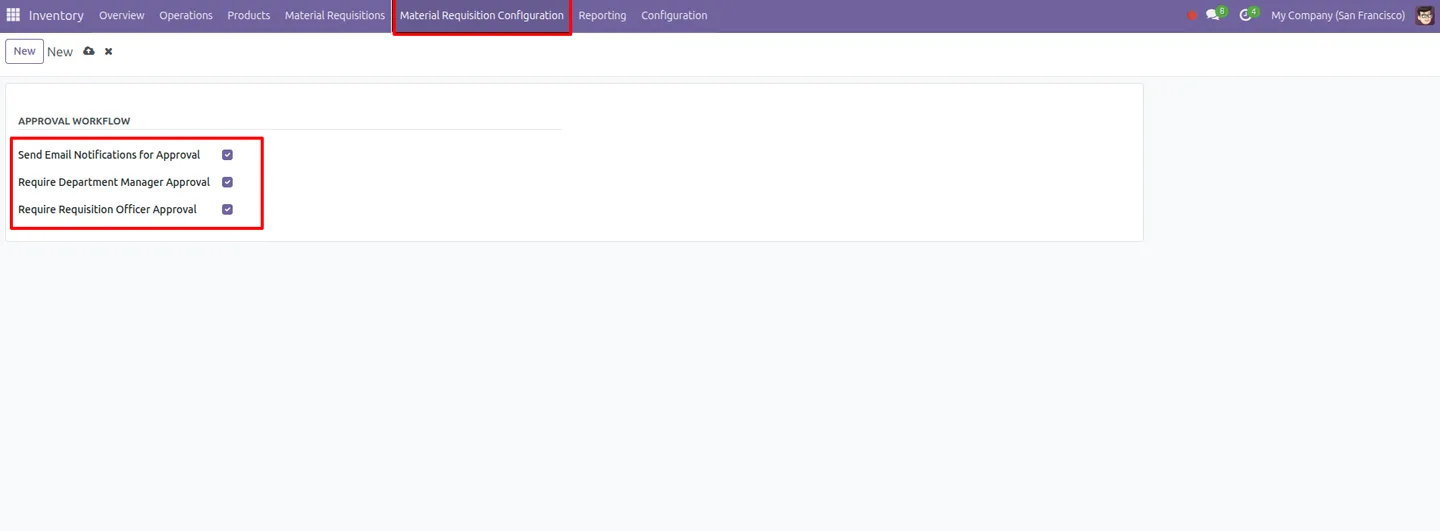
Go to Inventory → Material Requisition Configuration and define the approval stages and rules requisitions must follow.
- 5
Set user stock locations
In Settings, configure each user's stock location so material transfers are delivered to the correct destination.
- 6
Raise a requisition
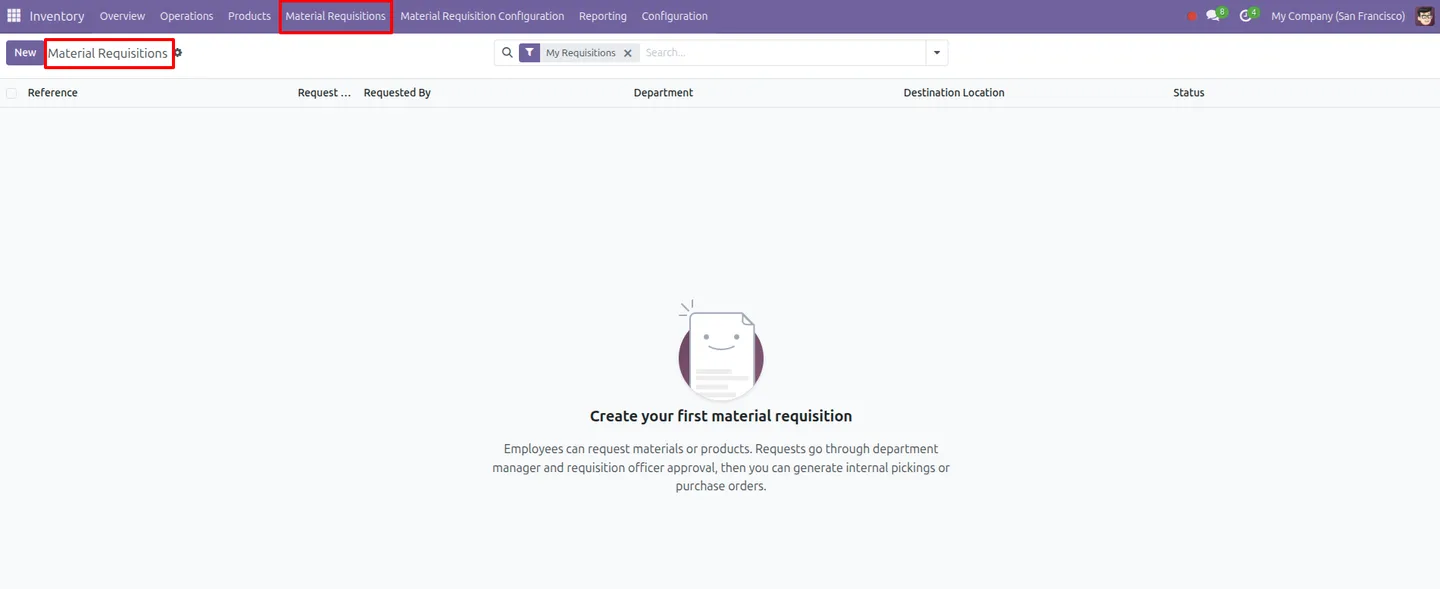
Open Inventory → Material Requisition, create a request, and submit it for approval. Once approved, fulfil it with a purchase order or a stock transfer.
Frequently asked questions
-
How does the approval workflow work?
Each requisition moves through a multi-level approval chain you define under Inventory → Material Requisition Configuration. A request must be authorised before procurement can fulfil it, and department managers sign off on their own team's requisitions.
-
Can a requisition be fulfilled without buying stock?
Yes. An approved requisition can be fulfilled through an internal stock transfer when the goods are already in your warehouse, or through a purchase order when stock needs to be bought.
-
Who can raise and approve material requests?
The module adds three roles — Requisition Officer, Department Manager, and Employee. Employees raise requests, department managers approve their team's requests, and requisition officers oversee the wider process.
-
Are requesters notified about their requests?
Yes. The module sends automated email notifications at the key workflow stages, so requesters and approvers are alerted as a requisition is submitted, approved, or fulfilled.
-
Which Odoo versions does the module support?
Material Requisition Management supports Odoo 16.0, 17.0, 18.0, 19.0, and 20.0, in both the Community and Enterprise editions.
-
Can I print a requisition?
Yes. The module generates detailed PDF requisition reports you can use for record-keeping, audits, or sharing with people outside Odoo.
-
Which Odoo apps does it depend on?
It builds on Inventory, Purchase, Employees, Invoicing, and Discuss, so those apps should be installed for the requisition, approval, and fulfilment workflow to run.
-
Is support included?
Yes. The module includes 90 days of bug-fix support, Monday to Friday, 10:00–19:00 IST.
Listing verified against the Odoo App Store:
Related services
Get the most out of this module with senior TechUltra consultants.
Odoo Customization Services
Tailored Odoo customizations from a Gold Partner — 200+ projects, upgrade-safe patterns, fixed-scope quotes, senior consultants. Free demo consultation.
Hire Odoo Developers
Hire certified Odoo developers from a Gold Partner — 400+ implementations, 92% satisfaction, Odoo since 2016. Silver / Gold / Platinum packages, free trial.
Odoo Support & Maintenance
Odoo Gold Partner support — 24/7 functional, technical, and server coverage for Enterprise and Community editions. Fast turnaround, free consultation.







