

Odoo App · WhatsApp & Messaging
WhatsApp Helpdesk Automation
Notify customers on WhatsApp automatically every time their Odoo helpdesk ticket changes stage.
Overview
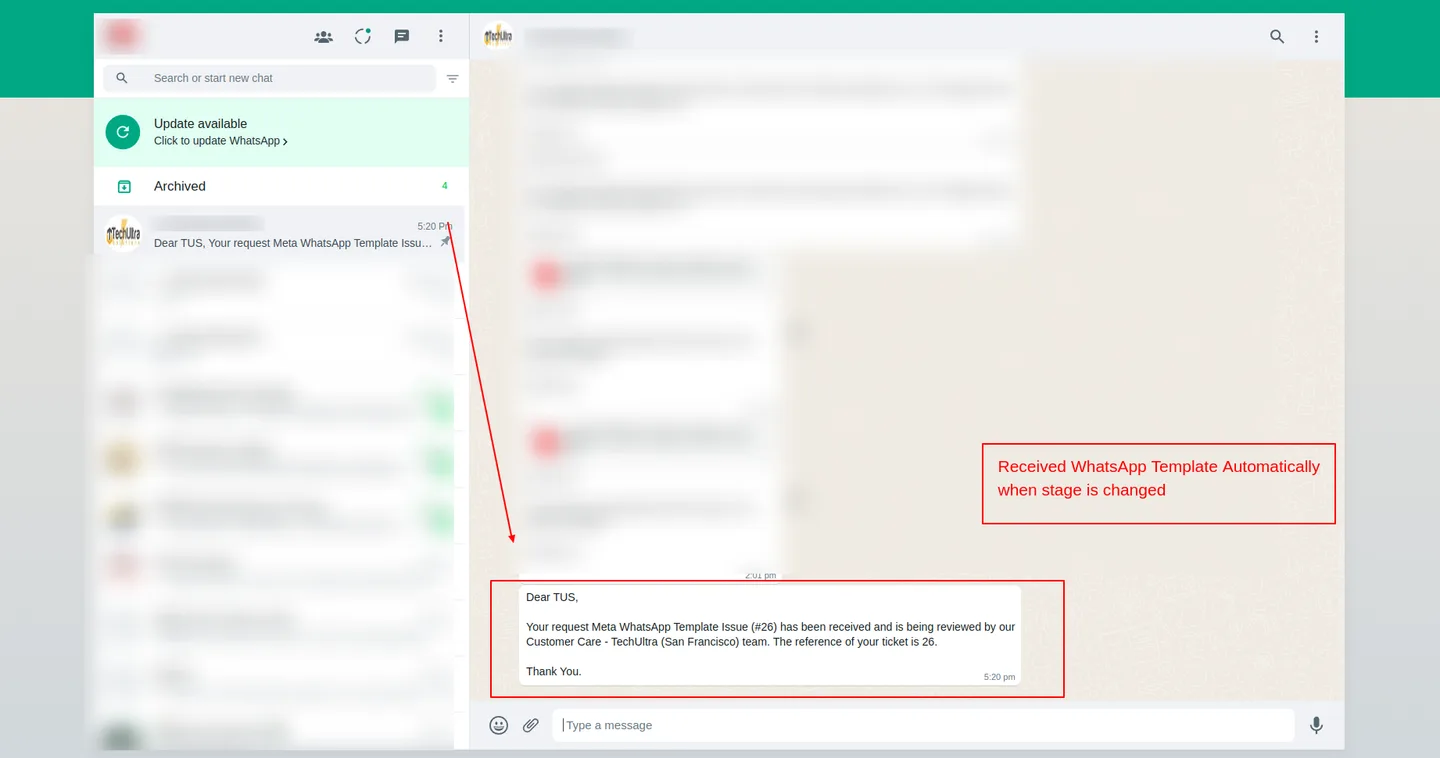
WhatsApp Helpdesk Automation turns Odoo's helpdesk stages into WhatsApp moments. As soon as an agent moves a ticket from New to In Progress, Waiting on Customer, or Resolved, the customer hears about it on WhatsApp — without a single manual message.
Built by TechUltra Solutions on top of Meta's official WhatsApp Cloud API, the module attaches a WhatsApp template to each helpdesk stage. The stage transition itself is the trigger; the template fills in customer name, ticket reference, and other dynamic fields automatically.
The result is consistent customer comms across every ticket and every agent — no missed updates, no copy-paste, and a clear record of what was sent and when, all attached to the Odoo helpdesk ticket.
Key features
-
Send a WhatsApp template on stage change
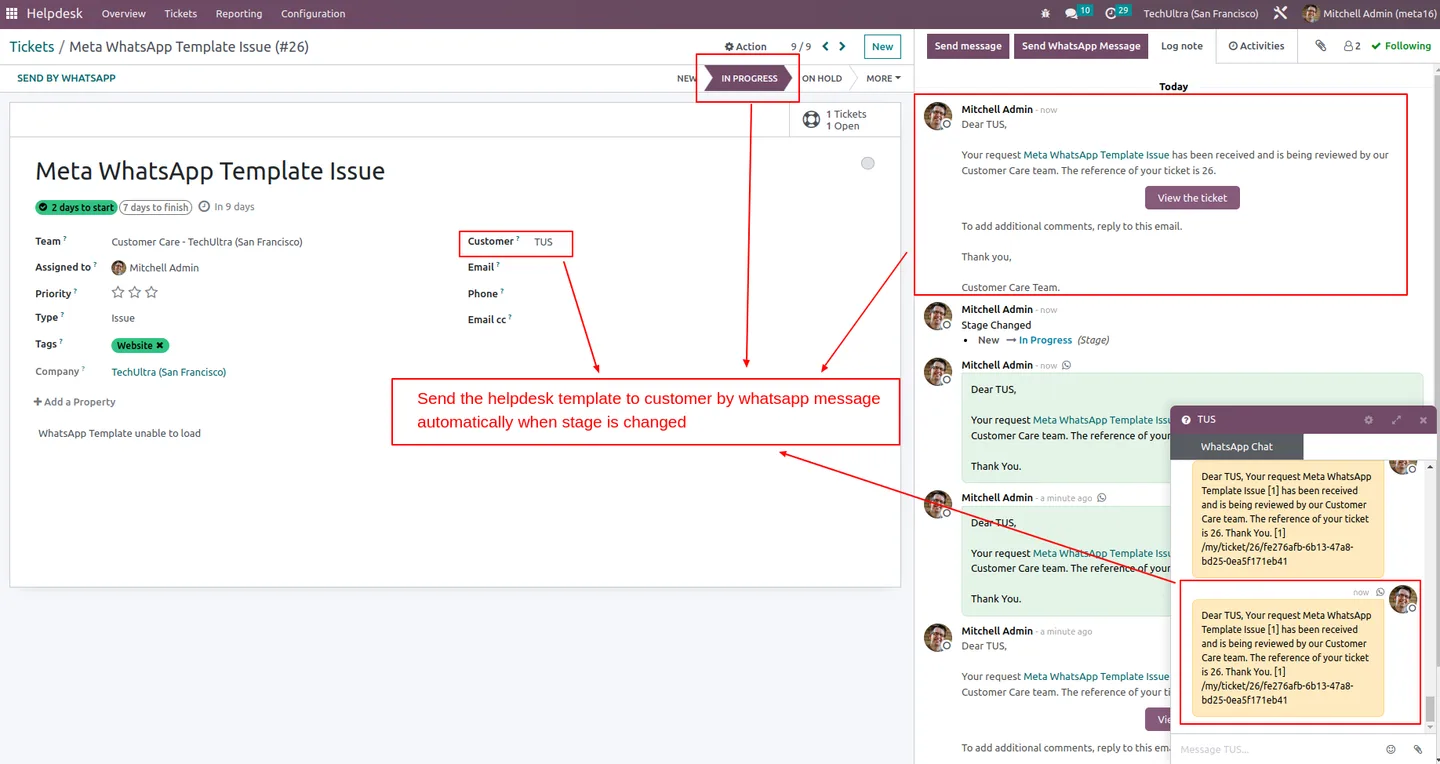
Whenever a helpdesk ticket's stage changes, the configured WhatsApp template is sent to the customer automatically — the stage transition is the trigger.
-
One template per helpdesk stage
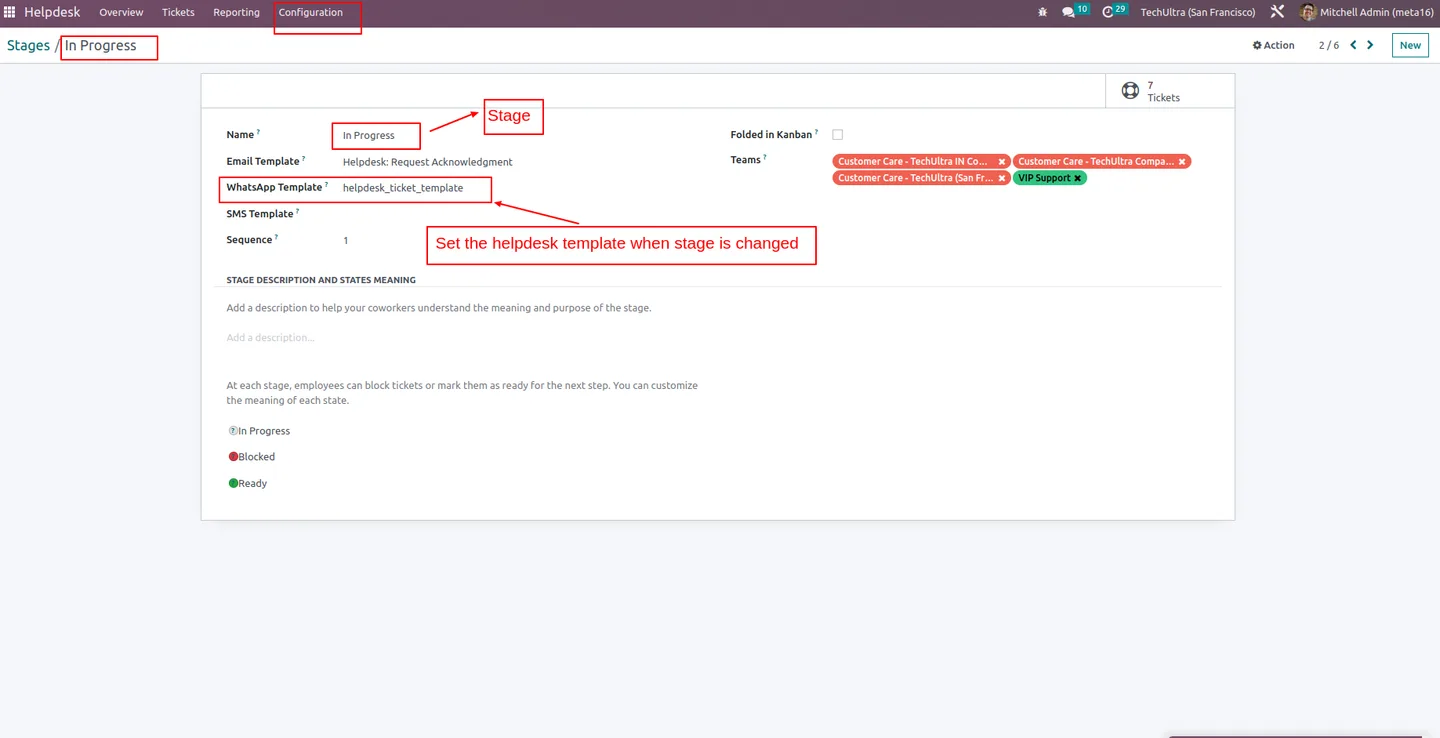
Each stage in Helpdesk → Configuration → Stages can be assigned its own WhatsApp template, so the message matches the moment — assigned, in progress, resolved, escalated.
-
Dynamic template content
Templates fill in dynamic fields — customer name, ticket reference, agent name, deadlines — so each WhatsApp message reads as a personalised update, not a form letter.
-
Official Meta WhatsApp Cloud API
Messages are delivered through Meta's official WhatsApp Cloud API — the supported, account-grade channel for business messaging on WhatsApp.
-
Driven from the standard helpdesk UI
Agents work in the normal Helpdesk → My Tickets / All Tickets views and drag tickets between stages — the automation runs in the background, with no extra clicks per ticket.
-
Consistent customer comms across the team
Because the template is tied to the stage, every customer hears the same message in the same tone — independent of which agent moved the ticket.
-
Conversation logged in Odoo
Outbound WhatsApp messages are recorded against the helpdesk ticket, so the history is searchable, auditable, and visible to whoever picks the ticket up next.
-
Supports Odoo 12 through 17
Maintained across Odoo 12, 13, 14, 15, 16, and 17 on Odoo Online, Odoo.sh, and on-premise installs.
WhatsApp Helpdesk Automation in Odoo
Every screen, in the order you meet it — configuration first, then the module in use.



Technical details
Specification
- Publisher
- TechUltra Solutions Private Limited
- Technical name
- tus_meta_wa_helpdesk_automation
- Odoo versions
- 12.0, 13.0, 14.0, 15.0, 16.0, 17.0
- Lines of code
- 5,786
- License
- Odoo Proprietary License v1.0 (OPL-1)
- Price
- $116.83 (one-time)
Deployment
- Odoo Online
- Odoo.sh
- On-premise
Odoo dependencies
- Helpdesk
- Discuss
- WhatsApp Base (TechUltra)
Support
90 days of bug-fix support, Monday to Friday (10:00–19:00 IST). Raise a ticket at support@techultra.in.
Setup & configuration
From install to first call — here is the path.
- 1
Install the module
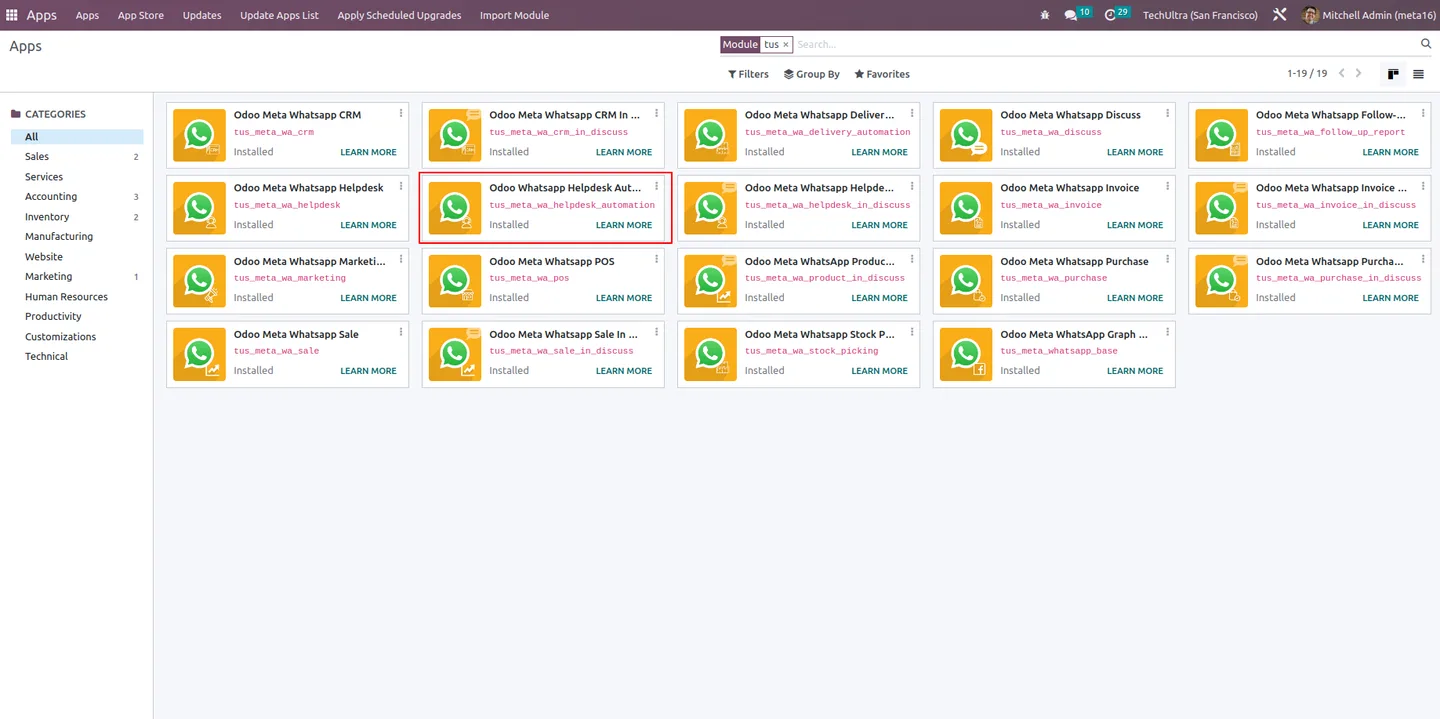
In Odoo, open Apps, remove the Apps filter, search for “WhatsApp Helpdesk Automation”, and click Install. The module pulls in TechUltra's WhatsApp Base as a dependency.
- 2
Connect Meta WhatsApp Cloud API
In the Meta for Developers portal, create a WhatsApp Business app and copy the Phone Number ID, WhatsApp Business Account ID, and access token. Add them to the WhatsApp configuration in Odoo.
- 3
Approve WhatsApp templates
Submit the helpdesk message templates for approval in Meta Business Manager, then sync them so they are selectable inside Odoo.
- 4
Assign a template per stage
Go to Helpdesk → Configuration → Stages, open a stage, and set the WhatsApp template it should send. Repeat for every stage that should notify the customer.
- 5
Test the workflow
Open Helpdesk → My Tickets or All Tickets, pick a ticket, and move it to a configured stage. The matching WhatsApp template is sent to the customer's WhatsApp number automatically.
Frequently asked questions
-
When does it send a WhatsApp message?
Whenever a helpdesk ticket's stage changes. The stage transition itself is the trigger, and the WhatsApp template assigned to that stage is sent to the customer automatically.
-
How do I set up templates per stage?
Open Helpdesk → Configuration → Stages, pick a stage, and assign the WhatsApp template that should be sent when a ticket lands in that stage. Repeat for each stage that should notify the customer.
-
Are templates dynamic?
Yes. Templates fill in dynamic fields — customer name, ticket reference, agent name, deadlines — so each message reads as a personalised update rather than a generic notification.
-
Which WhatsApp API does it use?
Meta's official WhatsApp Cloud API. The integration is the supported, account-grade WhatsApp Business channel — not an unofficial web bridge.
-
Does it work with Odoo Enterprise Helpdesk?
Yes. The module is built on the standard Helpdesk app, which is part of Odoo Enterprise, and supports Odoo Online, Odoo.sh, and on-premise installs.
-
Which Odoo versions are supported?
The module supports Odoo 12.0, 13.0, 14.0, 15.0, 16.0, and 17.0.
-
Are messages logged in Odoo?
Yes. Outbound WhatsApp messages are recorded against the helpdesk ticket, so support managers can audit exactly what the customer received and when.
-
Is the agent involved in sending the message?
No. The stage change is the only action the agent takes; the WhatsApp template is sent automatically in the background — no extra clicks per ticket.
Listing verified against the Odoo App Store:
Related solutions
Whole-platform solutions that complement WhatsApp Helpdesk Automation.
WhatsApp ↔ Odoo Integration
Connect WhatsApp to Odoo: two-way WhatsApp Business API sync, order and invoice messages, payment links and one shared team inbox. Free demo from a Gold Partner.
AI WhatsApp Chatbot
LLM-powered WhatsApp chatbot grounded in your Odoo data. Handles ordering, support, FAQs, and lead qualification with human-agent escalation.
Odoo WhatsApp Push Notifications
Real-time WhatsApp push notifications in Odoo — web, Android, iOS. Customer names in Discuss instead of phone numbers. Compatible with Odoo 17 and 18.
Related services
Get the most out of this module with senior TechUltra consultants.
Odoo Customization Services
Odoo customization from a Gold Partner: custom modules, workflows, reports and Studio changes, written upgrade-safe and quoted at a fixed scope. Free scoping call.
Hire Odoo Developers
Hire certified Odoo developers from a Gold Partner: one developer or a team, full-time or part-time, 70–160 hours a month. Silver, Gold or Platinum plan, free trial.
Odoo Support Services & Maintenance
Odoo support services from a Gold Partner: functional and technical support plus server cover for Enterprise and Community, 30-minute P1 response, 24/7 option.







