
OCR AI
OCR AI Expense
Auto-extract employee expense receipts from photos, PDFs, and email forwards — populating Odoo's expense queue with vendor, category, GST, and amount. Approval routing and reimbursement integrated.
Last reviewed:
What it is
An AI pipeline that ingests expense receipts (smartphone photos taken on the go, PDFs from online services, email-forwarded order confirmations) and creates Odoo expense records with vendor, date, category suggestion, GST, and total. Employees submit a photo; the pipeline does the data entry; the employee just confirms or corrects. Approval routing follows your existing expense policy.
Why it matters
Expense reporting is universally dreaded — entry friction means employees procrastinate, finance teams chase missing receipts, and end-of-month becomes a backlog. Cutting submission time from 5–10 minutes per expense to 30 seconds (snap a photo, confirm, submit) means employees actually file expenses on time. Finance teams stop being collection agents.
Features
-
Mobile photo capture
Mobile-first design — employees photograph receipts in seconds. Auto-crop, perspective-correct, and quality-check happen client-side before upload.
-
Multi-format ingestion
Photos, scanned PDFs, email-forwarded confirmations from online services (Uber, hotels, airlines, restaurants). All flow through the same pipeline.
-
Category suggestion
Suggests expense category based on vendor and historical patterns (employee's previous expenses, company-wide common categories). Employee confirms or overrides.
-
GST/VAT extraction
Tax breakdowns captured per receipt (CGST/SGST/IGST for India, VAT for EU/UK). Tax-mismatch detection flags suspicious receipts.
-
Duplicate detection
Catches the same receipt submitted twice (often happens when employees re-snap if the first attempt looks blurry). Configurable false-positive override.
-
Policy enforcement
Per-category limits enforced (meal cap per day, hotel limit per night, allowable categories per role). Over-policy expenses flag for additional approval.
-
Mileage tracking
Vehicle mileage expenses (for personal-vehicle business use) calculated from origin/destination addresses with current per-km rate.
-
Reimbursement integration
Approved expenses flow to payroll for next-cycle reimbursement, or to AP for direct vendor payment if the expense was charged to a corporate card.
How it works
-
Install the module
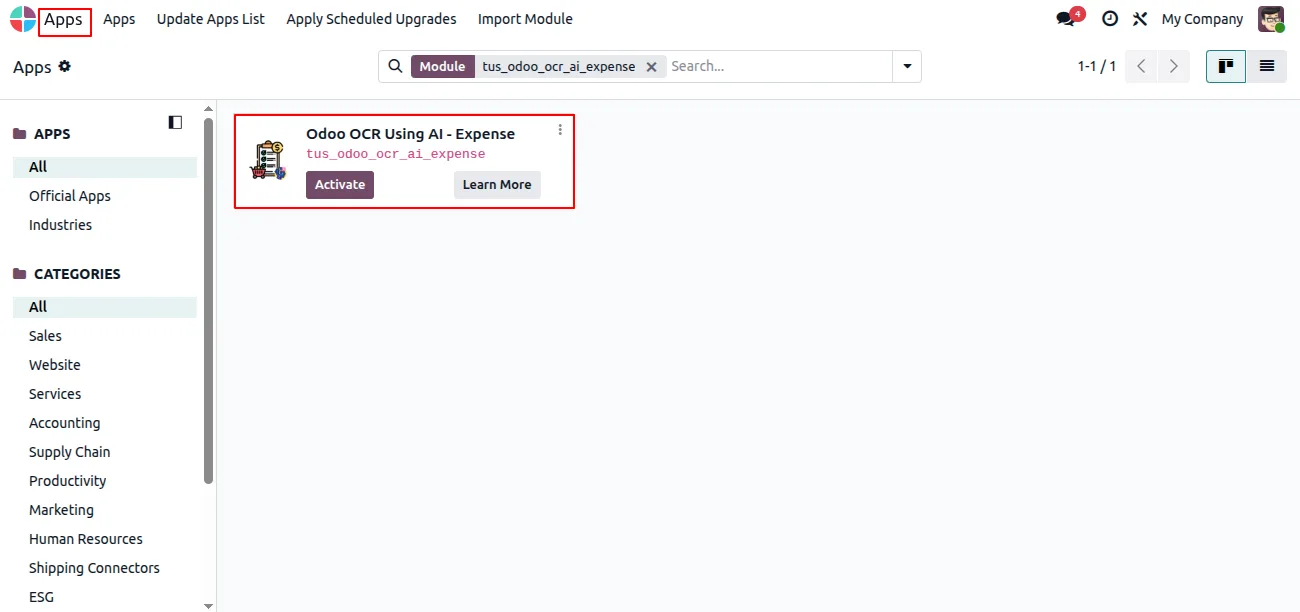
In Odoo, open Apps, remove the Apps filter, search for “Odoo OCR AI — Expenses”, and click Install. The shared Odoo OCR AI Base module installs alongside it.
-
Create an OCR account and buy tokens
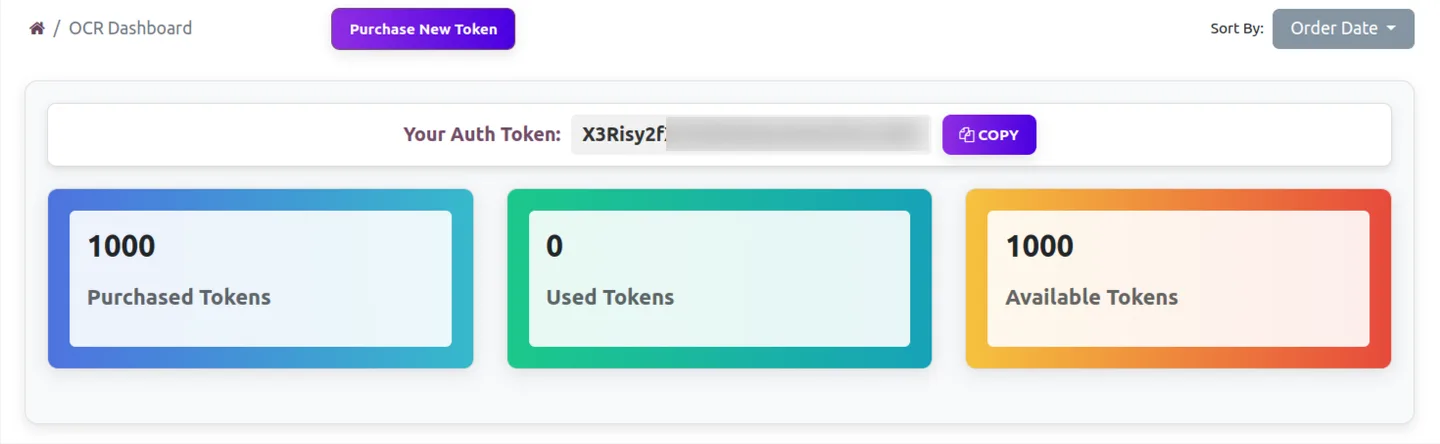
Sign up for the TechUltra AI OCR service at ai.fynix.app, open the OCR dashboard to copy your authentication key, and purchase OCR tokens from the shop — 2 million tokens for $20 USD.

-
Connect the OCR service in Odoo
Turn on Developer mode, then go to Settings → OCR AI Integration and enter your authentication token and the OCR server URL for your company.
-
Map the expense fields
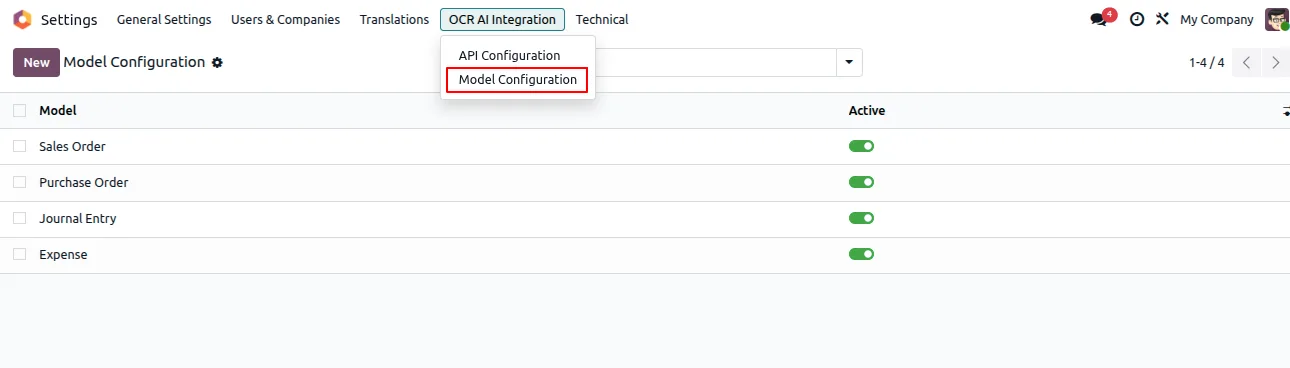
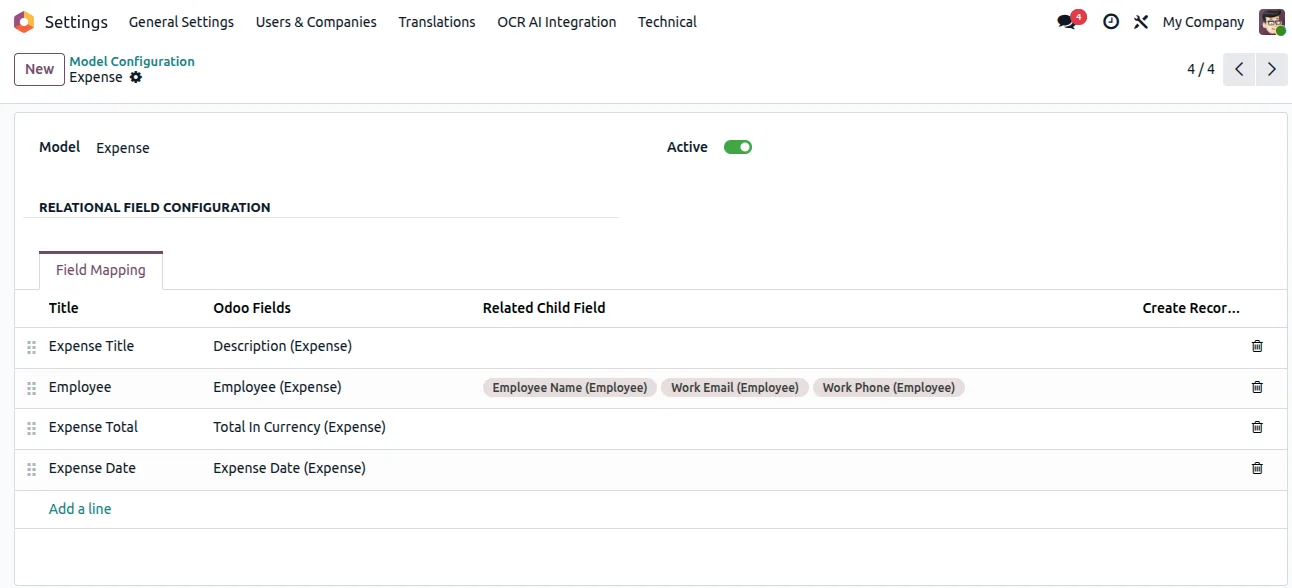
Under Settings → OCR AI Integration, select the Expense model and map each extracted value to the matching Odoo expense field.
-
Scan a receipt
Open Expenses, upload a receipt or bill, and run the OCR action. Review the draft expense the module creates and submit it through Odoo's normal expense workflow.
Deployment timeline
Standard deployment is 4–6 weeks. Faster than Invoice/PO deployments because the policy work is usually well-documented and the document variety is narrower (most receipts are visually similar).
Best for
Finance and AP teams on Odoo 16, 17, 18, or 19 (Community or Enterprise) that want to remove manual expense entry without commissioning a custom OCR pipeline. Especially useful when staff submit a wide mix of receipt formats — restaurant bills, fuel receipts, online-service confirmations, supplier invoices — since the AI is layout-agnostic and does not need per-vendor templates. The free module + per-token extraction backend ($20 USD for 2 million tokens, fractions of a cent per document) means the cost scales with the volume of documents you actually scan, with no fixed per-seat licence.
Frequently asked questions
-
Can employees submit expenses from their phone?
Yes — that's the primary use case. Mobile-first design: employees snap a photo of the receipt; the pipeline auto-crops and processes; employees confirm category and submit. Average submission time is 30 seconds end-to-end.
-
What about email-forwarded confirmations?
Standard. Employees forward Uber, hotel, airline, and online-purchase confirmations to a dedicated address (e.g. expenses@yourcompany.com); pipeline extracts data and creates the expense record. No app needed for this workflow.
-
Does it handle our expense policy rules?
Yes — per-category limits, allowable categories per role, approval thresholds, currency rules, mileage rates all configured. Over-policy expenses flag for additional approval rather than being silently approved.
-
What's the accuracy on photo-quality receipts?
First-pass accuracy on header data (vendor, date, total) is 92–96% on phone photos taken in reasonable lighting. Crumpled receipts, low-light photos, and very small printed receipts (taxi tickets) have lower accuracy — the model flags these as low-confidence so employees check before submitting.
-
Can we integrate with corporate cards?
Yes — corporate-card transaction feeds reconcile against employee-submitted receipts. Unmatched card transactions (charge appears but employee didn't submit a receipt) flag in a finance dashboard so the team can chase them down.
-
What about international expenses in multiple currencies?
Receipts in any currency convert to your reporting currency at the receipt-date FX rate. Multi-currency expense reports run cleanly. Travel-heavy clients often use card-feed FX rates for consistency with statements.
-
How does reimbursement work?
Two paths: payroll integration (approved expenses flow to next payroll cycle for reimbursement) or AP (for corporate-card transactions where the company already paid). Configurable per category and per company policy.
-
Implementation timeline?
4–6 weeks total. Bottleneck is usually policy mapping (mapping company expense policy to Odoo categories takes longer than people expect — most policies have undocumented gray areas). Pilot rollout in week 4–5, company-wide in week 6.