
OCR AI
OCR AI Invoice Capture
Auto-extract vendor invoices straight into Odoo's bills queue — line items, GST, vendor matching, and approval routing handled by an AI pipeline that learns from your team's corrections.
Last reviewed:
What it is
An AI pipeline that ingests vendor invoices from PDFs, scans, and email attachments; extracts structured data (vendor, invoice date, due date, line items, GST/VAT, totals); matches against existing vendors and POs in Odoo; and creates a vendor bill in draft state for human review and approval. The model learns from each correction your AP team makes — accuracy improves over time without explicit retraining.
Why it matters
AP teams spend most of their time on data entry, not value-add work. A typical 5-person AP team processes 2,000–5,000 invoices a month; manual entry takes 3–6 minutes per invoice. OCR Invoice Capture cuts that to 30–60 seconds per invoice (review and approve, not entry). The freed-up time lets the team focus on vendor-management quality, GL accuracy, and exception handling — not retyping.
Features
| Capability | What it does |
|---|---|
| Multi-format ingestion | PDFs, scanned images, email attachments, and uploaded files all flow into the same pipeline. Email-to-invoice routing supported. |
| Line-item extraction | Header (vendor, dates, totals) plus line-level detail (quantity, description, rate, GST, total). Multi-page invoices handled cleanly. |
| Vendor matching | Auto-matches against existing vendors using name, GST number, address, or bank details. Unknown vendors flagged for one-time vendor creation. |
| PO matching | When invoices reference POs, line items match against PO lines automatically. Variance (price, quantity) flagged for AP review. |
| GL coding suggestions | Suggests GL accounts based on vendor, line description, and historical posting patterns. AP team accepts or overrides; the model learns. |
| Approval routing | Draft bills route to approvers based on amount, vendor, or department rules. Approvers see the original invoice document alongside the structured data. |
| Duplicate detection | Hash-based duplicate detection catches the same invoice arriving via two channels (email + portal upload). Configurable false-positive override. |
| Continuous learning | Every AP-team correction (vendor mismatch, line-item edit, GL recoding) feeds back to the model. Accuracy improves week-over-week without manual retraining. |
How it works
-
Install the module
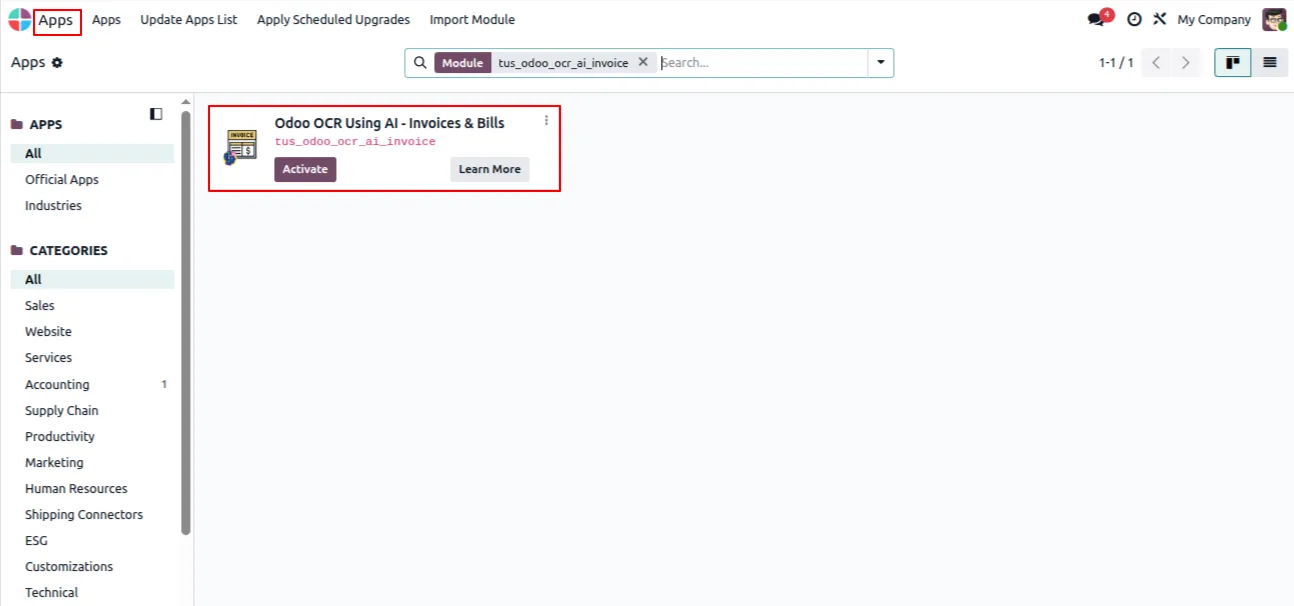
In Odoo, open Apps, remove the Apps filter, search for “Odoo OCR AI — Invoices & Bills”, and click Install. The shared Odoo OCR AI Base module installs with it.
-
Create an OCR AI account
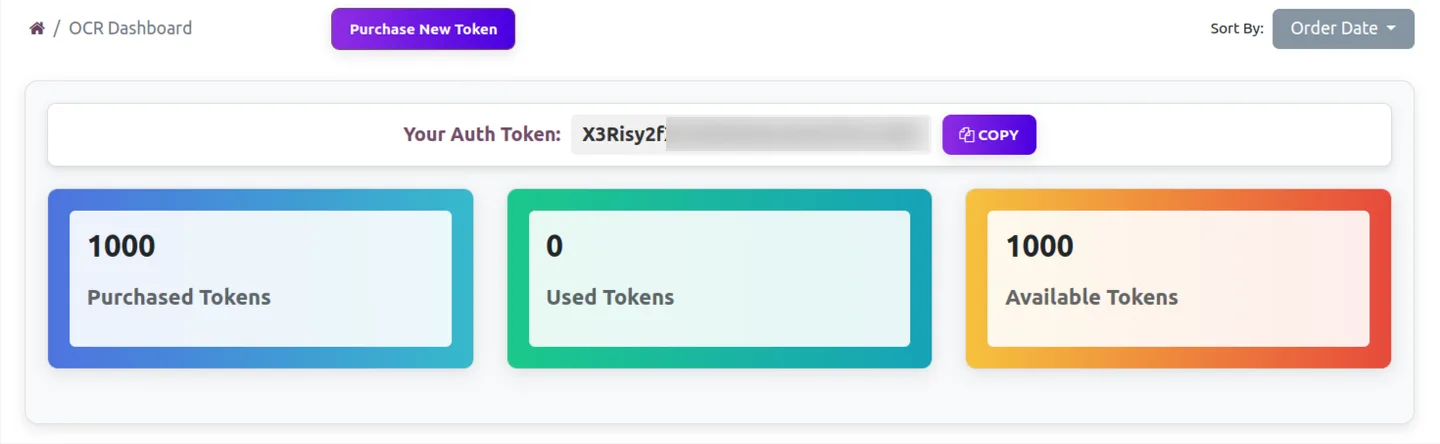
Register at ai.fynix.app and copy your authentication key from the OCR dashboard. Each company in a multi-company Odoo database can use its own token.
-
Buy OCR tokens
Purchase OCR tokens from ai.fynix.app/shop — 2 million tokens for $20 USD. Tokens are consumed per page as documents are processed; a typical invoice uses a few thousand tokens.

-
Configure the connection
Enable developer mode, go to Settings → OCR AI Integration, paste the company authentication token, and set the server URL to https://ai.fynix.app/tus_ocr_api.
-
Map the invoice fields
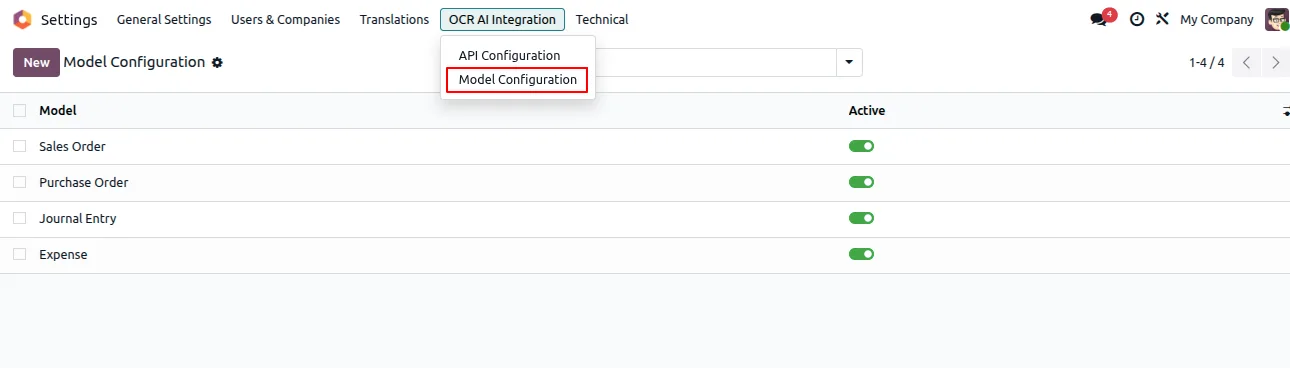
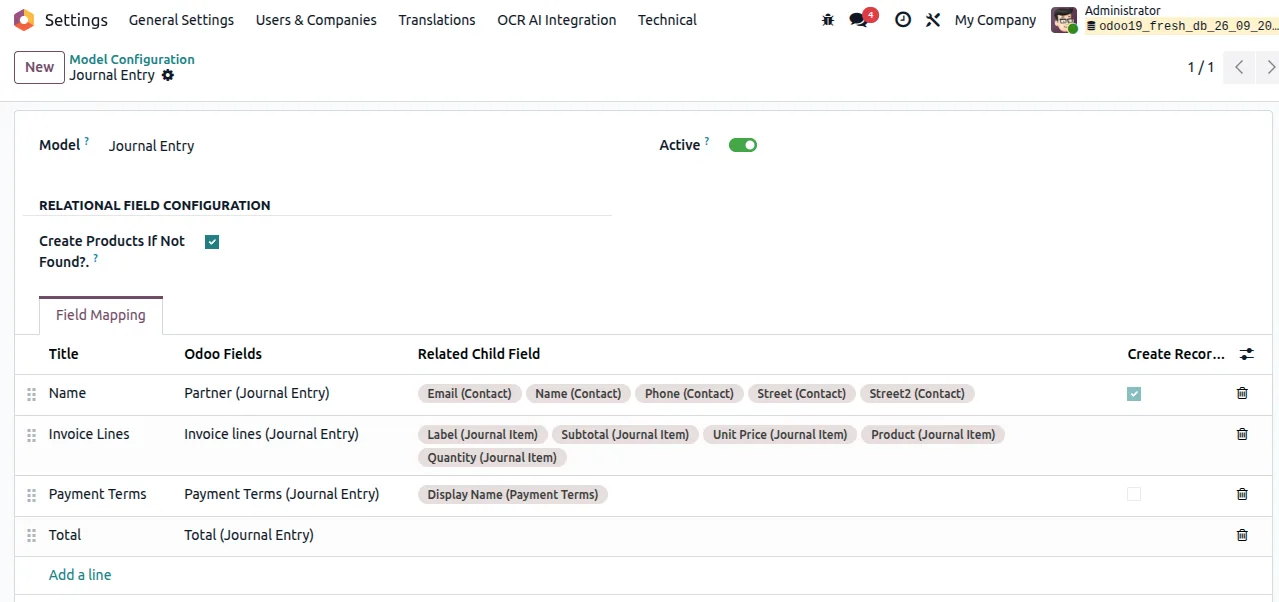
Open Settings → OCR AI Integration → Model Configuration and map the extracted fields onto the Journal Entry model for customer invoices and vendor bills.
-
Upload and create
Upload an invoice or bill as a PDF or image, let the AI read it, and create the Odoo customer invoice or vendor bill with a single click.
Deployment timeline
Standard deployment is 6–10 weeks: 1 week discovery and invoice sampling, 2–3 weeks pipeline build, 2–3 weeks sandboxed testing with the AP team, 1 week phased go-live. The model continues learning from corrections after go-live; accuracy plateau is typically reached by month 3.
Best for
Accounting teams on Odoo 16, 17, 18, or 19 (Community or Enterprise) that want to remove manual vendor-bill data entry without commissioning a custom OCR pipeline. Especially useful when vendors send PDF bills via email in many different layouts, since the AI is layout-agnostic and does not need per-vendor templates. The free module + per-token extraction backend ($20 USD for 2 million tokens, fractions of a cent per document) means the unit economics work at low volume — no minimum invoice count is needed to justify the spend. Multi-company Odoo databases are supported via per-company OCR tokens.
Frequently asked questions
-
What's the typical accuracy?
First-pass accuracy is 92–96% on header data and 88–94% on line items after the model is trained on your invoice samples (typically 200–500 invoices). 'First-pass' means the AP team reviews and approves without edits. Edits during the first 90 days feed back to the model and accuracy continues improving — most clients see 95%+ on header and 92%+ on line items by month 3.
-
What invoice formats does it handle?
PDFs (digital and scanned), images (JPG, PNG), and emails (with PDF/image attachments). Multi-page invoices handled. Handwritten invoices and very low-quality scans (sub-300dpi) have lower accuracy — we flag these during discovery and recommend a vendor portal alternative.
-
Does it handle GST / VAT compliance?
Yes — GST extraction (CGST/SGST/IGST/cess for India), VAT for EU/UK clients, sales tax for US clients. Line-level tax breakdowns captured separately. Tax-mismatch detection (e.g. line totals don't add up to header total) flags invoices for review.
-
What about three-way matching?
Standard. When invoices reference POs, our pipeline matches line items against PO lines and goods-receipt records. Variance (price difference, quantity short/over, missing GR) flags the bill for AP review with the discrepancy highlighted.
-
Will it work with our existing approval workflow?
Yes — Odoo's standard approval workflow handles routing based on amount, vendor, department, or custom rules. Our pipeline creates draft bills; existing approval logic takes over from there. We don't replace your approval process.
-
Can vendors send invoices directly?
Yes — we set up an email address (e.g. invoices@yourcompany.com) that routes attachments through the pipeline. Vendors send invoices to that address; AP team reviews structured drafts in Odoo. No portal sign-up required for vendors.
-
What happens with low-confidence extractions?
Bills with confidence below threshold (configurable, default 80%) flag for AP review with the uncertain fields highlighted. AP team confirms or corrects; corrections feed back to the model. No silent low-confidence posts — everything below threshold gets human review.
-
Implementation timeline?
6–10 weeks total. The bottleneck is usually invoice-sample collection (your AP team needs to gather 200–500 representative invoices) and the sandboxed testing period (2–3 weeks of real corrections to train the model). Phased go-live happens in week 6–8.